Freedom251 › ROM Patching Software

EZ ROM Patcher
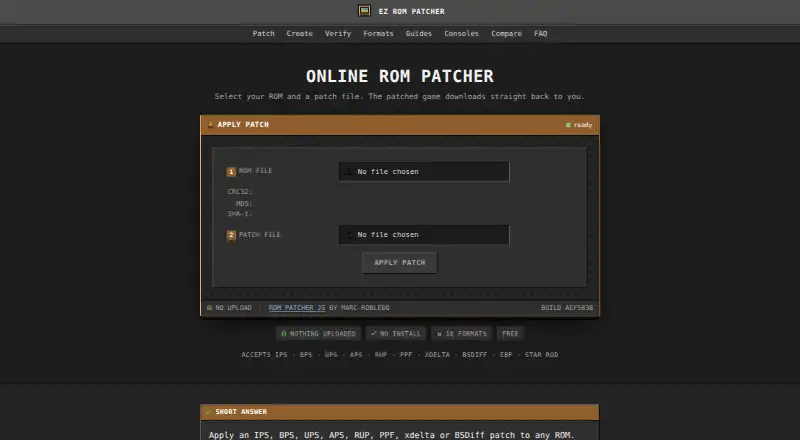
What EZ ROM Patcher is
EZ ROM Patcher is a free browser tool for applying patch files to game ROMs, producing modified games such as fan translations, ROM hacks, bug fixes, and restoration patches. The patching runs on the user’s device, and the maker says ROMs and patches are not sent to a server. Supported formats include IPS, BPS, UPS, APS, RUP, PPF, BSDiff, xdelta/VCDIFF, EBP, and Star Rod .mod. A separate patch creator compares an original ROM with an edited copy and can make IPS, BPS, UPS, APS, RUP, PPF, and EBP patches. The checksum tool calculates CRC32, MD5, and SHA-1 hashes and compares them with entered values or checksum files. ZIP archives can be unpacked, including a choice of patch when several are inside; RAR and 7z archives must be extracted first. The site says it works in mobile Safari and Chrome, though large disc images may exceed a phone browser’s available memory. Some formats have checksums the tool can check, while IPS, PPF, xdelta, and BSDiff do not record one. No account is required; users provide their own ROM files.
Who it suits
It suits people who want to patch game ROMs or create patches in a browser without uploading files. It may also help users verify ROM hashes or work from supported mobile browsers.
What it does well
- Patching runs locally, without sending files to a server.
- Supports ten listed patch formats.
- Includes a tool for creating patches.
- Calculates CRC32, MD5, and SHA-1 hashes.
- No account is required.
What to know first
- RAR and 7z archives must be extracted first.
- Large disc images may exceed phone-browser memory.
- Several supported formats do not record checksums.
Plans
| Plan | Billed and limits | Price |
|---|---|---|
| EZ ROM Patcher | Free browser-based tool · no account or installation stated | Free |
As ezrompatcher.com lists them, read 29 Sept 2026. The maker's own page has the final word.
Getting started
- Open https://ezrompatcher.com/.
- Choose a patching, patch creation, or checksum tool.
- Supply your own ROM and patch files, or an original and edited ROM for patch creation.
- For a ZIP archive, select the patch to use if it contains several.
- Extract RAR or 7z archives before supplying their files.
Overview
EZ ROM Patcher applies modification files to game ROMs in a browser, making it a practical choice for players and hobbyists who already have a ROM and a patch. Its wide format support and patch-creation tools make it more than a one-purpose applicator, though archive handling and phone memory impose limits.
The patcher runs on the user's device; the maker says ROMs and patches are not transmitted, and processing can continue offline after the page loads. No account or installation is required. Users must supply their own ROMs: the site does not host them or link to ROM sites.
Key features
Apply patches and handle archives
EZ ROM Patcher supports IPS, BPS, UPS, APS, RUP, PPF, BSDiff, xdelta/VCDIFF, EBP and Star Rod .mod files. That breadth is useful when a patch is supplied in a less common format. ZIP archives can be unpacked in the tool, including archives with multiple patches from which the user can choose. RAR and 7z files must be extracted separately, an extra step for users whose files arrive in those formats.
Create patches
A separate creator compares an original ROM with an edited copy and can produce IPS, BPS, UPS, APS, RUP, PPF and EBP patches. This suits people who want to distribute their own modifications as patch files. It does not create every format the patcher can apply: BSDiff, xdelta/VCDIFF and Star Rod .mod are absent from the creator's output list.
Verify checksums and ROM matches
The checksum tool calculates CRC32, MD5 and SHA-1 hashes and compares them with pasted values or .sfv, .md5 and .sha1 files. That helps users check file identity or integrity against a value they already have. Checksums embedded in BPS, UPS, APS, RUP and Star Rod patches are checked against the base ROM; IPS, PPF, xdelta and BSDiff do not record a checksum, so those formats cannot provide the same base-ROM check.
The maker says files are read into device memory and never transmitted. This is a meaningful privacy advantage for users who prefer not to upload ROMs, while the browser-based approach also means device resources matter: large disc images may exceed a phone browser's available memory. The site says it works in mobile Safari and Chrome, but that caveat makes a computer the safer choice for large files.
Pricing
EZ ROM Patcher — free. The free browser-based tool has no account requirement or installation requirement. There is no separate paid tier or trial to weigh. The trade-off is that users bring their own ROMs and must extract RAR and 7z archives outside the tool.
Platforms
EZ ROM Patcher is presented as cross-platform software, with browser use on Android, iOS, Linux, macOS and Windows. Mobile Safari and Chrome are supported, but limited phone memory can be a constraint for large disc images. The browser approach avoids a platform-specific installation, though it depends on a compatible browser and available device memory.
Who it's for
This is a strong fit for ROM owners who want to apply patches across several formats, check hashes, or create common patch types without installing software or making an account. It is less suitable for anyone seeking ROM downloads, for users handling RAR or 7z archives who want in-tool extraction, or for phone users working with especially large images.
Pros and cons
- Pros: broad support for ten patch formats makes it useful with varied patch files.
- Pros: local processing keeps ROMs and patches on the device, according to the maker.
- Pros: patch creation and checksum comparison add useful tools beyond applying patches.
- Cons: RAR and 7z archives need separate extraction, unlike ZIP files.
- Cons: some supported formats do not record a base-ROM checksum, limiting automatic matching checks.
- Cons: large disc images may exceed mobile browser memory.
Alternatives
ROM Patching Software is a useful place to compare other tools. Choose Delta Patcher or PyPatcherGBA if you prefer a free option for Linux, macOS or Windows. IUBPatchLib is another free Linux, macOS and Windows option; its MIT license may suit readers seeking that licensing approach.
rom-weaver is worth considering if you want a browser or command-line version and self-hosting options. Floating IPS (Flips) is a free desktop alternative for IPS and BPS patching. Choose Patcher64+ Tool for its stated N64, NES and SNES focus, provided you meet its Windows and PowerShell requirements. Rom Patcher JS is an alternative for web or self-hosted use. BPS Super Mario Bros. 2 Patcher is another free web option.
Verdict
Choose EZ ROM Patcher if you want a free, account-free browser tool that combines broad patch application with patch creation and hash checks while keeping files on your device. Look elsewhere if your workflow depends on built-in RAR or 7z extraction, your phone struggles with large images, or you need ROMs supplied by the tool.
Verdict
EZ ROM Patcher combines local ROM patching with patch creation and checksum tools at no charge. Users need to supply their own ROMs, and some archive and checksum limitations are worth noting.
Questions
How much does EZ ROM Patcher cost?
The listed plan is free.
Does it need an account or installation?
No account is required, and the tool is browser-based.
Which patch formats does it support?
It applies IPS, BPS, UPS, APS, RUP, PPF, BSDiff, xdelta/VCDIFF, EBP, and Star Rod .mod patches.
Does it upload ROMs or patches?
The maker says files are read on the user’s device and never transmitted to a server.
Can it create patches or check ROM hashes?
Yes. It creates IPS, BPS, UPS, APS, RUP, PPF, and EBP patches, and calculates CRC32, MD5, and SHA-1 hashes.
Which archive formats can it open?
It can unpack ZIP archives. RAR and 7z files must be extracted first.
Facts from EZ ROM Patcher's own pages
- Archive handling
- The patcher can unpack ZIP archives and lets users choose a patch when an archive contains several; RAR and 7z files must be extracted first. · ezrompatcher.com, 29 Sept 2026
- Base ROM checks
- BPS, UPS, APS, RUP and Star Rod patches include checksums that the site checks, while IPS, PPF, xdelta and BSDiff do not record a checksum. · ezrompatcher.com, 29 Sept 2026
- Checksum verifier
- A separate tool calculates CRC32, MD5 and SHA-1 hashes and can compare them with pasted values or .sfv, .md5 and .sha1 files. · ezrompatcher.com, 29 Sept 2026
- Create patches
- The patch creator compares an original ROM with an edited copy and can create IPS, BPS, UPS, APS, RUP, PPF and EBP patches. · ezrompatcher.com, 29 Sept 2026
- Integrations
- The patching engine is Rom Patcher JS by Marc Robledo, and the checksum tool uses CRC32 and MD5 implementations from SFV Checker. · ezrompatcher.com, 29 Sept 2026
- Mobile use
- The site says the patcher works in mobile Safari and Chrome, while large disc images may exceed a phone browser's available memory. · ezrompatcher.com, 29 Sept 2026
- Open source engine
- The site uses the MIT-licensed Rom Patcher JS engine and describes EZ ROM Patcher as an independent site not affiliated with Marc Robledo. · ezrompatcher.com, 29 Sept 2026
- Patch formats
- It supports IPS, BPS, UPS, APS, RUP, PPF, BSDiff, xdelta/VCDIFF, EBP and Star Rod .mod patch formats. · ezrompatcher.com, 29 Sept 2026
- ROM hosting
- The maker says it does not host ROMs or link to ROM sites, and users supply their own ROM files. · ezrompatcher.com, 29 Sept 2026
- Runs locally
- ROM patching runs in the browser on the user's device, and ROMs and patches are not uploaded to a server. · ezrompatcher.com, 29 Sept 2026
- Security and privacy
- The maker says files are read into memory on the user's device and never transmitted, and patching can continue after the page loads if the user disconnects. · ezrompatcher.com, 29 Sept 2026
- Support and account
- The maker states that no account is required and links to guides and a FAQ; the opened pages do not state a separate support service. · ezrompatcher.com, 29 Sept 2026
- What it does
- Applies patch files to game ROMs to create modified games such as fan translations, ROM hacks, bug fixes and restoration patches. · ezrompatcher.com, 29 Sept 2026
Where EZ ROM Patcher stands on Freedom251
- ROM Patching Software#2 of 20