Freedom251 › Robotics Education Software
Rocksi
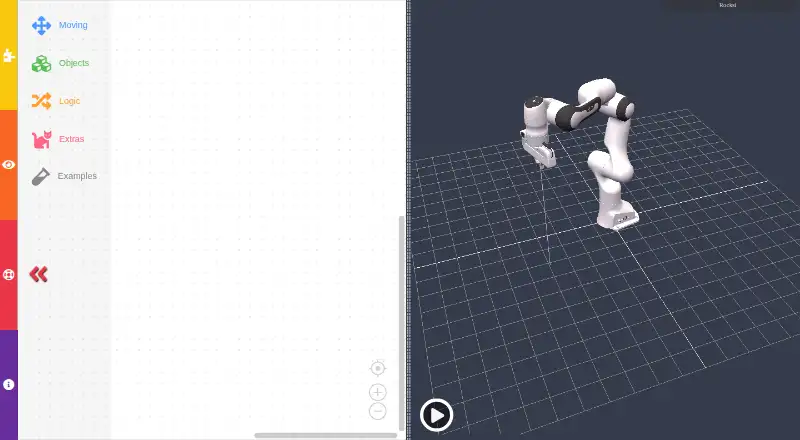
What Rocksi is
Rocksi is a browser-based simulator for programming a 3D virtual robot with block coding. It runs in modern browsers such as Firefox, Chrome and Safari, with no download or installation required. The maker says it was created for education and can be used in school classes, university lectures, workshops and fairs. Supported robots include Franka, Niryo NED, Sawyer and Robotiq grippers. The software page lists Blockly and JS-Interpreter among its programming libraries, and three.js, cannon-es, urdf-loaders and xacro-parser among its 3D libraries. Rocksi has a free plan at no cost, requires no registration and has no free trial. It is associated with Robokind Stiftung in Hannover, Germany, which the privacy policy identifies as the data controller. That policy says server logs may contain browser and operating-system details, pages visited, visit times and IP addresses, and are normally deleted within seven days. The source repository describes the project as MIT-licensed.
Who it suits
Rocksi suits learners and educators looking for a browser-based way to program virtual robots with blocks. Its stated uses include classes, lectures, workshops and fairs.
What it does well
- Runs in modern browsers without installation
- Free plan; no registration required
- Supports Franka, Niryo NED, Sawyer and Robotiq grippers
- Includes Blockly and JS-Interpreter libraries
- Available across mobile, desktop and web platforms
What to know first
- No free trial is listed
- Server logs may include IP addresses and visit details
Plans
| Plan | Billed and limits | Price |
|---|---|---|
| Free | Completely free; no registration required | Free |
As rocksi.net lists them, read 8 Oct 2026. The maker's own page has the final word.
Getting started
- Open https://rocksi.net/ in a modern browser such as Firefox, Chrome or Safari.
- Choose a supported robot model: Franka, Niryo NED, Sawyer or Robotiq grippers.
- Start using the simulator; registration and installation are not required.
Rocksi is a browser-based simulator where learners program a three-dimensional virtual robot with visual blocks. It is aimed at schools, universities, workshops and fairs using its supported robot families. Free, no-registration access is its clearest advantage; the main caveat is that its usefulness depends on whether those specific models fit your course or project.
Overview
Rocksi puts a robot simulation in a modern browser, including Firefox, Chrome and Safari, so participants can start without downloading or installing an application. That is practical for shared classroom computers and short events where setup time matters. The MIT-licensed source code also makes the project relevant to educators and developers who want to inspect or adapt an open project.
Robokind Stiftung, headquartered in Hannover, Germany, is responsible for Rocksi. The stated educational focus covers school classes, university lectures, workshops and fairs, rather than a single age group or curriculum.
Key features
- 3D virtual robot: Students program a simulated machine and see the result in a three-dimensional environment. This is more concrete than arranging blocks without a robot context, but it remains a simulator rather than a way to control arbitrary hardware.
- Block-based programming: Blockly provides a visual coding approach suitable for mixed learner levels. JS-Interpreter is also among the project’s programming libraries, although the stated coding mode is block-based rather than a separate text-programming mode.
- Supported robot models: The software supports Franka, Niryo NED, Sawyer and Robotiq grippers. That focused list can support lessons built around those platforms, while institutions teaching other robots will need another tool.
- Browser-first delivery: No installation is required, and access works through modern browsers. The project also identifies three.js, cannon-es, urdf-loaders and xacro-parser as part of its 3D and robot-model technology.
- Privacy and contact: Server logs may contain browser and operating-system information, visited pages, visit time and IP address, normally deleted within seven days. Robokind Stiftung is the data controller. Updates and feedback can be sent to [email protected].
Pricing
Rocksi’s Free plan costs nothing and is completely free with no registration required. There is no free trial because access is already free, and no paid tier, seat charge, renewal or usage quota is stated. That makes it suitable for educators who need to put a class into a simulator without procurement or account administration. The trade-off is that the free offering is tied to Rocksi’s browser simulator and supported models; there is no separate paid plan described for broader hardware or advanced requirements.
Platforms
Rocksi runs in modern web browsers and is listed for iPhone, iPad, iOS, Android, Linux, Windows and macOS. Browser access is the practical core, while the broad platform listing gives learners a choice of computers and mobile devices. Institutions should still ensure their chosen browser is modern enough for the three-dimensional simulator.
Who it's for
Rocksi is a strong fit for teachers, lecturers and workshop leaders introducing robot programming with Franka, Niryo NED, Sawyer or Robotiq equipment as the reference models. Its no-install, no-registration workflow also suits fairs and temporary teaching setups. Individual learners can use it for visual practice at no cost. It is a weaker choice for teams that need a simulator covering many other robot brands, or for users seeking a stated text-coding workflow rather than blocks.
Pros and cons
Pros
- Free without registration: Classes can begin without account creation or subscription management.
- No installation: Browser delivery reduces preparation work across school and workshop computers.
- Concrete 3D context: Visual code is connected to a virtual robot, helping lessons demonstrate robot behavior.
- Open-source licensing: The MIT license is useful for educators and developers who value inspectable, reusable software.
Cons
- Limited model scope: The named support is Franka, Niryo NED, Sawyer and Robotiq grippers, so other hardware curricula may not transfer.
- Block-only stated mode: Learners looking specifically for a published text-coding option may need another platform.
- Server-log collection: Browser, page-visit and IP data may be retained for up to seven days, a consideration for institutions with strict privacy policies.
Alternatives
Robotics Education Software is the broader directory category for comparing classroom-oriented tools. Choose EdScratch when you use an Edison robot and want a free browser-based tool without extra software. mBlock is preferable when you want both block and Python coding plus AI and IoT features. Choose PictoBlox for free individual, non-commercial use with a freemium model. FinchBlox is another free option for its compatible ecosystem. Ozobot Classroom suits educators seeking a teacher portal with 700 lessons. ROBO Pro Coding is the choice when local and cloud program saving matters. Choose Sphero Edu for Sphero robot programming through its app and web access. Thymio Suite is appropriate when you have a Thymio robot and want desktop software.
Verdict
Choose Rocksi if you teach or study robot programming and its four supported model families fit the lesson. Its combination of a 3D simulator, visual blocks, browser access and genuinely free no-registration use removes substantial classroom friction. Look elsewhere if you need broader robot coverage, a stated text-programming mode or tighter control over server-log data.
Verdict
Rocksi combines block-based robot programming with browser access and a listed range of robot models. Its free plan and education focus may suit classroom or workshop use; readers should also note the stated server-log collection.
Questions
How much does Rocksi cost?
Its Free plan costs nothing, and the pricing model is free.
Do I need to register or install anything?
No registration is required. Rocksi runs in modern browsers without a download or installation.
Which robots does Rocksi support?
The supported list includes Franka, Niryo NED, Sawyer and Robotiq grippers.
Which platforms are listed?
Rocksi lists modern web browsers, iPhone, iPad, iOS, Android, Linux and Windows.
Who is responsible for Rocksi?
Robokind Stiftung in Hannover, Germany, is identified as the responsible organization and data controller.
Is Rocksi open source?
The software page links to a source code repository that describes the project as distributed under the MIT license.
Facts from Rocksi's own pages
- 3D libraries
- The software page lists three.js, cannon-es, urdf-loaders and xacro-parser among its libraries. · rocksi.net, 8 Oct 2026
- Browser access
- Rocksi runs in modern browsers including Firefox, Chrome and Safari, without a download or installation. · rocksi.net, 8 Oct 2026
- Education
- The maker says Rocksi was created with education in mind and can be used in school classes, university lectures, workshops and fairs. · rocksi.net, 8 Oct 2026
- Headquarters
- Hannover, Germany · rocksi.net, 28 Sept 2026
- License
- The software page links to the Rocksi source code repository, which describes the project as distributed under the MIT license. · github.com, 8 Oct 2026
- Maker
- The imprint identifies Robokind Stiftung as the responsible organization and gives its address as Appelstraße 30, 30167 Hannover, Germany. · rocksi.net, 8 Oct 2026
- Privacy
- The privacy policy says server logs may include browser and operating system details, visited pages, visit time and IP address, and are normally deleted within seven days. · rocksi.net, 8 Oct 2026
- Privacy contact
- The privacy policy identifies Robokind Stiftung in Hannover, Germany, as the data controller. · rocksi.net, 8 Oct 2026
- Programming library
- The software page lists Blockly and JS-Interpreter among the libraries used for Rocksi. · rocksi.net, 8 Oct 2026
- Purpose
- Rocksi is a browser based simulator for programming a 3D virtual robot, similar to Scratch or Lego Mindstorms. · rocksi.net, 8 Oct 2026
- Robot models
- The homepage names Franka Emika and Niryo robots, while the software page also lists Sawyer and Robotiq grippers. · rocksi.net, 8 Oct 2026
- Support
- The homepage provides [email protected] for updates and feedback. · rocksi.net, 8 Oct 2026
Where Rocksi stands on Freedom251
- Robotics Education Software#11 of 26