Freedom251 › Robotics Education Software

PictoBlox
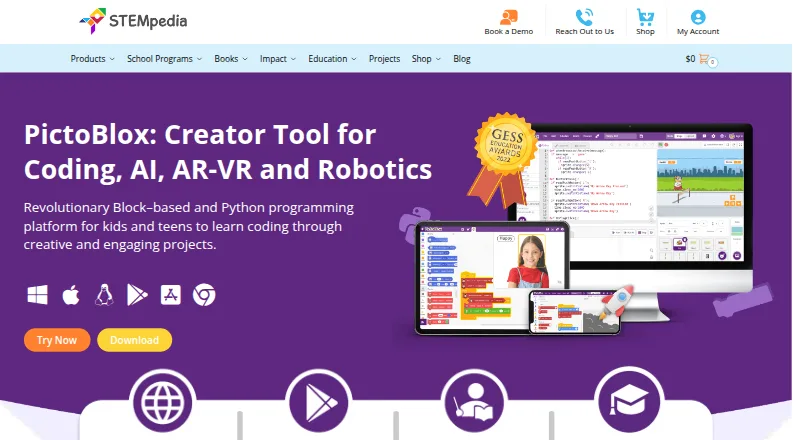
What PictoBlox is
PictoBlox is educational software for learning block-based coding and Python through projects in areas such as games, animation, robotics, IoT, AI, and machine learning. Its AI tools include face and object detection, computer vision, speech recognition, and other listed tasks; the machine-learning environment supports classification or regression models for image, object, pose, audio, text, and number data. The Python editor includes a debugger, code visualizer, autocomplete, interactive REPL, and package manager. Learners can use 3D and XR Studio to make models and interactive AR or VR projects, then export projects to Google Cardboard VR, Pico VR, or Meta Quest. PictoBlox can program compatible hardware over USB or Bluetooth, including Arduino, Quarky, evive, LEGO, and micro:bit devices. Junior Blocks offers activities for children ages 4–7. The software runs on Windows, macOS, Linux, Chromebook, Android, iOS, and web browsers. Its free plan is for individual, non-commercial use; PictoBlox is proprietary and not open source.
Who it suits
PictoBlox suits learners exploring coding through creative, robotics, AI, or machine-learning projects, as well as educators using classroom tools and curriculum resources. Junior Blocks is intended for children ages 4–7.
What it does well
- Supports both block-based coding and Python.
- Includes AI and machine-learning project tools.
- Programs compatible hardware over USB or Bluetooth.
- Supports AR and VR project creation and export.
- Runs on desktop, mobile, Chromebook, and web.
What to know first
- Free plan is limited to individual, non-commercial use.
- PictoBlox is proprietary, not open source.
Limits
The free plan is for individual, non-commercial purposes. Commercial use requires contacting the maker to discuss collaboration.
Plans
| Plan | Billed and limits | Price |
|---|---|---|
| Free (individual and non-commercial use) | Individuals · non-commercial purposes; contact maker for commercial use | Free |
As thestempedia.com lists them, read 29 Sept 2026. The maker's own page has the final word.
Getting started
- Visit https://thestempedia.com/product/pictoblox/.
- Choose the Windows, macOS, Linux, Chromebook, Android, or iOS version, or use the web browser.
- Start with individual non-commercial use under the free plan.
- Use the in-app tutorials or the maker's free online tutorials and projects.
- Contact the maker about commercial use or email support.
PictoBlox is a coding and project environment for learners who want to move between visual blocks, Python, robotics, AI and XR. Its breadth makes it a strong fit for classrooms and curious makers; commercial users should look elsewhere unless they arrange terms with the maker.
Overview
PictoBlox connects coding lessons to projects including games, animations, IoT and robotics. Block-based and text-based modes accommodate different levels, while a robot simulator, classroom tools and curriculum library make it relevant beyond individual practice. That range is a strength, but it also means the best fit is a learner or educator seeking a broad toolkit rather than a single-purpose robotics app.
For children ages 4–7, Junior Blocks provides play-based coding, AI and robotics activities. The software is proprietary, not open source. STEMpedia identifies Agilo Research Pvt. Ltd. as responsible for its services and lists Ahmedabad, India as its headquarters; the company was founded in 2017.
Key features
Blocks, Python and AI
Users can work in graphical blocks or Python. The Python editor’s visualizer, debugger, autocomplete, interactive REPL and inbuilt PIP package manager give learners tools to inspect and develop code, not just assemble blocks. This makes PictoBlox useful for a progression from visual coding into text-based work.
AI capabilities span face detection and recognition, computer vision, natural language processing, object and human-pose detection, speech recognition and QR scanning. Its machine-learning environment supports classification or regression models for images, objects, hand poses, poses, audio, text and numbers. The range suits project-led exploration of several AI concepts, though it may be more than a learner needs for basic coding practice.
XR and hardware
3D and XR Studio supports 3D models and interactive AR and VR projects using blocks or Python, with exports to Google Cardboard VR, Pico VR and Meta Quest. Hardware can be programmed over USB or Bluetooth; compatible devices include Arduino, Quarky, evive, LEGO and micro:bit, with Wizbot also among the supported robots. This combination is appealing to learners who want code to reach beyond the screen, provided they have compatible hardware for physical robot work.
In-app tutorials, free online tutorials and projects, educator-led courses and email support offer several learning routes. On privacy, PictoBlox says pictures and videos are not stored, and camera or video data is processed locally or through secured servers with automated processing. STEMpedia’s policy says it does not knowingly collect information from children under 13 on its website, Dabble and PictoBlox software, and says it will not sell personal information.
Pricing
Free (individual and non-commercial use): free. The free plan is for individuals and non-commercial purposes, making it a straightforward option for personal learning and projects. Commercial use is not covered: interested users should contact the maker to discuss collaboration. No paid plan is given a fixed price, so commercial terms require custom pricing.
The free plan’s stated scope is individual use, so educators evaluating it for classroom deployment should confirm that it fits their intended use. The product includes classroom tools and a curriculum library, but those capabilities do not change the non-commercial restriction.
Platforms
PictoBlox supports Windows, macOS, Linux, Chromebook, Android, iOS and web browsers. That broad coverage gives learners and educators flexibility across desktop, mobile and browser-based setups. Hardware connections over USB or Bluetooth may still shape which device is practical for a particular robot project.
Who it's for
PictoBlox is best suited to learners and educators who want one environment for block coding, Python, AI experiments and robotics, with XR projects as an additional path. Junior Blocks makes it relevant to younger children, while the Python editor and broad project menu can serve more advanced exploration. It is less compelling for someone who only wants a focused robot-specific activity or needs open-source software.
Pros and cons
- Pro: Blocks and Python sit alongside tools such as a debugger, code visualizer and REPL, supporting a move from visual to text coding.
- Pro: AI, machine learning, XR and hardware projects cover a wide range of practical learning activities.
- Pro: The free individual plan and availability across desktop, mobile and web lower barriers to personal learning.
- Con: The free plan is expressly non-commercial, so commercial users must negotiate terms with the maker.
- Con: Robot projects involving physical devices depend on compatible hardware and a USB or Bluetooth connection.
- Con: Its proprietary license rules it out for users who require open-source software.
Alternatives
Robotics Education Software is a useful starting point for comparing tools across the category.
- mBlock is worth considering for a free coding platform with blocks, Python, AI and IoT features across desktop, mobile and web.
- Ozobot Classroom is the better fit for educators seeking a free teacher-focused portal with 700 lessons.
- Sphero Edu suits users who want free app and web access for programming, provided they have a compatible Sphero robot.
- True Robotics Playground is an option for web-based block coding connected to True Robotics kits over Bluetooth or USB.
- VEXcode may suit learners looking for a free VR tier with blocks, 15 basic-graphics playgrounds, curriculum, activities and online resources.
- Trackio is an alternative for users seeking a free machine-learning experiment tracking library with Hugging Face hosting.
- Wonder Workshop Blockly may fit a small classroom using a physical Dash robot: its free tier allows up to 35 students, one teacher and one classroom.
- Open Roberta Lab is a free, browser-based option for users who want to avoid installation.
Verdict
Choose PictoBlox if you want a free, non-commercial learning environment that can carry projects from blocks into Python, AI, robotics and XR. Its breadth and multiple learning paths are the main reasons to choose it; the non-commercial boundary, proprietary license and reliance on compatible hardware for physical projects are clear reasons to look elsewhere.
Verdict
PictoBlox spans coding, AI, hardware projects, and XR creation across many platforms. Individual non-commercial users can use the free plan; those considering commercial use need to contact the maker.
Questions
Is PictoBlox free?
Yes. Its free plan costs nothing for individual, non-commercial use.
Can PictoBlox be used commercially?
The free plan is non-commercial. The maker asks people interested in commercial use to contact it to discuss collaboration.
Which platforms does it support?
PictoBlox supports Windows, macOS, Linux, Chromebook, Android, iOS, and web browsers.
Is PictoBlox open source?
No. PictoBlox is proprietary software.
What coding modes does it offer?
It supports graphical block-based coding and Python. The Python editor includes a visualizer, debugger, autocomplete, interactive REPL, and PIP package manager.
Who is responsible for PictoBlox?
STEMpedia identifies Agilo Research Pvt. Ltd. as the company responsible for its services and lists Ahmedabad, India as its headquarters.
Facts from PictoBlox's own pages
- 3D and XR
- 3D and XR Studio supports creating 3D models and interactive AR and VR projects with blocks or Python, with project export to Google Cardboard VR, Pico VR, and Meta Quest. · thestempedia.com, 29 Sept 2026
- AI and ML
- Its AI features include face detection and recognition, computer vision, natural language processing, object detection, human pose detection, speech recognition, QR scanning, and machine learning. · thestempedia.com, 29 Sept 2026
- Commercial use
- The maker asks users interested in commercial use to contact it to discuss collaboration. · thestempedia.com, 29 Sept 2026
- Company
- STEMpedia identifies Agilo Research Pvt. Ltd. as the company responsible for its services and lists Ahmedabad, India as its headquarters. · thestempedia.com, 29 Sept 2026
- For younger learners
- Junior Blocks offers play-based coding, AI, and robotics activities for children ages 4–7. · thestempedia.com, 29 Sept 2026
- Founded
- 2017 · thestempedia.com, 23 Sept 2026
- Hardware
- PictoBlox can control and program hardware over USB or Bluetooth and lists compatibility with Arduino, Quarky, evive, LEGO, and micro:bit devices. · thestempedia.com, 29 Sept 2026
- Headquarters
- Ahmedabad, Gujarat, India · thestempedia.com, 23 Sept 2026
- License
- PictoBlox is proprietary and is not open source. · thestempedia.com, 29 Sept 2026
- ML models
- The machine-learning environment supports image, object, hand-pose, pose, audio, text, and number classification or regression models. · thestempedia.com, 29 Sept 2026
- Privacy
- The product FAQ says PictoBlox does not store users’ pictures or videos and that camera or video data is used locally or through secured servers with automated processing. · thestempedia.com, 29 Sept 2026
- Privacy policy
- STEMpedia’s privacy policy says it does not knowingly collect information from children under 13 on its website, Dabble, and PictoBlox software, and says it will not sell personal information. · thestempedia.com, 29 Sept 2026
- Purpose
- PictoBlox is educational software for learning graphical block-based coding and Python through projects such as games, animations, IoT, robotics, AI, and machine learning. · thestempedia.com, 29 Sept 2026
- Python tools
- The Python editor includes a code visualizer, debugger, autocomplete, interactive REPL, and inbuilt PIP package manager. · thestempedia.com, 29 Sept 2026
- Support and learning
- The maker points users to in-app tutorials, free online tutorials and projects, educator-led courses, and email support. · thestempedia.com, 29 Sept 2026
Where PictoBlox stands on Freedom251
- Robotics Education Software#7 of 26