Freedom251 › Robotics Education Software
True Robotics Playground
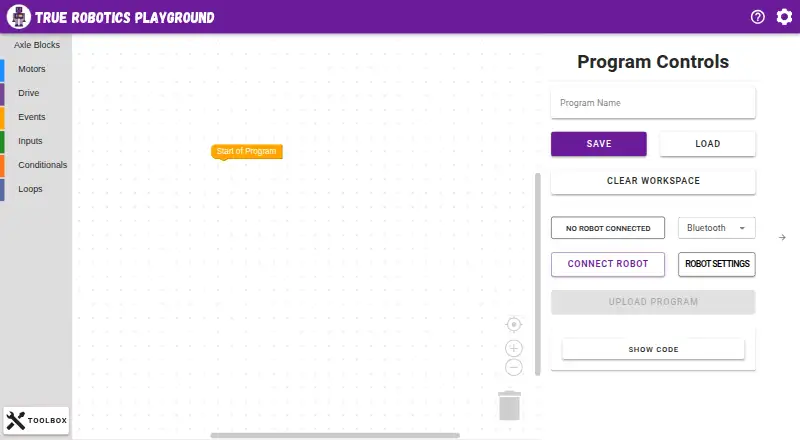
What True Robotics Playground is
True Robotics Playground is a free, browser-based block coding platform for elementary and middle school robotics classrooms. Students build programs by arranging blocks to practice sequencing commands, responding to sensor inputs, and creating loops. Starter Blocks provides a simplified mode for beginner coders, while a built-in Simulation robot lets students work without a physical robot. The Playground can also program True Robotics kits, including Treads, Pilot, Axle, and FlexForge, over Bluetooth or USB. It runs in a browser on Windows, Mac, iPad, Chromebook, and Android tablet computers, and students can use it without logging in or creating accounts. The Playground Wiki documents each coding block. True Robotics describes itself as a K-8 educational robotics company serving schools with robot kits, curriculum, and teacher training. It was co-founded in 2021 by Anthony Galgano and Kwasi Acheampong and is based in Worcester, Massachusetts. The maker says students access the platform anonymously and that it does not collect their personal data. It may collect non-personal usage details, such as device and browser type, to improve the student service. The maker says its student privacy practices address CIPA, COPPA, FERPA, and the Model Student Data Privacy Agreement. The free plan is listed as free.
Who it suits
True Robotics Playground suits elementary and middle school teachers introducing coding and robotics, including beginners who can start with Starter Blocks. It also fits classrooms using True Robotics kits or a simulator, especially where students should use the platform without individual accounts.
What it does well
- Free plan is listed as free.
- Students can use it without accounts or logins.
- Simulation robot supports coding without physical hardware.
- Starter Blocks offers a beginner coding mode.
- Programs True Robotics kits over Bluetooth or USB.
- Playground Wiki documents each coding block.
What to know first
- Classroom tools are not included.
- A curriculum library is not included.
Plans
| Plan | Billed and limits | Price |
|---|---|---|
| True Robotics Playground | Web-based block coding platform; connects to True Robotics robot kits over Bluetooth or USB | Free |
As app.truerobotics.org lists them, read 4 Oct 2026. The maker's own page has the final word.
Getting started
- Open https://app.truerobotics.org/ in a supported web browser.
- Use a browser on Windows, Mac, iPad, Chromebook, or an Android tablet.
- Start coding without creating a student account.
- Choose Starter Blocks for the simplified beginner mode, or use the Simulation robot.
- Connect a supported True Robotics kit over Bluetooth or USB if using hardware.
Verdict
Choose True Robotics Playground for browser-based block coding with a simulator, beginner mode, and support for True Robotics kits. Schools looking for built-in classroom tools or a curriculum library should consider those stated omissions.
Questions
How much does True Robotics Playground cost?
The plan is listed as free, and the pricing model is free.
Do students need accounts?
No. Students can use the Playground without logins or accounts.
Which devices does it support?
It runs in a browser on Windows, Mac, iPad, Chromebook, and Android tablet computers.
Can students use it without a robot kit?
Yes. The built-in Simulation robot lets students code without hardware.
Which robot kits can it program?
Supported kits include Treads, Pilot, Axle, and FlexForge; the Playground connects to True Robotics kits over Bluetooth or USB.
What does the maker say about student privacy?
The maker says students access the platform anonymously and their personal data is not collected. It may collect non-personal usage details such as device and browser type.
Facts from True Robotics Playground's own pages
- Accounts
- Students do not need logins or accounts to use the Playground. · app.truerobotics.org, 4 Oct 2026
- Beginner mode
- Starter Blocks is a simplified mode for beginner coders. · app.truerobotics.org, 4 Oct 2026
- Documentation
- The maker says every coding block is documented in the Playground Wiki. · app.truerobotics.org, 4 Oct 2026
- Founded
- 2021 · app.truerobotics.org, 28 Sept 2026
- Headquarters
- Worcester, Massachusetts, United States · app.truerobotics.org, 28 Sept 2026
- Intended users
- True Robotics describes itself as a K-8 educational robotics company serving schools with robot kits, curriculum, and teacher training. · truerobotics.org, 4 Oct 2026
- Learning
- Students use drag-and-drop blocks to learn sequencing commands, responding to sensor inputs, and building loops. · app.truerobotics.org, 4 Oct 2026
- Maker history
- True Robotics says it was co-founded in 2021 by Anthony Galgano and Kwasi Acheampong and is based in Worcester, Massachusetts. · truerobotics.org, 4 Oct 2026
- Privacy frameworks
- The maker says its student privacy practices address CIPA, COPPA, FERPA, and the Model Student Data Privacy Agreement. · truerobotics.org, 4 Oct 2026
- Purpose
- The Playground is a free block coding platform for elementary and middle school robotics classrooms. · app.truerobotics.org, 4 Oct 2026
- Robot kits
- It programs True Robotics kits including Axle, Pilot, and FlexForge over Bluetooth or USB. · app.truerobotics.org, 4 Oct 2026
- Simulation
- A built-in Simulation robot lets students code without hardware. · app.truerobotics.org, 4 Oct 2026
- Student privacy
- The maker's privacy policy says students access the platform anonymously and it does not collect their personal data. · truerobotics.org, 4 Oct 2026
- Supported devices
- The Playground runs in a web browser on Windows, Mac, iPad, Chromebook, and Android tablet computers. · app.truerobotics.org, 4 Oct 2026
- Usage data
- The maker says it may collect non-personal usage data such as device and browser type to improve the student service, without identifying individual users. · truerobotics.org, 4 Oct 2026
Where True Robotics Playground stands on Freedom251
- Robotics Education Software#16 of 26