Freedom251 › AI Business Card Makers

Ridvay
What Ridvay is
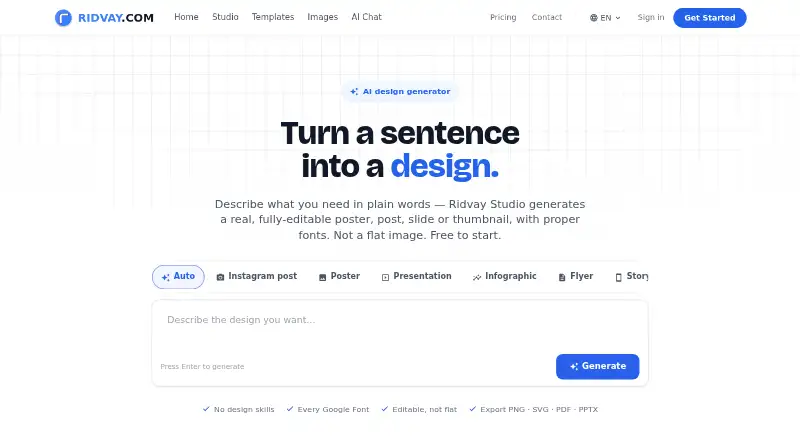
Ridvay Studio turns a plain-language description into an editable poster, social post, slide, thumbnail, or multi-page design. Its elements can be moved, restyled, or deleted, and the Recreate feature can convert an uploaded screenshot, photo, or old flyer into editable text and layers. Brand kits hold colors, fonts, logos, and a brand voice for use when generating or refining designs. Exports include PNG, SVG, PDF, PowerPoint, GIF, and MP4, and designs can be shared through editable links. Free exports include a small “Made with Ridvay” credit; paid plans remove it. A hosted MCP server connects with clients including Claude, ChatGPT, Cursor, and GitHub Copilot in VS Code, enabling agents to create or refine designs, export and share them, and update design variables. The Free plan includes five AI designs and three AI images per day, along with unlimited manual designs and templates. Plus costs €5.99 a month, and Ultimate costs €17 a month. Ridvay has no mobile apps.
Who it suits
Ridvay suits people creating posters, social posts, slides, thumbnails, or multi-page designs who want editable output. It may also suit teams that use supported MCP clients to create or refine designs through agents.
What it does well
- Generated designs have editable elements and layers.
- Brand kits store colors, fonts, logos, and voice.
- Supports PNG, SVG, PDF, PowerPoint, GIF, and MP4 exports.
- Free plan includes unlimited manual designs and templates.
What to know first
- Free exports carry a “Made with Ridvay” credit.
- Free AI design and image allowances are daily limits.
- No mobile apps are available.
Limits
The Free plan allows five AI designs and three AI images per day, though manual designs and templates are unlimited. Plus costs €5.99 a month and includes 300 AI designs, 40 AI images, and five AI video exports per month. Ultimate costs €17 a month and includes unlimited AI designs under fair use, 200 AI images, and 20 AI video exports per month.
Plans
| Plan | Billed and limits | Price |
|---|---|---|
| Free | 5 AI designs/day · 3 AI images/day · unlimited manual designs and templates · PNG, JPG, PDF exports | Free |
| Ultimate | Billed monthly · Unlimited AI designs (fair use) · 200 AI images/month · 20 AI video exports/month · Imagen 4 and Nano Banana Pro · priority render queue | €17 a month |
| Plus | Billed monthly · 300 AI designs/month · 40 AI images/month · 5 AI video exports/month · no daily limit | €5.99 a month |
As ridvay.com lists them, read 2 Oct 2026. The maker's own page has the final word.
Getting started
- Open https://ridvay.com/ in a web browser.
- Start on the Free plan, or choose Plus for €5.99 a month or Ultimate for €17 a month.
- Describe a poster, social post, slide, thumbnail, or multi-page design, or upload an image for Recreate.
- Edit generated elements and apply a brand kit if you have one.
- Export the design or share it using an editable link; connect a supported client through the hosted MCP server if needed.
Overview
Ridvay Studio is an AI-assisted design editor for creating posters, social posts, slides, and thumbnails. It suits people who want to turn prompts or existing images into designs they can keep editing, rather than accept a finished graphic as-is. Its strongest case is the combination of flexible layouts, brand tools, and export options; the free plan limits AI use and adds a credit to exported work.
Key features
Generated designs consist of editable elements that can be moved, restyled, or deleted, giving users control over the result. Recreate brings the same approach to uploaded screenshots, photos, and old flyers, converting them into designs with editable text and layers. That makes Ridvay a useful option for adapting existing material as well as starting fresh.
Brand kits save colors, fonts, logos, and a brand voice for use during generation and refinement. Multi-page support covers decks, carousels, and documents; custom dimensions and print-ready output broaden its use beyond standard social graphics. Exports include PNG, SVG, PDF, PowerPoint, GIF, and MP4, and designs can also be shared through an editable link.
Ridvay’s hosted MCP server connects with clients including Claude, ChatGPT, Cursor, and GitHub Copilot in VS Code. An agent can create or refine designs, export and share them, and update variables in a living design. This is a distinct advantage for users who want design tasks to fit into an agent-based workflow, though it matters less to people who prefer to work entirely in a visual editor.
Ridvay says it does not share conversations with third parties for training, marketing, or purposes beyond generating requested AI responses. Depending on the selected model, chat messages, study content, and uploaded images may be processed by third-party AI providers. Its services are hosted on Google Cloud Platform, primarily in US data centers, with reasonable measures used to protect information.
Pricing
The Free plan costs nothing. It allows 5 AI designs and 3 AI images per day, alongside unlimited manual designs and templates, with PNG, JPG, and PDF exports. That is a practical starting point for occasional design work or learning the editor, but the daily AI quotas and “Made with Ridvay” export credit make it less suitable for polished, frequent client or brand work.
Plus costs €5.99 a month, billed monthly. It raises the allowance to 300 AI designs and 40 AI images per month, adds 5 AI video exports per month, and removes the daily limit. It is the more appropriate step up for regular individual use, though users producing many images or video exports may run into its monthly caps.
Ultimate costs €17 a month, billed monthly. It includes unlimited AI designs subject to fair use, 200 AI images and 20 AI video exports per month, Imagen 4 and Nano Banana Pro, and a priority render queue. This plan fits heavier work where the larger image and video allowances or faster queue matter; its AI image and video quotas still apply.
A 7-day trial is available. Paid plans export without the Ridvay credit. The published plan details give no seat counts, so teams should not assume a particular multi-user allowance.
Platforms
Ridvay is available on Android, iOS, the web, and through an API. There are no mobile apps, so users looking for native phone or tablet apps should not choose it on the basis of its platform listing alone.
Who it's for
Ridvay is best for people making visual content across several formats who value editable output, saved brand styles, and the option to work from an existing image. Its free plan also supports unlimited manual designs, making it useful when AI is occasional rather than central to the workflow. It is a weaker fit for anyone who needs unrestricted AI generation on a free tier, or a dedicated mobile app.
Pros and cons
- Pros: Designs remain editable after generation, including designs recreated from uploaded images, so users can refine rather than settle for a flattened result.
- Pros: Brand kits, multi-page formats, custom dimensions, and print-ready output support work beyond one-off social graphics.
- Pros: Exports span common image, document, presentation, and video formats, with editable-link sharing and MCP integrations for agent workflows.
- Cons: Free AI use is limited to 5 designs and 3 images daily, and free exports carry a Ridvay credit.
- Cons: Paid plans retain monthly image and video quotas; Ultimate’s unlimited design allowance is subject to fair use.
- Cons: Native mobile apps are absent, and some AI processing may involve third-party providers.
Alternatives
For a broader starting point, see AI Poster Generators.
Designkit is worth considering if Android or iOS access matters; its free plan offers 20 first-login credits for up to 20 images, but no video generation.
LightX AI Poster Generator may suit users who want photo-editor tools and design and video templates alongside 6 daily free AI credits.
Contentdrips is an alternative for users seeking basic templates and a free allowance of 50 AI credits, though its free plan has no team members and supports one brand.
Folio Poster is another option for browser-based poster work, with four free templates and A0 PDF export; its PDF carries a light Folio Studio watermark.
Kittl is an alternative with a free tier of five projects and 100 one-time AI tokens.
Piktochart may better suit a small team that values shared capacity: its free plan covers 1–4 team members, with two downloads, 1 GB storage, and 60 AI credits.
Pixazo AI Research Poster Maker is a browser-based alternative for research-poster creation; image generation uses a Pixazo Playground account.
Text to Poster offers a free tier with 20 one-time welcome credits, watermark-free downloads, and support for up to two reference images.
Verdict
Ridvay is a strong choice for individuals creating editable visual content across social, presentation, and print formats, especially when reusable brand styles or image recreation will save effort. Its mix of editable output and broad exports is the main reason to choose it. Look elsewhere if native mobile apps or larger free AI allowances are essential.
Verdict
Ridvay combines prompt-based design generation with editable elements, brand kits, and multiple export formats. The free plan has daily AI limits and credited exports, while paid plans start at €5.99 a month.
Questions
How much does Ridvay cost?
The Free plan costs nothing. Plus costs €5.99 a month, and Ultimate costs €17 a month.
Is Ridvay free, and is there a trial?
Ridvay has a Free plan. A 7-day trial is listed.
Which platforms does Ridvay support?
Ridvay supports web and API access. It has no mobile apps.
What can Ridvay export?
Designs can be exported as PNG, SVG, PDF, PowerPoint, GIF, or MP4. They can also be shared through an editable link.
Can Ridvay connect to AI clients?
Its hosted MCP server can connect with Claude, ChatGPT, Cursor, and GitHub Copilot in VS Code. Connected agents can create or refine designs, export and share them, and update design variables.
Who makes Ridvay?
The privacy policy directs questions to Ridvay SIA at [email protected].
Facts from Ridvay's own pages
- AI processing
- Depending on the selected model, chat messages, study content, and uploaded images may be processed by third-party AI providers. · ridvay.com, 2 Oct 2026
- Brand kits
- Brand kits store colors, fonts, logos, and a brand voice, and can be applied during generation and refinement. · ridvay.com, 2 Oct 2026
- Design formats
- Studio supports multi-page designs such as decks, carousels, and documents. · ridvay.com, 2 Oct 2026
- Editing
- Generated designs use editable elements that users can move, restyle, or delete. · ridvay.com, 2 Oct 2026
- Exports
- Designs can be exported as PNG, SVG, PDF, PowerPoint, GIF, or MP4, and shared using an editable link. · ridvay.com, 2 Oct 2026
- Free export limit
- Free exports carry a small “Made with Ridvay” credit; paid plans export without it. · ridvay.com, 2 Oct 2026
- Image recreation
- The Recreate feature can turn an uploaded screenshot, photo, or old flyer into a design with editable text and layers. · ridvay.com, 2 Oct 2026
- MCP capabilities
- Through MCP, an agent can create or refine designs, export them, share them, and update variables in a living design. · ridvay.com, 2 Oct 2026
- MCP integrations
- Ridvay provides a hosted MCP server that can connect with clients including Claude, ChatGPT, Cursor, and GitHub Copilot in VS Code. · ridvay.com, 2 Oct 2026
- Privacy
- Ridvay says it does not share conversations with third parties for training, marketing, or purposes beyond generating requested AI responses. · ridvay.com, 2 Oct 2026
- Product
- Ridvay Studio turns a plain language description into an editable poster, social post, slide, or thumbnail with fonts and design layers. · ridvay.com, 2 Oct 2026
- Security
- Ridvay says its services are hosted on Google Cloud Platform, primarily in US data centers, and that it uses reasonable measures to protect information. · ridvay.com, 2 Oct 2026
- Support contact
- The privacy policy directs questions to Ridvay SIA at [email protected]. · ridvay.com, 2 Oct 2026
- Target users
- Ridvay describes Studio as a tool for creating posters, social posts, slides, and thumbnails, and its pricing page says the editor is free while paid plans expand AI allowances. · ridvay.com, 2 Oct 2026
Where Ridvay stands on Freedom251
- AI Business Card Makers#8 of 25
- AI Poster Generators#10 of 24