Freedom251 › AI Poster Generators

Folio Poster
What Folio Poster is
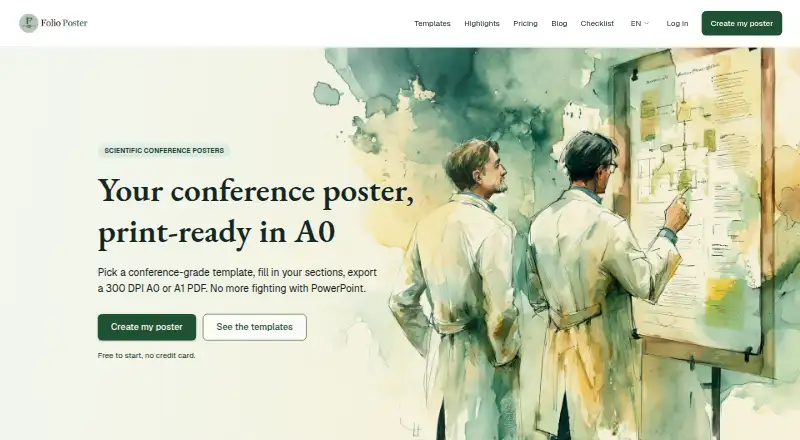
Folio Poster is a web editor for making scientific conference posters for print. It supports research sections such as introduction, methods, and results, along with tables, charts, KPIs, and figures. Posters can be exported as A0 or A1 PDFs in portrait or landscape at 300 DPI. Each poster can also have a companion web page, reached through a QR code on the poster. The editor offers seven color themes, with interface and section labels in English and French. Its listed audiences include medical and health research, experimental sciences, psychology and humanities, thesis and doctoral work, engineering and computing, and allied health. The free plan includes four templates, A0 PDF export, and a companion page, but adds a light Folio Studio watermark to the PDF. Paid options include watermark removal for one poster for €0.99 once, an AI pack for €2.49 once, Pro monthly for €3.99 per month, and Pro annual for €29.99 per year. Pro includes all 17 templates and 10 AI-assisted generations every 30 days.
Who it suits
It suits researchers and students preparing scientific posters across the listed fields, especially those who need print-ready A0 or A1 PDFs and a linked companion page. English- and French-language labels are available.
What it does well
- Exports A0 or A1 PDFs at 300 DPI.
- Portrait and landscape layouts are supported.
- QR codes link posters to companion pages.
- Seven color themes and two interface languages.
- Pro includes all 17 templates.
What to know first
- Free PDFs carry a light Folio Studio watermark.
- Free plan includes four templates.
- AI pack does not unlock Pro templates or remove watermarks.
Limits
The Free plan has four templates and its A0 PDF has a light Folio Studio watermark. The one-time AI pack adds five generations but does not unlock Pro templates or remove the watermark.
Plans
| Plan | Billed and limits | Price |
|---|---|---|
| Free | Free · 4 templates · A0 PDF export · companion page · PDF has a light Folio Studio watermark | Free |
| Single poster unlock | One-time payment · Removes the watermark from one specific poster · no subscription | €0.99, paid once |
| AI pack | One-time payment · 5 extra generations with no expiry · does not unlock Pro templates or remove the watermark | €2.49, paid once |
| Pro annual | €29.99 / year · All 17 templates · 10 AI-assisted generations every 30 days · watermark-free PDF export for all posters | €29.99 a year |
| Pro monthly | €3.99 / month · All 17 templates · 10 AI-assisted generations every 30 days · watermark-free PDF export for all posters | €3.99 a month |
As poster.foliostudio.app lists them, read 7 Oct 2026. The maker's own page has the final word.
Getting started
- Visit the Folio Poster website.
- Use the web editor to create a poster with research sections and content blocks.
- Choose from the available templates and themes.
- Use the Free plan or select a paid option.
- Export an A0 or A1 PDF, or provide a companion page linked by QR code.
Folio Poster is a web editor for scientific research posters, aimed at researchers and students preparing conference or thesis work. Its focus on A0/A1 print output and a QR-linked companion page makes it more purpose-built for academic posters than a general graphics tool, but the free export carries a watermark.
Overview
The editor follows a research-poster structure, with sections such as introduction, methods, and results, plus figures and data blocks. That makes it a natural fit for presenting a study rather than designing a broad range of promotional graphics. Posters can also have a companion web page, with a QR code on the poster linking readers to it.
Print support is a core strength: posters export as A0 or A1 PDFs, in portrait or landscape, at 300 DPI. The free plan includes A0 export, but its light Folio Studio watermark makes it better for drafting than for a final poster that must be presented without branding.
Key features
- Research-focused content: Introduction, methods, and results sections give academic work a familiar framework. Tables, bar and donut charts, large-number KPIs, and figures provide several ways to present findings.
- Print and web together: A QR code connects the printed poster to its companion page. This is useful when conference readers want a digital route to the work, alongside the physical poster.
- Templates and themes: There are seven color themes and 17 templates on Pro. The free plan restricts users to four templates, so it offers a way to start but a narrower choice for anyone refining a particular look.
- AI-assisted generations: Pro includes 10 generations every 30 days. The separate AI pack adds five generations with no expiry, but does not unlock Pro templates or remove export watermarks.
Pricing
Folio Poster has a free plan and paid options beginning at €0.99 per one-time purchase or €2.49 per one-time purchase, with subscriptions at €3.99 per month or €29.99 per year. The free option is useful for building a poster and producing an A0 PDF, but it includes only four templates and the exported PDF has a light Folio Studio watermark.
- Free — free: Four templates, A0 PDF export, and a companion page. Best for trying the editor or preparing a draft; the watermark is the main drawback for a finished print.
- Single poster unlock — €0.99, paid once: Removes the watermark from one specific poster, with no subscription. This is the economical choice when only one final poster needs clean output.
- AI pack — €2.49, paid once: Adds five generations with no expiry. It suits occasional use of AI assistance, but does not include Pro templates or watermark removal.
- Pro monthly — €3.99 a month: Unlocks all 17 templates, 10 AI-assisted generations every 30 days, and watermark-free PDF export for all posters. It fits a short-term project or a user who wants to avoid a longer commitment.
- Pro annual — €29.99 a year: Includes the same templates, generation allowance, and watermark-free exports as monthly Pro. It is the lower-cost subscription for someone expecting to make posters throughout the year.
The plan details do not state a trial period, renewal terms, or additional seat limits, so the practical distinction is the one-poster watermark unlock versus broader Pro access.
Platforms
Folio Poster runs on the web. Its interface and section labels are available in English and French, which makes it usable for poster work in either language.
Who it's for
The stated audiences span medical and health research, experimental sciences, psychology and humanities, thesis and doctoral work, engineering and computing, and allied health. The common need is a structured scientific poster intended for print, especially when pairing it with a companion page matters. It is less suited to people seeking a general-purpose design tool for many unrelated graphic formats.
Pros and cons
- Pros
- A0 and A1 PDF export at 300 DPI, in both orientations, is directly aligned with print poster preparation.
- The QR-linked companion page extends a conference poster with a digital destination.
- A one-time €0.99 unlock can remove the watermark from a single poster without taking on a subscription.
- Cons
- The free PDF has a watermark, so it is not a clean final export.
- Only four templates are included free; all 17 require Pro.
- The AI pack does not solve either limitation: it adds generations but neither unlocks Pro templates nor removes the watermark.
Alternatives
For a broader set of options, browse AI Poster Generators.
- Designkit is worth considering if you want Android and iOS apps as well as web access; its free plan offers 20 first-login credits and up to 20 images, with limited image generation and no video generation.
- LightX AI Poster Generator suits someone who wants mobile or API access and photo-editor tools alongside free design and video templates; its free Starter plan includes six daily AI credits.
- Ridvay is a stronger fit if you want unlimited manual designs and templates with PNG, JPG, and PDF exports on the free plan, plus daily AI design and image allowances.
- Contentdrips may suit a user who wants a free plan with 50 AI credits, basic templates, and one brand; the free plan does not include team members.
- Kittl is another web-based option, with a free tier that allows five projects and provides 100 one-time AI tokens.
- Piktochart is worth comparing if team membership and storage matter: its free plan allows one to four team members, two downloads, 1 GB storage, and 60 AI credits.
- Pixazo AI Research Poster Maker is a browser-based alternative for research-poster work; generating images uses a Pixazo Playground account.
- Poster is another web option, with a browser extension and a free plan that gives new users five credits and PNG/JPG downloads at 1080p.
Verdict
Choose Folio Poster if your priority is a scientific conference poster with print-ready A0/A1 PDFs and a QR-linked companion page. The single-poster watermark unlock is a practical route to a clean final export without subscribing, while Pro makes sense for repeated work or access to all templates. Look elsewhere if you need a wider general design toolkit or want watermark-free output without paying.
Verdict
Folio Poster covers poster content, print export, and companion pages in one web editor. The free plan is a starting point, while watermark-free exports and all templates require a Pro plan.
Questions
Does Folio Poster have a free plan?
Yes. The Free plan costs €0.00 and includes four templates, A0 PDF export, and a companion page. Its PDF has a light Folio Studio watermark.
How much does Folio Poster cost?
The single-poster watermark unlock costs €0.99 once, and the AI pack costs €2.49 once. Pro costs €3.99 per month or €29.99 per year.
What does Pro include?
Pro includes all 17 templates, 10 AI-assisted generations every 30 days, and watermark-free PDF exports for all posters.
What file formats and page sizes can it export?
Posters can be exported as A0 or A1 PDFs in portrait or landscape at 300 DPI.
Can a poster link to a web page?
Yes. Each poster can have a companion web page, and a QR code on the poster links to it.
What platforms and languages does it support?
Folio Poster is available on the web, and its interface and section labels are available in English and French.
Facts from Folio Poster's own pages
- AI pack limit
- The one-time AI pack provides five extra generations with no expiry and does not include Pro templates or watermark removal. · poster.foliostudio.app, 7 Oct 2026
- Data blocks
- The site lists tables, bar charts, donut charts, and large-number KPIs as supported data blocks. · poster.foliostudio.app, 7 Oct 2026
- Export
- Posters can be exported as A0 or A1 PDFs in portrait or landscape at 300 DPI. · poster.foliostudio.app, 7 Oct 2026
- Free plan limit
- The free plan includes four templates, A0 PDF export, and a companion page; its PDF has a light Folio Studio watermark. · poster.foliostudio.app, 7 Oct 2026
- Headquarters
- Rouen, France · poster.foliostudio.app, 28 Sept 2026
- Intended fields
- The listed audiences include medical and health research, experimental sciences, psychology and humanities, thesis and doctoral work, engineering and computing, and allied health. · poster.foliostudio.app, 7 Oct 2026
- Language
- The interface and section labels are available in English and French. · poster.foliostudio.app, 7 Oct 2026
- Poster content
- The editor supports sections such as introduction, methods, and results, plus tables, charts, KPIs, and figures. · poster.foliostudio.app, 7 Oct 2026
- Purpose
- Folio Poster is for creating scientific conference posters designed for print in A0. · poster.foliostudio.app, 7 Oct 2026
- Themes
- The product offers seven color themes. · poster.foliostudio.app, 7 Oct 2026
- Web version and QR
- Each poster can have a companion web page, and a QR code on the poster links to it. · poster.foliostudio.app, 7 Oct 2026
Where Folio Poster stands on Freedom251
- AI Poster Generators#7 of 24