Freedom251 › AI Poster Generators
Kodo
What Kodo is
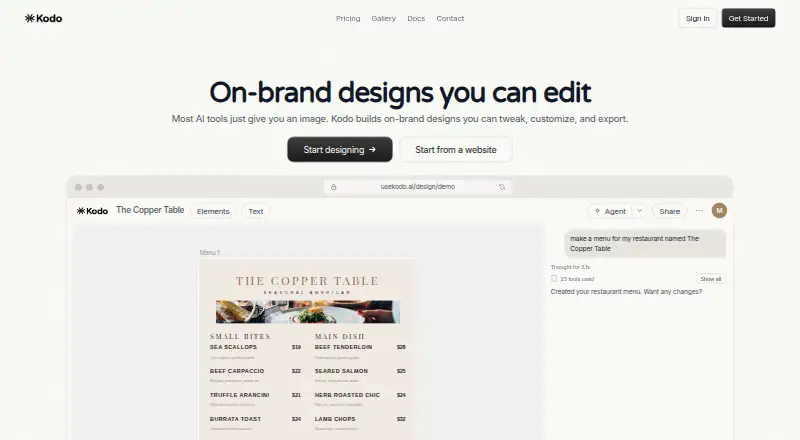
Kodo is a web-based AI design tool that turns text prompts into editable designs. It can create presentations, posters, menus, flyers, business cards, invitations, infographics, and social media graphics. Its vector tools let users adjust design elements, colors, and typography. Export formats include PNG, JPG, WEBP, SVG, PDF, and PPTX; PPTX export requires frames. Kodo also documents how to export a PPTX and import it into Google Slides for editing. Users can share designs with team members or external collaborators, setting view, edit, or comment permissions. The Free plan costs nothing and includes 30 credits, five projects, one brand kit, watermark-free exports, and custom fonts. Starter costs $12 a month and provides 100 credits monthly, 15 projects, and up to five brand kits. AI design generation typically uses about 4–12 credits per design, and unused free-plan credits do not refill automatically. Kodo says users own their designs and can use them personally or commercially, modify them, and export them.
Who it suits
Kodo suits people who want to generate editable designs from prompts and refine them with vector tools. Its collaboration permissions and brand kits may also suit teams sharing designs, while commercial-use rights are stated for users' designs.
What it does well
- Generates editable designs from text prompts.
- Creates eight listed kinds of design.
- Exports PNG, JPG, WEBP, SVG, PDF, and PPTX.
- Free plan includes watermark-free exports and custom fonts.
- Designs can be shared with view, edit, or comment permissions.
- Users own designs and may use them commercially.
What to know first
- Unused free-plan credits do not refill automatically.
- PPTX export requires frames.
- Free plan is limited to 30 credits and five projects.
Limits
The Free plan includes 30 credits and five projects. AI design generation typically uses about 4–12 credits per design, and unused free-plan credits do not refill automatically.
Plans
| Plan | Billed and limits | Price |
|---|---|---|
| Free | $0/month · 30 credits · 5 projects · 1 brand kit · Watermark-free exports · Custom fonts | Free |
| Starter | $12/month · 100 credits/mo · 15 projects · Up to 5 brand kits · Watermark-free exports · Custom fonts | $12 a month |
| Operator | $39/month · 350 credits/mo · Unlimited projects · Up to 20 brand kits · Watermark-free exports · Custom fonts | $39 a month |
| Agency | $99/month · 1000 credits/mo · Unlimited projects · Up to 100 brand kits · Watermark-free exports · Custom fonts | $99 a month |
As usekodo.ai lists them, read 7 Oct 2026. The maker's own page has the final word.
Getting started
- Visit https://usekodo.ai/.
- Use Kodo in a web browser.
- Start with the Free plan, which includes 30 credits and five projects.
- Choose Starter for 100 credits per month and 15 projects, or review higher paid plans.
- Create a design from a text prompt, then edit it or share it with collaborators.
Verdict
Choose Kodo if you want prompt-based design generation with editable vector tools, varied export formats, and collaboration permissions. The free plan includes 30 credits and five projects; Starter raises those allowances for $12.00 per month. Consider the credit use and non-refilling free credits when planning ongoing generation.
Questions
Does Kodo have a free plan?
Yes. Free costs nothing and includes 30 credits, five projects, one brand kit, watermark-free exports, and custom fonts.
What are Kodo's paid plan prices?
Starter is $12 a month, Operator is $39 a month, and Agency is $99 a month.
Which platforms does Kodo support?
Kodo is available on the web.
What file formats can Kodo export?
It supports PNG, JPG, WEBP, SVG, PDF, and PPTX exports. PPTX export requires frames.
Can designs be used commercially?
Kodo says users own their designs and may use them for personal or commercial purposes, modify them, and export them.
Can users collaborate on designs?
Yes. Users can share with team members or external collaborators and set view, edit, or comment permissions.
Facts from Kodo's own pages
- AI features
- Kodo documents text-to-design, background removal, and Magic Eraser; AI features use credits or separate allowances. · usekodo.ai, 7 Oct 2026
- Collaboration
- Users can share designs with team members or external collaborators with view, edit, or comment permissions. · usekodo.ai, 7 Oct 2026
- Credit limits
- AI design generation typically costs about 4–12 credits per design, and unused free-plan credits do not refill automatically. · usekodo.ai, 7 Oct 2026
- Design formats
- Kodo can create presentations, posters, menus, flyers, business cards, invitations, infographics, and social media graphics. · usekodo.ai, 7 Oct 2026
- Design ownership
- Kodo says users own their designs and may use them for personal or commercial purposes, modify them, and export them. · usekodo.ai, 7 Oct 2026
- Editing
- Kodo designs are editable, with professional vector tools for adjusting elements, colors, and typography. · usekodo.ai, 7 Oct 2026
- Exports
- Kodo supports PNG, JPG, WEBP, SVG, PDF, and PPTX exports; PPTX export requires frames. · usekodo.ai, 7 Oct 2026
- Google Slides
- Kodo documentation explains how to export a PPTX and import it into Google Slides for editing. · usekodo.ai, 7 Oct 2026
- Security
- Kodo says designs are stored securely with automatic backups, uses industry-standard encryption, and does not share user data. · usekodo.ai, 7 Oct 2026
- Support
- Kodo lists email support at [email protected], says it responds within 24 hours, and offers a 15-minute demo call. · usekodo.ai, 7 Oct 2026
- What it does
- Kodo is an AI design tool that creates editable designs from text prompts. · usekodo.ai, 7 Oct 2026
Where Kodo stands on Freedom251
- AI Poster Generators#9 of 24
- AI Logo Makers#26 of 65
- Podcast Cover Maker Software#23 of 35
- Infographic Makers#21 of 26