Freedom251 › Bookmark Managers

Raindrop.io
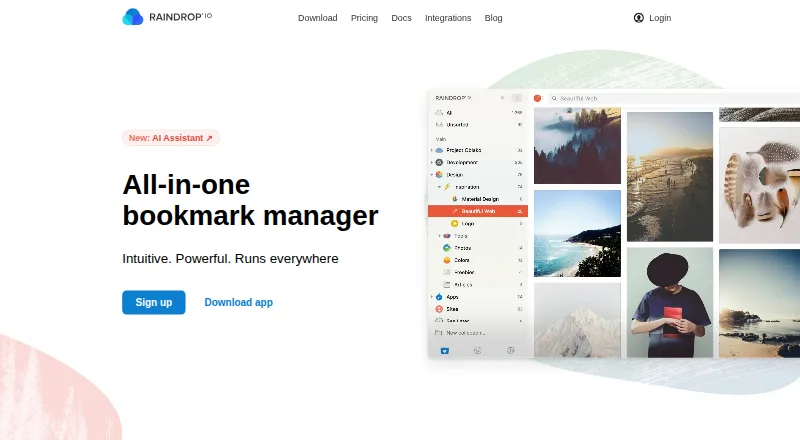
What Raindrop.io is
Raindrop.io is a bookmark manager for saving and organizing things found while browsing, including books, songs, and articles. Users can group saved items into collections, tag them, and filter by type, tag, or domain. The library provides article and video previews and offers Grid, Headlines, Masonry, and List views. Users can collaborate on the free plan, set collection permissions, and share public collections with visitors who do not need an account. Free includes unlimited bookmarks, collections, highlights, and devices, plus 100 MB of file uploads per month. Pro adds full-text search across saved web pages, PDFs, and YouTube videos, including spoken words; it also saves web-page copies that remain accessible if originals change or disappear. Other Pro features include reminders, annotations, an AI assistant and suggestions, daily backups, and priority email support. No Pro price amount is listed. Integrations include Apple Shortcuts, IFTTT, Make, Zapier, ChatGPT, Claude, Notion, Readwise, Dropbox, Google Drive, and OneDrive. The maker says collections are private by default and data is stored on AWS servers in Frankfurt, Germany.
Who it suits
Raindrop.io suits people who want to organize and revisit material saved while browsing across devices. Pro may suit users who need full-text search, web archives, or additional file uploads.
What it does well
- Free plan includes unlimited bookmarks and collections.
- Public collections can be shared without visitor sign-up.
- Searches saved pages, PDFs, and YouTube videos on Pro.
- Available for mobile, desktop, web, and browser extensions.
What to know first
- Free plan includes 100 MB of uploads monthly.
- No Pro price amount is listed.
- Older platform requirements include Android 7.0 and iOS 17.4.
Plans
| Plan | Billed and limits | Price |
|---|---|---|
| Free | unlimited bookmarks · unlimited collections · unlimited highlights · unlimited devices · 100 MB file uploads/month · sharing and collaboration | Free |
| Pro yearly | yearly · AI assistant · full-text search · web archive · reminders · annotations · duplicate and broken-link finder · daily backups · 10 GB uploads/month · priority email support | $27.99 a year |
| Pro monthly | monthly · AI assistant · full-text search · web archive · reminders · annotations · duplicate and broken-link finder · daily backups · 10 GB uploads/month · priority email support | $2.99 a month |
| Pro | Yearly; the page shows a ~20% yearly discount but no price amount · 10 GB file uploads/month · AI assistant and suggestions · Full-text search · Web archive · Reminders · Annotations · Daily backups · Priority email support | On request |
As raindrop.io lists them, read 14 Oct 2026. The maker's own page has the final word.
Overview
Raindrop.io is a bookmark manager for people who want to keep browsing finds organized across devices, rather than leave them in a pile of saved links. It suits readers building a searchable personal library or sharing collections with others. Its free plan is unusually open on bookmark and device counts; deeper search and durable page copies require Pro.
Key features
Organizing and finding saved items
Collections, tags, and filters by type, tag, or domain give a growing library more structure than a browser’s basic bookmark list. Grid, Headlines, Masonry, and List views let users choose how to scan it, while article and video previews add context. Duplicate detection is also included, which can help keep a large collection from accumulating repeat links.
Pro’s full-text search reaches into saved web pages and PDFs, as well as YouTube videos, including spoken words. That makes it more useful for retrieving a passage or topic than relying on titles and tags alone. Pro also archives page copies, preserving access when an original is changed or removed. These are meaningful upgrades for research-heavy or reference libraries, but users who only need to save and sort links can remain on Free.
Sharing, integrations, and data handling
Free users can collaborate, set permissions for collections, and publish collections that visitors can view without signing up. That is a practical sharing setup for groups that do not need every reader to create an account. Integrations include Apple Shortcuts, IFTTT, Make, Zapier, ChatGPT, Claude, Notion, Readwise, Dropbox, Google Drive, and OneDrive; glue apps can connect Raindrop.io to more than 1,000 other apps.
The maker says data is stored on AWS servers in Frankfurt, with three copies maintained across distributed data centers in Germany. Collections are private by default; file links require authentication and expire after 10 minutes. The maker also says it does not advertise, track, or sell user data. Continuous backups can be restored to a point within the past year, while daily backups are a Pro feature.
Pricing
Raindrop.io uses a freemium model. Free costs nothing, billed Free indefinitely, and allows 100 MB of file uploads per month. It includes unlimited bookmarks, collections, highlights, and devices, plus collaboration. This is the sensible starting point for personal collections and lightweight sharing, though the monthly upload allowance can constrain users who save many files.
Pro is billed yearly, with a roughly 20% yearly discount, and custom pricing. Its upload quota rises to 10 GB per month, and it adds an AI assistant and suggestions, full-text search, web archive, reminders, annotations, daily backups, and priority email support. It is better suited to people who need to search within saved material or preserve pages, but the upload quota and feature set do not remove the need to assess whether a paid plan fits your use.
Platforms
Raindrop.io is available on the web, Android, iOS, macOS, and Windows, with browser extensions and an API. The download page requires iOS 17.4 or later, Android 7.0 or later, macOS Monterey 12 or later, and Windows 10 or later. Those minimum versions matter for users on older devices. The maker is headquartered in Astana, Kazakhstan, and describes the product as independent and bootstrapped, with no investors or corporate parent.
Who it's for
Choose Raindrop.io if you want generous bookmark, collection, highlight, and device allowances at no cost, with room to upgrade for full-text retrieval and archived pages. Its collection permissions and public sharing also suit people who want to curate links for others without requiring visitors to sign up. It is less compelling if your priority is a clearly stated Pro price or if your devices fall below the listed operating-system requirements.
Pros and cons
- Pros: Free supports unlimited bookmarks, collections, highlights, and devices, so the core library need not be trimmed to fit a count cap.
- Pros: Pro search covers pages, PDFs, and spoken words in YouTube videos, while its archive keeps copies of changed or deleted pages.
- Pros: Free collaboration, collection permissions, and public collections make sharing useful without imposing sign-up on visitors.
- Cons: Free file uploads stop at 100 MB per month, a meaningful ceiling for users saving files regularly.
- Cons: Full-text search, archiving, reminders, annotations, and daily backups are reserved for Pro.
- Cons: Pro's yearly price amount is not provided, making the cost harder to compare before choosing it.
Alternatives
Bookmark Managers is a useful place to compare more options. Choose Diigo if its free allowance of 1,000 bookmarks or notes and 200 highlights better fits a capped library; it also limits free users to 50 screenshots or images, five outliners, and one private group with three members, with no PDF annotation.
Karakeep may suit someone who wants self-hosted as an option, though its free hosted plan is limited to 10 bookmarks and 20 MB of storage. Delinqs is worth considering for a small group: its free plan supports up to three users with unlimited bookmarks and all features, while its Team plan costs $9.99 a month per seat.
Choose LinkAce for a self-hosted bookmark archive, or its hosting plan at €4 a month. Shiori is another self-hosted option, offered as MIT-licensed software in a single binary. Start.me is aimed at start pages, with three pages and basic widgets on its ad-supported free tier, or unlimited pages on PRO for $25 a year.
floccus is a free and open-source bookmark option from a creator who works on it in free time alongside employment at Nextcloud GmbH. BibSonomy is a free option for readers looking for a web-based service with an API.
Verdict
Raindrop.io is a strong fit for anyone building a cross-device bookmark library who values unlimited saved items on a free plan and useful sharing controls. Its strongest reasons to upgrade are full-text search and web archiving; the main reason to look elsewhere is the monthly upload ceiling on Free or the absence of a stated Pro price amount.
Verdict
Raindrop.io offers a free way to organize and share bookmarks, with search and archiving among Pro features. Check the upload allowance and device requirements; no Pro price amount is provided.
Facts from Raindrop.io's own pages
- Account protection
- Two-factor authentication is available, and uploaded-file links require authentication and expire after 10 minutes. · help.raindrop.io, 14 Oct 2026
- API authentication
- Third-party applications must be registered and use OAuth; ordinary access tokens expire after two weeks. · developer.raindrop.io, 14 Oct 2026
- API rate limit
- OAuth clients may make up to 120 API requests per minute per authenticated user. · developer.raindrop.io, 14 Oct 2026
- Archive
- Pro saves copies of web pages so they remain accessible if the originals are deleted or changed. · help.raindrop.io, 29 Sept 2026
- Automation
- The integrations page says glue apps can connect Raindrop.io with more than 1,000 other apps. · help.raindrop.io, 29 Sept 2026
- Backup limitation
- Account backups include bookmarks, collections, tags, highlights and notes but exclude uploaded files, which must be downloaded separately as a ZIP. · help.raindrop.io, 14 Oct 2026
- Backups
- Data is continuously backed up and can be restored to a point within the past year. · help.raindrop.io, 29 Sept 2026
- Collaboration
- Users can collaborate on the free plan, control collection access with permissions, and share public collections without requiring visitors to sign up. · raindrop.io, 29 Sept 2026
- Collections
- Users can group bookmarks into collections and choose from thousands of collection icons. · raindrop.io, 14 Oct 2026
- Company
- The maker describes Raindrop.io as an independent, bootstrapped product with no investors or corporate parent. · help.raindrop.io, 29 Sept 2026
- Company size
- Crunchbase lists Raindrop as a private company headquartered in Astana, Kazakhstan, with 1–10 employees. · crunchbase.com, 14 Oct 2026
- Documentation and support
- The help center covers getting started, saving, organization, search, sharing, account administration, troubleshooting and export, with support by email. · help.raindrop.io, 14 Oct 2026
- Duplicate and broken-link tools
- The product can identify duplicate bookmarks and pages that are no longer accessible. · raindrop.io, 14 Oct 2026
- Free and Pro limits
- Free users get 100 MB of uploads per month and 100 MB per file, while Pro allows 10 GB per month and 300 MB per file. · help.raindrop.io, 14 Oct 2026
- Full-text search
- Pro accounts can search the contents of saved webpages, PDFs and YouTube transcripts. · raindrop.io, 14 Oct 2026
- Headquarters
- Astana, Kazakhstan · raindrop.io, 23 Sept 2026
- Highlights
- Users can annotate passages in saved web content and revisit those highlights later. · raindrop.io, 14 Oct 2026
- Integrations
- The free plan advertises more than 2,600 integrations, including workflows through services such as IFTTT and Zapier. · raindrop.io, 14 Oct 2026
- Licence
- The main web and extension repository is released under the MIT licence. · github.com, 14 Oct 2026
- Limit: Android feature gaps
- Google Play reviewers mention editing and search bugs and request multi-tag searching. · play.google.com, 14 Oct 2026
- Limit: automation and AI maturity
- G2 reviewers report no automatic sorting into meaningful collections and say AI tagging can be immature and create extra manual work. · g2.com, 14 Oct 2026
- Limit: export and restore problems
- Trustpilot reviewers report failed ZIP exports, iOS Safari login problems and restore/import operations that lose folder placement or icons. · trustpilot.com, 14 Oct 2026
- Notion integration
- The Notion integration imports a My Links.csv export and can synchronize links and highlights between Notion and Raindrop.io. · help.raindrop.io, 14 Oct 2026
- Offline limitation
- The mobile app requires an internet connection to synchronize changes and save new bookmarks. · help.raindrop.io, 14 Oct 2026
Where Raindrop.io stands on Freedom251
- Bookmark Managers#2 of 43
- Edge Extensions#3 of 23
- Extensions#3 of 23