Freedom251 › Bookmark Managers

Karakeep
What Karakeep is
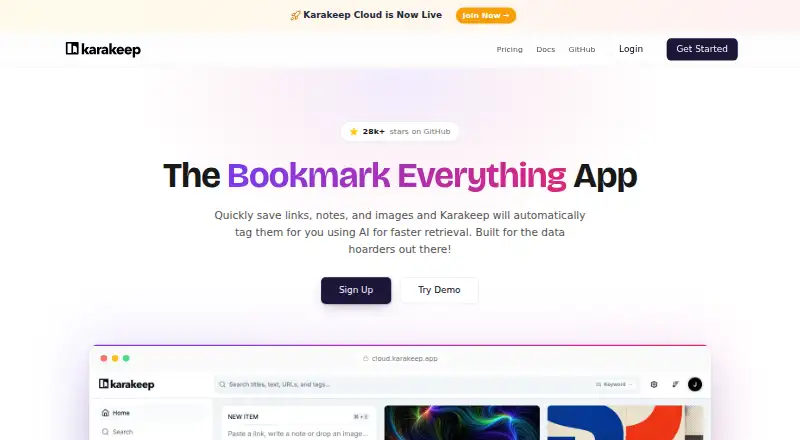
Karakeep saves links, notes, and images, then uses AI tagging and several search methods to help users retrieve them. Search includes full-text, keyword, hybrid, and semantic options; OCR makes text in images and screenshots searchable. Saved articles have a reader view, text highlighting, and offline reading in the mobile apps. Users can create rules to organize bookmarks, follow RSS feeds, publish lists as RSS feeds, and share lists with friends or teammates as editors or viewers. For AI assistant access, Karakeep offers agentic skills, a first-party MCP server, a CLI, and an API with scoped permissions and markdown content. The open-source app can be self-hosted with Docker; that plan is free with unlimited bookmarks and storage. The cloud Free plan costs nothing and includes 10 bookmarks and 20MB storage. Pro costs $4 a month and includes 50,000 bookmarks and 50GB storage. The privacy policy says cloud primary data is stored in Europe and personal data is not sold; self-hosted data stays on the user's infrastructure.
Who it suits
Karakeep suits people who save links, notes, and images and want multiple ways to search and organize them. It also suits teams sharing lists or users who want to self-host their bookmark library.
What it does well
- OCR makes image and screenshot text searchable
- Mobile apps support offline article reading
- Self-hosted plan is free with unlimited bookmarks and storage
- Shared lists support editor and viewer roles
- Cloud data is stored in Europe
What to know first
- Free cloud plan is limited to 10 bookmarks
- Free cloud plan includes 20MB storage
- Pro costs $4 a month
Limits
The free cloud plan allows 10 bookmarks and 20MB of storage. Pro costs $4 a month and includes 50,000 bookmarks and 50GB of storage. The free self-hosted plan has unlimited bookmarks and storage.
Plans
| Plan | Billed and limits | Price |
|---|---|---|
| Free | 10 bookmarks · 20MB storage · mobile & web apps · browser extensions | Free |
| Self-Hosted | Free forever · Unlimited bookmarks · unlimited storage · complete data control · community support | Free |
| Pro | $4 per month; or $40/year and save 17% · 50,000 bookmarks · 50GB storage · AI-powered tagging · full-text search · mobile & web apps · browser extensions | $4 a month |
| Karakeep for your team | Custom per seat · Everything in Pro · custom deployment & domain · SSO · user management · priority support | On request |
As karakeep.app lists them, read 29 Sept 2026. The maker's own page has the final word.
Getting started
- Visit https://karakeep.app/.
- Choose the free cloud plan or Pro plan, or use the free self-hosted option.
- For self-hosting, deploy Karakeep with Docker.
- Use the web app, mobile apps, or browser extension to work with saved items.
Overview
Karakeep is a bookmark manager and searchable archive for people who want more than a browser’s basic saved-links list. Its standout strength is the combination of rich search, reading tools, automation, and options to keep data on your own infrastructure; the main trade-off is that the free cloud tier is small.
It can hold links, notes, and images, automatically adding AI tags to help sort a growing collection. Web archiving and duplicate detection add useful support for building an archive rather than simply keeping a list of URLs. For another option in the category, see Bookmark Managers.
Key features
Search and reading
Karakeep supports full-text, keyword, hybrid, and semantic search, while OCR makes words inside saved images and screenshots searchable. That breadth is useful when a collection includes more than links or when you remember the subject of an item but not its title. Saved articles open in a distraction-free reader, with text highlighting and offline reading in the mobile apps.
Organization and sharing
Rules can tag or organize bookmarks automatically, and users can subscribe to RSS feeds or publish lists as feeds. Shared lists support friends or teammates as editors or viewers, making the app practical for collaborative collections as well as personal archives.
Access and integrations
Karakeep provides agentic skills, a first-party MCP server, a CLI, and an API with scoped permissions and markdown content. Community integrations for Raycast and Obsidian are listed on its apps page, alongside installable skills for AI assistants. These options make saved material accessible to technical workflows, though users who only need a simple personal bookmark list may not need them.
Pricing
The free cloud plan costs nothing and allows 10 bookmarks with 20MB of storage, using mobile and web apps plus browser extensions. That cap makes it a small trial or a fit for a very light collection, not a long-term home for an expanding archive.
Pro costs $4 a month, billed at $4 per month, or $40/year with a stated 17% saving. It raises capacity to 50,000 bookmarks and 50GB, and includes AI-powered tagging, full-text search, mobile and web apps, and browser extensions. This is the more suitable cloud tier for regular use; it still has finite storage and bookmark quotas.
Self-Hosted is free, free forever, with unlimited bookmarks and storage, complete data control, and community support. It is the strongest fit for users comfortable managing their own deployment, while those who want managed hosting should weigh Pro’s limits against convenience. The team plan has custom pricing per seat and includes everything in Pro, custom deployment and domain, SSO, user management, and priority support.
Paid plans include a 7-day money-back guarantee. After cancellation, cloud data remains available for 30 days for export. Karakeep says cloud primary data is stored in Europe and personal data is not sold; it cites encryption in transit, access controls, and regular security reviews. Self-hosted data stays on the user’s infrastructure and is not collected or accessed by Karakeep.
Platforms
Karakeep is available on Android, iOS, macOS, and the web, with browser extensions and an API. Self-hosting is also supported, with Docker as the deployment route. Mobile offline reading is useful for people who want saved articles away from a connection; self-hosting suits users who prioritize control over managed service.
Who it's for
Karakeep suits readers, researchers, and teams who save varied material and want several ways to retrieve, organize, or share it. Its OCR, semantic search, RSS, and AI-facing access options are especially relevant to collections that outgrow manual folders. It is less compelling as a free cloud choice for heavy saving, given the 10-bookmark and 20MB caps, and self-hosting is not the right route for someone unwilling to operate their own service.
Pros and cons
- Pro: Multiple search modes plus OCR cover text in both articles and images, improving retrieval across mixed collections.
- Pro: Rules, RSS, shared-list roles, and AI access tools support both automated organization and collaborative use.
- Pro: Free self-hosting includes unlimited bookmarks and storage, with data remaining on the user’s infrastructure.
- Con: The free cloud plan’s 10 bookmarks and 20MB are restrictive for anyone building a substantial archive.
- Con: Self-hosting provides unlimited capacity but relies on the user to manage deployment; support is community-based.
- Con: Pro still caps users at 50,000 bookmarks and 50GB, so cloud users must plan around quotas.
Alternatives
Diigo is worth considering for readers who want a larger free allowance for bookmarks and notes: its free plan supports 1,000 bookmarks or notes, 200 highlights, 50 screenshots or images, five outliners, and one private group with three members, though it does not include PDF annotation.
Raindrop.io is a better fit if unlimited bookmarks, collections, highlights, and devices on a free plan matter more than Karakeep’s search and self-hosting combination; its free tier includes 100 MB of file uploads per month.
Delinqs offers a free plan for up to three users with unlimited bookmarks and all features, making it a straightforward alternative for a small group prioritizing shared access.
LinkAce may suit someone seeking a self-hosted bookmark archive, with a free and open-source self-hosted plan and a hosting option priced at €4 a month.
Shiori is another free, MIT-licensed self-hosted option, distributed as a single binary.
Start.me is an alternative for users who want start pages: its free tier allows three pages with basic widgets and advertising.
Bookmark OS may fit users who prefer a browser-extension and web tool with unlimited bookmarks on its free plan, alongside monthly screenshot-icon and upload limits.
Linkman is a Windows-focused alternative with a free Lite plan for private, non-commercial use, allowing up to two sets of 5,000 bookmarks and sync across multiple browsers on one computer.
Verdict
Karakeep is a strong choice for people who want a capable, searchable archive with automation, sharing, and the option to keep data self-hosted. Its clearest advantage is how much control and retrieval capability it offers, especially on the free self-hosted plan. Choose Pro for managed cloud use and a much larger working collection; look elsewhere if you need a generous free cloud quota or do not want to manage self-hosting.
Verdict
Karakeep offers search, organization, and shared-list features for saved links, notes, and images, with both cloud and self-hosted options. Its free cloud plan has limits; self-hosting is free with unlimited bookmarks and storage.
Questions
Is Karakeep free?
Yes. The cloud Free plan costs nothing and includes 10 bookmarks and 20MB of storage. Self-hosting is also free, with unlimited bookmarks and storage.
What does Karakeep Pro cost?
Pro costs $4 a month, or $40/year. It includes 50,000 bookmarks and 50GB of storage.
Which platforms does Karakeep support?
Listed platforms include Android, iOS, macOS, web, API, browser extension, and self-hosted.
Is Karakeep open source?
Yes. It can be self-hosted with Docker, and self-hosted data stays on the user's infrastructure.
What integrations does Karakeep offer?
The apps page lists community Raycast and Obsidian integrations. Karakeep also offers installable skills for AI assistants, a first-party MCP server, a CLI, and an API.
What happens to cloud data after cancellation?
Cloud data remains available for 30 days after cancellation for export. Paid plans also have a 7-day money-back guarantee.
Facts from Karakeep's own pages
- AI assistant access
- Karakeep offers agentic skills, a first-party MCP server, a CLI, and an API with scoped permissions and markdown content. · karakeep.app, 29 Sept 2026
- Automation and feeds
- Users can create rules to tag or organize bookmarks, subscribe to RSS feeds, and publish lists as RSS feeds. · karakeep.app, 29 Sept 2026
- Collaboration
- Users can invite friends or teammates to shared lists as editors or viewers. · karakeep.app, 29 Sept 2026
- Headquarters
- United Kingdom · karakeep.app, 23 Sept 2026
- Integrations
- The apps page lists community Raycast and Obsidian integrations; it also offers installable skills for AI assistants. · karakeep.app, 29 Sept 2026
- Platforms
- Official apps are available for iOS and Android, with browser extensions for Chrome, Firefox, and Safari. · karakeep.app, 29 Sept 2026
- Privacy and data location
- The cloud privacy policy says primary data is stored in Europe and personal data is not sold. · karakeep.app, 29 Sept 2026
- Purpose
- Karakeep saves links, notes, and images and automatically tags them with AI for faster retrieval. · karakeep.app, 29 Sept 2026
- Reading
- Saved articles have a distraction-free reader view, text highlighting, and offline reading in the mobile apps. · karakeep.app, 29 Sept 2026
- Search
- It offers full-text, keyword, hybrid, and semantic search, and OCR makes text inside images and screenshots searchable. · karakeep.app, 29 Sept 2026
- Security
- The privacy policy lists encryption in transit, access controls, and regular security reviews as data protection measures. · karakeep.app, 29 Sept 2026
- Self-hosted data
- The privacy policy says self-hosted data stays on the user's infrastructure and is not collected or accessed by Karakeep. · karakeep.app, 29 Sept 2026
- Self-hosting
- Karakeep is open source and can be self-hosted with Docker; its self-hosted plan is free with unlimited bookmarks and storage. · karakeep.app, 29 Sept 2026
- Support and cancellation
- Paid plans have a 7-day money-back guarantee, and cloud data remains available for 30 days after cancellation for export. · karakeep.app, 29 Sept 2026
Where Karakeep stands on Freedom251
- Bookmark Managers#9 of 43