Freedom251 › Bookmark Managers

Delinqs
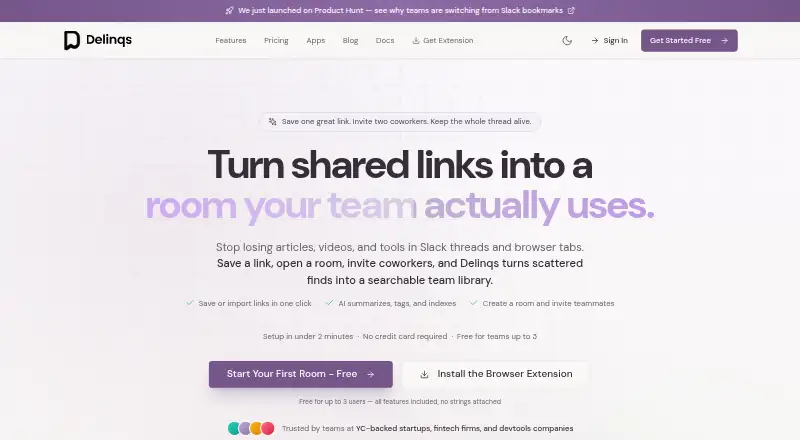
What Delinqs is
Delinqs collects links shared by a team into an AI-organized library. Each saved bookmark gets an AI-written summary, generated tags, and key takeaways, and users can ask questions across the team's saved material. A live feed gathers articles, videos, podcasts, and tools curated by teammates. Search works across bookmark text and semantic matches, while browser extensions can recognize an existing bookmark to help prevent duplicates. Teams can arrange resources in rooms, groups, and collections, use clonable templates, and discuss links through comments, reactions, and threads. Delinqs lists Slack, RSS feeds, Zapier, IFTTT, a REST API, and an MCP server as integration or automation options. Users can also forward email to [email protected]. Extensions are available for Chrome, Firefox, Edge, and Safari; the product also lists Android, iOS, web, and API access. The Free plan costs nothing, supports up to three users, and includes unlimited bookmarks and all features without a credit card. Team costs $9.99 a month per seat and includes priority support with same-day response. Enterprise pricing is volume-based and adds SSO and SAML, audit logs, custom retention policies, a dedicated customer success manager, and a 99.9% uptime SLA. Delinqs says it encrypts data at rest and in transit with AES-256 and does not use customer data to train AI models.
Who it suits
Delinqs suits teams that want a shared, searchable place for links, with AI summaries and question answering across saved material. It also fits teams that need collaboration tools, browser extensions, or integrations with Slack and automation services.
What it does well
- Free plan includes unlimited bookmarks and all features.
- AI adds summaries, tags, and key takeaways to bookmarks.
- Search includes full-text and semantic search.
- Browser extensions are available for Chrome, Firefox, Edge, and Safari.
- Users can export bookmarks as JSON, CSV, or HTML.
What to know first
- Free plan supports up to three users.
- Team requires four or more users and costs $9.99 per seat per month.
- Enterprise pricing is volume-based and not listed.
Limits
The Free plan is limited to three users. Team requires four or more users; Enterprise uses volume pricing, with no price listed.
Plans
| Plan | Billed and limits | Price |
|---|---|---|
| Free | forever · up to 3 users · unlimited bookmarks · all features · no credit card | Free |
| Team | per seat/month · 4 or more users · unlimited team members · all features · priority support with same-day response | $9.99 a month |
| Enterprise | custom volume pricing · SSO and SAML · audit logs · dedicated customer success manager · 99.9% uptime SLA · custom data retention | On request |
As delinqs.com lists them, read 15 Oct 2026. The maker's own page has the final word.
Getting started
- Visit the Delinqs website; its setup process takes under two minutes and requires no workspace configuration or IT department.
- Choose the Free plan for up to three users or Team for four or more users.
- Install a browser extension for Chrome, Firefox, Edge, or Safari if needed.
- Save links, or forward email to [email protected].
- Connect available integrations such as Slack, RSS feeds, Zapier, IFTTT, the REST API, or MCP server.
Delinqs is a shared-link library that uses AI to organize team bookmarks and help people find them later. It suits groups that collect and discuss useful online material together, rather than people seeking only a personal bookmark list. Its free tier includes unlimited bookmarks and all features, but only for up to three users.
Overview
Delinqs is designed around links shared across a team: bookmarks become a common collection that colleagues can organize, search, and discuss. That makes it a stronger fit for teams building a reusable knowledge library than for solo users who simply want to save pages. Setup is said to take under two minutes, with no workspace configuration or IT department required, a practical advantage for groups that want to start without a formal rollout.
Key features
Each bookmark receives an AI-written summary, generated tags, and key takeaways. Users can also ask questions across everything the team has saved, while full-text and semantic search offer direct ways to retrieve material. Together, these features address a familiar problem with shared collections: links are easy to save but can be difficult to rediscover. Their value will depend on a team having enough useful material to make a shared library worthwhile.
A live feed brings together articles, videos, podcasts, and tools curated by teammates. Rooms, groups, collections, and clonable templates give teams ways to organize shared links, while comments, reactions, and discussion threads support conversation around them. This is a broader collaboration setup than a simple save-for-later list, and may be unnecessary for users who do not need colleagues to contribute or discuss bookmarks.
Chrome, Firefox, Edge, and Safari extensions capture links and identify an existing bookmark instead of making a duplicate. Email forwarding to [email protected] offers another capture route. Integrations and automation options include Slack, RSS feeds, Zapier, IFTTT, a REST API, and an MCP server, giving teams several potential ways to connect link collection with other workflows.
Delinqs says it encrypts data at rest and in transit with AES-256, does not use customer data to train AI models, and is pursuing SOC 2 Type II compliance. Enterprise adds SSO and SAML, audit logs, custom retention policies, and a 99.9% uptime SLA. Users can export bookmarks in JSON, CSV, or HTML; after cancelling a paid account, read-only access to data remains on the free tier. That export and retention path is useful for teams wary of locking their shared library into one service.
Pricing
The Free plan costs nothing and includes all features and unlimited bookmarks for up to three users, with no credit card required. It is a substantial way for a small group to try the shared-library approach, but the three-user cap makes it unsuitable for larger teams.
Team costs $9.99 a month, billed per seat/month, and is for four or more users. It includes unlimited team members, all features, and priority support with same-day response. The pricing model makes the cost rise with seats, so teams should weigh that against the value of keeping a larger group in one searchable library.
Enterprise has custom pricing with volume pricing for larger teams. It adds SSO and SAML, advanced security controls and audit logs, a dedicated customer success manager, a 99.9% uptime SLA, and custom data retention. Those controls make it the relevant tier for organizations with identity, oversight, or retention requirements; smaller teams that do not need them can start on Free or Team.
Platforms
Delinqs is available on web, Android, and iOS, with an API and browser extensions for Chrome, Firefox, Edge, and Safari. The range supports both desktop capture and mobile access, while the API offers another route for integrations.
Who it's for
Delinqs is best suited to teams that regularly share articles, videos, podcasts, and tools and want to retrieve or discuss them as a group. Small teams can use the full feature set without paying, while larger groups can move to per-seat Team pricing or choose Enterprise for its additional controls. Individuals looking for a lightweight personal bookmark manager may find the team-centered features more than they need.
Pros and cons
- Pros: Free includes unlimited bookmarks and all features for up to three users, so a small team can use the complete product without a bookmark quota.
- Pros: AI summaries, tags, takeaways, questions, and full-text and semantic search give teams several ways to make a shared collection retrievable.
- Pros: Browser extensions check for duplicates, and email forwarding adds convenient capture options beyond the web interface.
- Pros: JSON, CSV, and HTML export plus read-only access after cancellation provide a path to retain and retrieve data if a paid account ends.
- Cons: The free plan's three-user limit means groups of four or more must pay for Team or consider another tool.
- Cons: Team is billed per seat/month, so larger teams face increasing costs even though members and bookmarks are unlimited.
- Cons: Enterprise's identity, audit, retention, and uptime controls are reserved for custom-priced plans, making it a less straightforward option for organizations that need those protections on a fixed budget.
Alternatives
Diigo is worth considering when a reader wants a bookmark and annotation tool with a defined free allowance: its free plan covers 1,000 bookmarks/notes, 200 highlights, 50 screenshots/images, five outliners, and one private group with three members, but excludes PDF annotation.
Karakeep may suit someone who wants a self-hosted option or a small free start; its free hosted plan is limited to 10 bookmarks and 20MB of storage, with mobile and web apps and browser extensions.
Raindrop.io is an alternative for users who prioritize unlimited bookmarks, collections, highlights, and devices on a free plan, with 100 MB of file uploads per month.
LinkAce is a fit for readers who prefer a self-hosted bookmark archive; its self-hosted plan is free and open source.
Shiori is another self-hosted choice, offering free MIT-licensed software distributed as a single binary.
Start.me may be a better match for users who want start pages rather than a team bookmark library; its free plan allows up to three pages, basic widgets, and includes advertising.
Symbaloo is an alternative for readers interested in an ad-supported free plan that includes Learning Paths.
Atavi is a free web service for people who want to save as many bookmarks as they want.
For more options, see Bookmark Managers.
Verdict
Delinqs is a strong choice for teams that want one shared, searchable home for useful links, especially if AI organization and team discussion matter as much as capture. The free plan makes it easy for up to three users to start with unlimited bookmarks and all features. Larger teams should compare the ongoing per-seat Team cost with their need for priority support, while organizations requiring SSO, audit, retention, or uptime commitments should consider Enterprise; those who only need personal bookmarking should look elsewhere.
Verdict
Teams that want to capture and find shared links can start with the free plan, which includes all features and unlimited bookmarks for up to three users. Larger teams may choose Team for same-day priority support or Enterprise for its identity, audit, retention, and uptime controls; Enterprise pricing is volume-based.
Questions
Is Delinqs free?
Yes. The Free plan costs nothing, supports up to three users, and includes unlimited bookmarks and all features without a credit card.
How much does Team cost?
Team costs $9.99 a month per seat and requires four or more users. It includes priority support with same-day response.
What platforms are available?
Delinqs lists Android, iOS, web, and API access, along with browser extensions for Chrome, Firefox, Edge, and Safari.
Which integrations does Delinqs list?
It lists Slack, RSS feeds, Zapier, IFTTT, a REST API, and an MCP server. Users can also forward email to [email protected].
What does Enterprise include?
Enterprise adds SSO and SAML, audit logs, custom data retention policies, a dedicated customer success manager, and a 99.9% uptime SLA. Pricing is volume-based.
Can users export bookmarks?
Yes. Bookmarks can be exported as JSON, CSV, or HTML. Cancelled paid accounts retain read-only access to their data on the free tier.
Facts from Delinqs's own pages
- AI data policy
- The site says customer data is not used to train AI models. · delinqs.com, 15 Oct 2026
- AI organization
- Each bookmark receives an AI-written summary, auto-generated tags, and key takeaways. · delinqs.com, 30 Sept 2026
- AI questions
- Users can ask questions that draw answers from their team’s saved bookmarks. · delinqs.com, 15 Oct 2026
- AI summaries
- The service generates summaries, tags, and key takeaways for saved links. · delinqs.com, 15 Oct 2026
- Browser extensions
- Extensions are offered for Chrome, Firefox, Edge, and Safari, with downloadable packages for sideloading. · delinqs.com, 15 Oct 2026
- Cancellation behavior
- After a paid subscription ends, the account returns to the free tier with read-only access to existing data. · delinqs.com, 15 Oct 2026
- Collaboration
- Teams can create rooms, groups, collections, clonable templates, comments, reactions, and discussion threads. · delinqs.com, 30 Sept 2026
- Collections
- Users can publish themed public collections and allow visitors to preview and unlock them after signup. · delinqs.com, 15 Oct 2026
- Company headquarters
- The opened product pages do not state a headquarters location. · delinqs.com, 15 Oct 2026
- Data export
- Users can export bookmark data as JSON, CSV, or HTML. · delinqs.com, 15 Oct 2026
- Discussion
- Bookmarks support comments, emoji reactions, threaded discussions, typing indicators, and live updates. · delinqs.com, 15 Oct 2026
- Documentation depth
- The site links to API documentation and setup guidance, but the opened homepage does not provide endpoint schemas, SDK listings, or a detailed developer reference. · delinqs.com, 15 Oct 2026
- Duplicate detection
- The browser extension detects links already saved so duplicate bookmarks are avoided. · delinqs.com, 15 Oct 2026
- Email capture
- Links can be captured by forwarding email to [email protected]. · delinqs.com, 15 Oct 2026
- Enterprise controls
- Enterprise plans add SSO, SAML single sign-on, audit logs, custom data retention policies, and a 99.9% uptime SLA. · delinqs.com, 30 Sept 2026
- Founded year
- The opened product pages do not state a founding year. · delinqs.com, 15 Oct 2026
- Integrations
- Listed integrations and automation options include Slack, RSS feeds, Zapier, and IFTTT. · delinqs.com, 15 Oct 2026
- Keyboard controls
- The interface advertises Cmd+K saving, slash search, Cmd+J AI chat, and Vim-style navigation shortcuts. · delinqs.com, 15 Oct 2026
- Licence
- The opened product pages describe hosted software and downloadable extension packages but do not state an open-source licence. · delinqs.com, 15 Oct 2026
- Limit: Enterprise pricing
- Enterprise pricing is not published as a fixed amount and is described as custom volume pricing. · delinqs.com, 15 Oct 2026
- Limit: free team size
- The free tier is limited to teams of up to three users. · delinqs.com, 15 Oct 2026
- Limit: SOC 2 status
- SOC 2 Type II is described as being pursued, so the page does not establish that certification has been completed. · delinqs.com, 15 Oct 2026
- Maker identity
- The opened product pages identify the product as Delinqs and provide [email protected], but do not state a legal entity name. · delinqs.com, 15 Oct 2026
- MCP server
- The product advertises an MCP server at /mcp for connecting AI assistants. · delinqs.com, 15 Oct 2026
Where Delinqs stands on Freedom251
- Bookmark Managers#4 of 43