Freedom251 › Data Center Infrastructure Management Software
RackTables
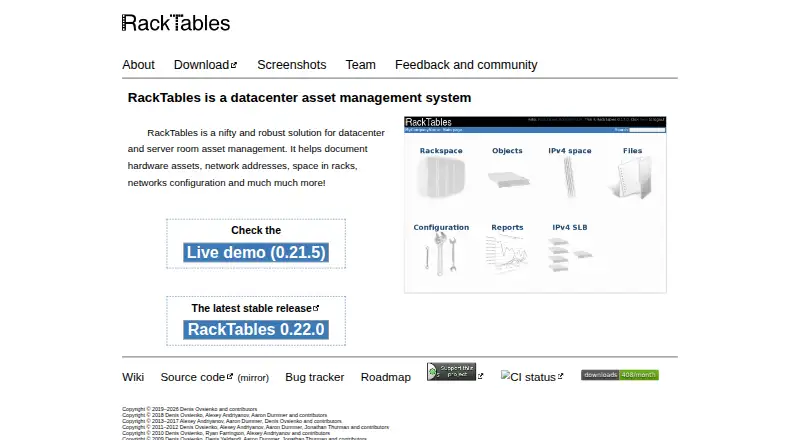
What RackTables is
RackTables is a free, on-premises system for documenting datacenter hardware, rack space, IP addresses, and network configuration. It records devices, racks, and enclosures, and lets users mount devices, arrange racks into rows, check available space, and mark unusable rack units. Those records support asset management and rack capacity planning.
For network documentation, RackTables manages IP addresses and networks, records NAT rules, and stores load balancing policies and configurations. Users can maintain device ports and their links, attach files to system objects, and organize hardware with flexible tags and filtering rules. User accounts and permissions can allow or deny actions. RackTables is written in PHP and accessed through a browser with an internet connection. The project identifies version 0.22.0 as its latest stable release and provides a user mailing list and bug tracker. It notes that volunteer-driven issue requests may not be dispatched immediately; bug reports are public by default, though an issue can be set to private.
Who it suits
RackTables suits teams that need to document datacenter devices, rack capacity, and network configuration in an on-premises system. Browser access requires an internet connection.
What it does well
- Tracks devices, racks, and enclosures
- Checks free rack space and marks unusable units
- Documents IP addresses, NAT rules, and load balancing
- Supports tags, filtering, files, and permissions
- Free software under GNU GPL version 2
What to know first
- Volunteer-driven issue requests may not be dispatched immediately
- Bug reports are public by default
- Latest stable release listed is version 0.22.0
Plans
| Plan | Billed and limits | Price |
|---|---|---|
| Free software (GNU GPL version 2) | No limits stated | Free |
As racktables.org lists them, read 8 Oct 2026. The maker's own page has the final word.
Getting started
- Visit the RackTables website.
- Set up the on-premises application.
- Open RackTables in a web browser with an internet connection.
- Create user accounts and permissions, then document devices, racks and network details.
RackTables is a free, self-hosted system for keeping datacenter hardware and network records together. It is best suited to teams that need detailed infrastructure documentation and rack-capacity planning without a software license fee. Its broad inventory model is balanced by volunteer-driven support and public-by-default bug reports.
Overview
RackTables ties physical assets to their rack locations and network records, so teams can document equipment, connections and addressing in one system. That makes it more useful for datacenter operations than a basic asset list, particularly when knowing where equipment sits and how it connects matters.
The application runs on-premises and is accessed through a browser with an internet connection. The project describes it as PHP software, and its homepage identifies version 0.22.0 as the latest stable release. Teams that want a hosted service should look elsewhere.
Key features
- Devices and rack capacity: Track devices, racks and enclosures, mount equipment, organize racks into rows, check free space and mark unusable rack units. This supports practical capacity planning, though it is oriented around documenting racks rather than a general inventory workflow.
- Network documentation: Manage IP addresses and networks, record NAT rules, and store load-balancing policies and configurations. Maintaining these alongside device records helps infrastructure teams keep physical and network context connected.
- Ports and links: Record device ports and the links between them, giving teams a way to document connectivity as part of the same inventory.
- Tags and attachments: Add files to system objects and apply flexible tags. Filtering rules can retrieve tagged hardware, which helps teams find relevant assets in a growing inventory.
- Permissions: User accounts can be granted or denied actions. This gives teams control over who can change records, while issue reports have a separate privacy consideration: they are public by default, with an option to make an issue private.
Pricing
RackTables is free software under GNU GPL version 2. Its Free software plan costs nothing, and no limits are stated. That makes it a fit for teams willing to operate an on-premises application without a software charge; it does not provide a paid support tier in the plan information.
Platforms
RackTables is web-based and deployed on-premises. Browser access suits teams that need to reach records from different locations, while the self-hosted model means the organization is responsible for running the application.
Who it's for
Choose RackTables if your team needs a free, detailed record of datacenter equipment, rack positions, available capacity and network configuration in one web application. It is less suitable for organizations that require hosted deployment or dependable, immediate support: the project relies on volunteers, and issue requests may not be dispatched promptly.
Pros and cons
- Pro: Physical inventory, IP records, network configuration and connectivity documentation sit together, reducing the need to split those records across separate tools.
- Pro: Rack rows, free-space checks and unusable-unit markings make it useful for tracking capacity as well as installed equipment.
- Pro: The GPL-licensed plan is free, with no limits stated.
- Con: On-premises deployment excludes teams seeking a managed hosted service.
- Con: Volunteer-driven issue handling may be slow, and bug reports are public by default unless changed to private.
Alternatives
For a broader comparison, browse Data Center Infrastructure Management Software, Network Documentation Software, IP Address Management Software or Asset Tracking Software.
- Global Site Management offers a free entry-level version intended for smaller data centers and pilot programs, along with a free trial and Android, iOS, web and Windows platforms. Consider it when those platform options or a pilot-oriented starting point fit better.
- Danbyte is free and open source, with all features included, no seat license or enterprise tier, no license expiry, and self-hosted deployment. Choose it if those licensing terms are a priority.
- ColdAisle is a free, self-hosted web application with Windows support and an MIT license. It may suit teams seeking that licensing model.
- openDCIM is a free, web-based application under GPL v3 for Linux and self-hosted environments. Consider it if that license or platform combination is a better fit.
- Brightlayer DCIM is a paid option purchased through an Eaton reseller; choose it if you prefer to pursue a demonstration or consultation for a paid product.
- CenterOS Capacity Management offers paid Private Cloud and SaaS plans with custom pricing. Its private-cloud plan includes a dedicated single-tenant deployment and contractual SLAs, making it an option for teams seeking those terms.
- CONTEG Aegis DCIM is a paid web-based option from a manufacturer of data-center and related infrastructure solutions.
- EkkoSense offers a paid annual SaaS license priced by monitored elements, with possible CAPEX or multi-year OPEX deals. Consider it if that licensing approach suits your needs.
Verdict
RackTables is a strong choice for teams that want a free, on-premises record of datacenter assets, rack capacity and network configuration in one place. Its central advantage is the connection between physical and network documentation; its main trade-off is relying on volunteer support, with bug reports public by default. Choose it when comprehensive records matter more than hosted convenience or assured response times.
Verdict
RackTables covers physical datacenter inventory and network records, with rack-space planning, tags, and permissions. Teams should factor in the volunteer-driven support process and the public-by-default bug tracker.
Questions
How much does RackTables cost?
The GNU GPL version 2 plan is listed as free.
Is RackTables free?
Yes. RackTables has a free plan.
Which platforms does RackTables support?
The listed platform is web. It is deployed on-premises and accessed through a browser with an internet connection.
What can RackTables document?
It documents hardware, racks, network addresses, ports, links, NAT rules, and load balancing policies and configurations.
What is the latest stable release?
The project homepage identifies version 0.22.0 as the latest stable release.
How can users get support?
The project provides a user mailing list and bug tracker. Bug reports are public by default, with an option to set an issue to private.
Facts from RackTables's own pages
- Access control
- The system supports user accounts and permissions that allow or deny actions. · racktables.org, 8 Oct 2026
- Browser access
- The site says RackTables can be accessed from anywhere with a browser and an internet connection. · racktables.org, 8 Oct 2026
- Current stable release
- The homepage identifies RackTables 0.22.0 as the latest stable release. · racktables.org, 8 Oct 2026
- Devices and racks
- It tracks devices, racks and enclosures, and lets users mount devices in racks. · racktables.org, 8 Oct 2026
- Filtering
- Users can tag hardware and retrieve it using filtering rules. · racktables.org, 8 Oct 2026
- Implementation
- The project history describes RackTables as an application written in PHP. · racktables.org, 8 Oct 2026
- Issue privacy
- Bug reports are public by default, with an option to set an issue's view status to private. · racktables.org, 8 Oct 2026
- Network documentation
- It manages IP addresses and networks, documents NAT rules, and stores load balancing policies and configurations. · racktables.org, 8 Oct 2026
- Ports and links
- Users can maintain device ports and the links between them. · racktables.org, 8 Oct 2026
- Purpose
- RackTables is a datacenter asset management system for documenting hardware, network addresses, rack space and network configuration. · racktables.org, 8 Oct 2026
- Rack capacity
- Users can organize racks into rows, check free space and mark unusable rack units. · racktables.org, 8 Oct 2026
- Support
- The project provides a user mailing list and bug tracker; it notes that volunteer-driven issue requests may not be dispatched immediately. · racktables.org, 8 Oct 2026
- Tags and files
- Users can attach files to system objects and organize objects with flexible tags. · racktables.org, 8 Oct 2026
Where RackTables stands on Freedom251
- Data Center Infrastructure Management Software#5 of 24
- Asset Tracking Software#19 of 52
- Ip Management#7 of 18
- IP Address Management Software#20 of 43
- Network Documentation Software#15 of 27
- Ipam Tool#10 of 18