Freedom251 › Data Center Infrastructure Management Software

ColdAisle
What ColdAisle is
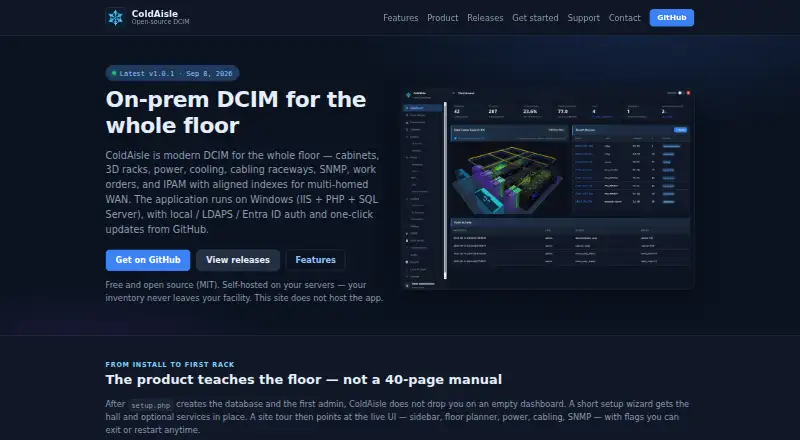
ColdAisle is free, MIT-licensed software for managing data center infrastructure on premises. It runs on Windows using IIS, PHP, and SQL Server, and its marketing site does not host customer inventory. Floor planning includes 2D layouts and interactive 3D views with cabinets, row PDUs, and raceways. Power tools cover A/B zones, panels, single-, dual-, and three-phase PDUs, outlet inventory, history charts, and overload alerts. Cooling features include CRAC and CRAH equipment, environmental sensors, and 3D airflow visualization. For device monitoring, ColdAisle supports SNMPv2c and SNMPv3, MIB uploads, device discovery, OID templates, and scheduled polling. SNMP secrets are encrypted at rest with the application key. Authentication options include local accounts, LDAPS with Active Directory group mapping, and Microsoft Entra ID OIDC single sign-on. Built-in roles include Administrator, Operator, Auditor, and Viewer. ColdAisle can import openDCIM data through a live API or offline JSON dumps, with a preview before migration.
Who it suits
ColdAisle suits data center operators replacing spreadsheets or openDCIM, and teams that need directory authentication while keeping floor plans in-house. It is designed for on-premises use on Windows.
What it does well
- Free to use under the MIT License.
- Includes 2D plans and interactive 3D views.
- Monitors power and cooling infrastructure.
- Supports SNMPv2c and SNMPv3 with scheduled polling.
- Imports openDCIM data with a migration preview.
What to know first
- Requires Windows, IIS, PHP, and SQL Server.
- IPAM does not provide IPv6, DNS, or a DHCP server.
- There is no paid ticket portal in v1.
- No free trial is listed.
Limits
The free ColdAisle plan is the MIT-licensed self-hosted application. Its IPAM feature does not provide IPv6, DNS, or a DHCP server.
Plans
| Plan | Billed and limits | Price |
|---|---|---|
| ColdAisle | Free to use · MIT license · self-hosted | Free |
As coldaisle.app lists them, read 2 Oct 2026. The maker's own page has the final word.
Getting started
- Open the ColdAisle website.
- Deploy the application on Windows using IIS, PHP, and SQL Server.
- Choose local accounts, LDAPS with Active Directory group mapping, or Microsoft Entra ID OIDC single sign-on.
- Set up Administrator, Operator, Auditor, and Viewer access as needed.
- Use the floor planner and infrastructure tools to manage the data center.
ColdAisle is a self-hosted data center infrastructure management application for tracking facilities and devices in one place. It best suits operators replacing spreadsheets or openDCIM who need directory authentication and want inventory to stay on premises. Its breadth and MIT license are compelling; the Windows-based application stack and limited IPAM make it a poor fit for some environments.
Overview
ColdAisle brings rack management, space planning, power and cooling monitoring, and device monitoring into a single on-premises application. The maker’s background as a working network infrastructure administrator aligns with its focus on operational needs, but the practical fit depends on whether a team can support its required server stack.
The application runs on Windows using IIS, PHP, and SQL Server; the marketing site does not host customer inventory. The MIT license and public source, issue, and release repository give technically capable teams room to inspect and adapt the software. That freedom comes with self-hosting responsibility, rather than a hosted service handling deployment and upkeep.
Key features
Floor plans, power, and cooling
The floor planner offers 2D plans and interactive 3D views showing cabinets, row PDUs, and raceways. For teams tracking space and capacity, this connects rack layouts with physical planning instead of leaving the floor plan in a separate document. Power tools cover A/B zones, panels, single-, dual-, and three-phase PDUs, outlet inventory, history charts, and overload alerts. Cooling support includes CRAC and CRAH equipment, environmental sensors, and 3D airflow visualization. Together, these features suit operators who need to consider facility infrastructure as well as racks, though they still require a Windows-based deployment.
Device monitoring, access, and migration
SNMPv2c and SNMPv3 support, MIB uploads, device discovery, OID templates, and scheduled polling provide a substantial set of device-monitoring tools. Secrets are encrypted at rest with the application key, a useful safeguard for stored SNMP credentials. Authentication can use local accounts, LDAPS with Active Directory group mapping, or Microsoft Entra ID OIDC single sign-on. Administrator, Operator, Auditor, and Viewer roles help distinguish administrative and read-only access.
Teams moving from openDCIM can import data through a live API or offline JSON dumps, with a preview before migration. That lowers the risk of moving inventory blind, but support is narrower: bug reports and feature requests go through GitHub Issues, and there is no paid ticket portal in v1.
IPAM boundaries
ColdAisle’s IPAM does not provide IPv6, DNS, or a DHCP server. It may still suit teams with narrower IP inventory needs, but it should not be chosen as a substitute for those network services.
Pricing
The sole ColdAisle plan costs free. It is free to use, MIT-licensed, and self-hosted; rack management, power monitoring, cooling monitoring, and space and capacity planning are included. There is no paid tier or hosted option among the stated plans, so the trade-off is not reduced feature access but the need to operate the application on premises.
There is no free trial, since the plan is free. That makes it possible to begin without a subscription commitment, but teams still need to be prepared to deploy and maintain the Windows, IIS, PHP, and SQL Server stack.
Platforms
ColdAisle is self-hosted and on-premises, with a web application running on Windows. It is suited to organizations able to provide that server environment; teams that require Linux hosting should look elsewhere.
Who it's for
ColdAisle is aimed at data center operators replacing spreadsheets or openDCIM, particularly teams that need directory authentication while keeping floor plans and inventory in-house. Its combined planning, power, cooling, and SNMP capabilities make it a sensible choice for teams consolidating those operational views. It is less suitable for sites that cannot support Windows with IIS, PHP, and SQL Server, need IPv6, DNS, or a DHCP server from IPAM, or depend on a paid support portal.
Pros and cons
- Pros: Free and MIT-licensed, with no reduced-feature entry tier described; teams can use the software without a license charge.
- Pros: Floor planning, power, cooling, and SNMP monitoring are covered together, reducing the need to split those views across separate tools.
- Pros: Active Directory group mapping and Entra ID single sign-on support directory-based access, while role choices separate operator, auditor, and viewer access.
- Cons: The Windows, IIS, PHP, and SQL Server stack limits deployment flexibility, especially for teams standardized on Linux.
- Cons: IPAM lacks IPv6, DNS, and DHCP server functions, so it cannot cover those needs by itself.
- Cons: Support requests go through GitHub Issues rather than a paid ticket portal in v1, which may not suit teams seeking formal support channels.
Alternatives
Compare data center infrastructure management software if you want to survey the category more broadly.
- Global Site Management is worth considering if a smaller data center or pilot program suits its free GSMpowerlite plan; it also offers a free trial and mobile platforms.
- Danbyte may fit teams seeking a free, open-source, self-hosted option with all features included and no seat license or expiry; it supports Linux as well as web access.
- openDCIM is another free, self-hosted web application under GPL v3, and may suit teams already using a Linux-based deployment.
- Brightlayer DCIM is a paid alternative purchased through an Eaton reseller.
- Hyperview offers a 30-day trial with all features and no credit card needed, making it a reasonable option for teams wanting a time-limited evaluation.
- CONTEG Aegis DCIM is another paid web-based option.
- Cormant-CS may suit buyers looking for a subscription with 500 assets and support that includes 32 hours of live consultant time; its approximate 25–30 rack plan costs $7,200 a year on a one-year agreement.
- EcoStruxure IT is a paid web and mobile alternative with a three-year plan for 250 nodes.
Verdict
Choose ColdAisle if you want a free, MIT-licensed, self-hosted system spanning floor plans, power, cooling, and device monitoring, and can support its Windows application stack. Its broad operational scope and directory authentication are the strongest reasons to adopt it. Look elsewhere if your deployment must run on Linux, your IPAM needs include IPv6, DNS, or DHCP service, or your team requires a paid support channel.
Verdict
ColdAisle covers floor plans, power, cooling, and device monitoring in a self-hosted package. Its Windows and server requirements, along with the stated IPAM exclusions, are worth checking against a site’s needs.
Questions
How much does ColdAisle cost?
The ColdAisle plan is free.
Is ColdAisle open source?
Yes. ColdAisle is released under the MIT License, with source, issues, and releases on its public product repository.
Which platforms does ColdAisle support?
It is listed for self-hosted, web, and Windows use. The application runs on Windows using IIS, PHP, and SQL Server.
What authentication options does it offer?
Options include local accounts, LDAPS with Active Directory group mapping, and Microsoft Entra ID OIDC single sign-on.
Can ColdAisle import openDCIM data?
Yes. It can import through a live API or offline JSON dumps, with a preview before migration.
What does ColdAisle's IPAM include?
The IPAM feature page says it does not provide IPv6, DNS, or a DHCP server.
Facts from ColdAisle's own pages
- Access roles
- Built-in roles are Administrator, Operator, Auditor, and Viewer. · coldaisle.app, 2 Oct 2026
- Authentication
- Authentication options include local accounts, LDAPS with Active Directory group mapping, and Microsoft Entra ID OIDC single sign-on. · coldaisle.app, 2 Oct 2026
- Cooling
- Cooling features include CRAC and CRAH equipment, environmental sensors, and 3D airflow visualization. · coldaisle.app, 2 Oct 2026
- Floor planning
- The floor planner supports 2D plans and interactive 3D views with cabinets, row PDUs, and raceways. · coldaisle.app, 2 Oct 2026
- Hosting
- The application runs on Windows using IIS, PHP, and SQL Server, and the marketing site does not host customer inventory. · coldaisle.app, 2 Oct 2026
- Intended users
- The maker describes it for operators replacing spreadsheets or openDCIM and teams that need directory authentication while keeping floor plans in-house. · coldaisle.app, 2 Oct 2026
- IPAM limits
- The IPAM feature page states that it does not provide IPv6, DNS, or a DHCP server. · coldaisle.app, 2 Oct 2026
- License
- ColdAisle is released under the MIT License, with source, issues, and releases on its public product repository. · coldaisle.app, 2 Oct 2026
- Maker background
- ColdAisle is developed by a working network infrastructure administrator. · coldaisle.app, 2 Oct 2026
- Migration
- ColdAisle can import openDCIM data through a live API or offline JSON dumps, with a preview before migration. · coldaisle.app, 2 Oct 2026
- Power
- Power features include A/B zones, panels, single-, dual-, and three-phase PDUs, outlet inventory, history charts, and overload alerts. · coldaisle.app, 2 Oct 2026
- Purpose
- ColdAisle is on-premise data center infrastructure management software for the whole datacenter. · coldaisle.app, 2 Oct 2026
- SNMP
- ColdAisle supports SNMPv2c and SNMPv3, MIB uploads, device discovery, OID templates, and scheduled polling. · coldaisle.app, 2 Oct 2026
- SNMP security
- SNMP secrets are encrypted at rest with the application key. · coldaisle.app, 2 Oct 2026
- Support
- Bug reports and feature requests go through GitHub Issues, and the site says there is no paid ticket portal in v1. · coldaisle.app, 2 Oct 2026