qutebrowser
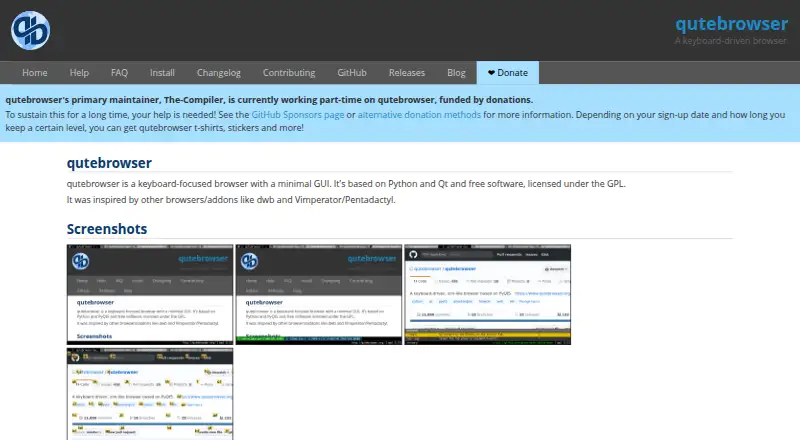
What qutebrowser is
qutebrowser is a free, open-source desktop browser for Linux, macOS, and Windows, designed for people who prefer keyboard controls and a minimal graphical interface. Its configurable key bindings are designed to be compatible with dwb. The software is built with Python and Qt, and uses QtWebEngine by default, a browser engine based on Chromium. Extensions are not supported.
JavaScript can be disabled by default, with exceptions allowed for a session, a host, subdomains, or an individual URL. When the Python adblock library is available, qutebrowser integrates Brave’s Rust adblocker and uses ABP-like filter lists; its blocking does not include cosmetic filtering. The FAQ also describes setting key bindings to open video links in mpv, optionally using link hints.
The project says that an up-to-date Qt provides QtWebEngine security fixes through Qt patch releases, with Chromium process isolation and sandboxing enabled. The optional QtWebKit backend does not have process isolation or sandboxing and has known security issues. Windows and macOS downloads require manual upgrades, while Linux packages are listed for multiple distributions. Windows and macOS binary releases lack proprietary codecs such as H.264/MP4. qutebrowser is available at no cost under the GPL; donations are optional.
Who it suits
qutebrowser suits desktop users who want a minimal browser controlled primarily through configurable keyboard bindings. It may appeal to people who want to tune JavaScript permissions or configure video links to open in mpv, and who do not need extensions.
What it does well
- Free and open-source under the GPL.
- Available for Linux, macOS, and Windows.
- Configurable keyboard bindings support keyboard-focused browsing.
- JavaScript permissions can be set by session, host, subdomains, or URL.
- Chromium process isolation and sandboxing are enabled in the default backend.
What to know first
- Extensions are not supported.
- Windows and macOS downloads require manual upgrades.
- Windows and macOS binaries omit proprietary codecs such as H.264/MP4.
- The optional QtWebKit backend lacks process isolation and sandboxing.
Limits
qutebrowser is free software under the GPL, with optional donations. Its Windows and macOS binary releases do not include proprietary codecs such as H.264/MP4, and browser extensions are not supported.
Plans
| Plan | Billed and limits | Price |
|---|---|---|
| qutebrowser | Free software under the GPL; donations are optional | Free |
As qutebrowser.org lists them, read 11 Oct 2026. The maker's own page has the final word.
Getting started
- Visit the qutebrowser website.
- Choose the installation route for Linux, macOS, or Windows.
- Install the available package, app file, standalone package, or installer for your platform.
- Configure key bindings and, if desired, JavaScript exceptions or a binding for mpv.
Verdict
Choose qutebrowser if you want a free, open-source desktop browser centered on keyboard control and configurable JavaScript settings. Look elsewhere if extensions are essential or you need automatic upgrades for Windows or macOS downloads.
Questions
Does qutebrowser cost anything?
The qutebrowser plan is free. It is free software under the GPL, and donations are optional.
Which platforms are supported?
It is a desktop browser for Linux, macOS, and Windows.
Is qutebrowser open source?
Yes. It is free software under the GPL.
Does it support browser extensions?
No, extension support is listed as none.
What browser engine does it use?
It uses QtWebEngine by default, which is based on Chromium. An optional QtWebKit backend is also described.
How are Windows and macOS updates handled?
Windows standalone packages and installers, and prebuilt macOS app files, must be upgraded manually.
Facts from qutebrowser's own pages
- Ad blocking
- When the Python adblock library is available, qutebrowser integrates Brave’s Rust adblocker using ABP-like filter lists, but the blocker does not support cosmetic filtering. · qutebrowser.org, 11 Oct 2026
- Alternative backend limitation
- The optional QtWebKit backend has no process isolation or sandboxing, and the installation page warns that it has known security issues. · qutebrowser.org, 11 Oct 2026
- Browser engine
- chromium · qutebrowser.org, 23 Sept 2026
- Built-in ad blocking
- Yes · qutebrowser.org, 23 Sept 2026
- Codecs
- The Windows and macOS binary releases ship with QtWebEngine without proprietary codec support such as H.264/MP4. · qutebrowser.org, 11 Oct 2026
- Extension support
- none · qutebrowser.org, 23 Sept 2026
- External integrations
- The FAQ describes configuring key bindings to open video links in mpv, optionally using link hints. · qutebrowser.org, 11 Oct 2026
- Free plan
- Yes · qutebrowser.org, 23 Sept 2026
- JavaScript controls
- Users can disable JavaScript by default and grant exceptions for a session, a host, subdomains, or an individual URL. · qutebrowser.org, 11 Oct 2026
- Keyboard use
- Its key bindings are designed to be compatible with dwb, and the browser supports configurable key bindings. · qutebrowser.org, 11 Oct 2026
- Linux packaging
- The installation guide lists packages in multiple Linux distributions and says packaging other than specified maintainer releases is community-maintained. · qutebrowser.org, 11 Oct 2026
- macOS downloads
- Prebuilt macOS app files are available, and the page says users must upgrade them manually. · qutebrowser.org, 11 Oct 2026
- Maintainer
- The site identifies Freya Bruhin (The Compiler) as qutebrowser’s primary author and says the primary maintainer works part-time on it, funded by donations. · qutebrowser.org, 11 Oct 2026
- Open source
- Yes · qutebrowser.org, 23 Sept 2026
- Supported platforms
- desktop · qutebrowser.org, 23 Sept 2026
- Purpose
- qutebrowser is a keyboard-focused browser with a minimal GUI. · qutebrowser.org, 11 Oct 2026
- Security
- With an up-to-date Qt, the FAQ says QtWebEngine receives security fixes through Qt patch releases and Chromium process isolation and sandboxing are enabled. · qutebrowser.org, 11 Oct 2026
- Support
- The help page lists IRC, a mailing list, GitHub Discussions, and Reddit as ways to get help. · qutebrowser.org, 11 Oct 2026
- Technology
- It is based on Python and Qt and uses QtWebEngine by default, which is based on Chromium. · qutebrowser.org, 11 Oct 2026
- Windows downloads
- Standalone packages and installers are built for each release, and users must upgrade them manually. · qutebrowser.org, 11 Oct 2026
Where qutebrowser stands on Freedom251
- Web browsers#17 of 154