Candy Browser
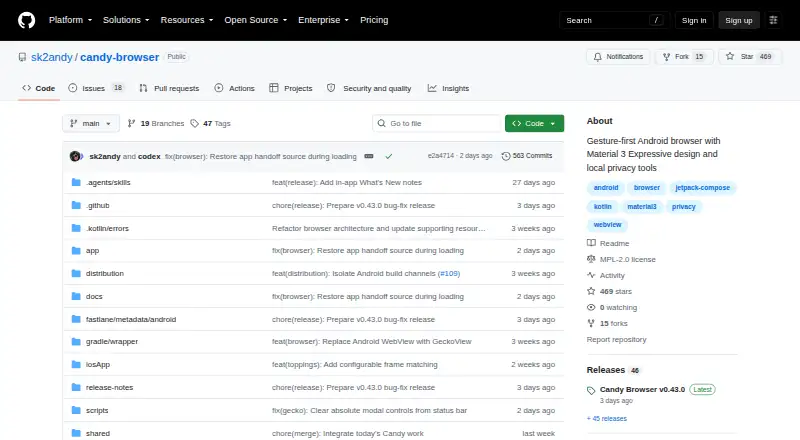
What Candy Browser is
Candy Browser is a free, open-source Android browser organized around gesture controls, on-device reading tools and privacy features. On Android, users can choose GeckoView or Android System WebView. Tabs can be changed with gestures and arranged in Coverflow, compact grid or list views, and address-bar actions are configurable. In GeckoView mode, Candy supports Mozilla-signed Firefox WebExtensions, with extension actions, popups, settings, permissions and updates managed in the browser. Some extensions that rely on Firefox Desktop features or desktop-only APIs may not work.
Reader Studio extracts articles locally and offers typography and theme controls, offline saves and text-to-speech. Local protections include tracker and ad filtering, third-party-cookie blocking, cookie-banner hiding, Privacy X-Ray and per-site permission activity. Private tabs hold session and journey data in memory and are excluded from sync and local full-text indexing. Candy Sync synchronizes writable tab profiles across Android, Chromium and Firefox clients through a server users host themselves. Tab data is encrypted on the device with AES-256-GCM; the server stores ciphertext, while routing metadata is still needed. Candy requires Android 13 (API 33) or newer. The project describes an iOS WKWebView target, while its download instructions specify Android. Signed Android APK builds are distributed through GitHub releases.
Who it suits
Candy Browser suits Android users who want gesture-based tab controls, locally processed reading tools and built-in privacy protections. It may also suit users who want Firefox WebExtensions in GeckoView mode or who are willing to host a server for tab-profile sync.
What it does well
- Choose GeckoView or Android System WebView on Android.
- Gesture-based tab switching and several tab layouts.
- Reader Studio supports offline saves and text-to-speech.
- Private tabs stay out of sync and local full-text indexing.
- Sync tab data is encrypted locally with AES-256-GCM.
- Free and open source under the Mozilla Public License 2.0.
What to know first
- Requires Android 13 (API 33) or newer.
- Candy Sync requires a server users host themselves.
- Some Firefox extensions relying on desktop APIs may not work.
Plans
| Plan | Billed and limits | Price |
|---|---|---|
| Candy Browser | Android browser; requires Android 13 (API 33) or newer | Free |
As github.com lists them, read 11 Oct 2026. The maker's own page has the final word.
Getting started
- Open the Candy Browser project on GitHub.
- Check that your device runs Android 13 (API 33) or newer.
- Download a signed Android APK build from GitHub releases.
- Choose the build variant that matches your needs, such as FOSS or System WebView-only.
- Select GeckoView or Android System WebView in the browser.
- For cross-client tab-profile sync, host a Candy Sync server.
Verdict
Choose Candy Browser if you want an open-source Android browser with gesture controls, local privacy tools and reading features. Its extension support is limited by GeckoView’s APIs, and cross-client sync requires a self-hosted server.
Questions
How much does Candy Browser cost?
Candy Browser is free: its listed plan is free.
Is Candy Browser open source?
Yes. Its source code is available under the Mozilla Public License 2.0.
Which platforms does it support?
The listed platforms are Android, extension and self-hosted, with mobile support. The project describes an iOS WKWebView target, but its download instructions specify Android.
Which browser engines can I use?
On Android, Candy can use GeckoView or Android System WebView.
Does it support Firefox extensions?
In GeckoView mode, it supports Mozilla-signed Firefox WebExtensions. Some extensions that depend on Firefox Desktop features or desktop-only APIs may not work.
How does Candy Sync work?
It synchronizes writable tab profiles across Android, Chromium and Firefox clients through a server users host themselves. Tab data is encrypted locally with AES-256-GCM; routing metadata remains necessary.
Facts from Candy Browser's own pages
- Browser engine
- gecko · github.com, 20 Sept 2026
- Browser engines
- Android can use GeckoView or Android System WebView; the project describes an iOS WKWebView target, but its download instructions specify Android. · github.com, 11 Oct 2026
- Built-in ad blocking
- Yes · github.com, 20 Sept 2026
- Cross-device sync
- Yes · github.com, 20 Sept 2026
- Downloads
- Candy is distributed as signed Android APK builds through GitHub releases, with separate FOSS, System WebView-only and User CA variants also described. · github.com, 11 Oct 2026
- Extension limits
- Extension support follows GeckoView’s public APIs, so some Firefox Desktop extensions and desktop-only APIs may not work. · github.com, 11 Oct 2026
- Firefox extensions
- In GeckoView mode, it supports Mozilla-signed Firefox WebExtensions, with extension actions, popups, options, permissions and updates managed inside Candy. · github.com, 11 Oct 2026
- Free plan
- Yes · github.com, 20 Sept 2026
- Gestures and tabs
- It supports gesture-based tab switching, Coverflow, compact grid and list tab views, and configurable address-bar actions. · sk2andy.github.io, 11 Oct 2026
- Local protection
- Local protection features include tracker and ad filtering, third-party-cookie blocking, cookie-banner hiding, Privacy X-Ray and per-site permission activity. · github.com, 11 Oct 2026
- Maker
- The repository is maintained under the GitHub account sk2andy; the pages opened do not state a maker name, headquarters or founding date. · github.com, 11 Oct 2026
- Open source
- Yes · github.com, 20 Sept 2026
- Supported platforms
- mobile · github.com, 20 Sept 2026
- Private tabs
- Private tabs keep session and journey data in memory only, and Candy says they do not enter sync or local full-text page indexing. · github.com, 11 Oct 2026
- Product
- Candy Browser is a gesture-first Android browser with local privacy tools and selectable GeckoView or Android System WebView engines. · github.com, 11 Oct 2026
- Reading tools
- Reader Studio extracts articles locally and supports typography and theme adjustments, offline saves and text-to-speech. · github.com, 11 Oct 2026
- Requirement
- Candy Browser requires Android 13 (API 33) or newer. · github.com, 11 Oct 2026
- Search
- Supported search providers listed by the project include Google, DuckDuckGo, Bing, Brave, Ecosia, Startpage, Qwant, Kagi, Perplexity, ChatGPT and configurable SearXNG. · github.com, 11 Oct 2026
- Source and license
- The project’s source code is available under the Mozilla Public License 2.0. · github.com, 11 Oct 2026
- Sync
- Candy Sync synchronizes writable tab profiles across Android, Chromium and Firefox clients using a server that users host themselves. · github.com, 11 Oct 2026
- Sync encryption
- Candy Sync encrypts tab data locally with AES-256-GCM, and the repository says the server stores ciphertext while routing metadata remains necessary for sync. · github.com, 11 Oct 2026
Where Candy Browser stands on Freedom251
- Web browsers#15 of 154