Freedom251 › Quiz Maker Software
QuizFaber
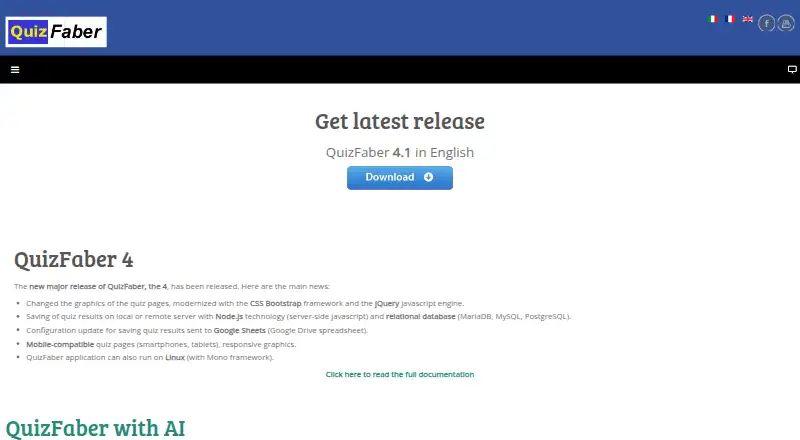
What QuizFaber is
QuizFaber is free software for creating multimedia quizzes as HTML pages without requiring HTML or JavaScript knowledge. Built-in question formats include multiple choice, multiple answers, true or false, open answer, gap filling, and matching words; users can also create custom types such as jigsaws, crosswords, numerical answers, and hot spots. Quiz pages can be styled with backgrounds, colors, sounds, fonts, and CSS settings, and responsive layouts support viewing on phones and tablets. Results can be stored locally, on a remote server, or in a Google Drive spreadsheet. The Google Drive method requires an account and is described for quizzes of up to 60 questions. Server storage can use Node.js with SQL Server, Oracle, MariaDB, MySQL, or PostgreSQL. QuizFaber supports Moodle XML import and export, with compatibility depending on question type. Results analysis includes scores, answer corrections, filters, and exports. Quizzes can be published online, on an intranet, on a local PC, or as browser pages. Commercial use requires prior authorization from the author.
Who it suits
QuizFaber suits schools, universities, and companies creating quizzes for web, intranet, or local use. It may fit users who want varied question formats and result storage choices without writing page code.
What it does well
- Creates HTML quizzes without HTML or JavaScript knowledge.
- Offers built-in and custom question types.
- Supports local, remote, and Google Drive result storage.
- Analytics can be exported in Excel, HTML, log, or database formats.
- Supports Moodle XML import and export.
What to know first
- Google Drive storage is described for up to 60 questions.
- Google Drive storage requires a Google account.
- Commercial use requires the author's prior authorization.
Limits
QuizFaber is free freeware, but commercial use requires the author’s prior authorization. Google Drive result storage requires a Google account and is described for quizzes with up to 60 questions.
Plans
| Plan | Billed and limits | Price |
|---|---|---|
| QuizFaber | Freeware · commercial use requires author’s prior authorization | Free |
As quizfaber.com lists them, read 7 Oct 2026. The maker's own page has the final word.
Getting started
- Open https://www.quizfaber.com/index.php/en/.
- Download QuizFaber for Windows or Linux, or use its web or self-hosted platform.
- Create a quiz using built-in questions or custom question types.
- Choose how to store results: locally, on a remote server or in Google Drive.
- Publish the quiz on the internet, a local network or intranet, a local PC, or as browser HTML pages.
QuizFaber is a free desktop-oriented quiz authoring tool that creates multimedia quizzes as HTML pages without requiring HTML or JavaScript skills. It suits educators and organizations that want to build and publish quizzes themselves; its mix of custom question types and result options is useful, but Moodle compatibility varies and commercial use requires the author’s prior authorization.
Overview
QuizFaber turns quiz authoring into a publishing workflow: create questions, set scoring and appearance, then publish pages for the internet, an intranet, or a local computer. It is freeware rather than a hosted quiz service, so its appeal is strongest for people comfortable managing where quizzes run and how results are collected.
The software has been developed since 1997 and is based in Turin, Italy. Its maker describes it as suitable for schools, universities, and companies. Documentation and FAQs support the download, and users with download problems are directed to contact the author.
Key features
Built-in formats cover multiple choice, multiple answers, true or false, open answers, gap filling, and matching words. Users can also create unlimited custom question types, with examples such as jigsaws, crosswords, numerical answers, and hot spots. That range makes the tool more adaptable than a fixed-format quiz builder, though custom formats may take more authoring effort.
Scoring can produce a numeric grade, weighted results, positive or negative points, textual evaluation, or no evaluation. Quiz analytics include correct and wrong answers, final marks, and per-question corrections, with filters by candidate, mark range, and time period. Results can be exported to Excel, HTML, logs, or a database.
Appearance controls include backgrounds, colors, sounds, fonts, and CSS settings. Responsive layouts allow quizzes to be viewed on smartphones and tablets. A cryptographic mechanism is provided to hide correct answers and revealing text from the visible HTML code, a useful safeguard when publishing quiz pages.
Results can be stored locally, on a remote server, or in a Google Drive spreadsheet. The Google Drive option requires a Google account and is described for quizzes of up to 60 questions. For server-based storage, the maker describes a Node.js approach supporting SQL Server, Oracle, MariaDB, MySQL, and PostgreSQL. Moodle import and export use Moodle XML, but compatibility depends on question type, so check formats before moving a quiz between systems.
Pricing
QuizFaber is free: the QuizFaber plan costs nothing and is freeware. There is no free trial because the software is already free. The important qualification is that commercial use requires the author’s prior authorization; organizations planning commercial deployment should resolve that condition first.
Platforms
QuizFaber is available for Linux and Windows, and its publishing options include browser-based HTML pages, internet, local network or intranet, and local PC. The listed web and self-hosted platforms reflect its publishing and deployment choices; the quiz pages themselves adapt to smartphone and tablet screens.
Who it's for
QuizFaber is a good fit for teachers, universities, and organizations that want broad question formats, flexible scoring, and control over result storage without paying for a plan. It is less suitable for buyers seeking a hosted service with straightforward commercial terms, or for Moodle workflows that depend on question formats whose compatibility has not been confirmed.
Pros and cons
- Pros: A free authoring tool with built-in and unlimited custom question types, offering room to build quizzes beyond standard multiple-choice formats.
- Pros: Multiple scoring modes, detailed answer and mark analytics, filters, and several export formats support varied assessment workflows.
- Pros: Results can go to local or remote storage, supported databases, or Google Drive, giving administrators options about where records live.
- Cons: Commercial use requires the author’s prior authorization, a material constraint for businesses and paid deployments.
- Cons: Moodle XML compatibility depends on question type, which can complicate transfer of quizzes using less common formats.
- Cons: Google Drive storage requires an account and is described for quizzes of up to 60 questions, limiting that route for larger assessments.
Alternatives
Quiz Maker Software is a broader category to explore when you want to compare quiz-building tools before choosing a specific product.
Choose FlexiQuiz instead if you need a web, mobile, or API-accessible freemium service: its free plan permits unlimited quizzes but caps each at 10 questions and includes 20 responses per month.
TAO may suit teams seeking a freemium option across web, desktop, and self-hosted platforms, with a free forever starter plan that includes one author seat and 50 learner test attempts per month.
Testportal is another freemium option for web and mobile use, with a Free EDU plan that includes 100 stored results.
Consider SpeedExam if you want an exam-oriented free plan with 25 attempts per month, 2,000 questions, and 100 MB of storage.
TriviaMaker is an alternative for mobile and web trivia, though its free Basic plan limits styles and team participation and disables customization and team features.
Crowdpurr offers a web-based free plan for up to 20 participants, 15 questions, and three simultaneous experiences; it may be a better fit for running multiple audience activities within those caps.
ProProfs Quiz Maker is worth considering for API or web access if its free plan’s limit of 12 questions and 90-day report history fits your needs.
Classtime is a web alternative for live classroom sessions, with a free Basic plan supporting up to 40 simultaneous students and unlimited questions and sessions.
Verdict
Choose QuizFaber if you want free, flexible quiz authoring with varied question types, scoring, and result-storage options, and you are prepared to manage publishing and deployment. Look elsewhere if commercial use is central to your plans or if you need assured Moodle compatibility across every question type.
Verdict
QuizFaber provides a free way to build and publish multimedia quizzes, with several scoring and result-storage options. Check question-type compatibility for Moodle and the authorization requirement for commercial use.
Questions
Is QuizFaber free?
Yes. QuizFaber is listed as freeware at no cost. Commercial use requires the author’s prior authorization.
Which platforms does QuizFaber support?
Its listed platforms are Linux, self-hosted, web and Windows.
Can QuizFaber export quizzes to Moodle?
Yes. It supports Moodle XML import and export, with compatibility depending on the question type.
How can quiz results be stored?
Results can be saved locally, on a remote server or in a Google Drive spreadsheet. Google Drive storage requires a Google account and is described for quizzes up to 60 questions.
What question types can I create?
Built-in types include multiple choice, multiple answers, true or false, open answer, gap filling and matching words. Users can also make unlimited custom types.
Who makes QuizFaber?
The author describes QuizFaber as useful for schools, universities and companies. Its listed founding year is 1997 and its headquarters are in Turin, Italy.
Facts from QuizFaber's own pages
- Answer protection
- The feature page says a cryptographic mechanism is provided to hide correct answers and revealing text in the visible HTML code. · quizfaber.com, 7 Oct 2026
- Custom questions
- Users can create unlimited custom question types, including jigsaw, crossword, numerical answer, and hot spot examples. · quizfaber.com, 7 Oct 2026
- Founded
- 1997 · quizfaber.com, 28 Sept 2026
- Google Drive limit
- The Google Drive result-storage method is described for quizzes with up to 60 questions and requires a Google account. · quizfaber.com, 7 Oct 2026
- Headquarters
- Turin, Italy · quizfaber.com, 28 Sept 2026
- Integrations
- QuizFaber supports importing from and exporting to Moodle using Moodle XML, with compatibility depending on question type. · quizfaber.com, 7 Oct 2026
- Intended users
- The author describes QuizFaber as useful for schools, universities, and companies. · quizfaber.com, 7 Oct 2026
- Mobile viewing
- Quiz pages use responsive layouts that can be viewed on smartphones and tablets. · quizfaber.com, 7 Oct 2026
- Privacy
- The website privacy policy says it collects log-file data and uses cookies, including Google Analytics cookies, while describing browsing as anonymous. · quizfaber.com, 7 Oct 2026
- Purpose
- QuizFaber creates multimedia quizzes as HTML pages without requiring the user to know HTML or JavaScript. · quizfaber.com, 7 Oct 2026
- Question types
- Built-in question types include multiple choice, multiple answers, true or false, open answer, gap filling, and matching words. · quizfaber.com, 7 Oct 2026
- Quiz design
- Quiz pages can be customized with backgrounds, colors, sounds, fonts, and CSS settings. · quizfaber.com, 7 Oct 2026
- Result storage
- Results can be stored on a local or remote server or in a Google Drive spreadsheet. · quizfaber.com, 7 Oct 2026
- Server and databases
- The maker describes Node.js-based result storage with databases including SQL Server, Oracle, MariaDB, MySQL, and PostgreSQL. · quizfaber.com, 7 Oct 2026
- Support
- The download page directs users with download problems to contact the author, and the site provides documentation and FAQs. · quizfaber.com, 7 Oct 2026
Where QuizFaber stands on Freedom251
- Quiz Maker Software#9 of 31