Freedom251 › Profiling Software
py-spy
What py-spy is
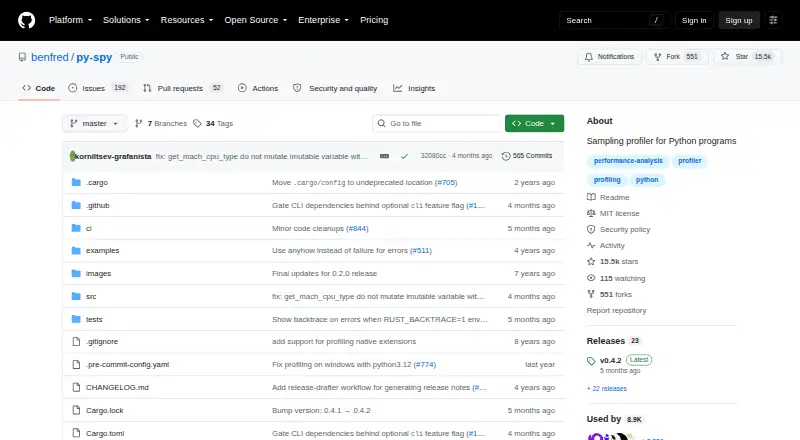
py-spy is a free, open-source sampling profiler for Python programs. It observes a running process from outside the Python process, so you can inspect where execution time goes without restarting the program or changing its code. The command-line tools cover three tasks: `record` saves profiles, `top` displays live activity, and `dump` shows thread call stacks. Recorded output can be a flame graph, speedscope profile, raw data, or Chrome trace. The project lists support for CPython versions 2.3–2.7 and 3.3–3.14, and says it can profile native extensions written in C, C++, or Cython on some platforms. With `--subprocesses`, `record` and `top` can include child Python processes. py-spy runs on Linux, macOS, and Windows, and is available through pip, release binaries, Cargo, Homebrew, Arch AUR, and Alpine packages. It is MIT-licensed and costs nothing.
Who it suits
It suits Python developers who need to inspect CPU activity, threads, or child processes without changing a running program. It is available for Linux, macOS, and Windows.
What it does well
- Profiles a process without restarting it or changing its code.
- Offers live activity, saved profiles, and thread call stacks.
- Exports flame graphs, speedscope profiles, raw data, and Chrome traces.
- Can include child Python processes.
- Supports native extensions on some platforms.
What to know first
- Attaching may require elevated permissions.
- macOS attachment always requires root.
- Docker and Kubernetes need the SYS_PTRACE capability.
- Nonblocking mode may produce sampling errors or partial stack frames.
Plans
| Plan | Billed and limits | Price |
|---|---|---|
| py-spy | MIT-licensed; sampling profiler for Python programs | Free |
As github.com lists them, read 5 Oct 2026. The maker's own page has the final word.
Getting started
- Open the py-spy GitHub repository.
- Choose Linux, macOS, or Windows.
- Install through pip, a GitHub release binary, Cargo, Homebrew, Arch AUR, or an Alpine package.
- Use `record` to save a profile, `top` to view live activity, or `dump` to display thread call stacks.
- For Docker or Kubernetes, provide the `SYS_PTRACE` capability.
- Use elevated permissions when required to attach to the target process.
py-spy is a free, open-source sampling profiler for Python applications that shows where a running program spends time without requiring a restart or code changes. It suits developers and operators who need CPU and thread insight from live processes, particularly when production safety and multiple profile formats matter.
Overview
py-spy runs outside the Python process and is written in Rust, keeping its profiling approach low-overhead and suitable for inspecting production code. Its sampling model is designed for locating time-consuming paths rather than tracing every event, so it offers a practical view of activity with less intrusion than instrumentation-heavy approaches. The tool can attach to an already-running program, which is useful when reproducing a performance problem or restarting a service is undesirable.
The project supports recent CPython releases from 2.3 through 2.7 and 3.3 through 3.14. That unusually broad range makes it relevant to both maintained systems and older Python deployments. Native extensions written in C, C++, or Cython can also be profiled on some platforms, extending visibility beyond pure Python code, although support is platform-dependent.
Key features
Three command-line views
record saves a profile for later analysis, top presents live activity, and dump prints thread call stacks. This division covers retrospective investigation, quick monitoring, and point-in-time stack inspection without forcing every workflow into one interface.
Portable profile outputs
record can produce flame graphs, speedscope profiles, and raw data; release notes also identify Chrome trace format support. Flame graphs help expose hot call paths, while speedscope and Chrome trace outputs fit viewers and tracing workflows that already use those formats. Raw data is the better choice when you need to process results yourself.
Process-tree and nonblocking options
With --subprocesses, record or top can include child Python processes such as multiprocessing jobs or gunicorn workers. That matters for services whose work is distributed across workers, where profiling only the parent would miss substantial activity. The --nonblocking option avoids pausing the target process, but the project warns that sampling errors or incomplete stack frames can result, so it trades fidelity for less interruption.
Pricing
| Plan | Price | Includes |
|---|---|---|
| py-spy | free | MIT-licensed sampling profiler for Python programs |
There is no paid tier, trial period, seat charge, or usage quota. The free plan includes CPU and thread profiling for Python, C, C++, and Cython, with desktop deployment. It is a strong fit for individuals, teams, and organizations that can operate a command-line profiler themselves. Buyers who need a hosted service, retention controls, or vendor-managed observability should compare it with commercial or freemium alternatives instead of expecting those service features from py-spy.
Platforms
py-spy runs on Linux, macOS, and Windows. Installation routes include PyPI, GitHub release binaries, Cargo, Homebrew, Arch AUR, and Alpine packages, giving both conventional developer setups and distribution-managed environments a path to installation.
Attachment permissions are an operational constraint. macOS always requires root, and Linux commonly requires root when attaching to a non-child process. In Docker and Kubernetes, the project says the container needs the SYS_PTRACE capability to read process memory. These requirements can affect production rollout and may rule out use in tightly restricted environments.
Who it's for
Choose py-spy when you need an open-source profiler that can inspect a live CPython process, generate several downstream-friendly formats, and follow child workers. It is especially well suited to engineers diagnosing CPU usage in services where changing application code or restarting the process is impractical.
It is less suitable when you need a hosted dashboard, long-term storage, built-in fleet management, or profiling without elevated process access. Teams operating locked-down containers should verify the required capability before standardizing on it.
Pros and cons
Pros
- Profiles without code changes or restarts: useful for live incidents and production diagnosis.
- Low-overhead external design: Rust and out-of-process sampling reduce intrusion into the target application.
- Multiple output formats: flame graphs, speedscope, raw data, and Chrome traces support different analysis workflows.
- Child-process coverage: multiprocessing and gunicorn workers can be included with one option.
- Broad availability: Linux, macOS, and Windows support plus several installation channels.
Cons
- Permission and container hurdles: root access or SYS_PTRACE may conflict with security policies.
- Nonblocking trade-off: avoiding pauses can produce sampling errors or partial stacks.
- Sampling limits: it identifies statistical hot spots rather than providing exhaustive event-level tracing.
- Security-update scope: only the most recent version receives security updates.
Alternatives
Profiling Software is the broader category to survey when you want to compare profiling tools by approach and deployment model.
- Grafana Cloud Application Observability is the better fit for hosted observability, with a free tier capped at 2,232 host hours and a Pro option priced at $0.03 per month under its stated platform-fee and usage terms.
- Scalene is another free, open-source Python profiler installable with pip or conda, worth considering when you want a different profiler workflow.
- YourKit .NET Profiler suits teams evaluating a paid profiler ecosystem or qualifying for its free-license arrangements.
- Javadoc is the choice for Java documentation generation included with JDK 25, not Python profiling.
- Node.js --prof is appropriate for generating V8 profiler output from Node.js applications.
- Parca offers an Apache 2-licensed open-source profiling platform for teams seeking a broader service-oriented setup.
- Pyroscope fits hosted or platform-based profiling, with a free plan offering 50 GB ingested per month and 14-day retention, plus paid plans.
- Valgrind is a free GPL-licensed option when you accept substantially slower programs and higher memory use.
Verdict
py-spy is a strong recommendation for developers and operators who need free, low-overhead sampling of live Python processes across major desktop platforms. Its external design, child-process support, and flexible exports make it particularly effective for diagnosing CPU and thread behavior without editing application code. Look elsewhere if your priority is hosted observability, persistent service-level dashboards, or an environment where root access and SYS_PTRACE cannot be granted.
Verdict
py-spy provides several ways to inspect running Python programs, with multiple output formats and child-process support. Check platform permissions and container requirements before attaching it to a process.
Questions
How much does py-spy cost?
The listed plan is free. There is no free trial.
Which platforms does py-spy support?
It supports Linux, macOS, and Windows.
Which Python versions are supported?
The README lists recent CPython versions 2.3–2.7 and 3.3–3.14.
What profile formats can `record` create?
It can create flame graphs, speedscope profiles, raw data, or Chrome traces.
Does py-spy profile native extensions?
The README says it can profile native extensions written in C, C++, or Cython on some platforms.
What permissions does py-spy need?
Attaching may require elevated permissions. macOS always requires root, while Linux commonly requires root for a non-child process; Docker and Kubernetes use requires `SYS_PTRACE`.
Facts from py-spy's own pages
- Commands
- The command line has `record`, `top`, and `dump` subcommands for saving profiles, viewing live activity, and displaying thread call stacks. · github.com, 5 Oct 2026
- Containers
- For Docker and Kubernetes, the README says py-spy needs the `SYS_PTRACE` capability to read process memory. · github.com, 5 Oct 2026
- Installation
- The project documents installation through PyPI with pip, GitHub release binaries, Cargo, Homebrew, Arch AUR, and Alpine packages. · github.com, 5 Oct 2026
- License
- The repository says py-spy is released under the MIT License. · github.com, 5 Oct 2026
- Low overhead
- It is written in Rust and runs outside the profiled Python process, which the project says makes it safe to use against production Python code. · github.com, 5 Oct 2026
- Native extensions
- The README says py-spy can profile native Python extensions written in C, C++, or Cython on some platforms. · github.com, 5 Oct 2026
- Nonblocking mode
- The `--nonblocking` option avoids pausing the target process, though the README notes it can cause sampling errors or partial stack frames. · github.com, 5 Oct 2026
- Permissions
- Attaching to a process may require elevated permissions; the README says macOS always requires root and Linux commonly requires root when attaching to a non-child process. · github.com, 5 Oct 2026
- Profile outputs
- `record` can create flame graphs, speedscope profiles, or raw data, and release notes also list Chrome trace format support. · github.com, 5 Oct 2026
- Purpose
- py-spy is a sampling profiler for Python programs that visualizes where a program spends time without restarting it or changing its code. · github.com, 5 Oct 2026
- Python support
- The README says it supports recent CPython versions 2.3–2.7 and 3.3–3.14. · github.com, 5 Oct 2026
- Security reporting
- The security policy asks users to report vulnerabilities by email and says only the most recent version receives security updates. · github.com, 5 Oct 2026
- Subprocesses
- With `--subprocesses`, `record` or `top` can include child Python processes, such as multiprocessing or gunicorn workers. · github.com, 5 Oct 2026
Where py-spy stands on Freedom251
- Profiling Software#12 of 29