Freedom251 › Blogging Platforms

Publii
by Publii
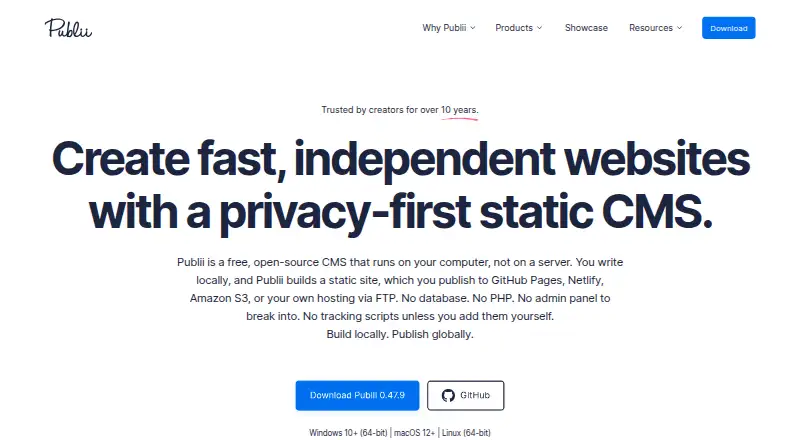
What Publii is
Publii is a free blogging platform for Windows, macOS, and Linux. It supports custom domains, theme customization through custom code, and blog analytics. The product’s listed capabilities focus on publishing and customizing a blog: you can connect a domain, alter themes with code, and view analytics. Publii does not include post scheduling or built-in memberships, so those functions are not part of its feature set. The free plan is available without a listed price. Publii is made by Publii, whose headquarters are in Krynica-Zdrój, Poland. Its desktop availability covers three operating systems, making it an option for publishers using Windows, macOS, or Linux. For people who want a no-cost blogging platform with domain support and analytics, Publii offers those tools alongside code-based theme customization; membership management and scheduled publishing are absent.
Who it suits
Publii suits bloggers who want a free desktop platform with custom-domain support, theme customization, and analytics. It may fit publishers using Windows, macOS, or Linux who do not need built-in memberships or post scheduling.
What it does well
- Free plan is available.
- Runs on Windows, macOS, and Linux.
- Supports custom domains.
- Theme customization supports custom code.
- Includes blog analytics.
What to know first
- No post scheduling.
- No built-in memberships.
Limits
The free Publii plan is a desktop CMS; paid themes, plugins, hosting, domains, and external services may cost extra. Built-in memberships and post scheduling are not included.
Plans
| Plan | Billed and limits | Price |
|---|---|---|
| Publii | Free and open-source desktop CMS · paid themes, plugins, hosting, domains, and external services may cost extra | Free |
As getpublii.com lists them, read 11 Oct 2026. The maker's own page has the final word.
Getting started
- Download the desktop app for Linux, macOS, or Windows.
- Create site content with the block, WYSIWYG, or Markdown editor.
- Set up a custom domain if needed.
- Choose a publishing route such as GitHub Pages, Netlify, FTP, or manual deployment.
- Publish the site to the selected destination.
Publii is a desktop CMS for people building blogs, portfolios, documentation, and other content-focused websites. It is best suited to publishers who want to manage drafts locally and choose their own publishing destination. The trade-off is a publishing workflow without built-in post scheduling or memberships.
Overview
Publii generates static websites on your computer, keeping drafts and site data local until you publish or connect an external service. Its desktop app collects no telemetry or usage statistics, and published sites do not need a publicly accessible database, PHP, or a public Publii admin panel. That makes the setup appealing to privacy-conscious site owners and reduces reliance on server-side components, but privacy for visitors still depends on hosting logs, analytics, forms, embedded media, and other services configured on the site.
You can publish to GitHub Pages, GitLab Pages, Netlify, Amazon S3, Google Cloud, FTP, or SFTP, or deploy manually. That range gives site owners control over where their work lives, while leaving the choice and configuration of hosting to them. Publii is open source under GPL-3.0 and is built with technologies including Electron and Vue.js.
Key features
Writing and content management
Block, WYSIWYG, and Markdown editors accommodate different writing habits. Posts can include image galleries, video, downloadable files, tables, and syntax highlighting, with authors, tags, and writing statistics for organizing and tracking content. WordPress WXR/XML import can bring across posts, pages, custom post types as posts, images, and authors, which may ease a move from WordPress.
The feature set covers the essentials for content publishing, but the absence of post scheduling matters to anyone planning timed releases, and the lack of built-in memberships rules it out for publishers who need that audience model as part of the CMS.
Site quality, privacy, and extensions
Publii generates static semantic HTML and includes metadata settings, sitemaps, structured data, social previews, lazy loading, minification, and WebP conversion. These tools address common search and performance tasks without requiring a separate publishing platform. Cookie consent groups, controls for embedded content and scripts, and Google Consent Mode v2 integration offer useful privacy controls, though the finished site's obligations still depend on the services and content it uses.
Plugins extend Publii with analytics, search, comments, SEO and GEO tools, icons, galleries, image decoding controls, and third-party integrations. This makes the core CMS more adaptable, but analytics and other external services can affect the privacy of a published site.
Pricing
Publii: free. The desktop CMS is free and open source, with no paid software plan described. Paid themes, plugins, hosting, domains, and external services may add costs, so free software does not necessarily mean a free website operation. A custom domain is supported, but its cost depends on the domain provider.
This is a strong fit for individuals who want to avoid a recurring CMS fee and are comfortable choosing their own hosting and optional extras. There are no published seat or usage caps to weigh, but site owners should budget separately for any paid themes, plugins, hosting, domains, or services they choose.
Platforms
Publii runs on Linux, macOS, and Windows. Its desktop format suits publishers who want to write and manage sites from a computer; it is not a browser-based editor in the platforms described here.
Who it's for
Publii suits bloggers, portfolio owners, documentation publishers, and other creators whose sites are primarily content-driven. It is particularly appropriate for people who value local drafts, a choice of editors, and control over deployment. Look elsewhere if scheduled publishing or built-in memberships are central to your workflow, or if you do not want to manage an external hosting destination.
Pros and cons
- Flexible publishing destinations: Support for major static hosting services, cloud storage, FTP/SFTP, and manual deployment lets owners select a destination that fits their setup.
- Local content control: Drafts stay on the computer until publication or an external connection, and the app collects no telemetry or usage statistics.
- Substantial built-in publishing toolkit: Multiple editors, rich post content, SEO settings, performance features, and privacy controls cover many routine site needs.
- No built-in scheduling or memberships: Publishers who rely on timed releases or membership features will need a different workflow or product.
- Hosting remains the owner's responsibility: Publii offers deployment choices rather than removing the need to choose and configure a destination.
- Optional costs can accumulate: Paid themes, plugins, domains, hosting, and external services may cost extra despite the free CMS.
Alternatives
For a broader selection, browse Static site generators, Blogging Platforms, Website builders, and Content Management Systems.
- Hugo is another free, open-source option for Windows, macOS, and Linux.
- Gatsby is an open-source framework with a free plan and a separate free tier that includes a 300 credit limit per month and unlimited deploy previews.
- Cecil is free software under the EUPL-1.2 license for Linux, macOS, and Windows.
- Eleventy is a free, MIT-licensed, self-hosted static-site generator.
- Nikola is free open-source software under the MIT license and requires Python 3.8 or later.
- Nanoc is a free project for Linux, macOS, and Windows.
- Zola is free, runs on Linux, macOS, and Windows, and is distributed as a single executable.
- Jekyll is a free static site generator for Linux, macOS, and Windows.
Verdict
Choose Publii if you want a free desktop CMS with local content management, flexible deployment, and a broad set of publishing tools for a content-focused site. Its strongest reason to choose it is control over both the authoring environment and hosting destination; its clearest reason to look elsewhere is the lack of built-in scheduling and memberships.
Verdict
Publii covers core blog publishing needs with custom domains, code-based theme customization, and analytics at no cost. Its listed feature set omits memberships and post scheduling.
Questions
How much does Publii cost?
The Publii plan is free. Paid themes, plugins, hosting, domains, and external services may cost extra.
Which operating systems does Publii support?
Publii is available for Linux, macOS, and Windows.
Can I publish a Publii site to my own domain?
Yes. Publii supports a custom domain.
Does Publii include memberships or post scheduling?
Built-in memberships and post scheduling are not included.
Is Publii open source?
Yes. Publii is licensed under GPL-3.0.
Where is Publii made?
Publii is made by Publii, headquartered in Krynica-Zdrój, Poland.
Facts from Publii's own pages
- Blog analytics
- Yes · getpublii.com, 22 Sept 2026
- Built-in memberships
- No · getpublii.com, 22 Sept 2026
- Content tools
- The editors support image galleries, videos, downloadable files, tables, syntax highlighting, authors, tags, and writing statistics. · getpublii.com, 11 Oct 2026
- Custom domain
- Yes · getpublii.com, 22 Sept 2026
- Data handling
- The desktop app does not collect telemetry or usage statistics, and drafts and site data stay on the user's computer until published or connected to an external service. · getpublii.com, 11 Oct 2026
- Editors
- It includes block, WYSIWYG, and Markdown editors for creating posts. · getpublii.com, 11 Oct 2026
- Extensions
- Publii plugins add analytics, search, comments, SEO and GEO tools, icons, galleries, image decoding controls, and third-party service integrations. · getpublii.com, 11 Oct 2026
- Free plan
- Yes · getpublii.com, 22 Sept 2026
- Headquarters
- Krynica-Zdrój, Poland · getpublii.com, 28 Sept 2026
- Intended users
- Publii describes itself as suitable for blogs, portfolios, documentation sites, and other content-focused websites. · getpublii.com, 11 Oct 2026
- Notable limit
- The privacy requirements for a published site depend on its configuration, since hosting logs, analytics, forms, embedded media, and external services may still process data. · getpublii.com, 11 Oct 2026
- Open source
- Publii is licensed under GPL-3.0 and is built with technologies including Electron and Vue.js. · getpublii.com, 11 Oct 2026
- Privacy controls
- Publii includes cookie consent groups, controls for embedded content and scripts, and Google Consent Mode v2 integration. · getpublii.com, 11 Oct 2026
- Product
- Publii is a free, open-source desktop CMS that builds static websites locally on your computer. · getpublii.com, 11 Oct 2026
- Publishing
- Publii can publish to GitHub Pages, GitLab Pages, Netlify, Amazon S3, Google Cloud, FTP, SFTP, or through manual deployment. · getpublii.com, 11 Oct 2026
- Post scheduling
- No · getpublii.com, 22 Sept 2026
- Security model
- Published Publii sites do not require a publicly accessible database, PHP, or a public Publii admin panel. · getpublii.com, 11 Oct 2026
- SEO and performance
- Publii generates static semantic HTML and includes metadata settings, sitemaps, structured data, social previews, lazy loading, minification, and WebP conversion. · getpublii.com, 11 Oct 2026
- Support
- Publii offers user and developer documentation, a community forum, and dedicated premium support for paid products. · getpublii.com, 11 Oct 2026
- Theme customization
- custom code · getpublii.com, 22 Sept 2026
- WordPress import
- Publii can import WordPress WXR/XML exports, including posts, pages, custom post types as posts, images, and authors. · getpublii.com, 11 Oct 2026
Where Publii stands on Freedom251
- Blogging Platforms#15 of 125
- Content Management Systems#28 of 165
- Static site generators#6 of 35
- Website builders#19 of 70
- Blog Software#12 of 25