Freedom251 › Photogrammetry Software
Proximap
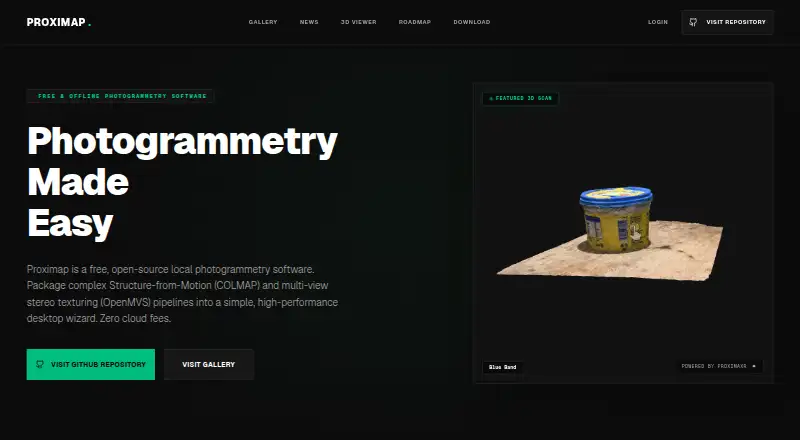
What Proximap is
Proximap is free, open-source desktop software for reconstructing 3D models through photogrammetry. Its desktop wizard brings together Structure-from-Motion and multi-view stereo texturing pipelines. The software integrates COLMAP for camera tracking and OpenMVS for dense point clouds, meshing, and texturing. Processing is local: datasets, processing work, and generated meshes stay on the machine, according to the site.
Proximap can use discrete GPUs, multithreaded CPUs, and integrated graphics. It monitors available RAM and can downscale assets and limit concurrent background threads when the system is under heavy load. Reconstructed models can be exported or shared in the Proximap gallery. The site describes it as intended for creators, hobbyists, and digital archivists.
The software runs on Linux, macOS, and Windows. Windows downloads support 64-bit Windows 10 and 11; the download page recommends 8 GB RAM, an Intel Core i5 8th Gen or newer, and Intel HD Graphics 630 or newer. The macOS version is optimized for Apple Silicon M1/M2/M3 and Intel Macs and includes native Metal API integrations. Linux options include Debian packages and portable archives for Ubuntu, Debian, Fedora, and Arch, as well as build-from-source scripts. The Free plan costs nothing and is described as offline desktop photogrammetry software.
Who it suits
Proximap suits creators, hobbyists, and digital archivists who want to build 3D models from photographs with desktop software. Its local processing and model export options also suit people who want datasets and generated meshes to remain on their machine.
What it does well
- Free and open-source desktop photogrammetry software.
- Processes datasets and generated meshes locally.
- Combines COLMAP camera tracking with OpenMVS reconstruction tools.
- Can use discrete GPUs, multithreaded CPUs, or integrated graphics.
- Can export models or share them in the Proximap gallery.
- Available for Linux, macOS, and Windows.
What to know first
- No free trial is offered.
- Windows support is listed for 64-bit Windows 10 and 11.
- Windows recommendations include 8 GB RAM and specified processor and graphics hardware.
Plans
| Plan | Billed and limits | Price |
|---|---|---|
| Free | Free offline desktop photogrammetry software | Free |
As proximap.space lists them, read 11 Oct 2026. The maker's own page has the final word.
Getting started
- Visit https://www.proximap.space/.
- Choose the download for Linux, macOS, or Windows.
- On Linux, use a Debian package, a portable archive for a listed distribution, or the build-from-source scripts.
- On Windows, use a 64-bit Windows 10 or 11 system.
- On macOS, use the version for Apple Silicon M1/M2/M3 or Intel Macs.
- Use the desktop wizard to work through the photogrammetry pipelines.
Verdict
Choose Proximap if you want free, open-source desktop photogrammetry with local processing and model export. Check its listed Windows compatibility and recommended hardware if you plan to use it on Windows.
Questions
How much does Proximap cost?
The Free plan costs nothing and is described as free offline desktop photogrammetry software.
Is Proximap open source?
Yes. Proximap is described as free, open-source software.
Which operating systems does it support?
It is available for Linux, macOS, and Windows.
Does Proximap process data online?
The site says datasets, processing, and generated meshes stay on the local machine.
What are the Windows requirements?
The download page lists 64-bit Windows 10/11 compatibility and recommends 8 GB RAM, an Intel Core i5 8th Gen or newer, and Intel HD Graphics 630 or newer.
Can I export reconstructed models?
Yes. Users can export reconstructed models or share them in the Proximap gallery.
Facts from Proximap's own pages
- Core software
- Proximap integrates COLMAP for camera tracking and OpenMVS for dense point clouds, meshing, and texturing. · proximap.space, 11 Oct 2026
- Export and sharing
- Users can export reconstructed models or share them in the Proximap gallery, according to the site. · proximap.space, 11 Oct 2026
- Hardware support
- The software can use discrete GPUs, multithreaded CPUs, and integrated graphics. · proximap.space, 11 Oct 2026
- Intended users
- The site describes Proximap as built for creators, hobbyists, and digital archivists. · proximap.space, 11 Oct 2026
- Linux support
- The download page lists Debian packages and portable archives for Ubuntu, Debian, Fedora, and Arch, plus build-from-source scripts. · proximap.space, 11 Oct 2026
- macOS support
- The download page says Proximap is optimized for Apple Silicon M1/M2/M3 and Intel Macs and includes native Metal API integrations. · proximap.space, 11 Oct 2026
- Memory management
- The site says Proximap monitors available RAM and can downscale assets and cap concurrent background threads under heavy load. · proximap.space, 11 Oct 2026
- Offline processing
- The site says datasets, processing, and generated meshes stay on the local machine. · proximap.space, 11 Oct 2026
- Purpose
- Proximap is free, open-source local photogrammetry software for reconstructing 3D models. · proximap.space, 11 Oct 2026
- Windows requirements
- The download page lists Windows 10/11 64-bit compatibility and recommends 8 GB RAM, an Intel Core i5 8th Gen or newer, and Intel HD Graphics 630 or newer. · proximap.space, 11 Oct 2026
- Workflow
- The desktop wizard packages Structure-from-Motion and multi-view stereo texturing pipelines. · proximap.space, 11 Oct 2026
Where Proximap stands on Freedom251
- Photogrammetry Software#16 of 34