Project Zomboid Mod Manager
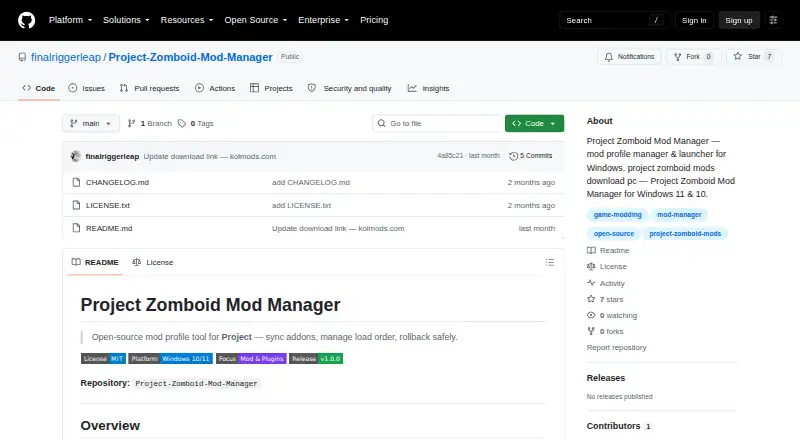
What Project Zomboid Mod Manager is
Project Zomboid Mod Manager is a free, MIT-licensed Windows profile manager and launcher for Project Zomboid. Players can save and load mod sets by game version or server, then launch with a selected profile. A dependency resolver flags conflicts before installation, while one-click synchronization pulls community mod lists from local folders. Mod sources are added through manual import. Before updates, the application snapshots mod folders so changes can be rolled back. Automatic backups are enabled by default and retain the last three snapshots. Separate mod folders and launch profiles leave vanilla game files untouched unless the user opts in. The interface is described as lightweight and having no background telemetry. The listed build supports 64-bit Windows 10 and 11, and setup should be run as Administrator. The project recommends it for single-player or private servers and says not to use it with competitive anti-cheat titles. Lua and C# API hooks are planned for future releases.
Who it suits
It suits Project Zomboid players on 64-bit Windows 10 or 11 who manage profiles for single-player or private servers.
What it does well
- Saves profiles by version or server
- Flags dependency conflicts
- Snapshots folders for rollback
- Keeps backups of three snapshots
- No background telemetry
What to know first
- Windows only
- Installer requires Administrator
- Not recommended with competitive anti-cheat titles
- Mod sources require manual import
Plans
| Plan | Billed and limits | Price |
|---|---|---|
| Free | Windows 10 / 11 (64-bit) · installer requires Administrator | Free |
As github.com lists them, read 12 Oct 2026. The maker's own page has the final word.
Verdict
Project Zomboid Mod Manager organizes mod profiles, checks conflicts, and preserves rollback snapshots on supported Windows systems. Its guidance is focused on single-player and private servers rather than competitive anti-cheat play.
Facts from Project Zomboid Mod Manager's own pages
- API
- The README says Lua and C# hooks are planned for a documented API in future releases. · github.com, 12 Oct 2026
- Backups
- Automatic backups are on by default and keep the last three snapshots. · github.com, 12 Oct 2026
- Conflict detection
- Yes · github.com, 22 Sept 2026
- Dependency checks
- The dependency resolver flags conflicts before installation. · github.com, 12 Oct 2026
- Game files
- The README says separate mod folders and launch profiles leave vanilla game files untouched unless the user opts in. · github.com, 12 Oct 2026
- Installation
- The listed build supports 64-bit Windows 10 and 11, and setup should be run as Administrator. · github.com, 12 Oct 2026
- License
- The repository identifies the software as MIT licensed. · github.com, 12 Oct 2026
- Mod list sync
- One-click sync pulls community mod lists from local folders. · github.com, 12 Oct 2026
- Mod profiles
- Yes · github.com, 22 Sept 2026
- Mod source access
- manual import · github.com, 22 Sept 2026
- Profiles
- Users can save and load mod sets by game version or server. · github.com, 12 Oct 2026
- Purpose
- The project describes itself as a Windows mod profile manager and launcher for Project Zomboid. · github.com, 12 Oct 2026
- Rollback
- The app snapshots mod folders before updates so they can be rolled back. · github.com, 12 Oct 2026
- Support
- The project invites issues and documentation pull requests, and asks bug reports to include Windows version and game build. · github.com, 12 Oct 2026
- Supported platforms
- windows · github.com, 22 Sept 2026
- Telemetry
- The README describes the UI as lightweight and says it has no background telemetry. · github.com, 12 Oct 2026
- Use limits
- The README recommends the client-side manager for single-player or private servers and says not to use it with competitive anti-cheat titles. · github.com, 12 Oct 2026
Where Project Zomboid Mod Manager stands on Freedom251
- Mod managers#64 of 78
- Game Mod Managers#69 of 79