Freedom251 › Game Mod Managers
Peaky Mod Manager
What Peaky Mod Manager is
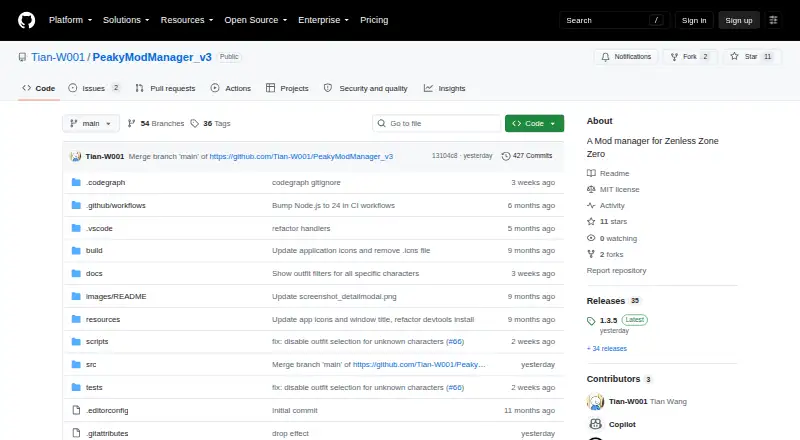
Peaky Mod Manager v3 is a free mod manager for Zenless Zone Zero. Built with Electron for Windows and Linux, it imports mods manually and enables or disables them by creating or removing symbolic links in a selected target folder. Users can save several mod configurations as presets and switch between them. Loading a preset only queues changes, so Apply must be selected. Presets can be backed up to or restored from Presets_Backup.json; restoring a backup overwrites current preset configurations. Mod details such as descriptions, types, character and outfit information, source URLs, and cover images are editable. Supported Mod INI files expose persistent toggle states and key bindings. Sync Toggles copies values from a configured ZZMI d3dx_user.ini into mod INI files, though compatibility is not guaranteed for every mod. A linked Chrome extension can import GameBanana mods by opening the manager and starting downloads. Automatic updates and manual installers are available through GitHub Releases, where version 1.3.5 is listed as latest.
Who it suits
It suits Zenless Zone Zero players who want presets, symbolic-link deployment, and editable mod information. Windows users get the stated Electron build; Linux operation is not guaranteed.
What it does well
- Free mod management
- Preset saving and switching
- Editable mod metadata and INI toggles
- GameBanana Chrome extension integration
- Automatic updates available
What to know first
- Linux operation is not guaranteed
- Preset loading requires clicking Apply
- Toggle sync may fail with some mods
- Restoring backups overwrites current presets
Verdict
Peaky Mod Manager offers configurable mod deployment with presets, backups, and detailed editing. Its manual Apply step and uncertain Linux and toggle compatibility are important limitations.
Facts from Peaky Mod Manager's own pages
- 3DMigoto toggles
- For supported mods, users can edit persistent toggle states and key bindings in the mod's INI file. · github.com, 11 Oct 2026
- Automatic updates
- Yes · github.com, 22 Sept 2026
- Backup and restore
- Preset configurations can be backed up to and restored from Presets_Backup.json in the library folder. · github.com, 11 Oct 2026
- Deployment method
- link · github.com, 22 Sept 2026
- Free plan
- Yes · github.com, 22 Sept 2026
- Game and setup dependency
- The README gives ZZMI/ZZMI/Mods as the target folder for ZZMI users and describes selecting library and target paths during setup. · github.com, 11 Oct 2026
- GameBanana integration
- The maker's Chrome extension imports mods from GameBanana by opening PeakyModManager and starting the download. · github.com, 11 Oct 2026
- Importer integration
- The project links a Chrome extension that imports mods from GameBanana by opening the app and starting the download. · github.com, 11 Oct 2026
- Latest listed release
- The Releases page lists version 1.3.5 as the latest release. · github.com, 11 Oct 2026
- License
- The project repository identifies its license as MIT. · github.com, 11 Oct 2026
- Mod controls
- It lets users import, enable, and disable mods, with changes applied by creating or removing symbolic links in the selected target folder. · github.com, 11 Oct 2026
- Mod editing
- Users can edit mod descriptions, types, character and outfit details, source URLs, and cover images. · github.com, 11 Oct 2026
- Mod management
- Users can import, enable, and disable mods, with changes applied through symbolic links in the selected target folder. · github.com, 11 Oct 2026
- Mod profiles
- Yes · github.com, 22 Sept 2026
- Mod source access
- manual import · github.com, 22 Sept 2026
- Operating systems
- The app is built with Electron for Windows and Linux, though correct operation on Linux is not guaranteed. · github.com, 11 Oct 2026
- Platforms
- The project says it is built with Electron for Windows and Linux, while noting that correct operation on Linux is not guaranteed. · github.com, 11 Oct 2026
- Preset application
- Loading a preset only queues changes; users must click Apply to put them into effect. · github.com, 11 Oct 2026
- Presets
- It saves multiple mod configurations and lets users switch between presets. · github.com, 11 Oct 2026
- Purpose
- PeakyModManager v3 is a lightweight mod manager for Zenless Zone Zero. · github.com, 11 Oct 2026
- Release
- The Releases page lists version 1.3.5 as the latest release. · github.com, 11 Oct 2026
- Restore behavior
- Restoring a preset backup overwrites the current preset configurations. · github.com, 11 Oct 2026
- Supported platforms
- multi-platform · github.com, 22 Sept 2026
- Toggle editing
- For supported Mod INI files, users can inspect and edit persistent toggle states and key bindings; the README says these edits change the mod's files and never modify d3dx_user.ini. · github.com, 11 Oct 2026
Where Peaky Mod Manager stands on Freedom251
- Game Mod Managers#49 of 79
- Mod managers#63 of 78