Freedom251 › Handyman Software
ProDesk
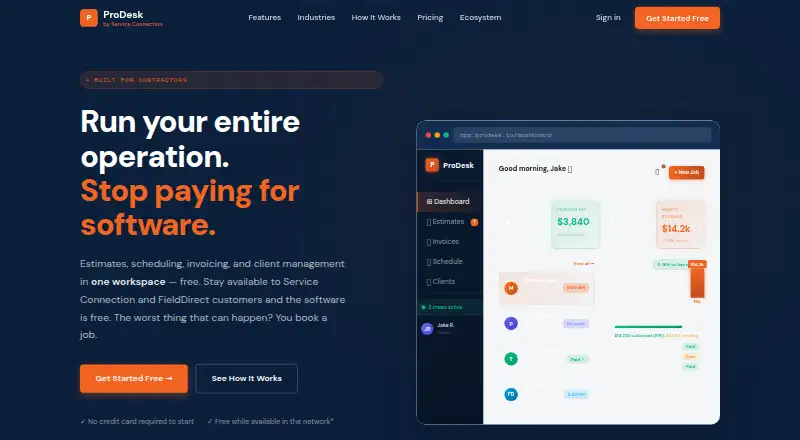
What ProDesk is
ProDesk is a contractor workspace for estimates, scheduling, invoicing, payments, customer records, and job tracking. Contractors can prepare estimates on-site, track approvals, follow up automatically, and turn estimates into invoices. Scheduling tools assign crews, help avoid double-booking, and send appointment reminders. Customer records bring job history, notes, photos, and billing records together, while a customer portal can provide access to estimates, work approvals, job status, and past invoices. Team members can be assigned jobs, and each technician sees only their own jobs in the mobile app. ProDesk is available on Android, iOS, and the web, and is presented for service contractors across 28+ industries. The plan is free while users remain active in both Service Connection and FieldDirect; closing availability entirely may lead to a software fee. Coverage, lead volume, and program availability vary by location and trade. Stripe processing fees apply and typically cost 2.9% + 30¢ per transaction.
Who it suits
ProDesk suits service contractors who need estimates, scheduling, invoices, customer records, and job tracking across web and mobile. Its availability conditions and location- and trade-based network variation are important to consider.
What it does well
- No usage caps on estimates, invoices, customers, or jobs.
- Customer portal supports estimate approval and job-status viewing.
- Technicians see only their assigned jobs in the mobile app.
- Available on Android, iOS, and web.
What to know first
- Free access requires active visibility in two programs.
- Closing availability entirely may trigger a software fee.
- Stripe processing fees typically cost 2.9% + 30¢ per transaction.
- Coverage and lead volume vary by location and trade.
Limits
The free plan is available while users remain active in both Service Connection and FieldDirect; closing availability entirely may bring a software fee. Stripe processing typically costs 2.9% + 30¢ per transaction. There are no usage caps on estimates, invoices, customers or jobs.
Plans
| Plan | Billed and limits | Price |
|---|---|---|
| ProDesk Software | Free while available to Service Connection and FieldDirect customers · unlimited estimates, invoices, customers and jobs · Stripe payment processing fees apply | On request |
As prodesk.io lists them, read 2 Oct 2026. The maker's own page has the final word.
Getting started
- Visit the ProDesk website.
- Use the web version or choose the Android or iOS app.
- Keep availability active in both Service Connection and FieldDirect for free access.
- Connect Stripe for payment processing.
- Assign jobs to team members and set up customer portal access as needed.
Overview
ProDesk is a contractor workspace for service businesses that want estimates, customer records, scheduling, invoicing and job activity in one place. It is best suited to contractors willing to stay visible in Service Connection and FieldDirect in exchange for software access. The appeal is broad, uncapped core usage; the trade-off is that access depends on those networks and payments carry Stripe fees.
Key features
Estimating through payment
Contractors can prepare and send estimates on-site, track approvals, automate follow-ups and convert estimates into invoices. Templates support repeatable quoting, while online payments and automated payment reminders connect billing to collection. Stripe processing typically costs 2.9% + 30¢ per transaction, so the software's free price does not make payment processing free.
Scheduling and job coordination
Crew assignment, a dispatch board and double-booking prevention give teams tools to coordinate work, with automated appointment reminders for customers. Team members can receive assigned jobs, and technicians see only their own jobs in the mobile app. That separation can suit field teams that need focused work lists, though it may be less useful for staff who need a shared view of every technician's schedule.
Customer records and portal
The CRM keeps job history, notes, photos and billing records with customer records. A customer portal lets clients view estimates, approve work, follow job status and reach past invoices. This joins customer-facing approval and status checks with the contractor's records rather than leaving those tasks as separate processes.
Lead sources and integrations
Stripe is the listed payment integration. Jobs from Angi, Thumbtack and TaskRabbit can be added manually, which can bring those opportunities into the workflow but is not an automated connection. Service Connection coverage and lead volume vary by location and trade; FieldDirect programs also depend on trade and geography.
Pricing
ProDesk Software: custom pricing. The plan is free while available to Service Connection and FieldDirect customers, with unlimited estimates, invoices, customers and jobs. Stripe processing fees apply, and a software fee may apply if availability is closed entirely. There is no free trial; the free plan itself has no stated usage caps on those four core items.
This structure suits contractors who can remain actively visible in both networks and want to avoid per-estimate, per-invoice, customer or job caps. It is a weaker fit for businesses that cannot or do not want to maintain that visibility, or whose location and trade have limited network coverage. The free access is conditional, not an unconditional no-cost subscription.
Platforms
ProDesk is available on Android, iOS and the web. The mobile app's technician-specific job view is relevant to field crews; the web version gives the product a browser-based option for office work.
Who it's for
ProDesk is aimed at service contractors across more than 28 industries. It is particularly compelling for businesses that need estimates, scheduling, customer records, job tracking and payments together, and can meet the Service Connection and FieldDirect visibility condition. Contractors who need broad lead coverage regardless of location, or who want software access without that condition, should compare alternatives.
Pros and cons
- Pros: Unlimited estimates, invoices, customers and jobs make the free plan practical for growing workloads rather than a small capped trial.
- Pros: Estimate approval, follow-up and invoice conversion connect quoting to billing, while the customer portal covers approvals, status and past invoices.
- Pros: Crew scheduling, double-booking prevention and technician-specific mobile job access address day-to-day field coordination.
- Cons: Free access requires active visibility in both Service Connection and FieldDirect; a software fee may apply if availability is closed entirely.
- Cons: Network coverage and lead volume vary by trade and location, so the condition may be less attractive where those programs are limited.
- Cons: Stripe charges typically 2.9% + 30¢ per transaction, adding a cost to payment processing.
- Cons: Angi, Thumbtack and TaskRabbit jobs are added manually, rather than through a listed automated integration.
Alternatives
For a broader shortlist, see Handyman Software.
- Fieseros is worth considering if a free plan with a 100-lifetime-job limit and a free trial is preferable; it includes leads, customers, quotes, estimates, a basic calendar, invoices, payments and before-and-after photos.
- Wallist suits a contractor prioritizing a company profile, service catalog, photo gallery and reviews on a free plan, rather than ProDesk's workflow emphasis.
- Contractor+ is an alternative for users comfortable with explicit free-plan limits: up to 250 leads and clients and five estimates or invoices per month, with a free trial.
- FieldVibe offers a free Solo plan for one user, with unlimited jobs and clients, manual reminders, one device, a business website and price book; it may fit a solo operator who wants those stated tools without ProDesk's network visibility condition.
- Workly is another paid option with a free trial and an Annual Premium plan at $119.99 a year.
- Clear Estimates is a paid alternative with a free trial and a Standard annual plan at $59 a month, including unlimited estimates and customers for one login; it may suit a buyer focused on estimating rather than a free, network-conditioned workspace.
- Tradify is a paid alternative with a free trial; its Lite plan is $47 a month per user and includes job management, scheduling with Google Calendar sync, quoting and invoicing.
- Jobber is a paid alternative with a free trial; its Core plan is $29 a month billed annually for one user, with online booking and scheduling.
Verdict
Choose ProDesk if you are a service contractor who wants uncapped estimates, invoices, customers and jobs alongside scheduling, customer records and payment tools, and can maintain active visibility in Service Connection and FieldDirect. Its main advantage is the breadth of the workflow at a free starting price; its main reason to look elsewhere is that access depends on network participation and availability, with Stripe fees on processed payments.
Verdict
ProDesk brings estimating, scheduling, customer records, and job tracking together for contractors. Its free access depends on continued visibility in Service Connection and FieldDirect, and Stripe fees apply to processed payments.
Questions
Is ProDesk free?
The ProDesk Software plan is free while users remain active in both Service Connection and FieldDirect. A software fee may apply if availability is closed entirely.
What platforms does ProDesk support?
ProDesk is available on Android, iOS and the web.
What does ProDesk do for estimates and invoices?
Contractors can create and send estimates on-site, track approvals, follow up automatically and convert estimates into invoices.
How does payment processing work?
ProDesk supports online payments and automated payment reminders through Stripe. The pricing page says processing typically costs 2.9% + 30¢ per transaction.
Does ProDesk connect with lead platforms?
Jobs from Angi, Thumbtack and TaskRabbit can be added manually. Stripe is the payment integration listed on the pricing page.
Facts from ProDesk's own pages
- Availability condition
- Free access requires active visibility in both Service Connection and FieldDirect, and a software fee may apply if availability is closed entirely. · prodesk.io, 2 Oct 2026
- Customer portal
- Contractors can give customers portal access to view estimates, approve work, track job status and access past invoices. · prodesk.io, 2 Oct 2026
- Customer records
- The CRM keeps customer job history, notes, photos and billing records together. · prodesk.io, 2 Oct 2026
- Estimates
- Contractors can create and send estimates on-site, track approvals, follow up automatically and convert estimates to invoices. · prodesk.io, 2 Oct 2026
- Integrations
- The pricing page lists Stripe payment integration, while the ecosystem page says jobs from Angi, Thumbtack and TaskRabbit can be added manually. · prodesk.io, 2 Oct 2026
- Intended users
- ProDesk is presented for service contractors across 28+ industries. · prodesk.io, 2 Oct 2026
- Network limits
- Service Connection coverage and lead volume vary by location and trade, and FieldDirect programs vary by trade and geography. · prodesk.io, 2 Oct 2026
- Payment fee
- The pricing page says Stripe processing typically costs 2.9% + 30¢ per transaction. · prodesk.io, 2 Oct 2026
- Payments
- The platform supports online payments and automated payment reminders, with payment processing through Stripe at its standard rates. · prodesk.io, 2 Oct 2026
- Product
- ProDesk is a contractor workspace for estimates, scheduling, invoicing, CRM, payments and job tracking. · prodesk.io, 2 Oct 2026
- Scheduling
- Scheduling tools let users assign crews, avoid double-booking and send automated appointment reminders to customers. · prodesk.io, 2 Oct 2026
- Team access
- Team members can be assigned jobs, and each technician sees only their own jobs in the mobile app. · prodesk.io, 2 Oct 2026
- Usage limits
- The pricing page says there are no usage caps on estimates, invoices, customers or jobs. · prodesk.io, 2 Oct 2026
Where ProDesk stands on Freedom251
- Handyman Software#4 of 27