Freedom251 › Exam Proctoring Software
ProctorDIY
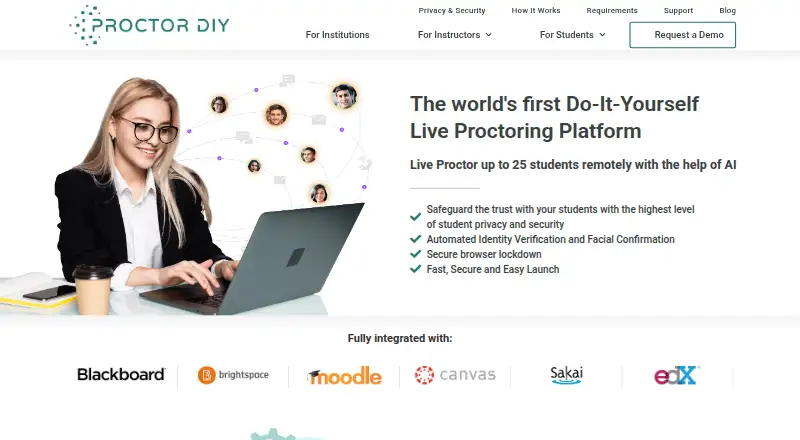
What ProctorDIY is
ProctorDIY is remote exam-proctoring software that lets instructors monitor their own students online with AI assistance. Instructors or teaching assistants can live-proctor up to 25 students. For identity checks, the student workflow compares face, ID, and knuckle scans with a stored biometric profile. During exams, the application checks for blacklisted apps and devices, captures screenshots and webcam data, and flags possible policy violations. Processed sessions and time-stamped, pre-flagged violations are sent to the instructor dashboard within 48 hours. It integrates with LTI-compatible learning systems, including Canvas, Blackboard, D2L, Sakai, and Moodle. Students launch an application the maker says downloads in under a minute and needs no administrative rights. The software is available on web, macOS, Windows, Android, as an extension, or self-hosted; Chromebook support depends on LMS and product level. The maker offers cloud or on-premise data management. Pricing is on request. The system may access connected devices, the screen, webcam, process and system logs, and keystrokes during an exam.
Who it suits
It suits K-12 instructors seeking to monitor their own students during online exams, particularly those using an LTI-compatible learning management system. Schools should consider the stated access to student devices and data, as well as the available deployment options.
What it does well
- Live proctoring for up to 25 students with AI assistance
- Identity checks use face, ID, and knuckle scans
- Flags possible violations and time-stamps them
- Integrates with Canvas, Blackboard, D2L, Sakai, and Moodle
- 24x7x365 support by chat, phone, email, and ticket
What to know first
- Pricing is available on request
- Chromebook support is limited by LMS and product level
- May access screens, webcam, keystrokes, and system logs during exams
- Student data is typically deleted 90 days after course submission
Limits
The maker does not state a plan price; pricing is on request. Chromebook support is limited to select LMSs and product levels. Student data is typically deleted 90 days after the final course submission date.
Getting started
- Visit the ProctorDIY website and request a demo or pricing information.
- Check that the institution’s LMS is LTI-compatible; named options include Canvas, Blackboard, D2L, Sakai and Moodle.
- Confirm the student device meets the listed macOS or Windows requirements, or check Chromebook eligibility for the LMS and product level.
- Have students launch the prompted application for the exam.
- Use the instructor dashboard to receive processed sessions and pre-flagged violations.
ProctorDIY is a remote-exam proctoring platform for instructors who want live oversight backed by automated checks. It suits K–12 and other teaching teams with an LMS workflow and the capacity to govern biometric and device access. Its strongest fit is institution-controlled assessment; buyers who require published prices or a narrower privacy footprint should compare alternatives.
Overview
Instructors or teaching assistants can live-proctor up to 25 students with AI assistance. Recorded sessions are processed and returned to the instructor dashboard within 48 hours, with potential violations pre-flagged and time-stamped. That pairing supports intervention during an exam and structured review afterward, but the live ceiling is restrictive for larger classes unless staff divide sessions.
Students launch a lightweight application that the maker says downloads in under a minute and needs no administrative rights. Institutions can choose cloud-based or on-premise data management, which is useful when deployment policy determines where exam data may reside.
Key features
Identity and exam controls
Face, ID and knuckle scans are matched to a stored biometric profile. This is a substantial identity check rather than a login-only gate, but it also makes biometric consent, notice and governance central to adoption.
Browser lockdown, blacklisted-application and device checks, screen recording, screenshots, webcam capture and policy-violation flags give instructors a broad view of an exam. During a session, the application may access connected devices, the desktop, webcam, process and system logs, and keystrokes. That coverage can deter prohibited activity, while institutions seeking minimal monitoring should consider the access disproportionate.
LMS workflow and review
LTI compatibility connects ProctorDIY with Canvas, Blackboard, D2L, Sakai and Moodle. Pre-flagged, time-stamped events in the dashboard make post-exam triage more focused than reviewing every minute of footage. Support operates 24x7x365 through live chat, phone, email and ticket, a practical advantage for exams running outside local office hours.
Privacy and deployment
The service states compliance with HIPAA, FERPA, GDPR and SOC 2 Type 2, and says student data is typically deleted 90 days after the final course submission or grade-submission deadline. If its mobile app is used, the phone webcam records and uploads scans. Chromebook support is limited to select LMSs and product levels, so Chromebook-heavy cohorts need confirmation before rollout.
Pricing
ProctorDIY uses a paid model with pricing on request. The maker offers a demo request rather than published plan prices, so institutions must contact sales to budget and establish terms. That approach can support a tailored cloud or on-premise deployment, but it prevents straightforward comparison for smaller programs and individual instructors.
Platforms
ProctorDIY supports Android, browser extension, macOS, self-hosted deployments, web and Windows. Requirements include macOS Sierra 10.12 or later and Windows 7 or later. Chromebook access depends on selected LMSs and product levels rather than broad platform support.
Who it's for
The product is aimed at K–12 instructors monitoring their own students, as well as teaching teams using an LTI-compatible LMS. It is a sensible choice when live oversight for groups of up to 25, biometric verification, broad exam telemetry and rapid flagged-session review justify the operational and privacy obligations. It is a weaker fit for classes larger than 25 per live session, Chromebook-first programs without a supported configuration, or buyers who need self-service prices.
Pros and cons
Pros
- Live and asynchronous coverage: Staff can supervise up to 25 students and receive processed sessions with time-stamped flags within 48 hours.
- Strong identity controls: Face, ID and knuckle scans are checked against a stored biometric profile.
- LMS connectivity: LTI support includes Canvas, Blackboard, D2L, Sakai and Moodle.
- Deployment choice: Cloud-based and on-premise data management accommodate different governance models.
- Always-on support: Chat, phone, email and ticket support run 24x7x365.
Cons
- Extensive data access: Webcam, screen, device, process, log and keystroke access may not suit privacy-sensitive courses.
- Biometric burden: Face, ID and knuckle scans require clear institutional handling and student communication.
- Live-session cap: The 25-student limit can force multiple sessions or additional staff.
- Chromebook constraints: Support is limited to certain LMS and product-level combinations.
- No published prices: Buyers cannot assess cost without a sales conversation.
Alternatives
Choose Proctorio if a freemium option, seven-day data retention and broad Android, iOS, Linux, macOS, web and Windows coverage are more important than ProctorDIY's stated deployment choices.
Choose Respondus Monitor if a two-month, no-obligation institutional pilot or a $15.00 USD-per-year student purchase is preferable.
Choose ThinkExam if you need a freemium service with a published Standard plan at $3,125 a month billed annually for 100 users and unlimited quizzes.
Choose OctoProctor if usage-based billing and support for up to 1,500 simultaneous users better match your scale.
Choose Grafari if a consumer-style paid service with free access, trials and published subscription options is the priority.
Choose Proctor360 for a remote-proctoring service sold through sales contact or demo booking.
ProctorNow is another paid option for macOS, web and Windows.
Choose ProctorU Proctoring Platform when you need distinct low- or mid-stakes Review+ workflows or high-stakes Live+ delivery.
See more options in Exam Proctoring Software.
Verdict
ProctorDIY is best for K–12 and LMS-connected institutions that need live supervision, biometric identity checks and a choice between cloud and on-premise data management. Its main reason to choose it is the combination of 25-student AI-assisted live proctoring and rapid, flagged post-session review. Look elsewhere if transparent pricing, broad Chromebook support or less intrusive exam data collection is more important.
Verdict
ProctorDIY combines live monitoring, biometric identity checks, and post-session review for online exams. Before choosing it, instructors should weigh its broad exam-time data access and Chromebook limitations against its LMS integrations and deployment choices.
Questions
How much does ProctorDIY cost?
Pricing is on request. The maker’s site offers a demo request.
Which platforms does ProctorDIY support?
Listed platforms are Android, extension, macOS, self-hosted, web and Windows. The system requirements list macOS Sierra 10.12 or later and Windows 7 or later; Chromebook support is limited to select LMSs and product levels.
Which learning management systems does it integrate with?
It integrates with LTI-compatible systems and names Canvas, Blackboard, D2L, Sakai and Moodle.
How many students can an instructor monitor live?
Instructors or teaching assistants can live-proctor up to 25 students remotely with AI assistance.
How does ProctorDIY verify student identity?
Students can be verified using face, ID and knuckle scans measured against a stored biometric profile.
What happens to student data after a course?
Student data is typically deleted 90 days after the final course submission date. The privacy page lists HIPAA, FERPA, GDPR and SOC 2 Type 2 among its compliance standards.
Facts from ProctorDIY's own pages
- Compliance
- The privacy page lists HIPAA, FERPA, GDPR, and SOC 2 Type 2 among its compliance standards. · proctordiy.com, 8 Oct 2026
- Data access
- During an exam, the application may access connected devices, the desktop screen, webcam, process and system logs, and keystrokes for proctoring. · proctordiy.com, 8 Oct 2026
- Deployment
- A company blog post says ProctorDIY offers cloud-based or on-premise data management. · proctordiy.com, 8 Oct 2026
- Exam monitoring
- The application checks for blacklisted applications and devices, captures screenshots and webcam data, and flags potential policy violations. · proctordiy.com, 8 Oct 2026
- Exam review
- The instructor dashboard receives processed sessions within 48 hours, with violations pre-flagged and time-stamped. · proctordiy.com, 8 Oct 2026
- Headquarters
- New York, New York, United States · proctordiy.com, 28 Sept 2026
- Identity checks
- Students can be verified with face, ID, and knuckle scans measured against a stored biometric profile. · proctordiy.com, 8 Oct 2026
- Identity verification
- The student workflow uses face, ID, and knuckle scans to verify identity against a stored biometric profile. · proctordiy.com, 8 Oct 2026
- Integrations
- The product integrates with LTI-compatible learning management systems and names Canvas, Blackboard, D2L, Sakai, and Moodle. · proctordiy.com, 8 Oct 2026
- Intended users
- The maker describes the product as enabling K-12 instructors to monitor their own students during online exams. · proctordiy.com, 8 Oct 2026
- Live monitoring
- The maker says an instructor can live proctor up to 25 students remotely with AI assistance. · proctordiy.com, 8 Oct 2026
- Live proctoring
- Instructors or teaching assistants can live-proctor up to 25 students remotely with AI assistance. · proctordiy.com, 8 Oct 2026
- Mobile app
- The privacy page says that if the ProctorDIY mobile app is used, the phone’s webcam records and uploads scans. · proctordiy.com, 8 Oct 2026
- Pricing
- The maker's site offers a demo request but does not state plan prices on the pages reviewed. · proctordiy.com, 8 Oct 2026
- Privacy and retention
- The privacy page says student data is typically deleted 90 days after the final course submission date. · proctordiy.com, 8 Oct 2026
- Purpose
- ProctorDIY provides remote exam proctoring that lets instructors monitor their own students with AI assistance. · proctordiy.com, 8 Oct 2026
- Review turnaround
- The instructor page says processed sessions and pre-flagged violations are returned to the instructor dashboard within 48 hours. · proctordiy.com, 8 Oct 2026
- Security
- The site states SOC 2 Type 2, HIPAA, FERPA, and GDPR compliance and says student data is typically deleted 90 days after the course grade submission deadline. · proctordiy.com, 8 Oct 2026
- Student installation
- Students are prompted to launch a lightweight application that the maker says downloads in under one minute and requires no administrative rights. · proctordiy.com, 8 Oct 2026
- Support
- Support is available 24x7x365 by live chat, phone, email, and support ticket. · proctordiy.com, 8 Oct 2026
- System requirements
- The requirements page lists macOS Sierra 10.12 or later and Windows 7 or later; Chromebook support is limited to select LMSs and product levels. · proctordiy.com, 8 Oct 2026
Where ProctorDIY stands on Freedom251
- Exam Proctoring Software#16 of 21