Freedom251 › Online Proctoring Software
Proctor360
What Proctor360 is
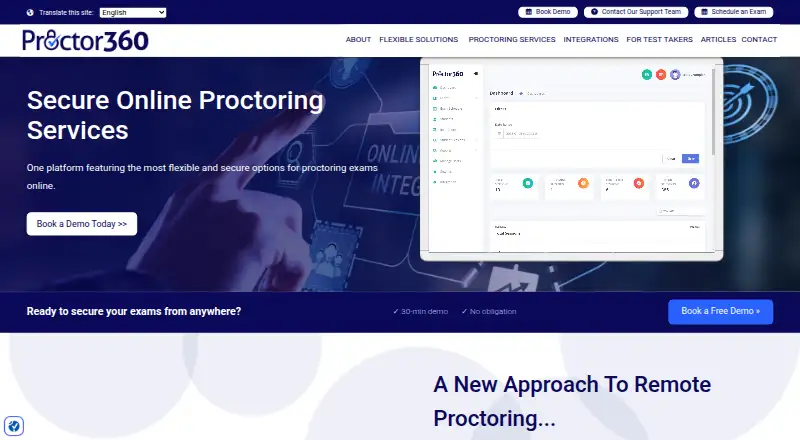
Proctor360 provides remote exam proctoring for organizations holding online, paper, or hybrid exams. Its options include live 360 Total View, multi-webcam and single-webcam proctoring, AI auto-proctoring, and institutional SaaS proctoring. The 360 Total View headset uses a 360-degree camera to capture the testing room during a session. AI auto-proctoring handles scheduling, check-in, and monitoring, then records possible incidents for review without interrupting candidates. A web dashboard presents session recordings, incident logs, screenshots, timestamps, and flags. Optional secure browsing can block and log external-site access and attempts to copy or paste exam information. Institutions can use their own staff as remote proctors, with sessions archived for later review. Listed integrations include Canvas, Moodle, Blackboard, Brightspace, NEO LMS, Populi, Assess.ai, and Prolydian. The maker says the AI engine does not save candidates’ biometric data. Pricing starts from $15, while the listed remote proctoring services plan has no price and directs organizations to contact sales or book a demo.
Who it suits
Proctor360 is aimed at schools, online academies, corporate training departments, certification programs, and government agencies. It can suit organizations needing live, AI-based, or institution-staffed oversight.
What it does well
- Supports online, paper, and hybrid exams.
- Offers live and AI proctoring options.
- AI review includes recordings, logs, screenshots, and timestamps.
- Optional secure browsing can block and log access.
- Integrates with listed learning platforms including Canvas and Moodle.
What to know first
- The named services plan has no listed price.
- Recording retention depends on organizational policy.
- Secure browsing is optional.
Limits
The remote proctoring services plan has no listed price and directs organizations to contact sales or book a demo. Recording retention periods are set by the institution or testing organization.
Plans
| Plan | Billed and limits | Price |
|---|---|---|
| Proctor360 remote proctoring services | Pricing not listed; contact sales or book a demo | On request |
As proctor360.com lists them, read 4 Oct 2026. The maker's own page has the final word.
Getting started
- Visit the Proctor360 website.
- Choose a proctoring option that fits the exam setup.
- For browser-based use, install the Chrome or Edge extension; Firefox is also listed as supported.
- Use the support portal or help-desk email for test-taker support, or live on-screen chat during an active exam.
- Contact sales or book a demo for the remote proctoring services plan.
Proctor360 is a remote exam-proctoring platform for schools, training teams, certification providers, and public agencies running online, paper, or hybrid assessments. It suits organizations that need both live supervision and an auditable record of sessions. Its strongest case is configurable oversight with automated review; buyers should weigh that breadth against custom pricing and institution-controlled retention.
Overview
Proctor360 combines identity verification, browser lockdown, screen recording, webcam monitoring, and LMS integrations in a cloud service. Institutions can choose human supervision or AI-assisted monitoring instead of forcing every exam into one workflow. The platform is aimed at organizations that need repeatable controls across different exam formats rather than individual learners seeking a one-off tool.
Its security description includes encryption in transit and at rest, access controls, monitoring, security assessments, and audit logging, and the company describes the service as SOC 2 compliant. Recording retention is determined by each institution or testing organization, so procurement teams must set and communicate their own retention rules. The company says its AI engine does not save candidates’ biometric data.
Key features
Flexible supervision
Organizations can select 360 Total View live, multi-webcam live, single-webcam live, AI auto-proctoring, or institutional SaaS proctoring. The 360 Total View headset captures the candidate’s room with a 360-degree camera, giving high-stakes programs broader environmental visibility than a single front-facing webcam. Multi-camera and live options fit cases where a human must intervene, while AI is better for scale and consistent first-pass monitoring.
AI review and controls
AI auto-proctoring handles scheduling, check-in, and monitoring without interrupting the candidate, then records potential incidents for staff review. Reviewers receive session recordings, incident logs, screenshots, timestamps, and flags in a web dashboard, turning a long exam into a queue of evidence to assess. Optional secure browsing can block and log external-site access and attempts to copy or paste exam information, which is useful for controlled assessments but may be excessive for lower-stakes tests.
Institution-run proctoring and integrations
Institutions can use their own staff as remote proctors through the cloud platform and archive sessions for later review. Listed integrations include Canvas, Moodle, Blackboard, Brightspace, NEO LMS, Populi, Assess.ai, and Prolydian, reducing the case for a separate exam workflow when a school already uses one of those systems.
Support and setup
Test takers can use a support portal, help-desk email, or live on-screen chat during an active exam. The FAQ says the primary setup uses a Chrome or Edge browser extension, with Firefox also supported, on Windows and macOS. That browser-centered model is practical for managed computers but makes extension and operating-system readiness part of exam planning.
Pricing
Proctor360 is a paid service with pricing from $15. The listed “Proctor360 remote proctoring services” plan uses custom pricing; organizations must contact sales or book a demo. That arrangement suits institutions that need a tailored mix of live staff, AI monitoring, integrations, or exam formats, but it prevents a simple self-serve cost comparison. Confirm the seat or usage basis, included options, support scope, and retention terms before committing.
Platforms
Proctor360 lists Android, iOS, macOS, Windows, web, and extension support. In practice, the FAQ places the main exam experience in a Chrome or Edge extension, with Firefox supported as well, and specifically cites Windows and macOS for that browser workflow.
Who it's for
Schools and online academies can combine LMS connections with live or AI supervision. Corporate training departments and certification programs benefit from recorded evidence and incident review, while government agencies can apply configurable controls to formal assessments. It is less compelling for a small operator wanting a transparent, instantly purchasable plan, because the principal service is sales-led and retention depends on the customer organization’s policy.
Pros and cons
Pros
- Multiple supervision modes: live, multi-camera, single-camera, AI, and 360-degree room capture can be matched to exam risk.
- Evidence-rich review: recordings, screenshots, timestamps, logs, and flags support post-exam decisions.
- Institutional control: in-house proctors and configurable retention fit organizations that need ownership of operations and records.
- Broad ecosystem: integrations with major LMS products can keep assessment administration in an existing environment.
- Privacy and security commitments: the company cites encryption, access controls, audit logging, SOC 2 compliance, and no saved biometric data for its AI engine.
Cons
- Custom pricing for the main service: buyers cannot judge total cost from a published plan price.
- Browser-extension dependency: Chrome or Edge setup and supported desktop operating systems must be prepared before an exam.
- Retention is customer-dependent: candidates and administrators may face different retention periods across institutions.
- Operational overhead: live supervision and evidence review require staff capacity even when AI handles first-pass monitoring.
Alternatives
Proctorio is a better fit when a freemium entry point, seven-day retention, and a limited review center are useful for evaluation or small-scale use.
Respondus Monitor suits institutions wanting a free, no-obligation two-month pilot or a $15-per-year student purchase plan.
ThinkExam is worth considering for teams seeking freemium access, trials, and web/mobile quiz plans.
OctoProctor is an option for organizations that prefer hours-based billing and support for up to 1,500 simultaneous users.
Grafari offers paid plans with free access and trials for buyers comparing subscription alternatives.
ProctorDIY is another paid proctoring option with extension and self-hosted platform support.
ProctorNow provides a paid alternative for macOS, web, and Windows deployments.
ProctorU Proctoring Platform is aimed at low- or mid-stakes recorded review through Review+ or high-stakes live-proctored launches through Live+.
Exam Proctoring Software and Online Proctoring Software roundups help compare broader categories.
Verdict
Choose Proctor360 if your organization needs several proctoring modes, detailed post-exam evidence, and the option to use internal proctors across connected LMS systems. Look elsewhere if transparent self-serve pricing, fixed retention, or a simpler browser setup matters more than configurable institutional oversight.
Verdict
Proctor360 offers several ways to supervise exams and review sessions afterward. Organizations should confirm plan pricing and retention policies with their provider.
Questions
How much does Proctor360 cost?
Pricing starts from $15. The remote proctoring services plan has no listed price and requires contacting sales or booking a demo.
Which exam formats does it support?
It supports online, paper, and hybrid exams.
Which proctoring options are available?
Options include 360 Total View live, multi-webcam live, single-webcam live, AI auto-proctoring, and institutional SaaS proctoring.
Does Proctor360 integrate with learning platforms?
Yes. Listed integrations include Canvas, Moodle, Blackboard, Brightspace, NEO LMS, Populi, Assess.ai, and Prolydian.
What browser setup does it support?
The FAQ says it primarily works through a Chrome or Edge browser extension and also lists Firefox as supported. Windows and macOS are supported.
Does its AI save candidates’ biometric data?
The maker says its AI engine does not save candidates’ biometric data.
Facts from Proctor360's own pages
- 360 Total View
- The 360 Total View headset uses a 360-degree camera to capture the candidate’s testing room throughout a session. · proctor360.com, 4 Oct 2026
- AI monitoring
- AI auto-proctoring automates scheduling, check-in, and monitoring, then logs potential incidents for review without interrupting the candidate. · proctor360.com, 4 Oct 2026
- Biometric data
- The company says its AI engine does not save candidates’ biometric data. · proctor360.com, 4 Oct 2026
- Data retention
- Recording retention periods depend on the institution or testing organization’s policies. · proctor360.com, 4 Oct 2026
- Headquarters
- United States · proctor360.com, 28 Sept 2026
- In-house proctoring
- Institutions can use their own staff as remote proctors through the cloud-based platform, which archives exam sessions for later review. · proctor360.com, 4 Oct 2026
- Integrations
- The integrations page lists Canvas, Moodle, Blackboard, Brightspace, NEO LMS, Populi, Assess.ai, Prolydian, and other services. · proctor360.com, 4 Oct 2026
- Proctoring options
- Its listed options include 360 Total View live, multi-webcam live, single-webcam live, AI auto-proctoring, and institutional SaaS proctoring. · proctor360.com, 4 Oct 2026
- Review tools
- The AI service provides session recordings, incident logs, screenshots, timestamps, and flags in a web-based review dashboard. · proctor360.com, 4 Oct 2026
- Secure browsing
- Optional secure browsing can block and log access to external sites and attempts to copy or paste exam information. · proctor360.com, 4 Oct 2026
- Security and compliance
- The maker’s GDPR page states that it uses encryption in transit and at rest, access controls, monitoring, security assessments, and audit logging, and describes Proctor360 as SOC 2 compliant. · proctor360.com, 4 Oct 2026
- Support
- Test takers can contact support through the support portal or help-desk email, and can use live on-screen chat during an active exam. · proctor360.com, 4 Oct 2026
- Supported setup
- The FAQ says Proctor360 primarily works through a browser extension for Chrome or Edge and supports Windows and macOS; it also lists Firefox as a supported browser. · proctor360.com, 4 Oct 2026
- What it does
- Proctor360 provides remote exam proctoring for organizations, with configurable oversight for online, paper, and hybrid exams. · proctor360.com, 4 Oct 2026
- Who it serves
- The maker describes its audience as including schools, online academies, corporate training departments, certification programs, and government agencies. · proctor360.com, 4 Oct 2026
Where Proctor360 stands on Freedom251
- Online Proctoring Software#14 of 27
- Exam Proctoring Software#11 of 21