Freedom251 › Daily Planner Apps

Pinky
by Pinky
What Pinky is
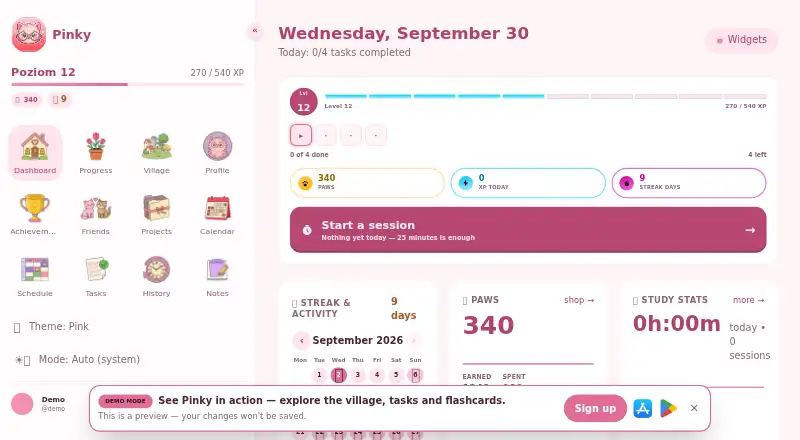
Pinky is a study planner from Pinky for school and university students. It brings a weekly class timetable with reminders together with to-do lists, deadlines, shared projects, Pomodoro focus sessions, and flashcards that use spaced repetition. Students can work on projects with friends, while study activity earns paws that help expand a village and unlock cats. Classmates can compete, adding a shared element to the study routine. Pinky is available on Android, iOS, and the web, and supports calendar synchronization. Its privacy policy describes optional two-way Google Calendar syncing for the study plan. A website demo lets visitors view the village, tasks, and flashcards without signing up. The app is free to download and use, and Pinky Pro is an optional subscription. An account created through Sign in with Apple or Google Sign-In and an internet connection are required for data synchronization. Pinky is intended for people aged 13 or older; users under 16 should have consent from a parent or guardian. The maker is Pinky, headquartered in Bełżyce, Poland.
Who it suits
Pinky suits school and university students who want a timetable, coursework tasks, focus sessions, and spaced-repetition flashcards in one planner. Its shared projects, classmate competitions, and study rewards may appeal to students who want social and game-like elements in their study routine.
What it does well
- Weekly class timetable includes reminders.
- To-do lists, deadlines, and shared projects support coursework planning.
- Flashcards use spaced repetition.
- Optional Google Calendar integration supports two-way study-plan syncing.
- Website demo is available without sign-up.
What to know first
- Data synchronization requires an account and an internet connection.
- Pinky Pro is an optional subscription with no listed price.
- Users under 16 should have parent or guardian consent.
Plans
| Plan | Billed and limits | Price |
|---|---|---|
| Pinky Pro | Monthly or yearly; exact price and any free trial are shown on the subscription screen before purchase · Optional subscription · Extra features | On request |
| Pinky | Free to download and use · Pinky Pro is an optional subscription | Free |
As pinky-planer.pl lists them, read 12 Oct 2026. The maker's own page has the final word.
Getting started
- Open the Pinky website to view the demo without signing up.
- Use Pinky on Android, iOS, or the web.
- Create an account with Sign in with Apple or Google Sign-In for data synchronization.
- Connect Google Calendar optionally for two-way study-plan synchronization.
Verdict
Choose Pinky if you want a student planner that combines scheduling, tasks, flashcards, and study rewards, with a free-to-use option. Look elsewhere if you need data synchronization without an account or internet connection, or need a stated Pinky Pro price before choosing a subscription.
Questions
Is Pinky free?
Yes. The Pinky plan is free to download and use; Pinky Pro is an optional subscription.
Which platforms does Pinky support?
Pinky is available on Android, iOS, and the web.
Can Pinky sync with Google Calendar?
Yes. Optional Google Calendar integration supports two-way synchronization of the study plan.
Do I need an account to use Pinky?
An account created with Sign in with Apple or Google Sign-In and an internet connection are required for data synchronization. The website demo can be viewed without signing up.
Who makes Pinky?
Pinky is made by Pinky, headquartered in Bełżyce, Poland.
Who can use Pinky?
The app is for people aged 13 or older. Users under 16 should have parent or guardian consent.
Facts from Pinky's own pages
- Account and internet requirements
- The terms require an account created with Sign in with Apple or Google Sign-In and an internet connection for data synchronization. · pinky-planer.pl, 12 Oct 2026
- Age requirement
- The app is for people aged 13 or older, and users under 16 should have parent or guardian consent. · pinky-planer.pl, 12 Oct 2026
- Calendar integration
- The privacy policy describes optional Google Calendar integration for two-way synchronization of the study plan. · pinky-planer.pl, 12 Oct 2026
- Calendar sync
- Yes · pinky-planer.pl, 22 Sept 2026
- Data and payments
- The privacy policy says Apple or Google handles card data, while Pinky processes subscription information supplied by RevenueCat and the app stores. · pinky-planer.pl, 12 Oct 2026
- Demo
- The website offers a demo with no sign-up that shows the village, tasks, and flashcards. · pinky-planer.pl, 12 Oct 2026
- Flashcards
- Flashcards use spaced repetition. · pinky-planer.pl, 12 Oct 2026
- Focus sessions
- Yes · pinky-planer.pl, 22 Sept 2026
- Free plan
- Yes · pinky-planer.pl, 22 Sept 2026
- Gamification
- Studying earns paws to expand a village and unlock cats, and users can compete with classmates. · pinky-planer.pl, 12 Oct 2026
- Headquarters
- Bełżyce, Poland · pinky-planer.pl, 28 Sept 2026
- Mobile platforms
- both · pinky-planer.pl, 22 Sept 2026
- Platforms
- Pinky is available for iPhone through the App Store and Android phones through Google Play. · pinky-planer.pl, 12 Oct 2026
- Purpose
- Pinky is a study planner for school and university students that combines a class schedule, tasks, Pomodoro, flashcards, and gamification. · pinky-planer.pl, 12 Oct 2026
- Schedule
- The app provides a weekly class timetable with reminders. · pinky-planer.pl, 12 Oct 2026
- Security and privacy
- The privacy policy says Pinky uses HTTPS/TLS, Firestore security rules, user data isolation, and limits data access to the administrator. · pinky-planer.pl, 12 Oct 2026
- Support
- The terms direct questions to [email protected]; the help centre says its content is not yet available. · pinky-planer.pl, 12 Oct 2026
- Tasks and projects
- Users can keep to-do lists and deadlines and work on shared projects with friends. · pinky-planer.pl, 12 Oct 2026
Where Pinky stands on Freedom251
- Daily Planner Apps#31 of 137
- Study Planner Apps#16 of 38