Freedom251 › Database Administration Tools

pgAdmin
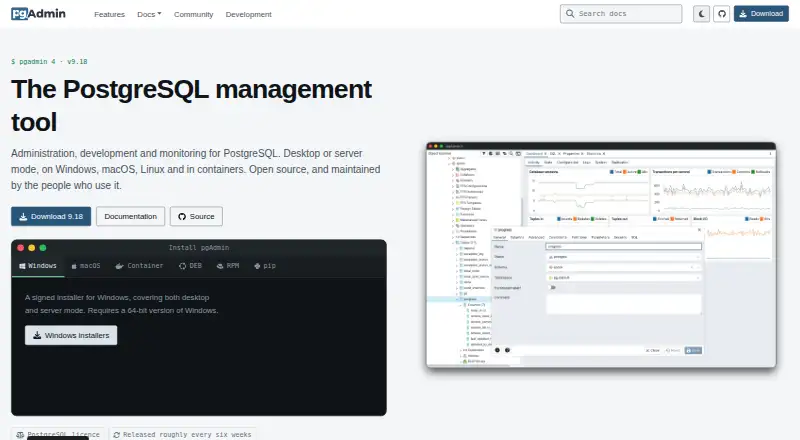
What pgAdmin is
pgAdmin is a graphical tool for PostgreSQL administration, development, and monitoring. It runs as desktop software or in server mode, where multiple users can access it over the web. It supports PostgreSQL and EDB Postgres Advanced Server versions supported when each pgAdmin release is issued. Query tools include syntax highlighting, a data grid, graphical query plans, schema diff, an ERD tool, and a procedural language debugger.
Users can create, view, and edit common PostgreSQL objects, with SQL definitions, properties, dependencies, and available statistics displayed. Maintenance functions include a monitoring dashboard, auto-vacuum management, and on-demand backup, restore, vacuum, and analyze operations. Downloads include Windows and macOS installers, Linux DEB and RPM packages, a Docker container, Python wheel, and source tarball. The Master Password encrypts credentials users choose to save and prevents key data from being stored on disk. pgAdmin is free under the PostgreSQL Licence. Only the latest release is supported, releases are aimed at roughly six-week intervals, and there are no long-term stable versions or paid support.
Who it suits
pgAdmin suits PostgreSQL administrators and developers who want graphical tools for database work and maintenance. It can serve an individual desktop workflow or multiple users through server mode.
What it does well
- Free under the PostgreSQL Licence
- Available in desktop and multi-user web modes
- Includes query, schema, ERD, and debugging tools
- Offers on-demand backup and restore operations
- Downloads cover major desktop and server formats
What to know first
- Only the latest release is supported
- No long-term stable versions
- No paid support
Limits
The free pgAdmin 4 plan is open source under the PostgreSQL Licence. The project supports only its latest release, targets releases roughly every six weeks, and has no long-term stable versions.
Plans
| Plan | Billed and limits | Price |
|---|---|---|
| pgAdmin 4 | Open source; PostgreSQL licence | Free |
As pgadmin.org lists them, read 5 Oct 2026. The maker's own page has the final word.
Getting started
- Visit https://www.pgadmin.org/.
- Choose an installation route: Windows or macOS installer, Linux DEB or RPM package, Docker container, Python wheel, or source code tarball.
- Run pgAdmin in desktop mode or configure server mode for multiple users over the web.
- Use the latest release, which the project recommends for its security fixes.
pgAdmin is a graphical tool for managing, developing, and monitoring PostgreSQL databases. It best suits PostgreSQL administrators and developers who want query work and routine maintenance in one free application. Its wide toolkit is a strong reason to choose it, provided you can keep pace with a release policy that supports only the newest version.
Overview
The PostgreSQL Licence allows use, copying, modification, and distribution without a fee, subject to its conditions. pgAdmin runs either as a desktop application or in server mode for multiple users over the web, making it useful for individual work as well as shared access. Its scope is focused: it supports PostgreSQL and EDB Postgres Advanced Server versions that are supported when each pgAdmin version is released.
Key features
The query tool combines syntax highlighting, query history, data editing, and export in binary, CSV, or text formats. A graphical query plan display, schema diff, ERD tool, and procedural language debugger extend it beyond basic query entry. That breadth makes pgAdmin a capable daily workspace for database developers; it may be unnecessary for readers who only need a simple query interface.
For object work, users can create, view, and edit common PostgreSQL objects, with SQL definitions, properties, dependencies, and statistics shown where available. A monitoring dashboard and auto-vacuum management sit alongside on-demand backup, restore, vacuum, and analyze operations, bringing common maintenance tasks into the same tool. SSH tunneling is supported.
The Master Password securely encrypts credentials users choose to save and prevents key data from being stored on disk. The project recommends using the latest release, which includes fixes for the listed security advisories. Releases are aimed at roughly six-week intervals, with no long-term stable version; only the latest release is supported. That cadence favors users who can update regularly and is a drawback for teams that need to remain on older versions. Paid support is unavailable, though users can turn to the support mailing list and public issue tracker.
Pricing
pgAdmin 4: free. The free, open-source plan is governed by the PostgreSQL Licence and gives users a no-fee option without a paid tier to step up to. Its trade-off is that support comes through community channels rather than a paid service.
Platforms
pgAdmin supports Linux, macOS, and Windows, as well as self-hosted and web deployments. Downloads include Windows and macOS installers, Linux DEB and RPM packages, a Docker container, a Python wheel, and a source code tarball. The range of packaging options suits varied deployment preferences, while server mode provides multi-user web access.
Who it's for
Choose pgAdmin if you work with PostgreSQL or EDB Postgres Advanced Server and want query development, object editing, monitoring, and maintenance in one free tool. It is a weaker fit for organizations that require paid support or a long-term supported version, or that cannot keep up with the latest release.
Pros and cons
- Pros: Broad query, object, and maintenance tools make it useful across development and routine administration.
- Pros: Desktop and multi-user web modes, plus multiple package formats, provide flexibility in how teams deploy it.
- Pros: The free open-source license permits use, copying, modification, and distribution without a fee, subject to its conditions.
- Cons: Only the latest release is supported, so users must keep current and cannot rely on a long-term stable version.
- Cons: There is no paid support; assistance is through the mailing list and public issue tracker.
Alternatives
For broader database administration choices, browse Database Administration Tools or compare Database Client Software.
- ClusterControl is worth considering if you want a freemium tool with a free Community plan for deployment, monitoring, performance advisors, and community support, or a paid Self-serve plan at €250 a month.
- OpenEverest is another free, open-source option for readers who want to deploy and customize without licensing fees.
- YugabyteDB Anywhere may suit readers evaluating a paid product that offers a free evaluation license for up to 32 consecutive calendar days; production use requires a commercial license.
- Adminer is a free web-based option for readers who want PHP-based administration and support for PHP 5.3+, 7, or 8 with enabled sessions.
- phpMyAdmin is a free web tool for administering MySQL and MariaDB rather than PostgreSQL.
- Trusted Postgres Architect is another free, self-hosted Linux option.
- Neo4j is a freemium, self-hosted alternative with a free AuraDB plan.
- Oracle Enterprise Manager is a paid alternative with a base platform included with an Oracle software license or support contract.
Verdict
pgAdmin is the right choice for PostgreSQL administrators and developers who want a comprehensive, free graphical workspace and can keep it updated. Its strongest advantage is the breadth of database work it brings together; look elsewhere if paid support or continued support for older releases is essential.
Verdict
pgAdmin provides broad graphical tools for PostgreSQL work, from queries and object editing to maintenance and monitoring. Users should be comfortable following the latest release, as older versions are not supported and paid support is unavailable.
Questions
How much does pgAdmin cost?
pgAdmin 4 is free and open source under the PostgreSQL Licence.
Which platforms and deployment options are available?
It supports Linux, macOS, Windows, self-hosted use, and web access. It can run as desktop software or in server mode for multiple users.
Which databases does it support?
It supports PostgreSQL and EDB Postgres Advanced Server versions supported when each pgAdmin release is issued.
Is pgAdmin open source?
Yes. It is distributed under the PostgreSQL Licence, which permits use, copying, modification, and distribution without a fee, subject to its conditions.
Does pgAdmin offer paid support?
No. Users can seek help through the support mailing list and public issue tracker.
How often are releases issued?
The project aims for releases roughly every six weeks and supports only its latest release.
Facts from pgAdmin's own pages
- Database support
- It supports PostgreSQL and EDB Postgres Advanced Server versions that are supported when each pgAdmin version is released. · pgadmin.org, 5 Oct 2026
- Deployment
- It can run in desktop mode or in server mode for multiple users over the web. · pgadmin.org, 5 Oct 2026
- Downloads
- The site lists Windows and macOS installers, Linux DEB and RPM packages, a Docker container, Python wheel, and source code tarball. · pgadmin.org, 5 Oct 2026
- License
- The PostgreSQL Licence permits use, copying, modification, and distribution without a fee, subject to its stated conditions. · pgadmin.org, 5 Oct 2026
- Maintenance
- Maintenance features include a monitoring dashboard, auto-vacuum management, and on-demand backup, restore, vacuum, and analyze operations. · pgadmin.org, 5 Oct 2026
- Object management
- Users can create, view, and edit common PostgreSQL objects, with SQL definitions, properties, dependencies, and statistics displayed where available. · pgadmin.org, 5 Oct 2026
- Purpose
- pgAdmin is a graphical management tool for PostgreSQL administration, development, and monitoring. · pgadmin.org, 5 Oct 2026
- Query tools
- Its tools include a syntax highlighting query tool, data grid, graphical query plan display, schema diff, ERD tool, and procedural language debugger. · pgadmin.org, 5 Oct 2026
- Release policy
- Only the latest release is supported, with releases aimed at roughly six-week intervals and no long-term stable versions. · pgadmin.org, 5 Oct 2026
- Saved credentials
- The Master Password securely encrypts credentials users choose to save, and prevents key data from being stored on disk. · pgadmin.org, 5 Oct 2026
- Security updates
- The project recommends running the latest release, which it says includes fixes for the listed security advisories. · pgadmin.org, 5 Oct 2026
- Support
- There is no paid support; users can seek help through the support mailing list and public issue tracker. · pgadmin.org, 5 Oct 2026
Where pgAdmin stands on Freedom251
- Database Administration Tools#7 of 34
- Database Client Software#20 of 53