Freedom251 › Database Administration Tools

DbNinja
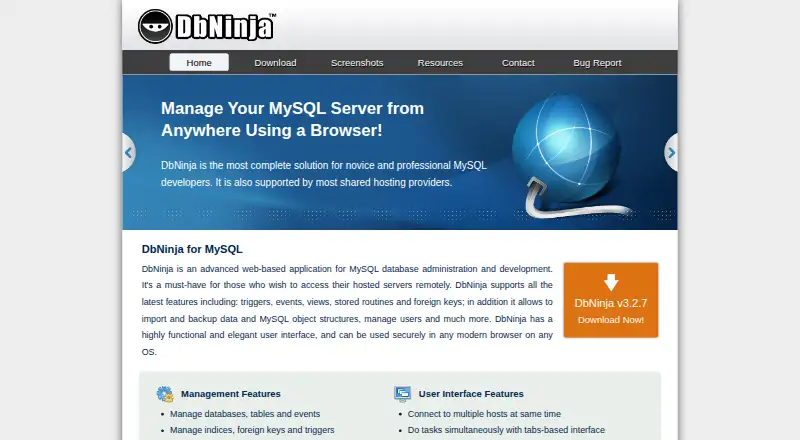
What DbNinja is
DbNinja is a self-hosted web application for administering and developing MySQL databases, including remote access to hosted servers. It manages database objects and accounts such as tables, events, indexes, foreign keys, triggers, procedures, functions, views, users, and privileges. For maintenance, it can back up and restore database structure and data, and compare or synchronize databases across hosts. Data export options include CSV, SQL, Excel, and JSON. Query tools provide syntax highlighting, saved favorite queries, and limits for fetched data and execution time. Users can connect to multiple hosts simultaneously in a tabbed interface. The free Personal use plan costs nothing and is for copies installed by the user, with use from one computer at a time. Setup involves placing the package in a webroot directory and completing the process in a browser. Requirements include a PHP-enabled web server, PHP 5.3 or higher with mysqli, MySQL 4.1 or higher, and a recent major browser with cookies enabled. Commercial licensing is available by quote.
Who it suits
DbNinja suits people who administer or develop MySQL databases and can install a web application on their own server. Commercial licensees can contact the maker about licensing for client or OEM use.
What it does well
- Backs up and restores database structure and data.
- Compares and synchronizes databases between hosts.
- Exports to CSV, SQL, Excel, and JSON.
- Connects to multiple hosts in a tabbed interface.
What to know first
- Personal use is limited to one computer at a time.
- Requires a PHP-enabled web server and specified PHP setup.
- Requires MySQL 4.1 or higher.
- Download page lists version 3.2.7, released April 8, 2017.
Limits
The free Personal use plan costs nothing and must be installed by the user; use is limited to one computer at a time. Commercial usage and OEM licensing are priced by quote, with fees varying by client users and the nature of use.
Plans
| Plan | Billed and limits | Price |
|---|---|---|
| Personal use | Free for personal use · must be installed by the user · use from one computer at a time | Free |
| Commercial usage and OEM licenses | Fees vary by number of client users and nature of use · contact sales for a quote | On request |
As dbninja.com lists them, read 9 Oct 2026. The maker's own page has the final word.
Getting started
- Open the DbNinja website and obtain the package.
- Prepare a PHP-enabled web server with PHP 5.3 or higher and mysqli, and MySQL 4.1 or higher.
- Copy the package into a directory in the webroot.
- Open the setup in a recent major browser with cookies enabled and complete configuration.
- Use the free Personal use plan from one computer, or contact sales about commercial or OEM licensing.
DbNinja is a self-hosted browser application for administering and developing MySQL databases, including remote servers. It suits administrators who want query, backup, migration, and export tools together and can manage their own PHP web server. The free personal-use option is useful, but deployment work and its one-computer limit make it a poor fit for users who need a hosted service or shared commercial access.
Overview
DbNinja combines database-object and permission management with query work, backups, exports, and synchronization between hosts. Keeping multiple connections open in tabs can help when work spans several databases. Because it is self-hosted, users control where it runs, but also take responsibility for setup and restricting access.
Key features
Administration and queries
The application manages databases, tables, events, indexes, foreign keys, triggers, procedures, functions, views, users, and privileges. Syntax highlighting and saved favorite queries support repeated tasks, while limits on fetched data and query execution time can help constrain large results and long-running work. These are practical tools for day-to-day MySQL administration, though they do not remove the need to manage the application’s hosting environment.
Backup, migration, and export
DbNinja can back up and restore both database structure and data, and compare and synchronize databases between hosts. It also exports data to CSV, SQL, Excel, and JSON. This range suits administrators who need to move or preserve MySQL data without switching among separate tools for each task.
Deployment and security
Setup involves copying the package into a directory in a webroot and completing configuration in a browser. The web server must support PHP 5.3 or later with mysqli; the database must be MySQL 4.1 or later, and access requires a recent major browser with cookies enabled. The maker says browser communication is encrypted and advises using HTTPS or DbNinja’s built-in connection encryption. Its setup guide also recommends restricting access to installation directories and known IP addresses. This is a reasonable fit for users able to handle server configuration and access controls, not those seeking zero-maintenance deployment.
Pricing
The Personal use plan costs nothing. It is free for personal use, must be installed by the user, and is limited to use from one computer at a time. That makes it a low-cost option for an individual working from a single computer, but the cap rules it out for broader shared or commercial use.
Commercial usage and OEM licenses have custom pricing: fees vary by the number of client users and nature of use, with sales providing a quote. Commercial licensees may provide DbNinja to clients, distribute it on server appliances, or include it in a management package, and may receive expert support and development resources. This route is aimed at businesses embedding or supplying the software; the personal-use plan does not cover those uses.
Platforms
DbNinja is a self-hosted web application, with platform support across Linux, macOS, and Windows environments. It works with MySQL, not a stated range of database engines. The download page lists version 3.2.7, released April 8, 2017, so users should consider that version date when deciding whether it fits their environment.
Who it's for
DbNinja is best for individuals or organizations that administer MySQL, want a browser-based interface for several hosts, and can install and secure a PHP application themselves. Its object management, query controls, backups, synchronization, and multiple export formats make it particularly relevant to routine database maintenance and data movement. It is less suitable for anyone who needs a managed service, supports databases beyond MySQL, or needs unrestricted multi-computer personal use under the free plan.
Pros and cons
- Broad MySQL administration in one interface: object, user, and privilege management sits alongside query tools, backups, synchronization, and exports.
- Multiple hosts can remain open: tabbed connections are useful when recurring work spans databases.
- Free personal-use entry point: the free plan lowers the cost for an individual, but limits use to one computer at a time and requires user installation.
- Self-hosting requires operational care: users need a compatible PHP server and must configure and restrict access themselves.
- MySQL-only scope: the stated engine support makes it unsuitable for teams administering other database engines.
Alternatives
Database Administration Tools is a useful place to compare options across the category. Consider ClusterControl instead if its Community plan’s deployment and monitoring, performance advisors, and community support are a closer fit; its free plan costs nothing, and its Self-serve plan is €250 a month.
OpenEverest is another free, open-source choice, with no licensing fees and the ability to deploy and customize it to your needs. Choose pgAdmin instead when PostgreSQL administration is the requirement: its free pgAdmin 4 plan is open source under the PostgreSQL licence.
Adminer may suit users looking for a free option for commercial or non-commercial use, with PHP 5.3+, 7, or 8 and enabled sessions. phpLiteAdmin is a free alternative for a PHP server with PDO, SQLite3, or SQLiteDatabase extension support.
phpMyAdmin is a free web tool for administering MySQL and MariaDB. Trusted Postgres Architect is a free alternative. YugabyteDB Anywhere offers an evaluation license for up to 32 consecutive calendar days, with a commercial production license required for production use.
Verdict
Choose DbNinja if you want a broad set of MySQL administration and data-movement tools in a browser and can host and secure the application yourself. Its free personal-use plan makes that package accessible to an individual, but the one-computer cap, self-hosting burden, and MySQL-only scope are sound reasons to look elsewhere when your work is shared, managed, or spans other database engines.
Verdict
DbNinja covers MySQL administration, query work, backup, migration, and exports in a self-hosted web application. Its free personal-use option requires user installation and has a one-computer limit.
Questions
Is DbNinja free?
Yes. The Personal use plan is free.
What does the free plan allow?
It is for personal use, must be installed by the user, and can be used from one computer at a time.
Which database does DbNinja support?
The listed supported database engine is MySQL. It requires MySQL 4.1 or higher.
Which platforms can I use it on?
Listed platforms are Linux, macOS, self-hosted, web, and Windows.
What is needed to install DbNinja?
It requires a PHP-enabled web server and PHP 5.3 or higher with mysqli. Setup also requires a recent major browser with cookies enabled.
Who makes DbNinja, and are commercial licenses available?
The site identifies Vayer Software Ltd. as the maker. Commercial usage and OEM licenses are available by quote.
Facts from DbNinja's own pages
- Backup and migration
- It backs up and restores database structure and data, and compares and synchronizes databases between hosts. · dbninja.com, 9 Oct 2026
- Browser and database requirements
- Use requires a recent major browser with cookies enabled and MySQL 4.1 or higher; setup requires a PHP enabled web server and PHP 5.3 or higher with mysqli. · dbninja.com, 9 Oct 2026
- Commercial licensing
- Commercial licensees may provide DbNinja to clients, distribute it on server appliances, or include it in a management package, and may receive expert support and development resources. · dbninja.com, 9 Oct 2026
- Database management
- It manages databases, tables, events, indexes, foreign keys, triggers, procedures, functions, views, users, and privileges. · dbninja.com, 9 Oct 2026
- Data export
- It exports data to CSV, SQL, Excel, and JSON formats. · dbninja.com, 9 Oct 2026
- Deployment
- DbNinja is installed by copying its package into a directory in the user's webroot and completing setup in a browser. · dbninja.com, 9 Oct 2026
- Maker
- The site identifies Vayer Software Ltd. as the company; the pages reviewed do not state its headquarters or founding year. · dbninja.com, 9 Oct 2026
- Multiple hosts
- Users can connect to multiple hosts at the same time and work in a tabbed interface. · dbninja.com, 9 Oct 2026
- Purpose
- DbNinja is a web based application for MySQL database administration and development, including remote access to hosted servers. · dbninja.com, 9 Oct 2026
- Query tools
- It offers syntax highlighting, saved favorite queries, and limits for fetched data and query execution time. · dbninja.com, 9 Oct 2026
- Security
- The maker says browser communication is encrypted and advises HTTPS or DbNinja's built in connection encryption; its setup guide also recommends restricting access to installation directories and known IP addresses. · dbninja.com, 9 Oct 2026
- Support
- The contact page lists a technical support email address at [email protected]. · dbninja.com, 9 Oct 2026
- Version
- The download page lists version 3.2.7, released April 8, 2017. · dbninja.com, 9 Oct 2026
Where DbNinja stands on Freedom251
- Database Administration Tools#3 of 34