Freedom251 › Ear Training Software

Perfect Ear
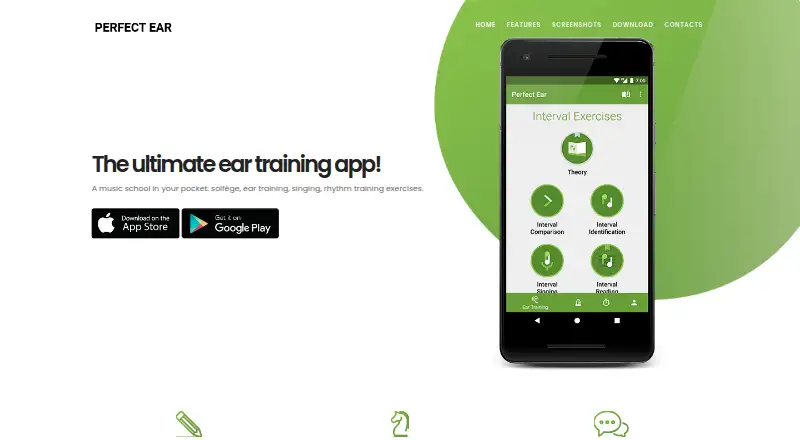
What Perfect Ear is
Perfect Ear is a music-learning app with exercises for ear training, rhythm, solfège, music theory, and note reading. Practice covers comparing and identifying intervals, recognizing chords, inversions and progressions, scales, and reading, writing, or imitating rhythms. For melody and pitch, it offers melodic dictation, absolute-pitch training, and note-singing drills. Sight-reading drills and a sheet-music trainer support note-reading practice. Users can build custom ear-training and rhythm exercises, chords, scales, and rhythm patterns. Piano or guitar can be used for ear-training exercises, and the sight-reading trainer works with a MIDI keyboard. The App Store listing describes guided courses from beginner to advanced and a daily practice dashboard. Perfect Ear is available on Android, iOS, and macOS, with a free plan and optional in-app purchases. Listed one-time purchases include exercise packs for 0.99 USD each, the custom exercise editor for 1.99 USD, the Full Exercise Pack for 4.99 USD, and Premium for 9.99 USD.
Who it suits
It suits musicians at different stages, from beginners and amateurs to professionals, who want structured practice in listening, rhythm, theory, or sight-reading. Custom exercises and piano, guitar, or MIDI keyboard practice offer additional ways to work on those skills.
What it does well
- Covers intervals, chords, scales, and rhythm.
- Includes melodic dictation and absolute-pitch training.
- Users can create custom exercises and patterns.
- Available on Android, iOS, and macOS.
What to know first
- Free download includes in-app purchases.
- Listed exercise packs cost 0.99 USD each.
Limits
Perfect Ear is free to download, with in-app purchases available. Listed one-time purchases range from 0.99 USD for exercise packs to 9.99 USD for Perfect Ear Premium; the Premium listing does not describe its included benefits.
Plans
| Plan | Billed and limits | Price |
|---|---|---|
| Free | Free download · some content locked | Free |
| Rhythm exercises pack | one-time in-app purchase · Rhythm exercises | $0.99, paid once |
| Chord exercises pack | one-time in-app purchase · Chord exercises | $0.99, paid once |
| Scales exercises pack | one-time in-app purchase · Scale exercises | $0.99, paid once |
| Classical Piano | one-time in-app purchase · Classical piano sounds | $0.99, paid once |
| Interval Exercises Pack | one-time in-app purchase · Interval exercises | $0.99, paid once |
| Perfect Ear Premium | one-time in-app purchase · Premium unlock | $14.99, paid once |
| Custom exercise editor | one-time in-app purchase · Create custom exercises | $1.99, paid once |
The first 8 of 10 plans, as perfectear.app lists them, read 15 Oct 2026. The maker's own page has the final word. Every plan
Getting started
- Visit the Perfect Ear website.
- Download the app from Google Play or the Apple App Store.
- Choose the free download to begin.
- Use the available courses and practice exercises.
- Purchase an exercise pack or other in-app item if needed.
Perfect Ear is a music-learning app for people who want to build listening, rhythm, theory and notation skills in one place. It suits beginners through experienced musicians who value varied or customized drills. Its breadth is a strength, but some exercise packs and the custom editor cost extra.
Overview
Perfect Ear covers interval and chord work, scales, rhythm, melodic dictation, pitch, singing and sight-reading. This range makes it a practical choice for learners developing several musicianship skills together; someone focused on a single skill may prefer a narrower tool. Guided courses run from beginner to advanced, while a daily practice dashboard supports a regular routine.
Users can build custom ear-training and rhythm exercises, chords, scales and rhythm patterns. That flexibility is useful when preset drills do not match a learner’s goals, though access to the custom exercise editor is a separate purchase.
Key features
- Intervals and chords: Drills cover interval comparison and recognition, chord recognition, inversions and progressions. Piano or guitar can be used for ear-training practice, connecting listening work to familiar instruments.
- Rhythm and scales: Users can read, write and imitate rhythms, and practice scales. Custom patterns offer more control over practice, at the cost of building exercises rather than relying only on ready-made material.
- Melody, singing and pitch: Melodic dictation, absolute-pitch training and note-singing drills broaden the app beyond recognition exercises.
- Sight-reading: Sheet-music reading drills and a sight-reading trainer support notation practice; a MIDI keyboard can be used with the trainer.
- Learning and support: Guided courses and a daily practice dashboard give learners structure. The developer welcomes suggestions and provides email support at [email protected].
Pricing
The free plan costs nothing and is free to download, with in-app purchases available.
Individual one-time purchases let users add selected content rather than committing to a recurring fee. Classical Piano, Interval Exercises Pack, Rhythm exercises pack, Chord exercises pack and Scales exercises pack each cost $0.99, paid once. The Custom exercise editor costs $1.99, paid once. These lower-cost options suit learners who know which area or tool they want, but buying several packs may be less straightforward than choosing the Full Exercise Pack at $4.99, paid once.
Perfect Ear Premium costs $9.99, paid once, but its included benefits are not described. A separate Christmas Sale purchase is $2.99, paid once; its name alone does not establish what it includes. Readers should compare the clearly named packs with their needs rather than assume either purchase unlocks specific features.
Platforms
Perfect Ear is available on Android, iOS and macOS, giving mobile users and Mac users a choice of supported devices. The app is published on Google Play and the Apple App Store by Crazy Ootka Software AB. Google Play says it may collect app activity and app info and performance data, shares no data with third parties and encrypts data in transit. Apple's privacy disclosure says diagnostics may be collected but are not linked to the user.
Who it's for
Perfect Ear is a good fit for musicians who want one app spanning ear training, rhythm, theory and reading, particularly those who will benefit from guided courses or custom practice. Its range can serve amateurs and professionals, but the separate packs make it worth checking which exercises are included before settling on a paid route. It is less compelling for someone who wants a clearly bounded free curriculum or only one specialized training mode.
Pros and cons
- Pro: Broad coverage from chords and intervals to singing and sight-reading lets learners work across several skills in one app.
- Pro: Custom exercises, scales and rhythm patterns can align drills with individual goals.
- Pro: Several named packs are priced as low-cost one-time purchases, avoiding a required subscription for those additions.
- Con: The free plan's exercise caps are unclear, making it hard to judge how much practice is available before buying.
- Con: The custom editor and content packs are paid separately, so building a tailored setup can add to the initial free download.
- Con: Premium's benefits are not defined, so its 9.99 USD one-time price is harder to evaluate than the named packs.
Alternatives
Ear Training Software is a useful starting point for comparing options across the category.
- Complete Ear Trainer is worth considering if you want an app also available on web and Windows: its free access covers the first chapter of each mode, and its full version costs $6.99, paid once.
- Coco suits someone seeking a game-based approach, with early levels and daily workouts in its free plan, subject to daily session limits.
- Nootka is a free, open-source option for readers who want an alternative available on Linux and Windows as well as Android and macOS.
- SightSing may suit learners focused on sight-singing, with free access to Levels 1–3 and a $4.99 a month plan for all 18 levels plus rhythm and interval training.
- The Ear Gym is another freemium option for Android and iOS, with free drills at your own pace.
- ToneGym is an alternative available on web as well as mobile, with a free tier described as limited access to training and learning tools.
- Trill combines a musician toolkit with limited free ear-training access and offers a 7-day free trial before its $59.99 a year Pro plan.
- Solfetta is a free, open-source web option whose settings are stored in the browser’s local storage.
Verdict
Choose Perfect Ear if you want a wide set of music-reading and listening drills, structured courses and the option to tailor exercises, with inexpensive one-time packs for targeted additions. Look elsewhere if you need clear free-plan limits or a defined Premium bundle before paying; the app’s range is appealing, but its purchase choices require some care.
Verdict
Perfect Ear brings a broad set of music-reading and listening drills together, with guided courses and custom practice options. The free plan is a starting point, while listed packs and other purchases add costs.
Questions
Is Perfect Ear free?
Yes. It is free to download, and in-app purchases are available.
Which platforms support Perfect Ear?
It is available on Android, iOS, and macOS.
What does Perfect Ear help musicians practice?
It covers ear training, rhythm, solfège, music theory, note reading, sight-reading, melody, and pitch.
What do the listed purchases cost?
Exercise packs are listed at $0.99 as a one-time purchase. The custom exercise editor is 1.99 USD once, the full exercise pack is 4.99 USD once, and Perfect Ear Premium is 9.99 USD once.
Who makes Perfect Ear?
It is distributed under developer Crazy Ootka Software AB.
Can users create their own exercises?
Yes. Users can create custom ear-training and rhythm exercises, chords, scales, and rhythm patterns.
Facts from Perfect Ear's own pages
- Android data safety
- Google Play says the app may collect app activity and app info and performance data, shares no data with third parties, and encrypts data in transit. · play.google.com, 3 Oct 2026
- API and SDK
- The reviewed official and store pages identify no public API or SDK. · perfectear.app, 15 Oct 2026
- Apple privacy disclosure
- The App Store listing says diagnostics may be collected but are not linked to the user. · apps.apple.com, 3 Oct 2026
- Apple requirements
- The App Store requires iOS 17 or later, iPadOS 17 or later, or macOS 14 or later on a Mac with Apple M1 or newer. · apps.apple.com, 15 Oct 2026
- Chord training
- Chord exercises cover identification, inversions, reading and progressions from basic through advanced. · perfectear.app, 15 Oct 2026
- Courses and practice tracking
- The App Store listing describes guided courses from beginner to advanced and a daily practice dashboard. · apps.apple.com, 3 Oct 2026
- Customisation
- Google Play says users can create custom ear-training and rhythm exercises, chords, scales and rhythm patterns. · play.google.com, 15 Oct 2026
- Customization
- Users can create custom ear-training and rhythm exercises, chords, scales, and rhythm patterns. · play.google.com, 3 Oct 2026
- Data safety
- Google Play states that no data is shared with third parties, activity and performance data may be collected, transit is encrypted and data cannot be deleted. · play.google.com, 15 Oct 2026
- Distribution and developer
- The app is listed on Google Play and the Apple App Store under developer Crazy Ootka Software AB. · apps.apple.com, 3 Oct 2026
- Headquarters
- The developer listing gives Höglandstorget 8, Lgh 1202, 167 71 Bromma, Sweden. · play.google.com, 15 Oct 2026
- Intended users
- The maker describes its exercises as suitable for musicians of all levels, including amateurs and professionals. · perfectear.app, 3 Oct 2026
- Interval and chord practice
- Exercises cover interval comparison and recognition, chord recognition, inversions, and progressions. · apps.apple.com, 3 Oct 2026
- Interval training
- Interval exercises teach comparison, identification and reading of intervals. · perfectear.app, 15 Oct 2026
- Legal entity and founding
- Bloomberg LEI records identify Crazy Ootka Software AB as a Swedish entity created on 24 January 2020. · lei.bloomberg.com, 15 Oct 2026
- Licence
- AlternativeTo labels Perfect Ear proprietary and freemium, with a free limited version and one-time purchase model. · alternativeto.net, 15 Oct 2026
- Limit: custom ranges
- A reviewer said the paid custom editor could not set a C3–C4 range on treble clef for ukulele or guitar practice. · apps.apple.com, 15 Oct 2026
- Limit: rhythm feedback
- Chrome-Stats summaries report confusing rhythm feedback, no repeat after failed tasks and inconsistent metronome timing. · chrome-stats.com, 15 Oct 2026
- Limit: rhythm quantisation
- GiveMeApps reported that rhythm tapping marks answers wrong when timing is only a few ticks early or late. · givemeapps.com, 15 Oct 2026
- Limit: sight-reading controls
- App Store reviewers report that failed rhythm taps cannot be retried and sight reading lacks selectable key signatures. · apps.apple.com, 15 Oct 2026
- Limit: stability
- An App Store reviewer reported crashes after completing drills for months and said paid-user support emails received no response. · apps.apple.com, 15 Oct 2026
- Maker
- The app is developed by Crazy Ootka Software AB. · perfectear.app, 15 Oct 2026
- Melody, singing, and pitch
- Features include melodic dictation, absolute-pitch training, and note-singing drills. · apps.apple.com, 3 Oct 2026
- MIDI integration
- Google Play says the sight-reading trainer can be used with a plugged-in MIDI keyboard and that exercises work with piano or guitar. · play.google.com, 15 Oct 2026
Where Perfect Ear stands on Freedom251
- Ear Training Software#13 of 23