Freedom251 › Ear Training Software
Solfetta
What Solfetta is
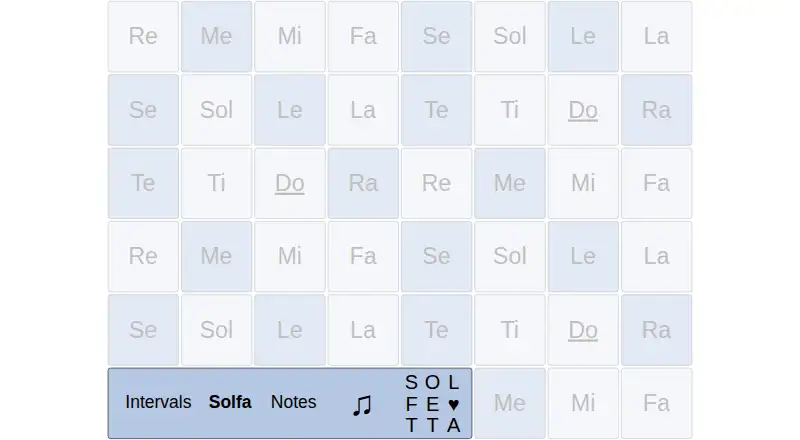
Solfetta is a free web-based ear-training app and instrument for practicing melodies and associating heard music with solfège note names. Its Intervals, Solfa, and Notes modes use the same note buttons with different labels. A separate melody feature offers well-known tunes with easy, medium, and hard guidance levels. Users can set the key and major or minor tonality, adjust tuning and volume, choose a synthesized sound, and change display options. The maker says users can play along with music on their device and adjust Solfetta’s sound, volume, and tuning to match. The app is open source under the MIT license. It uses no cookies and stores settings in browser local storage. The maker notes that Web Audio can sometimes go silent on iOS; the Fix Audio option reloads the app. Older Android devices may have noticeable audio latency, and simultaneous touches can sometimes be missed. The maker created Solfetta to support ear practice on a phone or tablet and help build associations between music and note names. Its listed price is free.
Who it suits
Solfetta suits people practicing by ear, including phone or tablet users working on melody and solfège note recognition. Its device-specific audio caveats are worth considering before practice.
What it does well
- Intervals, Solfa, and Notes practice modes
- Melody guidance levels from easy to hard
- Adjustable key, tonality, tuning, and sound
- Open source under the MIT license
- No cookies; settings stay in browser local storage
What to know first
- Web Audio can go silent on iOS
- Older Android devices may have noticeable audio latency
- Simultaneous touches can sometimes be missed
Plans
| Plan | Billed and limits | Price |
|---|---|---|
| Free | Open-source ear training app · settings stored in browser local storage | Free |
As tomcooke.me lists them, read 4 Oct 2026. The maker's own page has the final word.
Getting started
- Open the Solfetta website in a web browser.
- Choose Intervals, Solfa or Notes mode, or open melody practice.
- Set the key, tonality, tuning, volume, sound and display options as needed.
- Play the note buttons or use melody guidance; you can play along with music on your device.
- If Web Audio goes silent on iOS, use Fix Audio to reload the app.
Verdict
Solfetta offers several ways to practice note recognition and melodies, along with controls for matching its sound to music on a device. Its free, open-source format is straightforward, though audio behavior may vary on iOS and older Android devices.
Questions
Is Solfetta free?
Yes. Its Free plan costs nothing.
Which platforms does Solfetta support?
Solfetta is web-based and is intended for practice on a phone or tablet.
Is Solfetta open source?
Yes. It is open source under the MIT license.
What practice modes does it have?
It offers Intervals, Solfa and Notes modes, plus a melody feature with easy, medium and hard guidance levels.
Does Solfetta use cookies?
The maker says it uses no cookies and stores settings in browser local storage.
Are there any audio limitations?
Web Audio can sometimes go silent on iOS, where a Fix Audio option reloads the app. Older Android devices may have noticeable latency, and simultaneous touches can sometimes be missed.
Facts from Solfetta's own pages
- Audio limitation
- The maker notes that Web Audio can sometimes go silent on iOS and provides a Fix Audio option to reload the app. · github.com, 4 Oct 2026
- Device limitation
- The maker reports that older Android devices may have noticeable audio latency and that simultaneous touches can sometimes be missed. · github.com, 4 Oct 2026
- Intended user
- The maker created Solfetta to practice playing by ear on a phone or tablet and strengthen associations between heard music and note names. · github.com, 4 Oct 2026
- License
- Solfetta is open source under the MIT license. · github.com, 4 Oct 2026
- Melody practice
- A melody feature offers well-known tunes with easy, medium, and hard guidance levels. · github.com, 4 Oct 2026
- Play along
- The maker says users can play along with music on their device and adjust Solfetta’s sound, volume, and tuning to match it. · github.com, 4 Oct 2026
- Practice modes
- The app offers Intervals, Solfa, and Notes modes that use the same note buttons with different labels. · github.com, 4 Oct 2026
- Privacy
- The maker says Solfetta uses no cookies and stores settings in browser local storage. · github.com, 4 Oct 2026
- Purpose
- Solfetta is an ear-training app and web-based instrument for practicing melodies with a focus on solfège note names. · tomcooke.me, 4 Oct 2026
- Settings
- Users can change the key, major or minor tonality, tuning, volume, synthesized sound, and display options. · github.com, 4 Oct 2026
Where Solfetta stands on Freedom251
- Ear Training Software#19 of 23