Freedom251 › Ear Training Software
Nootka
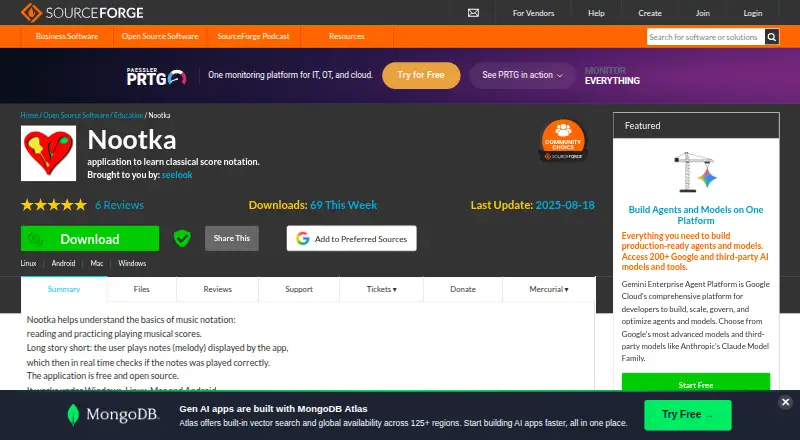
What Nootka is
Nootka is a free app for learning classical music notation, reading scores, and practicing melodies. It listens to sung or played sounds and checks in real time whether notes match a displayed melody. Users can make their own exercise sets and review analyzed results. The notation options include treble, bass, and other clefs, as well as the grand staff. Nootka also supports different kinds of guitars and their tunings. Packages or installers are listed for Android, Linux, macOS, and Windows, and mobile apps are available. The project is licensed under the GNU General Public License version 3.0, or GPLv3. Its listed languages are Czech, English, French, German, Hungarian, Italian, Polish, Russian, Slovene, and Spanish. The support page points users to getting-started documentation and bug and feature request trackers. Nootka has a free plan listed as free, and there is no free trial.
Who it suits
Nootka suits learners who want to practice reading notation by singing or playing, and guitar users working with different guitar types and tunings. It is available across desktop and mobile platforms.
What it does well
- Checks played notes against displayed melodies in real time.
- Detects sung and played sounds.
- Users can create their own exercise sets.
- Supports multiple clefs and the grand staff.
- Available for Android, Linux, macOS, and Windows.
What to know first
- No free trial is listed.
- No iOS platform is listed.
Plans
| Plan | Billed and limits | Price |
|---|---|---|
| Nootka | Free · Free and open source | Free |
As nootka.sourceforge.io lists them, read 4 Oct 2026. The maker's own page has the final word.
Getting started
- Visit the Nootka website.
- Open the Nootka 2.0.2 files page.
- Choose the package or installer for Android, Linux, macOS or Windows.
- Use the getting-started documentation linked from the support page.
Nootka is a free, open-source app for learning classical notation by reading melodies and singing or playing them. It suits self-directed students, teachers building targeted drills, and guitarists working across tunings. The strongest reason to choose it is immediate score-to-sound practice without a purchase; choose another tool if you want a broad, course-structured ear-training program.
Overview
Nootka presents a melody in notation, listens to what you sing or play, and checks in real time whether the notes match. That tight loop turns sight-reading into an active exercise: you must interpret the symbols and produce the corresponding pitches, rather than only identify them on screen.
Exercise results are analyzed after practice, giving learners a way to review performance rather than relying solely on memory. You can also create your own exercise sets, which is useful for isolating difficult passages, building a personal progression, or adapting drills for students. The app is centered on notation and performance matching, so it is a better fit for score-reading practice than for a full theory syllabus.
Key features
- Real-time performance checks: Sound detection covers both played and sung notes, and the app compares them with the displayed melody. This gives immediate confirmation during practice, although the core task remains accurate note matching.
- Multiple clefs: Treble, bass, other clefs, and the grand staff are supported. Learners can move beyond a single beginner notation without changing applications.
- Custom exercise sets: User-created sets let you direct practice toward particular material or skill gaps. This flexibility favors teachers and disciplined learners who know what they want to rehearse; beginners seeking a prescribed lesson path may prefer a more guided product.
- Result analysis: Exercise results are analyzed so practice can be adjusted over time. The feature is most useful when you return to weaknesses and compare your work across repeated drills.
- Guitar support: Nootka supports different kinds of guitars and their tunings, making it relevant to players who change instruments or tuning systems.
- Open-source project: The software is released under GPLv3. Its support page directs users to getting-started documentation plus bug and feature-request trackers, providing a clear route for learning the app and reporting problems.
- Language coverage: The project lists Czech, English, French, German, Hungarian, Italian, Polish, Russian, Slovene, and Spanish.
Pricing
Nootka is free and open source. The Nootka plan costs nothing, is billed as Free, and has no paid tier or trial period to weigh. That removes subscription risk and makes it practical for students, classrooms, and hobbyists who need regular practice without a software budget. Because there is only one free plan, there are no paid upgrades for expanded exercise capacity or premium course content; readers wanting those kinds of structured offerings should compare alternatives.
Platforms
Nootka provides mobile and desktop coverage on Android, Linux, macOS, and Windows. The Nootka 2.0.2 files page lists installers or packages for each of those systems, so a learner can keep the same notation-focused approach across a phone and computer. iOS and web access are not part of this platform set, which matters if those are your primary devices.
Who it's for
Choose Nootka if you are learning to read standard notation and want your own voice or instrument to be evaluated as you work. It is particularly well matched to guitarists because of its instrument and tuning support, and to teachers or advanced students who will benefit from making custom exercise sets. Its clef range also suits learners progressing from treble into bass, other clefs, or grand-staff reading.
It is less suitable if your priority is a linear ear-training course, mobile-first iOS access, or a large catalog of game-like drills. Nootka's value comes from focused score-to-performance practice and self-direction.
Pros and cons
Pros
- Immediate feedback on sung and played notes: You can correct mistakes while performing a melody instead of waiting for a later review.
- Customizable practice: User-created exercise sets support targeted work rather than a fixed drill sequence.
- Broad notation and guitar support: Several clefs, grand staff, guitar types, and tunings cover varied study needs.
- No cost or subscription: The GPLv3 free plan removes financial barriers for individual and classroom use.
- Cross-platform desktop and Android reach: Windows, macOS, Linux, and Android versions accommodate mixed-device households.
Cons
- Notation is the center of the experience: Readers seeking a broad, course-like ear-training curriculum may find the scope narrow.
- No iOS or web version: Apple mobile and browser-only users need another option.
- Self-directed setup: Building exercises yourself is powerful but offers less built-in structure than sequenced training apps.
Alternatives
For a wider category browse, see Ear Training Software. Complete Ear Trainer is a better pick for a freemium, chapter-based ear-training route, with its free access covering the first chapter of each mode and a 6.99 USD one-time full version. Functional Ear Trainer suits learners who want Android, iOS, macOS, or Windows access and are willing to consider paid features.
Perfect Ear offers freemium training on Android, iOS, and macOS with inexpensive one-time exercise packs. Auris is the alternative for Android, iOS, or web users who want progress saving on its paid yearly plan. Coco is a game-oriented freemium option with daily workouts and session limits on its free tier.
Minuet is another free desktop choice for Linux, macOS, and Windows. Note Precision: Intervals focuses on interval training across Android, iOS, and macOS, while SightSing targets sight-singing on iOS and the web, with paid access to all 18 levels.
Verdict
Nootka is a strong choice for learners who want a free, configurable bridge between written scores and real performance. Its live checking, clef coverage, result analysis, and guitar-aware exercises make focused practice unusually direct. Look elsewhere if you need a guided ear-training curriculum, iOS or browser support, or a primarily game-based learning experience.
Verdict
Nootka combines score-reading practice with real-time sound checks and user-created exercises. Its platform and notation support make it useful to a range of learners, though no free trial is listed.
Questions
Is Nootka free?
Yes. Its plan is listed as free, billed Free, and the project is described as free and open source.
Is there a free trial?
No, Nootka has no free trial.
Which platforms does it support?
Nootka is available for Android, Linux, macOS and Windows. Mobile apps are listed as available.
What does Nootka help users practice?
It helps users learn classical music notation, read scores and practice melodies, with real-time checks of sung or played notes.
Is Nootka open source?
Yes. The project is listed under the GNU General Public License version 3.0 (GPLv3).
Which languages are listed?
Czech, English, French, German, Hungarian, Italian, Polish, Russian, Slovene and Spanish.
Facts from Nootka's own pages
- Downloads
- The Nootka 2.0.2 files page lists installers or packages for Windows, Mac, Android, and Linux. · sourceforge.net, 4 Oct 2026
- Exercises
- Users can create their own exercise sets. · sourceforge.net, 4 Oct 2026
- Instruments
- It supports different kinds of guitars and their tunings. · sourceforge.net, 4 Oct 2026
- Languages
- The project page lists Czech, English, French, German, Hungarian, Italian, Polish, Russian, Slovene, and Spanish. · sourceforge.net, 4 Oct 2026
- License
- The project is listed under the GNU General Public License version 3.0 (GPLv3). · sourceforge.net, 4 Oct 2026
- Notation
- It supports treble, bass, and other clefs, as well as the grand staff. · sourceforge.net, 4 Oct 2026
- Purpose
- Nootka helps users learn classical music notation, read scores, and practice playing them. · sourceforge.net, 4 Oct 2026
- Real-time feedback
- The app checks in real time whether notes in a displayed melody were played correctly. · sourceforge.net, 4 Oct 2026
- Results
- It analyzes exercise results. · sourceforge.net, 4 Oct 2026
- Sound detection
- The app detects sung and played sounds. · sourceforge.net, 4 Oct 2026
- Support
- The project’s support page points users to its getting-started documentation and lists bug and feature request trackers. · sourceforge.net, 4 Oct 2026
Where Nootka stands on Freedom251
- Ear Training Software#7 of 23