Freedom251 › Virtual Try-On Software
Perfect Corp. AI Makeup Virtual Try-On API
Visit Perfect Corp. AI Makeup Virtual Try-On API Alternatives
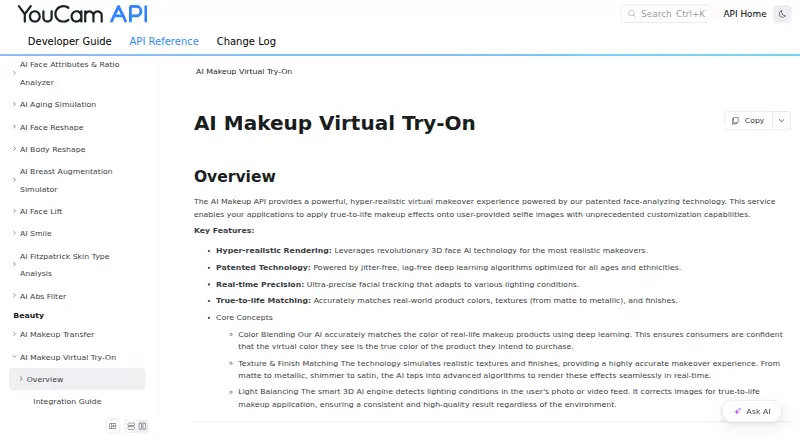
What Perfect Corp. AI Makeup Virtual Try-On API is
Perfect Corp. AI Makeup Virtual Try-On API applies customizable makeup effects to user-provided selfie images. It uses 3D face AI rendering and facial tracking that adapts to lighting, with matching for real-world product colors, textures, and finishes. Requests can select makeup categories, patterns, colors, textures, and intensity. Supported product types include blush, concealer, eyeliner, eyebrows, foundation, lip color, skin smoother, bronzer, contour, eyeshadow, eyelashes or mascara, highlight, and lip liner.
The service uses an asynchronous REST workflow: submit an image and makeup effects, receive a task ID, then poll for status and the result or an error. Images can be supplied by publicly accessible URL or uploaded file. Supported files are JPG, JPEG, or PNG under 10 MB, with a long side under 1,920 pixels and a detected face width of at least 100 pixels. Each V1.0 task consumes one unit. Developers can register for a YouCam API account for free, then purchase or subscribe to obtain units; pricing is on request. The API can be integrated into websites, e-commerce platforms, iOS and Android apps, applets, and mini-programs. Perfect Corp. was founded in 2015.
Who it suits
The API suits beauty and fashion brands, retailers, and developers building photo-based makeup try-on into digital experiences. It is relevant to applications that need configurable makeup effects and can use an asynchronous REST API.
What it does well
- Supports a broad range of makeup product types.
- Requests can customize colors, patterns, textures, and intensity.
- Works with image URLs or uploaded image files.
- REST API can integrate with websites and mobile apps.
- Failed query or engine tasks do not consume units.
What to know first
- Pricing is available on request.
- Each successful V1.0 task consumes one unit.
- Images must meet the documented file size, dimensions, and face-width limits.
Limits
Each AI Makeup Virtual Try-On V1.0 task consumes one unit. Supported JPG, JPEG, or PNG images must be under 10 MB, have a long side under 1,920 pixels, and contain a detected face at least 100 pixels wide.
Getting started
- Visit the Makeup Virtual Try-On API documentation.
- Register for a YouCam API account.
- Purchase or subscribe to obtain units.
- Send an API request with a Bearer token API key and an eligible image.
- Poll the returned task ID for status and results.
- Integrate the REST API into a website, e-commerce platform, iOS or Android app, applet, or mini-program.
Perfect Corp. AI Makeup Virtual Try-On API adds configurable makeup rendering to selfie photos for beauty brands, retailers, and developers building product-preview experiences. It is strongest when a team can manage an asynchronous API and per-task usage, while organisations handling face images must plan consent, key security, and privacy responsibilities.
Overview
The service applies virtual makeup across complexion, eye, and lip categories: foundation, concealer, blush, bronzer, contour, highlight, eyeliner, eyebrows, eyeshadow, eyelashes or mascara, lip color, lip liner, and skin smoothing. It is designed for photo-based try-on rather than a broad apparel or accessory fitting product.
Perfect Corp. describes 3D face-AI rendering, facial tracking that adapts to lighting, and matching for real-world product colors, textures, and finishes. For a retailer, that can make a catalogue preview more representative than a generic color overlay. The result remains dependent on an image meeting the service's input requirements.
Key features
Detailed makeup controls
Requests can define effect categories, palettes, patterns, colors, intensity, and supported finishes including matte, shimmer, and metallic. That range suits brands representing distinct product lines and shades. It also gives developers more parameters to expose or simplify in their own interface.
Asynchronous REST workflow
An application submits an image and effects, receives a task ID, then polls for the result or an error. This is a practical fit for websites, commerce flows, and mobile apps that can run background work and show a processing state. It is less suitable for an integration expecting a finished image in the initial request.
Input can be a publicly accessible image URL or an uploaded file. Files obtained through the File API must be uploaded to the returned URL before they can be used. Supported images are JPG, JPEG, or PNG under 10 MB, with a long side below 1,920 pixels and a detected face at least 100 pixels wide. Those constraints need to be enforced before submission to reduce avoidable failures.
Units, defaults, and authentication
AI Makeup Virtual Try-On V1.0 consumes one unit per task. Failed query or engine tasks do not consume units. If a request omits skin_smooth, the engine applies a default smoothing value of 50; documented parameters can set it to zero when an unretouched preview is required.
Every request uses an API key as a Bearer token in the Authorization header. The asynchronous status handling and credential management add implementation work, but the REST design can be integrated into websites, e-commerce platforms, iOS and Android apps, applets, and mini-programs. An official playground provides an interactive way to explore the API, and support is available at [email protected].
Pricing
Pricing is on request. Developers can register a YouCam API account for free, then purchase or subscribe to obtain units; a free trial is offered. Each completed task uses one unit, so projected photo volume should be discussed with Perfect Corp. before committing to a launch. No public seat allowance, unit bundle, renewal schedule, or paid price is provided.
The free account and trial are useful for prototyping, but they do not establish production capacity or a predictable per-image budget. Custom pricing is a reasonable fit for a brand negotiating volume, while a small team wanting transparent self-serve rates may find planning harder.
Platforms
The API is listed for Android, iOS, web, and API use. Perfect Corp. also describes integrations for e-commerce sites, applets, and mini-programs, allowing the same service to support a commerce site and native applications when the developer builds the surrounding workflow.
Who it's for
Beauty and fashion brands, retailers, and software teams with API development capacity are the natural audience. It suits product pages or mobile experiences where customers upload a selfie and preview specified cosmetics. It is not the right choice for a plug-and-play consumer editor or a team unable to operate polling, file handling, and credential storage.
Privacy planning is material. Perfect Corp. says photos uploaded for cloud virtual try-on and AI processing are permanently deleted after service completion, while its privacy policy says brand clients using Perfect AI API may receive and store generated outputs that can contain personal information. The API terms place key security responsibility on users and describe consent to collection and use of biometric information. Perfect Corp. describes a GDPR commitment and ISO/IEC 27001:2022 compliance; its HIPAA statement concerns its AI Skin Analyzer solution.
Pros and cons
Pros
- Fine-grained makeup specification: colors, patterns, intensity, and multiple finishes support product-specific previews.
- Broad integration reach: REST access and Android, iOS, and web support fit multi-channel commerce builds.
- Clear image rules: file type, size, dimensions, and face-width thresholds give developers concrete validation checks.
- Unit protection on failures: failed query or engine tasks do not consume units.
Cons
- Custom pricing: without public unit rates or quotas, budgeting requires a sales conversation.
- Polling is required: teams must implement task tracking and error handling instead of receiving an immediate result.
- Biometric and key obligations: consent, output handling, and API-key security remain the user's responsibility.
- Photo constraints: unsuitable dimensions or a small detected face can prevent a task from running.
Alternatives
Virtual Try-On Software is the broader directory category when you want to compare services rather than commit to this API.
TryItOn is worth choosing instead when a freemium product with a free Starter tier and wider desktop-platform coverage is more important than this makeup-focused API.
Photta fits readers seeking a web-and-API option with a free-start allowance and a published monthly Hobby plan.
RealityTry is an alternative for web users wanting free try-on credits and a one-click Shopify installation.
TryOn Virtual suits teams comparing API/web services with a free monthly session allowance and usage pausing at the limit.
Voilae is a web alternative with a free monthly try-on allowance and published overage pricing.
Tryonixs is an Android, iOS, web, and API option with a published Starter plan and Shopify integration.
WeShopAI Virtual Try-On is a cross-platform alternative offering registration points and a low-priced published Pro tier.
PICTOFiT is another Android, iOS, and web virtual try-on option.
Verdict
Choose Perfect Corp. AI Makeup Virtual Try-On API when you need configurable, product-oriented makeup effects in a custom website or app and can operate its asynchronous, unit-based workflow. Look elsewhere if transparent self-serve pricing, an immediate synchronous response, or a turnkey consumer editor matters more than granular controls and multi-platform API integration.
Verdict
Choose this API if you need configurable virtual makeup effects for selfie images and can build around its asynchronous REST workflow. Check unit requirements and request pricing before planning usage; integrations also require API key handling and consent practices described in its terms.
Questions
How is the API priced?
Pricing is on request. Developers can register for a YouCam API account for free, then purchase or subscribe to obtain units.
What platforms can use the API?
Perfect Corp. says its APIs can integrate with websites, e-commerce platforms, iOS and Android apps, applets, and mini-programs.
What image formats and sizes are supported?
JPG, JPEG, and PNG files are supported if they are under 10 MB, have a long side under 1,920 pixels, and a detected face at least 100 pixels wide.
How does a request work?
Submit an image and effects, receive a task ID, then poll for status and results or an error.
How many units does a makeup task use?
AI Makeup Virtual Try-On V1.0 uses one unit per task. Failed query or engine tasks do not consume units.
How are uploaded photos handled?
Perfect Corp.'s privacy policy says photos uploaded for cloud virtual try-on and AI processing are permanently deleted from its server after service completion.
Facts from Perfect Corp. AI Makeup Virtual Try-On API's own pages
- API playground
- The API documentation links to an official playground for interactively exploring and testing the Makeup Virtual Try-On API. · docs.perfectcorp.com, 8 Oct 2026
- API terms
- Perfect Corp.'s terms say API users are responsible for maintaining the security of their API keys and consent to the collection and use of biometric information as described in its privacy policy. · perfectcorp.com, 8 Oct 2026
- Authentication
- Requests require an API key sent in the Authorization header as a Bearer token. · docs.perfectcorp.com, 8 Oct 2026
- Customization
- Requests can specify makeup effects and palettes, including colors, patterns, intensity, and supported textures such as matte, shimmer, and metallic. · docs.perfectcorp.com, 8 Oct 2026
- Developer integrations
- Perfect Corp. says its YouCam APIs can integrate with websites, e-commerce platforms, iOS and Android apps, applets, and mini-programs. · docs.perfectcorp.com, 8 Oct 2026
- Errors and units
- The documentation says failed query or engine tasks do not consume units. · docs.perfectcorp.com, 8 Oct 2026
- Founded
- 2015 · docs.perfectcorp.com, 28 Sept 2026
- Free access
- Perfect Corp. says developers can register a YouCam API account for free and then purchase or subscribe to obtain units. · docs.perfectcorp.com, 8 Oct 2026
- Image input
- The API accepts a publicly accessible image URL or an uploaded image file; files obtained through the File API must be uploaded to the returned URL before use. · docs.perfectcorp.com, 8 Oct 2026
- Image limits
- Supported files are JPG, JPEG, or PNG under 10 MB, with a long side under 1,920 pixels and a detected face width of at least 100 pixels. · docs.perfectcorp.com, 8 Oct 2026
- Integration
- The API uses an asynchronous REST workflow: submit an image and effects, receive a task ID, then poll for status and results. · docs.perfectcorp.com, 8 Oct 2026
- Integration options
- Perfect Corp. describes its AI APIs as RESTful and says they can be integrated into websites, e-commerce platforms, iOS and Android apps, applets, and mini-programs. · app-cdn-01.perfectcorp.com, 8 Oct 2026
- Intended users
- Perfect Corp. describes its business solutions as serving beauty and fashion brands and retailers; the API documentation says applications can use the makeup service. · perfectcorp.com, 8 Oct 2026
- Makeup customization
- Requests can specify makeup effect categories, patterns, colors, textures, and color intensity. · docs.perfectcorp.com, 8 Oct 2026
- Photo handling
- Perfect Corp.'s privacy policy says photos uploaded for cloud virtual try-on and AI processing are permanently deleted from its server after the service is completed. · perfectcorp.com, 8 Oct 2026
- Privacy
- Perfect Corp.'s privacy page says brand clients using Perfect AI API may receive and store generated outputs that may contain personal information. · perfectcorp.com, 8 Oct 2026
- Purpose
- The API applies customizable, true-to-life makeup effects to user-provided selfie images. · docs.perfectcorp.com, 8 Oct 2026
- Rendering
- The documentation describes 3D face AI rendering, facial tracking that adapts to lighting, and matching for real-world product colors, textures, and finishes. · docs.perfectcorp.com, 8 Oct 2026
- Security and compliance
- Perfect Corp.'s compliance page describes a GDPR commitment and identifies ISO/IEC 27001:2022 compliance; its HIPAA statement refers to its AI Skin Analyzer solution. · perfectcorp.com, 8 Oct 2026
- Skin smoothing default
- If a request omits the skin_smooth effect, the engine applies a default skin-smoothing value of 50; the documented parameters can be set to zero to disable it. · docs.perfectcorp.com, 8 Oct 2026
- Support
- The API documentation lists [email protected] for issues. · docs.perfectcorp.com, 8 Oct 2026
- Usage unit
- AI Makeup Virtual Try-On V1.0 consumes one unit per task. · docs.perfectcorp.com, 8 Oct 2026
- What it does
- The API applies customizable virtual makeup effects to user provided selfie images using face analyzing technology. · docs.perfectcorp.com, 8 Oct 2026
- Workflow
- The API runs makeup processing asynchronously: submit an image and effects, receive a task ID, then poll for the result or an error. · docs.perfectcorp.com, 8 Oct 2026
Where Perfect Corp. AI Makeup Virtual Try-On API stands on Freedom251
- Virtual Try-On Software#17 of 26