Freedom251 › AI UI Design Generators
pen.dev
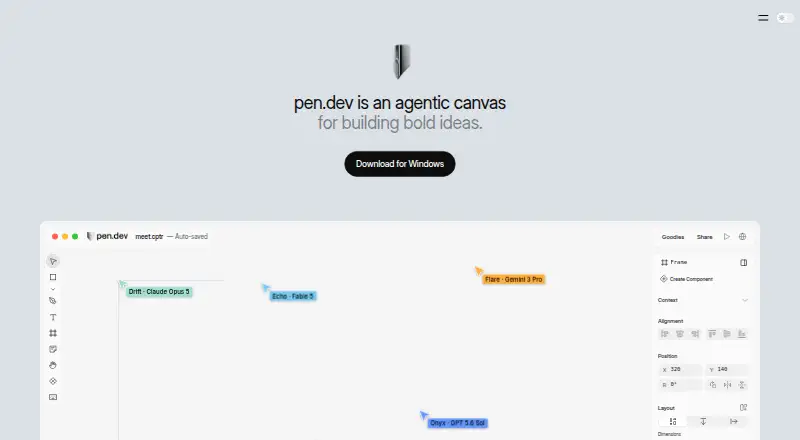
What pen.dev is
pen.dev is a vector design tool and agentic canvas for building software alongside development environments. Its editor works with components, variables, themes, scripts and shaders, and can import Figma files and HTML. You can provide a sketch or image as input, then export work as PNG, JPEG, WEBP, PDF, HTML, CSS or Tailwind. The .pen design file uses open JSON with a fully open schema, and custom components are supported.
For AI-assisted work, use pen.dev’s integrated agent or connect external agents through MCP. Documented MCP integrations include Claude Code, Codex, Gemini CLI, Antigravity, OpenCode, Kiro and Claude Desktop. Integrated provider choices include OpenAI, Anthropic, Google Gemini, Cursor, GitHub Copilot, xAI, OpenRouter and other API-key providers. pen.dev also offers a Chrome extension for webpage imports, IDE extensions for Cursor, VS Code, Antigravity and Windsurf, plus an npm-installed CLI requiring Node.js 22.19 or later. Listed platforms include API, extension, Linux, macOS, web and Windows. The pricing page says the service remains free until plans launch; its published tiers set monthly allowances for agent days, image and SVG generations, and parallel agents.
Who it suits
pen.dev suits software builders who want vector design tools, code oriented exports and agent workflows in one canvas. It may also suit teams that use the listed AI providers, MCP integrations or IDE extensions, and want an open JSON design format.
What it does well
- Supports components, variables, themes, scripts and shaders.
- Imports Figma files and HTML; accepts sketches or images.
- Exports to image, document, HTML, CSS and Tailwind formats.
- Connects external agents through MCP and offers an integrated agent.
- The .pen format is open JSON with a fully open schema.
What to know first
- Free tier allows five Agent days per month.
- Free tier limits image and SVG generations to 25 monthly.
- Free tier allows one agent at a time.
- CLI requires Node.js 22.19 or later.
Limits
The Free tier includes five Agent days and 25 image and SVG generations per month, with one agent at a time. Pro is listed at $16 a month and allows unlimited Agent days, 350 generations monthly and up to three parallel agents; Ultra is $48 a month and allows 750 generations and up to six parallel agents.
Plans
| Plan | Billed and limits | Price |
|---|---|---|
| Free | Unlimited MCP tool calls while designing · 25 image and SVG generations/month · 5 agent-designing days/month · 1 agent at a time · local .pen files · CLI/headless editor · sharing and personal workspaces | Free |
| Pro | per user / month · Unlimited MCP tool calls while designing · 350 image and SVG generations/month · unlimited agent-designing days · up to 3 parallel agents · organization developer keys · roles, billing and usage tracking | $16 a month |
| Ultra | per user / month · Unlimited MCP tool calls while designing · 750 image and SVG generations/month · up to 6 parallel agents · shared organizational usage pool · team workspaces and roles | $48 a month |
| Enterprise | Unlimited MCP tool calls · custom usage, pricing and support | On request |
As pen.dev lists them, read 15 Oct 2026. The maker's own page has the final word.
Getting started
- Visit the pen.dev website.
- Choose web, Linux, macOS or Windows, or use its API or extensions.
- For webpage imports, use the Chrome extension.
- For IDE use, choose the extension for Cursor, VS Code, Antigravity or Windsurf.
- For the CLI, install it through npm with Node.js 22.19 or later.
- Use the free offering while plans are coming soon; paid plan rates are published for when plans launch.
Overview
pen.dev combines vector design with software building in a canvas that can work alongside AI agents. It is best suited to designers and developers who want editable interface work, code exports and agent workflows together. Its broad toolset is appealing, though sustained generation and parallel agent use may call for a paid per-user plan.
Key features
The editor supports components, variables, themes, scripts and shaders, which gives reusable design work more room than a static mockup. Figma and HTML import, plus sketch or image input, help users start from existing material or a visual reference. Exports include PNG, JPEG, WEBP and PDF, alongside HTML, CSS and Tailwind for code-oriented handoff.
The .pen format is an open JSON file with a fully open schema, a practical choice for teams that want design data they can inspect. Users can work with the integrated agent or connect external agents through MCP. Documented integrations include Claude Code, Codex, Gemini CLI, Antigravity, OpenCode, Kiro and Claude Desktop. Integrated provider options include OpenAI, Anthropic, Google Gemini, Cursor, GitHub Copilot, xAI, OpenRouter and other API-key providers. The breadth is useful for workflows already using these tools; the number of agents that can run at once depends on the plan.
A Chrome extension imports webpages, and IDE extensions are available for Cursor, VS Code, Antigravity and Windsurf. The CLI installs through npm and requires Node.js 22.19 or later, so command-line use has a specific runtime prerequisite. For text-based AI requests made with a user's own provider credentials, the privacy policy says data goes directly from the device to that provider. Account data, cloud files and shared content receive encryption in transit and at rest and access controls. Requests to pen.dev's own models and image or SVG services pass through its servers in real time and are not stored, logged or cached there.
Pricing
Plans are coming soon, and pen.dev remains free until they launch. The published tiers indicate how capacity is expected to differ, but the free plan is the only current option during this period.
- Free: free. It includes 5 Agent days/month, 25 image and SVG generations/month and one agent at a time. This suits occasional use, but the generation and agent-day caps may constrain regular production work.
- Pro: $16 a month, billed $16 / user / month. It raises usage to unlimited Agent days, 350 image and SVG generations/month and up to 3 agents in parallel. It is the more suitable tier for an individual or team member who needs frequent agent access and moderate generation volume.
- Ultra: $48 a month, billed $48 / user / month. It includes unlimited Agent days, 750 image and SVG generations/month and up to 6 parallel agents. The higher quota is aimed at users whose work benefits from several simultaneous agents; the per-user price makes seat count relevant.
- Enterprise: custom pricing, with unlimited usage and custom usage, pricing and support for procurement and onboarding. Enterprise customers are directed to contact the company about their requirements.
There is no free trial. Until the plans launch, the service stays free; after launch, the free tier's monthly generation and agent-day limits are the main trade-off for avoiding a subscription.
Platforms
pen.dev supports web, macOS, Windows and Linux, with API and extension availability. Its Chrome extension handles webpage imports, while IDE extensions connect the workflow to supported editors.
Who it's for
pen.dev is a strong fit for people who move between vector interface design and development, especially those who want to use MCP-connected agents or export HTML, CSS or Tailwind. The open file format also suits teams that value inspectable design data. It is less compelling for high-volume work that must stay free, given the monthly caps, or for users who do not need its design and agent workflows together.
Pros and cons
- Pro: Design features, sketch and image input, and visual and code exports cover several stages of interface work in one tool.
- Pro: An open .pen JSON schema and broad documented agent connections give technical teams flexibility in how they work with designs.
- Con: The free tier limits Agent days to five monthly, image and SVG generations to 25, and concurrent agents to one.
- Con: Pro and Ultra pricing is per user, so the published monthly amount scales with the number of seats.
- Con: The CLI requires Node.js 22.19 or later, which adds a prerequisite for command-line workflows.
Alternatives
For a prototype-focused option with a post-trial free tier, UXPin offers two prototypes and 50 AI credits after its 14-day trial. Paper is an alternative with a free plan that includes unlimited viewers and editors and 100 weekly MCP tool calls. Starry may suit users who want a free download without a subscription and are willing to provide their own API key for AI chat. Coherent is a free, open-source option with unlimited projects and a bring-your-own-LLM-key model.
Figma Make is an option for users who want Figma's AI design workflow, with a Professional Full seat at $16 a month and 3,000 AI credits monthly. For a free site-building starting point, Relume provides one project and one page on its forever-free plan. UX Pilot is worth considering when the first design free or enterprise API and access controls are priorities. Visily offers a free Starter tier with 300 AI credits per month for users seeking a credit-based AI design option.
Browse AI UI Design Generators or AI Wireframe Generators to compare more tools in these categories.
Verdict
Choose pen.dev if your work spans vector interface design, software development and AI agents, and you value open design files and code exports. Its range of inputs, outputs and integrations is the main draw. Look elsewhere if you need dependable high-volume generation without a per-user subscription: the free tier is capped, and the higher published quotas come with monthly fees.
Verdict
Choose pen.dev if you want vector design, software building and AI agent workflows in a single canvas, with imports, multiple export formats and an open design format. The free tier has monthly agent and generation caps; the published Pro and Ultra tiers add capacity for a per-user monthly price.
Questions
Is pen.dev free?
Yes. Its pricing page says it stays free until plans launch. The listed Free plan costs nothing.
What do the paid plans cost?
Pro is $16 a month, billed at $16 per user per month. Ultra is $48 a month, billed at $48 per user per month. Enterprise uses custom pricing.
Which platforms does it support?
Listed platforms are API, extension, Linux, macOS, web and Windows. Extensions are available for Cursor, VS Code, Antigravity and Windsurf, and a Chrome extension imports webpages.
Which agents and AI providers can connect?
Documented MCP integrations include Claude Code, Codex, Gemini CLI, Antigravity, OpenCode, Kiro and Claude Desktop. Integrated provider options include OpenAI, Anthropic, Google Gemini, Cursor, GitHub Copilot, xAI, OpenRouter and other API-key providers.
What formats can I import and export?
The editor imports Figma files and HTML. Exports include PNG, JPEG, WEBP, PDF, HTML, CSS and Tailwind.
How does pen.dev handle AI data?
Text AI inputs and outputs using your own provider credentials go from your device directly to that provider. Requests to pen.dev-provided models and image or SVG services pass through High Agency servers in real time and are not stored, logged or cached there.
Facts from pen.dev's own pages
- Agent canvas
- The product combines an infinite canvas with built-in or externally connected AI agents for designing software interfaces, presentations and other content. · pen.design, 15 Oct 2026
- AI data handling
- For pen.dev-provided models and image or SVG services, the policy says requests pass through High Agency servers in real time and are not stored, logged, or cached there. · pen.dev, 7 Oct 2026
- AI providers
- The documented integrated provider options include OpenAI, Anthropic, Google Gemini, Cursor, GitHub Copilot, xAI, OpenRouter, and other API-key providers. · docs.pen.dev, 7 Oct 2026
- AI workflow
- Users can work with an integrated agent or connect external agents through MCP, and plans allow different numbers of agents to run in parallel. · pen.dev, 7 Oct 2026
- Backing
- The maker homepage links to a16z Speedrun as its backing organization, whose program advertises first checks of up to $1 million. · pen.design, 15 Oct 2026
- Browser and IDE tools
- Pen.dev offers a Chrome extension for importing webpages and IDE extensions for Cursor, VS Code, Antigravity, and Windsurf. · pen.dev, 7 Oct 2026
- Chrome adoption
- The pen.dev web-import extension listing shows 4,000 users and was updated September 23, 2026. · chromewebstore.google.com, 15 Oct 2026
- CLI
- The @pen.dev/cli package provides headless creation, editing, MCP-shell access and PNG, JPEG, WEBP and PDF export from the terminal. · docs.pen.dev, 15 Oct 2026
- CLI requirement
- The current CLI requires Node.js 22.19 or later and authenticates through interactive login or organization-scoped CLI keys. · docs.pen.dev, 15 Oct 2026
- Code export
- Frames can be exported in one click as HTML with CSS or Tailwind CSS, while artwork can be exported as PDF, PNG, JPEG or WEBP. · pen.design, 15 Oct 2026
- Company facts
- LinkedIn lists pen.dev as privately held software-development company headquartered in San Francisco with 2–10 employees. · linkedin.com, 15 Oct 2026
- Company legal name
- The product terms and EULA identify the maker as High Agency, Inc. · pen.dev, 15 Oct 2026
- Compliance limitation
- Terms prohibit submitting high-risk data such as payment-card, health, biometric, precise-location, minors' or GDPR special-category data without appropriate safeguards. · pen.dev, 15 Oct 2026
- Components
- Components support reusable symbols, overrides and component slots for composing complex layouts. · pen.design, 15 Oct 2026
- Current availability
- The pricing page says plans are coming soon and pen.dev stays free until plans launch. · pen.dev, 7 Oct 2026
- Data handling
- Text AI requests using a user's own provider credentials go directly from the device to that provider, while hosted-model requests pass through High Agency infrastructure in real time. · pen.dev, 15 Oct 2026
- Data security
- The privacy policy says account data, operational metadata, cloud files, and shared content are protected with encryption in transit and at rest and access controls. · pen.dev, 7 Oct 2026
- Design features
- The editor supports components, variables, themes, scripts, shaders, Figma and HTML import, and export to HTML and CSS/Tailwind. · pen.dev, 7 Oct 2026
- Design variables
- Variables let users define colors, spacing and typography once and reuse those values across a design. · pen.design, 15 Oct 2026
- Figma import
- Users can import .fig files with layouts, styles and images, or copy and paste Figma layers. · pen.design, 15 Oct 2026
- File format
- The .pen design format is an open JSON file whose schema is fully open. · pen.dev, 7 Oct 2026
- Format limitation
- The .pen format documentation warns that the schema can change incompatibly and advises keeping original files before opening them in newer versions. · docs.pen.dev, 15 Oct 2026
- Founded and size
- Andreessen Horowitz Speedrun lists Pen.dev as founded in 2025 with nine employees in California. · speedrun.a16z.com, 15 Oct 2026
- Founder
- The Speedrun profile identifies Tom Krcha as founder and CEO and says he previously worked on Around and co-founded Alter. · speedrun.a16z.com, 15 Oct 2026
Where pen.dev stands on Freedom251
- AI UI Design Generators#6 of 22
- AI Wireframe Generators#14 of 34