Freedom251 › AI Quiz Generators
PDFQuiz
What PDFQuiz is
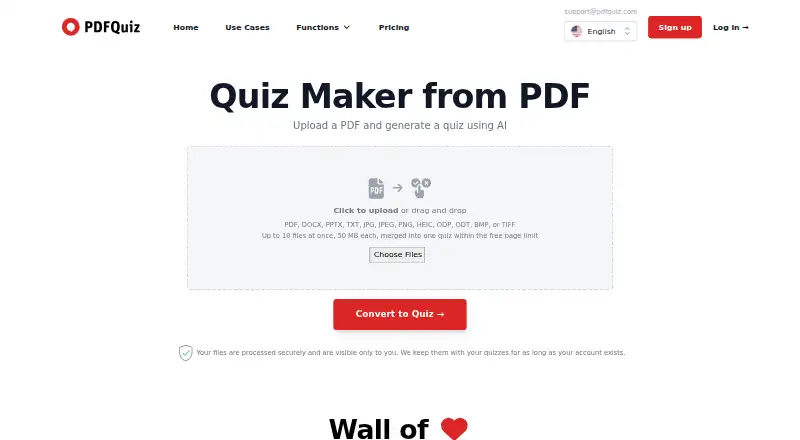
PDFQuiz uses AI to turn PDFs and other uploaded documents into interactive quizzes. The listed upload formats include PDFs, office documents, images, and text formats; OCR can read scanned pages and photos. Users can choose from six question types, then take quizzes online, review questions as flashcards, or download quizzes and results as PDFs. Anki export depends on plan. Paid plans can generate quizzes in a selected language from a list of more than 180 languages. The free option allows a 10-question quiz without an account, or three quizzes of up to 10 questions each with an account; account quizzes can use documents up to 20 pages. Paid tiers add different character limits and options such as invitations, timers, quiz editing, API access, and Zapier integration. The listed starting price is $5/mo (annual). Uploaded files, quizzes, and results remain while an account exists, but users can request deletion. The privacy policy describes SSL encryption, access controls, and encrypted password storage.
Who it suits
PDFQuiz may suit students, teachers, trainers, recruiters, and others who want to build quizzes from documents. Its plan-dependent sharing, assessment, and integration features may also suit employers, compliance officers, and business teams.
What it does well
- OCR reads scanned pages and photos.
- Offers six question types.
- Quizzes can be reviewed as flashcards.
- Paid plans support over 180 output languages.
- Users can request deletion of stored content.
What to know first
- Free account allows only three quizzes.
- Free account quizzes are limited to 10 questions each.
- Content remains stored while the account exists.
- Anki export and other tools depend on plan.
Limits
Without an account, the free option allows a 10-question quiz. A free account allows three quizzes with up to 10 questions each and documents of up to 20 pages per quiz.
Plans
| Plan | Billed and limits | Price |
|---|---|---|
| Free | No account: 10 questions · Free account: 3 quizzes, 10 questions each · Up to 20 document pages per quiz · 16 file formats · 10 files per upload, 20 MB each | Free |
| Pro | Billed $228 /year · Up to 3,500,000 chars/month · Up to 500 quiz invitations/month · Open-ended questions · Timers · Quiz editing | $228 a year |
| Elite | Billed $456 /year · Up to 8,500,000 chars/month · Up to 1,500 quiz invitations/month · Premium support · API access · Zapier integration · Custom branding · Whitelabel mode | $456 a year |
| Plus | Billed $84 /year · Up to 1,000,000 chars/month · Unlimited quizzes within character limit · PDF downloads · Anki export · Up to 300 questions per quiz | $84 a year |
As pdfquiz.com lists them, read 30 Sept 2026. The maker's own page has the final word.
Getting started
- Open the PDFQuiz website.
- Create a quiz without an account or use the free account option.
- Upload a supported document.
- Choose a question type and, on a paid plan, an output language if desired.
- Take the quiz online or use an export option available with your plan.
PDFQuiz converts uploaded documents into interactive quizzes for learners, instructors, and teams building practice or assessments from existing material. It is strongest when varied file types, OCR, and multiple question formats matter; the free tier is mainly a small trial, while sustained use requires a paid quota that matches your document volume.
Overview
PDFQuiz accepts 16 upload formats, including PDF, Word and PowerPoint files, images, and text documents. OCR can interpret scanned pages and photographs, so the source does not need to be clean, selectable text. The service then produces quizzes that can be taken online, with answer explanations and a question bank supporting review.
This document-first approach suits course notes, workplace training material, recruiting tests, and compliance content. It is less suitable if you need a generous free classroom platform: the free account allows only three quizzes, each with 10 questions, and limits a quiz source to 20 document pages.
Key features
Six question types cover single choice, multiple answer, true or false, fill in the blank, matching, and open ended responses. That range supports both rapid recall and more demanding checks of understanding, although open-ended questions are restricted to Pro. Paid plans can generate output in a selected language from more than 180 languages, useful for multilingual courses and distributed teams.
Online quiz taking and flashcard study make the same generated material useful for practice as well as assessment. Plus adds PDF downloads and Anki export, while Pro adds editable quizzes, manual quiz creation, timers, and invitation links. Pro invitations are capped at 500 per month, so larger cohorts need to monitor that allowance. Elite adds custom branding, whitelabel mode, API access, and Zapier integration. The API documentation covers retrieving invitees and their scores with an account API token, giving organizations a route to connect quiz results to their own workflows.
Security measures described for the service include SSL encryption, access controls, regular security updates, and encrypted password storage. Uploaded files, quizzes, and results remain while the account exists; users can request deletion. The privacy policy states compliance with the Data Protection Act 2018, GDPR, Singapore's PDPA 2012, and California's CCPA 2020.
Pricing
Free: $0.00. Without an account, you can create 10 questions. A free account permits three quizzes of 10 questions each, up to 20 document pages per quiz, 16 file formats, and 10 files per upload at 20 MB per file. It is appropriate for occasional personal study or a brief evaluation, not recurring instruction.
Plus: $84.00 per year, billed $84/year. It allows up to 1,000,000 characters per month, unlimited quizzes within that character allowance, PDF downloads, Anki export, and up to 300 questions per quiz. Choose it for individual learners or small-scale training that needs exports but not live invitations or open-ended questions.
Pro: $228.00 per year, billed $228/year. The 3,500,000-character monthly allowance comes with up to 500 quiz invitations per month, open-ended questions, timers, and quiz editing. It is the practical tier for instructors and managers running structured assessments; Plus users give up those assessment and sharing controls.
Elite: $38.00 per month, billed $456/year. It raises the allowance to 8,500,000 characters per month and 1,500 invitations, and includes premium support, API access, Zapier integration, custom branding, and whitelabel mode. This is aimed at organizations embedding quizzes into branded or automated programs rather than casual users.
Platforms
PDFQuiz is offered on the web and through an API. The API and Zapier connection are limited to Elite, so lower plans remain browser-based workflows.
Who it's for
Students can turn notes and readings into practice sets, while teachers and trainers gain reusable quizzes, flashcards, and plan-dependent exports. Recruiters, compliance officers, employers, business owners, and sales managers can use Pro or Elite for timed, invited assessments and, at the top tier, integrated reporting and branded delivery. Users working mainly with short documents and occasional self-study may find the free caps sufficient; high-volume programs should size their monthly character and invitation quotas before choosing.
Pros and cons
- Pros: Six question formats support different assessment styles; OCR handles scans and photos; 16 upload formats accommodate mixed source material; paid language generation spans more than 180 languages; flashcards, PDF output, and Anki export extend use beyond a single quiz.
- Cons: The free account is limited to three small quizzes and 20 source pages; open-ended questions, timers, editing, and invitations start at Pro; monthly character quotas can constrain heavy users; API, Zapier, branding, and whitelabel features require the expensive Elite tier.
Alternatives
For a broader directory of options, see AI Quiz Generators.
- PDFNoob is a free option across Android, iOS, macOS, web, and Windows when broad device coverage matters more than PDFQuiz's question formats and assessment tiers.
- Quizbot suits users wanting a mobile app and a free allowance of 50 questions per month, with a paid Standard plan.
- QuizFlight is better for live participation, offering a first session for up to 20 participants and a Business Starter plan.
- Quizgecko is an alternative for course-based quiz, flashcard, and podcast creation, with its first course free.
- BrushUpIQ fits simple web-based multiple-choice generation, with five generations per month on its free plan.
- IntelliAssess is aimed at student assessment, with a free plan supporting up to 25 students.
- Questgen offers 20 free runs and a $15-per-month Pro plan for users prioritizing run volume.
- QuizCraft is a web alternative with three free generations per month and exports to Kahoot, Blooket, and Gimkit.
Verdict
Choose PDFQuiz if you want to turn varied documents, including scans, into multilingual quizzes and need a progression from personal study to invited or integrated assessment. Look elsewhere if your priority is a generous free allowance, broad native-device coverage, or live participation at a lower tier.
Verdict
PDFQuiz turns uploaded material into quizzes with several question formats and study options. Compare plan limits and features, and note that uploaded materials remain while the account is active.
Questions
Is PDFQuiz free?
Yes. Without an account, the free option allows 10 questions. A free account allows three quizzes of up to 10 questions each.
What is the starting price for paid plans?
The listed starting price is $5/mo (annual). The plans list Plus at $84 per year, Pro at $228 per year, and Elite at $38 per year, billed $456 per year.
Which file formats can PDFQuiz use?
The pricing page lists 16 upload formats, including PDF, DOC and DOCX, PPT and PPTX, images, and text formats.
Can PDFQuiz read scanned documents?
Yes. OCR can read scanned pages and photos.
What can I export from PDFQuiz?
Depending on plan, users can download quizzes and results as PDFs and export quizzes to Anki.
Does PDFQuiz integrate with other services?
The Elite plan lists API access and Zapier integration. The API documentation describes retrieving quiz invitees and their scores using an account API token.
Facts from PDFQuiz's own pages
- API
- The API documentation describes endpoints for retrieving quiz invitees and their scores, using an account API token. · pdfquiz.com, 30 Sept 2026
- Compliance statements
- The privacy policy says it adheres to the Data Protection Act 2018, GDPR, Singapore's PDPA 2012, and California's CCPA 2020. · pdfquiz.com, 30 Sept 2026
- Data retention
- Uploaded files, quizzes, and results are retained for as long as the account exists, and users can request deletion. · pdfquiz.com, 30 Sept 2026
- Input formats
- The pricing page lists 16 upload formats, including PDF, DOC/DOCX, PPT/PPTX, images, and text formats. · pdfquiz.com, 30 Sept 2026
- Integrations
- The Elite plan lists API access and Zapier integration. · pdfquiz.com, 30 Sept 2026
- Languages
- Paid plans can generate a quiz in a selected output language from a list of more than 180 languages. · pdfquiz.com, 30 Sept 2026
- OCR
- Scanned pages and photos can be read with OCR. · pdfquiz.com, 30 Sept 2026
- Question types
- It supports six question types: single choice, multiple answer, true or false, fill in the blank, matching, and open ended. · pdfquiz.com, 30 Sept 2026
- Security and privacy
- The privacy policy says PDFQuiz uses SSL encryption, access control, and regular security updates, and that passwords are stored encrypted. · pdfquiz.com, 30 Sept 2026
- Sharing and assessment
- Pro includes quiz invitation links, up to 500 invitations per month, timers, editable quizzes, and manual quiz creation. · pdfquiz.com, 30 Sept 2026
- Study and export
- Users can take quizzes online, study questions as flashcards, download quizzes and results as PDF, and export quizzes to Anki depending on plan. · pdfquiz.com, 30 Sept 2026
- What it does
- PDFQuiz uses AI to turn PDFs and other uploaded documents into interactive quizzes. · pdfquiz.com, 30 Sept 2026
- Who it is for
- The maker describes use cases for students, teachers, recruiters, compliance officers, employers, trainers, business owners, and sales managers. · pdfquiz.com, 30 Sept 2026
Where PDFQuiz stands on Freedom251
- AI Quiz Generators#10 of 29