Freedom251 › AI Quiz Generators
LessonCue
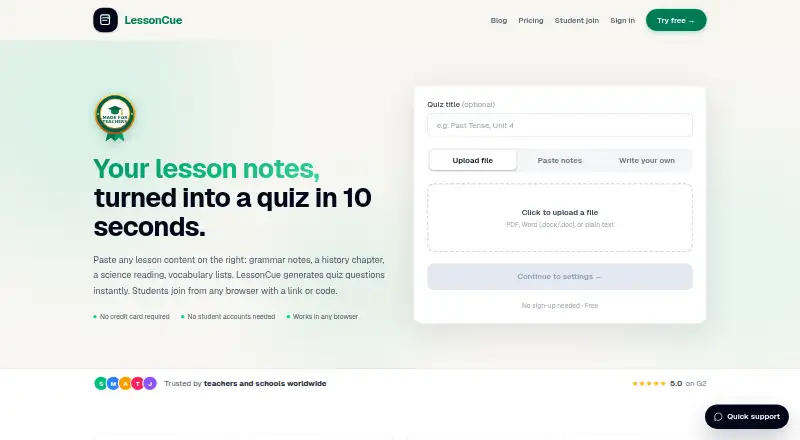
What LessonCue is
LessonCue turns teachers’ lesson materials into quizzes. Teachers can provide lesson notes, PDFs, or Word files, then review and edit the generated questions before sharing. The quiz formats include multiple choice, true/false, and fill-in-the-blank. Students join from a browser using a link or code, with no student account required. Results help teachers see which students understood the material and which topics may need more time.
LessonCue is web-based and says it is used by language teachers, subject teachers, tutors, and department heads. Its Free plan includes three quizzes, PDF upload or pasted notes, student access by link, and live results per student. Pro adds unlimited quizzes, full student-level results, question editing, and an automatic follow-up quiz based on weak areas. The listed Pro pricing is $9.90 per month, billed at $19, with back-to-school pricing depending on region; a 15-day trial is available. The School plan has custom pricing and adds multiple teacher accounts, one shared join link, and one bill. Classroom data may include names, quiz responses, class IDs, scores, and timestamps. Teachers can request deletion of account and quiz data by email.
Who it suits
LessonCue suits language and subject teachers, tutors, and department heads who want to turn lesson materials into quizzes and review student results. It may also fit schools that need multiple teacher accounts and a shared student join link.
What it does well
- Generates quizzes from notes, PDFs, or Word files.
- Supports multiple-choice, true/false, and fill-in-the-blank questions.
- Students can join by link or code without an account.
- Teachers can review and edit questions before sharing.
- Results show student understanding and topics needing more time.
What to know first
- The Free plan is limited to three quizzes.
- The School plan uses custom pricing.
- Schools are responsible for evaluating student privacy obligations.
Limits
The Free plan allows three quizzes and includes PDF upload or pasted notes, link-based student access, and live results per student. Pro is listed at $9.90 per month, billed at $19; School has custom pricing.
Plans
| Plan | Billed and limits | Price |
|---|---|---|
| Free | $0 · 3 quizzes · upload PDF or paste notes · students join by link, no account · live results per student | Free |
| Pro | $19; $9.90 /month · Back-to-school pricing · your region · Unlimited quizzes · upload PDF or paste notes · full student-level results · edit questions before sharing · auto follow-up quiz from weak areas | $9.90 a month |
| School | Custom pricing for teams & schools. · All Pro features per teacher · multiple teacher accounts · one shared join link · one bill, cancel anytime | On request |
As lessoncue.com lists them, read 9 Oct 2026. The maker's own page has the final word.
Getting started
- Open the LessonCue website in a web browser.
- Choose the Free plan or review the Pro and School options.
- Start with lesson notes, a PDF, or a Word file.
- Review and edit the generated questions before sharing.
- Give students the quiz link or code to join in a browser.
Verdict
Choose LessonCue if you want to build quizzes from lesson materials and see student-level results. Its free plan is capped at three quizzes, while schools needing multiple teacher accounts must look at custom-priced School.
Questions
Is LessonCue free?
Yes. The Free plan is listed as free and includes three quizzes.
What does Pro cost?
Pro is listed at $9.90 per month, billed at $19. Back-to-school pricing depends on region.
Is there a trial?
Yes, LessonCue lists a 15-day trial.
What platforms does LessonCue support?
LessonCue is available on the web.
Do students need accounts?
No. Students can join from a browser using a link or code without creating an account.
How can teachers request data deletion?
Teachers can email [email protected] to request deletion of account and quiz data.
Facts from LessonCue's own pages
- Audience
- LessonCue says it is used by language teachers, subject teachers, tutors, and department heads. · lessoncue.com, 9 Oct 2026
- Data deletion
- Teachers can request deletion of account and quiz data by emailing [email protected]. · lessoncue.com, 9 Oct 2026
- Headquarters
- Toronto, Ontario, Canada · lessoncue.com, 28 Sept 2026
- Privacy limits
- The privacy policy says schools are responsible for evaluating LessonCue against FERPA, COPPA, GDPR, and local student privacy obligations. · lessoncue.com, 9 Oct 2026
- Product
- LessonCue generates quizzes from teachers’ lesson notes, PDFs, or Word files. · lessoncue.com, 9 Oct 2026
- Question formats
- The quiz generator supports multiple choice, true/false, and fill-in-the-blank questions. · lessoncue.com, 9 Oct 2026
- Quiz creation
- Teachers can review and edit generated questions before sharing a quiz. · lessoncue.com, 9 Oct 2026
- Results
- Teachers can see which students understood the material and which topics need more time. · lessoncue.com, 9 Oct 2026
- Student access
- Students join a quiz from a browser using a link or code, without creating an account. · lessoncue.com, 9 Oct 2026
- Student data
- The privacy policy says classroom data may include student-entered names, quiz responses, class IDs, scores, and timestamps. · lessoncue.com, 9 Oct 2026
- Support
- LessonCue lists email support for product issues, classroom blockers, and account help. · lessoncue.com, 9 Oct 2026
Where LessonCue stands on Freedom251
- AI Quiz Generators#9 of 29