Freedom251 › AI Quiz Generators

QuizFlight
What QuizFlight is
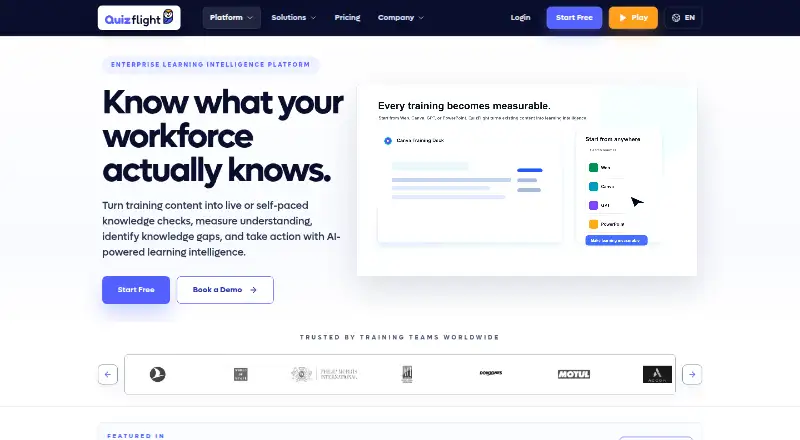
QuizFlight turns training material into live or self-paced knowledge checks to measure understanding and identify gaps by topic. Its AI question builder can create questions from company documents and uploaded training materials. Knowledge Tags connect questions and answers to topics, helping teams review where reinforcement may be needed. The platform provides participation, confidence, and knowledge-gap insights, though live analytics vary by plan. Sessions can launch through Microsoft Teams, Zoom, or in-room displays. Its iOS and Android apps support independent practice, assigned quizzes, and multiplayer play. Listed integrations include Office 365, Atlassian Confluence, Google Slides, ChatGPT, LMS options, and SSO/SAML. QuizFlight identifies enablement teams, schools, and event organizers as users, including for corporate training, onboarding, team building, and sales enablement. The free plan allows up to 20 participants in the first session and up to five thereafter, with no credit card. Business Starter is $8.25 a month, billed annually at $99, per host, for up to 100 participants per session. Business Pro is $12.42 a month, billed annually at $149, per host, for up to 250 participants. Enterprise pricing is custom after review.
Who it suits
QuizFlight suits enablement teams, schools, and event organizers creating training, onboarding, team-building, or sales-enablement sessions. Its mobile apps also support learners doing independent practice or assigned quizzes.
What it does well
- AI question builder uses company documents and training materials.
- Knowledge Tags map questions and answers to topics.
- Sessions can launch through Teams, Zoom, or in-room displays.
- Mobile apps support practice and multiplayer quizzes.
- Free plan includes a first session for up to 20 participants.
What to know first
- Free plan allows up to five participants after the first session.
- Starter is limited to 100 participants per session.
- Live analytics vary by plan.
- Enterprise pricing is custom after review.
Limits
The Free plan permits up to 20 participants in the first session and up to five participants in later sessions. Starter allows up to 100 participants per session and limits all question types; Pro allows up to 250 participants and includes advanced live analytics, exports, CSV downloads, and priority support.
Plans
| Plan | Billed and limits | Price |
|---|---|---|
| Free | First session up to 20 participants · then up to 5 participants · no credit card | Free |
| Business Pro | $149 billed annually · Per host · up to 250 participants per session · advanced live analytics · exports and CSV download · priority support | $12.42 a month |
| Business Starter | $99 billed annually · Per host · up to 100 participants per session · AI question builder · basic live analytics | $8.25 a month |
| Enterprise | Custom pricing available after review · 2,000+ participants per session · SSO/SAML · custom branding and domain · APIs and webhooks · dedicated success manager | On request |
As quizflight.com lists them, read 3 Oct 2026. The maker's own page has the final word.
Getting started
- Visit https://www.quizflight.com/en.
- Choose the Free plan, or select Business Starter or Business Pro for a paid host plan.
- Use the AI question builder with company documents or uploaded training materials.
- Launch a session through Microsoft Teams, Zoom, or an in-room display.
- Use the iOS or Android app for independent practice, assigned quizzes, or multiplayer play.
QuizFlight is a training assessment platform for turning company documents and learning materials into live or self-paced knowledge checks. It suits enablement teams, schools, and event organizers that need to see where learners understand a topic and where they need follow-up. Its strongest case is connecting quizzes to ongoing training; session caps and plan-dependent reporting narrow the choice.
Overview
QuizFlight goes beyond a one-off quiz by mapping questions and answers to Knowledge Tags, so teams can review results by topic rather than just participation. That makes it a better fit for onboarding, sales enablement, and other programs where identifying knowledge gaps can guide reinforcement. For casual quizzes without a training or review workflow, that structure may be more than necessary.
Key features
The AI question builder generates questions from company documents and uploaded training materials. A question bank and mixed question types support reusable assessments. The value is in getting checks from existing material and tracking understanding by topic, though the usefulness of that tracking depends on how consistently a team applies its Knowledge Tags.
Participation, confidence, and knowledge-gap insights provide multiple ways to review learner responses. Starter includes basic live analytics; Pro adds advanced live analytics and CSV exports. Teams that need richer session reporting or want to work with results outside the platform have a clear reason to step up from Starter.
Sessions can launch through Microsoft Teams, Zoom, or in-room displays. The iOS and Android apps support independent practice, assigned quizzes, and multiplayer play, extending use beyond facilitated sessions. Integrations include Office 365, Atlassian Confluence, Google Slides, ChatGPT, LMS options, Clever, Wonde, ClassLink, SSO/SAML, and custom LLM options.
QuizFlight says it uses managed cloud hosting, HTTPS/TLS for production traffic, and encrypted storage where supported by its provider. It describes the service as GDPR compliant and says regional data residency options are available. Enterprise privacy reviews can address subprocessors, data categories, retention and deletion expectations, privacy documentation, and DPA terms, which gives larger buyers a route to examine their requirements before adoption.
Pricing
The free plan costs nothing. It covers a first session of up to 20 participants, then sessions of up to 5 participants, with no credit card required. That is useful for trying the workflow or running very small sessions, but the sharp drop after the first session makes it unsuitable for regular team training.
Business Starter costs $8.25 a month, billed $99 billed annually, per host. It allows up to 100 participants per session and includes the AI question builder and basic live analytics. This is the practical entry point for recurring, smaller training sessions, but it limits both audience size and reporting depth.
Business Pro costs $12.42 a month, billed $149 billed annually, per host. Its 250-participant session cap, advanced live analytics, CSV downloads, and priority support make it a stronger fit for teams that need more headroom and actionable reporting. The higher cap still may not suit large events.
Enterprise has custom pricing after review and supports 2,000+ participants per session, all question types, SSO/SAML, custom branding and domain, APIs and webhooks, and a dedicated success manager. It is the plan for large organizations that need scale and administrative integration; it is a substantial step up from the self-serve tiers. Starter limits question types, while Pro and Enterprise include all question types.
Platforms
QuizFlight supports web, iOS, Android, and API access. The mobile apps make assigned and independent practice possible, while session launches through Teams, Zoom, or in-room displays support facilitated use. The company is headquartered in Istanbul, with offices in London and Newark.
Who it's for
Enablement teams, schools, and event organizers are the clearest audience. It is particularly well suited to corporate training, onboarding, team building, and sales enablement when organizers want to connect participation with topic-level understanding. Small teams can start free, but recurring sessions beyond five participants require a paid plan after the first session.
Pros and cons
- Pro: Knowledge Tags connect answers to topics, giving training teams a basis for targeted reinforcement rather than attendance-only review.
- Pro: Sessions, self-paced practice, assigned quizzes, and multiplayer mobile play cover both facilitated and independent learning.
- Pro: Pro adds advanced live analytics and CSV exports, while Enterprise scales to 2,000+ participants and adds APIs and webhooks.
- Con: The free plan falls from 20 participants in the first session to 5 thereafter, limiting its use for ongoing training.
- Con: Starter's 100-participant cap and basic live analytics may constrain larger sessions or teams that need deeper reporting.
- Con: Enterprise pricing requires review, so organizations needing its scale and controls must engage before judging the cost.
Alternatives
AI Quiz Generators is a category comparison for readers who want to consider a wider set of tools.
Choose PDFNoob instead if you need a free PDF tool across desktop and mobile platforms, rather than training sessions with topic-level learning insights.
Quizbot is another freemium option, with a free allowance of 50 questions per month, one notebook, and up to two sources; consider it if that question-generation workflow better matches your needs.
BrushUpIQ offers a web-based free plan with five quiz generations per month and up to five multiple-choice questions per quiz, making it a narrower alternative for document-based quiz generation.
IntelliAssess has a web free plan for up to 25 students and limited AI question allowances; consider it if those classroom-oriented limits fit better.
PDFQuiz offers web and API access, with a free option that supports document quizzes up to 20 pages; it is an alternative when document-based quiz creation is the priority.
QuizFlex AI is another freemium option, with paid plans that include voice notes and transcription; consider it if those capabilities are more relevant to your workflow.
QuizPilot offers quiz creation on iOS and web, with a free plan and no card required.
Quizzen has a free web plan capped at three quizzes every 30 days, 10 questions per quiz, and PDF files up to 20 pages; it suits readers whose needs fit those bounds.
Verdict
QuizFlight is a strong choice for training teams that need to run live or self-paced checks and use topic-level results to guide reinforcement. Its combination of knowledge mapping, mobile practice, and session analytics is the main reason to choose it. Look elsewhere if you need a generous free tier, predictable Enterprise pricing, or sessions larger than the paid self-serve caps without moving to a reviewed custom plan.
Verdict
QuizFlight links training checks with topic-level knowledge review and supports live and self-paced use. Compare the participant limits and analytics included in each plan with the way your team runs sessions.
Questions
Is QuizFlight free?
Yes. The Free plan costs nothing, requires no credit card, and allows up to 20 participants in the first session and up to five afterward.
How much do the paid plans cost?
Business Starter is $8.25 a month, billed $99 annually per host. Business Pro is $12.42 a month, billed $149 annually per host. Enterprise pricing is custom after review.
Which platforms does QuizFlight support?
Its listed platforms are Android, iOS, web, and API. It also supports launching sessions through Microsoft Teams, Zoom, or in-room displays.
What integrations are listed?
The integrations directory lists Office 365, Atlassian Confluence, Google Slides, ChatGPT, LMS options, Clever, Wonde, ClassLink, SSO/SAML, and custom LLM options.
What are the participant limits?
The Free plan allows 20 participants in its first session and five afterward. Starter allows 100 participants per session, Pro allows 250, and Enterprise lists 2,000+.
Facts from QuizFlight's own pages
- AI question creation
- Its AI question builder can generate questions from company documents and uploaded training materials. · quizflight.com, 3 Oct 2026
- Analytics
- The platform provides participation, confidence, and knowledge-gap insights, with live analytics varying by plan. · quizflight.com, 3 Oct 2026
- Audience
- QuizFlight identifies enablement teams, schools, and event organizers as users, with use cases including corporate training, onboarding, team building, and sales enablement. · quizflight.com, 3 Oct 2026
- Company history
- The About page opened does not state a founding year. · quizflight.com, 3 Oct 2026
- Company locations
- The company lists offices in London and Newark and its headquarters in Istanbul. · quizflight.com, 3 Oct 2026
- Compliance and data residency
- The company page describes the service as GDPR compliant and says regional data residency options are available. · quizflight.com, 3 Oct 2026
- Enterprise limits
- The pricing page lists all question types as limited on Starter and full on Pro and Enterprise, with participant limits of 100, 250, and 2,000+ respectively. · quizflight.com, 3 Oct 2026
- Headquarters
- Istanbul, Türkiye · quizflight.com, 28 Sept 2026
- Integrations
- The integrations directory lists Office 365, Atlassian Confluence, Google Slides, ChatGPT, LMS options, Clever, Wonde, ClassLink, SSO/SAML, and custom LLM options. · quizflight.com, 3 Oct 2026
- Knowledge mapping
- QuizFlight maps questions and answers to Knowledge Tags so teams can review understanding by topic and identify where reinforcement is needed. · quizflight.com, 3 Oct 2026
- Meeting workflows
- The features page says teams can launch sessions through Microsoft Teams, Zoom, or in-room displays. · quizflight.com, 3 Oct 2026
- Mobile apps
- The iOS and Android apps support independent practice, assigned quizzes, and multiplayer quiz play. · quizflight.com, 3 Oct 2026
- Privacy review
- Enterprise reviews can cover subprocessors, data categories, retention and deletion expectations, privacy documentation, and DPA terms. · quizflight.com, 3 Oct 2026
- Purpose
- QuizFlight turns training content into live or self-paced knowledge checks to measure understanding and identify knowledge gaps. · quizflight.com, 3 Oct 2026
- Security
- QuizFlight says it uses managed cloud hosting, HTTPS/TLS for production traffic, and encrypted storage where supported by the provider. · quizflight.com, 3 Oct 2026
- Support
- The pricing page lists standard support for Starter, priority support for Pro, and a dedicated success manager for Enterprise. · quizflight.com, 3 Oct 2026
Where QuizFlight stands on Freedom251
- AI Quiz Generators#6 of 29