Freedom251 › PDF Merger Software
PDFMerged
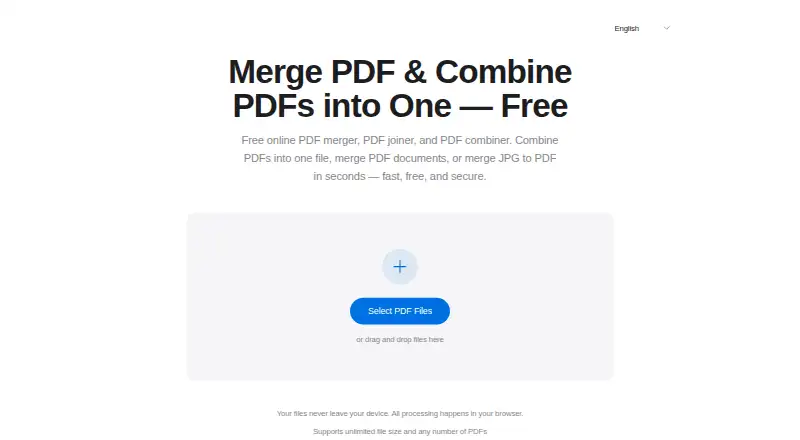
What PDFMerged is
PDFMerged combines multiple PDFs into one document in a browser. It can also include JPG, JPEG, and PNG images, and users can drag files to set their order before merging. The tool runs without installation or account sign-up, and processing takes place client-side. Its maker says files are not uploaded to or stored on its servers, and that merging preserves the original PDFs’ quality, resolution, and formatting. The free plan is listed as free, with unlimited file size and PDF count; available device memory is the practical limit. Password-protected PDFs must be unlocked before merging. The privacy policy says PDFMerged collects anonymous merge counts, language preference, basic browser information, and merge timestamps, but not IP addresses, file names, or file contents. It also says the service does not integrate third-party analytics, advertising, or tracking services. The browser tool is listed for Android, iOS, Linux, macOS, and Windows. Its terms say uninterrupted availability is not guaranteed.
Who it suits
PDFMerged suits people who want to combine PDFs or images in a browser without installing software or creating an account. It may also suit users who want processing to happen on their device.
What it does well
- Free plan allows unlimited file size and PDF count
- Drag files to set their merge order
- No installation or account sign-up required
- Processing happens client-side
What to know first
- Device memory is the practical file-count limit
- Protected PDFs must be unlocked first
- Uninterrupted access is not guaranteed
Limits
The Free plan costs nothing and allows unlimited file size and PDF count, with available device memory as the practical limit. Password-protected PDFs must be unlocked before merging.
Plans
| Plan | Billed and limits | Price |
|---|---|---|
| Free | Unlimited file size and PDF count · no watermarks · device memory is the practical limit · password-protected PDFs must be unlocked first | Free |
As pdfmerged.com lists them, read 11 Oct 2026. The maker's own page has the final word.
Getting started
- Open PDFMerged in a web browser.
- Add the PDFs and any JPG, JPEG, or PNG images to combine.
- Drag the files into the preferred order.
- Select the pages to include, if needed.
- Unlock any password-protected PDFs before merging.
- Merge the files in the browser.
PDFMerged is a browser-based utility for combining PDFs and common image files without installing software or creating an account. It is best for people who want a free, device-local merger for occasional or large batches, provided their device has enough memory and any protected documents can be unlocked first. Its broad file-count policy and privacy-oriented processing make it a strong specialist tool, while the lack of guaranteed uninterrupted access and the need to prepare password-protected PDFs limit its fit for dependent, automated workflows.
Overview
PDFMerged joins multiple PDF files into one document and can mix JPG, JPEG, and PNG images in the same merge. Drag-and-drop reordering lets you set the sequence before processing, and page selection helps omit pages you do not need. The maker says the output keeps the source PDFs’ quality, resolution, and formatting, which suits reports, invoices, scanned records, coursework, contracts, and other documents where preserving the original appearance matters.
Everything runs in a browser, with no installation and no sign-up. Client-side processing means the maker says files are not uploaded to or stored on its servers. Its privacy policy does record anonymous merge counts, language preference, basic browser information, and merge timestamps, but not IP addresses, file names, or file contents. It also says there are no third-party analytics, advertising, or tracking integrations. HTTPS is enforced, and users are advised to keep their browser and device secure.
Key features
Flexible assembly
Unlimited PDF count and unlimited file size are the headline advantages, with available device memory as the practical boundary. That is more accommodating than a fixed per-job quota, but a memory-constrained phone or older computer may become the bottleneck on very large jobs. Mixing image formats with PDFs avoids a separate conversion step, while page selection and visual reordering provide useful control over the final sequence.
Quality and document preparation
Preserving quality, resolution, and formatting is valuable for print-ready or archival material. Password-protected PDFs must be unlocked before they can be merged, so secured files add a preparation step and may require another application or the document owner’s password.
Privacy and reliability
Local processing reduces the exposure involved in sending sensitive legal, medical, financial, or personnel files to a remote server. The limited anonymous telemetry is narrower than content collection, and the absence of third-party tracking is reassuring for privacy-conscious users. However, the terms provide the service as available and do not promise uninterrupted access, so it should not be the sole dependency for time-critical production processes.
Pricing
Free: free. The plan includes unlimited file size and PDF count, no watermarks, and the device-memory limit as its only stated practical ceiling. It also includes the browser merger, image support, reordering, and page selection. There is no free trial because the service is already free, and no paid tier, renewal, seat charge, or usage quota is stated. For individuals, classrooms, small offices, and anyone merging documents occasionally, this removes the cost and account administration found in subscription tools. The trade-off is that protected PDFs still need unlocking and access is not guaranteed to be uninterrupted.
Platforms
PDFMerged is primarily a web tool and runs on Android, iOS, Linux, macOS, and Windows through a browser. That cross-platform reach is useful when files move between a phone and a computer, while the absence of a native installation keeps deployment simple. It also means the quality of the experience depends on the browser and the device’s available memory rather than on a dedicated desktop application.
Who it's for
It fits business, legal, education, personal, finance, medical, real-estate, government, tax, and human-resources document assembly, especially when files are sensitive and should remain on the device. It is a good choice for a user who needs a no-cost merger, wants to combine images and PDFs, or has a batch larger than a competing tool’s fixed allowance. Look elsewhere if your process requires guaranteed availability, cloud storage, or merging password-protected files without first unlocking them.
Pros and cons
- Pro: Unlimited file count and file size remove arbitrary per-job caps; device memory is the stated practical limit.
- Pro: PDF and JPG, JPEG, and PNG files can be combined in one output, reducing conversion work.
- Pro: Client-side processing, no account, and no server storage claim suit confidential documents.
- Pro: No watermarks and no installation keep the workflow clean and portable.
- Con: Password-protected PDFs must be unlocked before merging, adding a security-related prerequisite.
- Con: Large jobs can be constrained by the device’s available memory despite the unlimited policy.
- Con: Uninterrupted access is not guaranteed, which weakens its suitability for mission-critical dependence.
Alternatives
See PDF Merger Software for a broader shortlist. Choose HiPDF instead when you need OCR, batch processing, API or extension access, and a paid Basic plan at $39.95 a year billed annually, with a 100 MB maximum file size. PDF Candy is the better fit for a wider freemium toolkit, though its Web + Desktop Free plan imposes page and hourly restrictions, no batch processing, and limited file size. Pick PDF24 Compare PDF for a free, no-registration service with no limits or time restrictions, supported by advertising. CombinePDF suits smaller jobs capped at 20 files and 120 MB per file. CoolUtils Online PDF Merger is appropriate for up to five files per pass and 50 MB each, with JPG, PNG, and GIF support. LightPDF offers a broader freemium suite but limits its free web plan to 10 MB files and five cloud files for one year. Smallpdf is a larger toolkit with 30 free tools and a seven-day trial, rather than an unlimited specialist merger. AvePDF adds 50-plus document tools but limits its free plan to two operations per six hours, 128 MB files, and 10 files per processing.
Verdict
Choose PDFMerged if you need a free, installation-free way to assemble PDFs and images while keeping processing in the browser and avoiding watermarks, accounts, and fixed file-count quotas. Its main reason to look elsewhere is operational: password-protected files need unlocking, device memory still limits very large merges, and uninterrupted availability is not promised.
Verdict
PDFMerged offers browser-based merging with image support and no stated file-count cap beyond device memory. Unlock protected PDFs first, and keep in mind the service does not guarantee uninterrupted access.
Questions
How much does PDFMerged cost?
Its Free plan is listed as free.
Do I need to install software or sign up?
No. PDFMerged runs in a browser and does not require installation or an account sign-up.
Which platforms can I use it on?
The listed platforms are Android, iOS, Linux, macOS, web, and Windows.
Are files uploaded to PDFMerged’s servers?
The maker says processing happens client-side in the browser and files are not uploaded or stored on its servers.
What limits apply to the free plan?
File size and PDF count are unlimited; available device memory is the practical limit. Password-protected PDFs must be unlocked first.
Can it merge images with PDFs?
Yes. It can combine JPG, JPEG, and PNG images with PDFs.
Facts from PDFMerged's own pages
- Analytics
- The privacy policy says it collects anonymous counts of files merged, language preference, basic browser information, and merge timestamps, but not IP addresses, file names, or file contents. · pdfmerged.com, 11 Oct 2026
- Availability
- The terms say the service is provided as available and uninterrupted access is not guaranteed. · pdfmerged.com, 11 Oct 2026
- File count limit
- The number of PDFs is unlimited, with available device memory as the stated practical limit. · pdfmerged.com, 11 Oct 2026
- Image support
- It can combine JPG, JPEG, and PNG images with PDFs into one PDF. · pdfmerged.com, 11 Oct 2026
- Intended users
- The maker presents use cases across business, legal, education, personal, finance, medical, real estate, government, tax, and human resources. · pdfmerged.com, 11 Oct 2026
- Local processing
- PDF processing happens client-side in the browser, and the maker says files are not uploaded or stored on its servers. · pdfmerged.com, 11 Oct 2026
- No installation
- The tool runs in a browser and does not require software installation or an account sign-up. · pdfmerged.com, 11 Oct 2026
- Output quality
- The maker says merging preserves the original PDF quality, resolution, and formatting. · pdfmerged.com, 11 Oct 2026
- Protected PDFs
- Password-protected PDFs must be unlocked before merging. · pdfmerged.com, 11 Oct 2026
- Purpose
- PDFMerged combines multiple PDFs into one PDF document in a browser. · pdfmerged.com, 11 Oct 2026
- Reorder files
- Users can drag files to reorder them before merging. · pdfmerged.com, 11 Oct 2026
- Security
- The maker says its site enforces HTTPS and recommends using an updated browser and keeping the device secure. · pdfmerged.com, 11 Oct 2026
- Support
- For privacy and terms questions, the maker directs users to contact it through its GitHub repository. · pdfmerged.com, 11 Oct 2026
- Third-party services
- The privacy policy says PDFMerged does not integrate with third-party analytics, advertising, or tracking services. · pdfmerged.com, 11 Oct 2026
Where PDFMerged stands on Freedom251
- PDF Merger Software#14 of 36
- PDF mergers#9 of 23