Freedom251 › PDF Merger Software

Paperforge
What Paperforge is
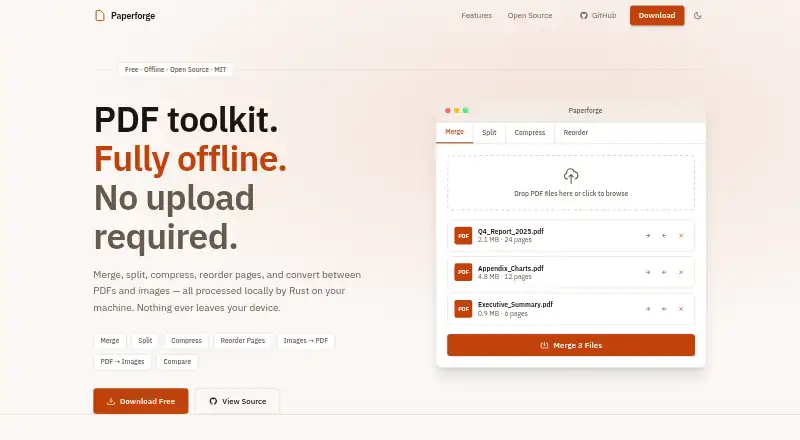
Paperforge is a free, open-source desktop toolkit for working with PDFs offline on Linux, macOS, and Windows. It can combine files, extract page ranges or individual pages, and build custom page sets. A thumbnail interface supports drag-and-drop reordering and page deletion. Users can choose compression levels from screen to printer grade, compare PDF versions in a side-by-side view, and convert between PDFs and JPG, PNG, or WebP images. Paperforge says files are processed locally with native Rust, with no uploads, tracking, or API calls. It is released under the MIT License, which permits free use, modification, and distribution. The Free plan costs nothing, requires no account, and has no subscription. Downloads are listed for Linux distributions, Apple Silicon and Intel Macs, and Windows. Building from source requires Node 18+, Rust stable, and Tauri prerequisites for the target platform. Support links include GitHub Discussions, bug reporting, and feature requests.
Who it suits
Paperforge suits people who want a free desktop PDF toolkit that processes files locally on Linux, macOS, or Windows.
What it does well
- Processes files locally
- No uploads, tracking, or API calls
- Combines, splits, and reorders PDFs
- Compares PDF versions side by side
- Available for Linux, macOS, and Windows
What to know first
- Building from source requires Node 18+
- Source builds require Rust stable
- Source builds require platform Tauri prerequisites
Plans
| Plan | Billed and limits | Price |
|---|---|---|
| Free | No account needed · No subscription | Free |
As paperforge.asyncat.com lists them, read 9 Oct 2026. The maker's own page has the final word.
Getting started
- Open the Paperforge website.
- Choose a download for Linux, macOS, or Windows.
- Select the package or build matching your system, such as Debian or Ubuntu, Fedora or RHEL, Arch Linux, Apple Silicon, Intel, or a Windows installer or executable.
- Install and open the desktop app.
- To build from source, prepare Node 18+, Rust stable, and the Tauri prerequisites for your target platform.
Verdict
Paperforge covers PDF page editing, compression, image conversion, and version comparison in an offline desktop app. Its MIT License permits free use, modification, and distribution.
Questions
How much does Paperforge cost?
The Free plan costs nothing. It has no subscription and requires no account.
Is Paperforge open source?
Yes. Paperforge is released under the MIT License, which permits free use, modification, and distribution.
Which platforms does Paperforge support?
Downloads are listed for Linux, macOS, and Windows. Options include Debian or Ubuntu, Fedora or RHEL, Arch Linux, Apple Silicon and Intel, and Windows installer or executable formats.
Does Paperforge process files online?
The product page says processing happens locally through native Rust, with no uploads, tracking, or API calls.
What can Paperforge do with PDF pages?
It can combine PDFs, extract page ranges or selected pages, reorder or delete pages, and compare versions. It can also compress PDFs and convert between PDFs and supported image formats.
What is required to build Paperforge from source?
Building from source requires Node 18+, Rust stable, and Tauri prerequisites for the target platform.
Facts from Paperforge's own pages
- Build requirements
- Building from source requires Node 18+, Rust stable, and Tauri prerequisites for the target platform. · paperforge.asyncat.com, 9 Oct 2026
- Compression
- It reduces PDF file size with selectable compression levels from screen to printer grade. · paperforge.asyncat.com, 9 Oct 2026
- Desktop platforms
- Downloads are listed for Linux, macOS, and Windows, including Debian or Ubuntu, Fedora or RHEL, Arch Linux, Apple Silicon, Intel, and Windows installer or executable options. · paperforge.asyncat.com, 9 Oct 2026
- Image conversion
- It combines JPG, PNG, and WebP images into PDFs and exports PDF pages as PNG or JPG images. · paperforge.asyncat.com, 9 Oct 2026
- License
- Paperforge is released under the MIT License, which the page says permits free use, modification, and distribution. · paperforge.asyncat.com, 9 Oct 2026
- Merge and split
- It can combine multiple PDFs and extract page ranges, individual pages, or arbitrary page sets. · paperforge.asyncat.com, 9 Oct 2026
- Network and tracking
- The product page describes the app as having no upload, no tracking, and no API calls. · paperforge.asyncat.com, 9 Oct 2026
- Offline processing
- The product page says file processing happens locally via native Rust and that no files are uploaded. · paperforge.asyncat.com, 9 Oct 2026
- Page editing
- It provides a visual drag-and-drop page thumbnail view for reordering and deleting pages. · paperforge.asyncat.com, 9 Oct 2026
- PDF comparison
- Its side-by-side diff view highlights changed, added, and removed content between PDF versions. · paperforge.asyncat.com, 9 Oct 2026
- Product
- Paperforge is a free, open-source offline PDF toolkit. · paperforge.asyncat.com, 9 Oct 2026
- Support
- The download page links to GitHub Discussions, bug reporting, and feature requests. · paperforge.asyncat.com, 9 Oct 2026
Where Paperforge stands on Freedom251
- PDF Merger Software#11 of 36