Freedom251 › Compensation Management Software
PayReview
What PayReview is
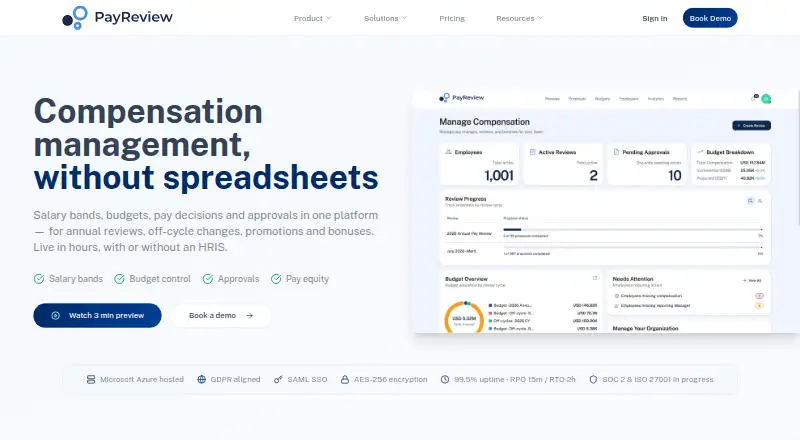
PayReview is a web platform for managing compensation decisions across annual reviews, off-cycle changes, promotions, bonuses, and one-time payments. It stores salary bands by job, level, and location, and supports employee compensation data in multiple currencies. HR, Finance, and managers can set budgets with percentage uplifts, fixed caps, merit matrices, promotion pools, and guardrails, then send decisions through configurable multi-step approvals. Dashboards track review progress and budget spend, while deadlines and reminders help teams follow the process. Employee information can be copied and pasted from Excel or Google Sheets, with field mapping, bulk editing, and validation. A team can begin a review without an HRIS integration and export results to payroll or HRIS systems afterward. PayReview generates payroll files in multiple formats, PDF reports, and personalized employee pay statements by email. Standard costs $5,000 a year and covers up to 3,000 employees, unlimited yearly pay changes, and 2–3 approval tiers. Enterprise uses custom pricing for larger organizations or advanced needs; Get Ready is an annual subscription whose billing begins on the first review date. The site states that data is hosted on Microsoft Azure, encrypted in transit and at rest, and protected by required administrative MFA.
Who it suits
PayReview is suited to HR, Finance, and managers coordinating compensation reviews and pay changes. Standard is sized for organizations up to 3,000 employees, while Enterprise is aimed at larger organizations or those with advanced needs.
What it does well
- Manage annual and off-cycle compensation decisions.
- Use salary bands across jobs, levels, and locations.
- Set budgets with caps, matrices, pools, and guardrails.
- Track review progress and spending in dashboards.
- Import employee data from Excel or Google Sheets.
- Start a review without an HRIS integration.
What to know first
- Standard costs $5,000 a year.
- No free plan is available.
- SCIM provisioning is not currently supported.
Limits
Standard is limited to organizations of up to 3,000 employees and includes 2–3 approval tiers. The Get Ready plan provides full platform access before the first review, with its annual subscription starting on the first review date.
Plans
| Plan | Billed and limits | Price |
|---|---|---|
| Standard | per year · Up to 3,000 employees · Unlimited pay changes per year · 2–3 approval tiers | $5,000 a year |
| Get Ready | Annual subscription starts on your first review date; contact PayReview about the plan. · Full platform access before first review · In-year changes, promotions, and new-hire pay | On request |
| Enterprise | Custom pricing · Over 3,000 employees or advanced needs · Custom integrations · Specific hosting locations | On request |
As payreview.com lists them, read 29 Sept 2026. The maker's own page has the final word.
Getting started
- Open https://payreview.com/ and choose a plan that fits your organization.
- Import employee data by copying and pasting from Excel or Google Sheets, or use an HRIS integration.
- Map fields, bulk edit records, and validate the imported data.
- Set review budgets and approval chains, then track progress in the dashboard.
- Export completed results to payroll or HRIS systems.
Verdict
Choose PayReview if your team needs structured compensation reviews, budget controls, approval chains, and payroll or HRIS exports. Look elsewhere if you require SCIM provisioning or a free plan; neither is available here.
Questions
Does PayReview have a free plan?
No. PayReview is a paid web platform.
How much does Standard cost?
Standard costs $5,000 a year, billed per year.
What is included in Standard?
It covers up to 3,000 employees, unlimited pay changes per year, and 2–3 approval tiers.
Can teams use it without an HRIS integration?
Yes. Teams can import data and begin a review without an HRIS integration, then export results to payroll or HRIS systems.
Which integrations are named?
HRIS examples include Workday, BambooHR, Rippling, and ADP Workforce Now. Payroll examples include ADP, Gusto, Paychex, and Rippling.
What security and compliance details does the site state?
Data is hosted on Microsoft Azure, encrypted in transit with TLS 1.2 or higher and at rest with AES-256, and administrative access requires MFA. The site states GDPR and UK GDPR alignment; SOC 2 Type II and ISO 27001 are pending.
Facts from PayReview's own pages
- Approvals and audit
- It provides configurable multi-step approval chains and exportable audit trails of changes. · payreview.com, 29 Sept 2026
- Budgeting
- Budgeting supports percentage uplifts, fixed caps, merit matrices, promotion pools, and guardrails. · payreview.com, 29 Sept 2026
- Compliance and availability
- The site states GDPR and UK GDPR alignment, says SOC 2 Type II and ISO 27001 are pending, and gives a 99.5% monthly uptime target for paid customers. · payreview.com, 29 Sept 2026
- Data import
- Employee data can be imported by copying and pasting from Excel or Google Sheets, with field mapping, bulk editing, and validation. · payreview.com, 29 Sept 2026
- Headquarters
- Denver, Colorado, United States · payreview.com, 28 Sept 2026
- Hosting locations
- Hosting defaults to the United States, with European Union hosting available to enterprise customers. · payreview.com, 29 Sept 2026
- Integrations
- The site names Workday, BambooHR, Rippling, and ADP Workforce Now as HRIS examples, and ADP, Gusto, Paychex, and Rippling as payroll examples. · payreview.com, 29 Sept 2026
- Intended users
- The site describes the product for HR, Finance, and managers, with Standard sized for organizations up to 3,000 employees and Enterprise for larger organizations or advanced needs. · payreview.com, 29 Sept 2026
- Notable limit
- SCIM provisioning is not currently supported. · payreview.com, 29 Sept 2026
- Payroll exports
- The product can generate payroll files in multiple formats, PDF reports, and personalized employee pay statements by email. · payreview.com, 29 Sept 2026
- Purpose
- PayReview is a compensation workflow platform for annual reviews, off-cycle changes, promotions, bonuses, and one-time payments. · payreview.com, 29 Sept 2026
- Reporting and tracking
- Dashboards track review progress and spend against budget, with deadlines and reminders. · payreview.com, 29 Sept 2026
- Salary bands
- It stores salary bands and ranges by job, level, and location, with employee compensation data that supports multiple currencies. · payreview.com, 29 Sept 2026
- Security
- The security page says data is hosted on Microsoft Azure, encrypted in transit with TLS 1.2 or higher and at rest with AES-256, with MFA required for administrative access. · payreview.com, 29 Sept 2026
- Standalone use
- PayReview says teams can import data and begin a review without an HRIS integration, then export results to payroll or HRIS systems. · payreview.com, 29 Sept 2026
- Support
- The Standard plan includes live chat support Monday to Friday, and the pricing page says all support is included. · payreview.com, 29 Sept 2026
Where PayReview stands on Freedom251
- Compensation Management Software#15 of 24
- Pay Transparency Software#27 of 36