Freedom251 › Payment Link Software
Pay. Pay by Link
What Pay. Pay by Link is
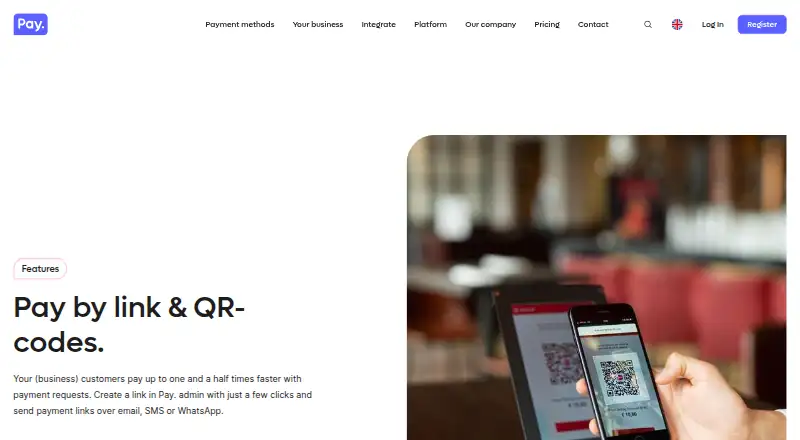
Pay. Pay by Link lets merchants request payment through shareable links or QR codes, for uses including prepayments, business invoices, and payment reminders. Links can be sent by email, SMS, or a merchant’s own channels such as WhatsApp; QR codes can be placed on receipts or invoices. Merchants can choose an expiry date and time for a payment request, while the dynamic link module also supports links that remain valid indefinitely. Dynamic links can accept fixed, minimum, maximum, or free amounts, selected payment methods, and up to three optional fields. Payment pages can use the merchant’s brand style, and customers pay using methods available on the merchant’s sales channels. Pay. lists more than 90 integrations, plugins for more than 20 webshop systems, and custom API integrations. The free Pioneer plan has no monthly charge, but adds €0,05 per transaction and 0,25% of turnover to Professional transaction rates. Professional costs €35 per month plus transaction fees. The service lists Android, iOS, web, and API platforms.
Who it suits
Pay. Pay by Link suits merchants who need to collect payments for invoices, prepayments, or reminders without relying only on a checkout page. It also fits businesses wanting shareable requests, QR codes, or configurable amounts and fields.
What it does well
- Payment requests can be shared by email, SMS, or WhatsApp.
- QR codes can be added to receipts and invoices.
- Dynamic links support flexible amounts and up to three fields.
- Payment pages can use merchant branding.
- More than 90 integrations are listed.
What to know first
- Pioneer charges transaction fees plus €0,05 and 0,25% of turnover.
- Professional costs €35 per month plus transaction fees.
- There is no free trial.
Limits
Pioneer has no monthly charge, but uses Professional transaction rates plus €0,05 per transaction and 0,25% of turnover. Professional costs €35 per month plus transaction fees; Business costs €89 per month plus transaction fees. Premium pricing is by quote.
Plans
| Plan | Billed and limits | Price |
|---|---|---|
| Pioneer | No monthly charges; pay per transaction, with Professional transaction rates plus €0,05 per transaction and 0,25% of turnover. · No setup fees · cancel anytime | Free |
| Professional | €35 per month, plus transaction fees. · 50+ payment methods · basic chat, email and phone support · free testing included | €35 a month |
| Business | €89 per month, plus transaction fees. · For organizations with annual revenues starting from €2.5 million · personal account manager · service level agreement | €89 a month |
| Premium | Request a quote. · For organizations with annual revenues starting from €25 million · specialized industries · priority support | On request |
As pay.nl lists them, read 30 Sept 2026. The maker's own page has the final word.
Getting started
- Open the Pay. Pay by Link website.
- Choose Pioneer, Professional, Business, or request a Premium quote.
- Create payment links in Pay. admin, or create QR codes for payment requests.
- Configure amount options, payment methods, and optional fields for dynamic links, and choose an expiry for a payment request as needed.
- Share the link by email, SMS, or another channel, or use the QR code on a receipt or invoice.
Pay. Pay by Link lets merchants collect payments through shareable requests and QR codes. It suits businesses that need to take payment beyond a standard checkout, particularly for invoices, prepayments and reminders. The Pioneer plan has no monthly fee, but transaction charges still apply.
Overview
Merchants create requests in Pay.’s admin and share them by email, SMS or channels such as WhatsApp. They can also put QR codes on receipts or invoices, giving customers another way to reach a payment page. That makes the feature practical for businesses that need to prompt payment in person or outside their usual webshop flow.
Payment pages can use the merchant’s brand style, and customers pay with methods available through that merchant’s sales channels. The options are therefore connected to the merchant’s existing payment setup. For more control over a request, dynamic links can specify a fixed, minimum, maximum or freely chosen amount, select payment methods and include up to three optional fields.
Pay. draws a distinction between a dynamic link, which can remain valid indefinitely, and a payment request that its sender can set to expire at a chosen date and time. Merchants should choose the configuration that fits whether a request is intended for reuse or for a limited payment window.
Key features
- Links and QR codes: Share requests digitally or place a QR code on an invoice or receipt. This is useful when customers need a direct payment route without a conventional checkout.
- Configurable requests: Set amount rules, select payment methods and add up to three optional fields. That offers useful flexibility for varied requests, though it is a focused payment tool rather than a full checkout-building feature.
- Integrations and APIs: Pay. reports more than 90 integrations, plugins for over 20 webshop systems and custom integrations through APIs. These options can help merchants connect payment collection to existing systems.
- Mobile app and support: Pay. says its free app provides insight into webshop or website payment traffic from any location, and its team is available 24/7 to support payment receipt and processing.
- Security and data: Pay. states that it is PCI-DSS certified, processes data according to GDPR, holds ISAE 3402 and ISO 27001:2022 certifications, and stores data in Dutch data centers while collecting only what is needed to process payments.
Pricing
Pay. is freemium, with plans charging transaction fees in addition to any monthly subscription. The free Pioneer plan has no monthly charges or setup fees and can be cancelled anytime, but it uses Professional transaction rates plus €0.05 per transaction and 0.25% of turnover. It is the lowest-commitment option, but those extra charges matter for merchants processing frequent or high-value payments.
- Pioneer — free: No monthly charge; pay per transaction. Best for merchants who want to start without a subscription and can weigh the added transaction charges against their payment volume.
- Professional — €35 per month, plus transaction fees: Includes 50+ payment methods, basic chat, email and phone support, and free testing. It is the clearest fit for businesses that need broader payment-method coverage and support, though the monthly charge makes it less suitable for occasional use.
- Business — €89 per month, plus transaction fees: Aimed at organizations with annual revenues starting from €2.5 million, with a personal account manager and service level agreement. The higher fee is tied to those larger-business services rather than just link creation.
- Premium — custom pricing: For organizations with annual revenues starting from €25 million and specialized industries; includes priority support. This is for larger or more specialized operations, not a straightforward low-cost option.
There is no free trial. Recurring payments are supported, but the listed plans do not give a separate recurring-payment quota or cap.
Platforms
Pay. Pay by Link is available on Android, iOS, web and API. The free mobile app provides payment-traffic insight; merchants can also use APIs for custom integrations.
Who it's for
This is a sensible choice for merchants who need branded payment requests, configurable amounts and ways to share them beyond a standard online checkout. The combination of links, QR codes and integrations can serve invoices, prepayments and reminders. Businesses with sporadic payment needs may prefer to avoid a monthly plan, while those processing more payments should compare the Pioneer transaction charges with Professional’s monthly fee and transaction fees.
Pros and cons
- Pro: Links can be shared by email, SMS or channels such as WhatsApp, and QR codes extend them to printed invoices and receipts.
- Pro: Amount rules, selected payment methods and up to three optional fields allow merchants to tailor requests without giving up reusable dynamic links.
- Pro: The Pioneer plan has no monthly charge or setup fee, so merchants can use the service without a subscription commitment.
- Con: Pioneer adds €0.05 per transaction and 0.25% of turnover to Professional transaction rates, so no monthly fee does not mean fee-free processing.
- Con: Payment methods depend on those available through the merchant’s sales channels, so the link does not independently guarantee a particular selection.
- Con: Professional and Business add recurring monthly costs on top of transaction fees; there is no free trial to evaluate a paid plan first.
Alternatives
For a broader comparison of dedicated tools, see Payment Link Software.
- Checkout.com is worth considering for registered charities, which have a free payment-processing plan in countries where it operates; its other pricing is tailored.
- Dojo may suit merchants looking for a freemium option with a free trial and an Essential plan that includes core tools, major card types, real-time transactions and PCI-compliance support.
- HitPay Payment Links suits merchants who want no setup or monthly fee and can work with a 0.2% Payment Links fee plus the payment-method processing fee.
- Mollie offers pay-as-you-go pricing with no contract or commitment, which may suit businesses preferring a transaction-based approach over Pay.’s paid monthly tiers.
- PayPal Invoicing is a relevant alternative when the priority is creating and sending invoices without setup or subscription fees; transaction fees apply when customers pay.
- SumUp Payment Links is another no-monthly-cost option, with a 2.50% transaction fee.
- Cashfree Payment Links charges nothing for link creation and reminders, while standard Payment Gateway charges still apply.
- DonoLink is an alternative for donation pages and overlays, with a 3.5% fee per donation plus Stripe processing fees.
Verdict
Choose Pay. Pay by Link if your business needs branded, configurable payment requests that can be sent digitally or shared as QR codes, with integrations for existing payment operations. Its main limitation is cost structure: Pioneer still carries additional transaction charges, while paid plans add monthly fees on top of transaction costs. Merchants who need occasional requests should compare that usage against pay-as-you-go alternatives; larger businesses may find the account management and service terms of higher tiers more relevant.
Verdict
Pay. Pay by Link offers several ways to send payment requests and configure what customers pay. The free Pioneer plan has no monthly charge but still includes transaction-based charges.
Questions
Is Pay. Pay by Link free?
The Pioneer plan has no monthly charge, but transaction fees apply: Professional rates plus €0,05 per transaction and 0,25% of turnover.
What does Professional cost?
Professional is €35 per month plus transaction fees.
Which platforms are supported?
The listed platforms are Android, iOS, web, and API.
Can payment requests expire?
A sender can choose an expiry date and time. A dynamic payment link can also remain valid indefinitely.
What payment methods can customers use?
Customers can use payment methods available on the merchant’s sales channels.
What integrations are available?
Pay. lists over 90 integrations, plugins for over 20 webshop systems, and custom integrations through APIs.
Facts from Pay. Pay by Link's own pages
- Branding and use cases
- Payment pages can use the merchant’s brand style, and Pay. describes the feature as useful for prepayments, business invoices and payment reminders. · pay.nl, 30 Sept 2026
- Data storage
- Pay. says data is stored in Dutch data centers and that it collects only data needed to process payments. · pay.nl, 30 Sept 2026
- Expiry
- The sender can choose the date and time when a payment request expires. · pay.nl, 30 Sept 2026
- Founded
- 2011 · pay.nl, 28 Sept 2026
- Headquarters
- Spijkenisse, Netherlands · pay.nl, 28 Sept 2026
- Integrations
- Pay. says it has over 90 integrations, offers plugins for over 20 webshop systems, and supports custom integrations through APIs. · pay.nl, 30 Sept 2026
- Link configuration
- The dynamic link module supports fixed, minimum, maximum or free amounts, selected payment methods, and up to three optional fields. · support.pay.nl, 30 Sept 2026
- Link duration
- A dynamic payment link remains valid indefinitely, while the product page also describes choosing an expiry for a payment request. · support.pay.nl, 30 Sept 2026
- Mobile apps
- Pay. says its app provides insight into webshop or website payment traffic from any location and identifies the app as free. · pay.nl, 30 Sept 2026
- Operating history and reach
- Pay. says it has worked on its payment platform since 2011 and that more than 35,000 businesses in Europe rely on its online and in-store payment solutions. · pay.nl, 30 Sept 2026
- Payment links
- Merchants create payment links in Pay. admin and can share them with customers by email, SMS or their own channels such as WhatsApp. · pay.nl, 30 Sept 2026
- Payment methods
- Customers can pay through links using the payment methods available on the merchant’s sales channels. · pay.nl, 30 Sept 2026
- QR codes
- Merchants can create QR codes for payment requests on receipts or invoices. · pay.nl, 30 Sept 2026
- Security and compliance
- Pay. states that it is PCI-DSS certified, processes data according to GDPR, holds ISAE 3402 certification, and has ISO 27001:2022 certification. · pay.nl, 30 Sept 2026
- Support
- Pay. says its team is available 24/7 to support merchants with receiving and processing payments. · pay.nl, 30 Sept 2026
Where Pay. Pay by Link stands on Freedom251
- Payment Link Software#9 of 32