Freedom251 › Payment Link Software
Jim Payment Link
What Jim Payment Link is
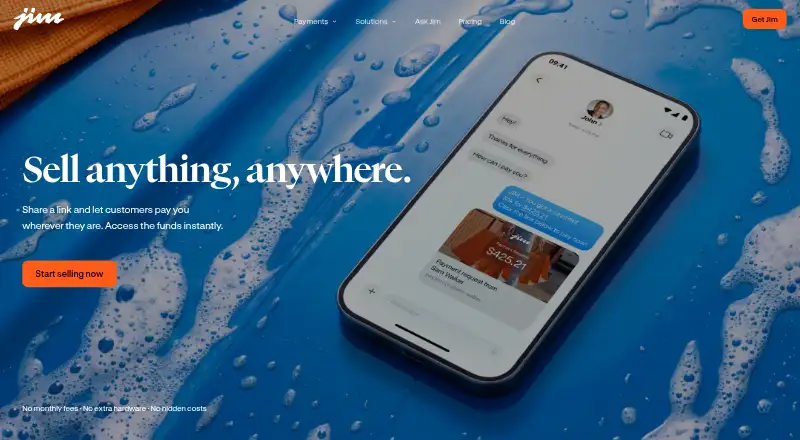
Jim Payment Link lets sellers request remote payment through a checkout link. In the Jim app, a seller enters the sale amount, selects Payment Link, and shares the generated URL by text, email, direct message, or another messaging app. Customers can pay without installing Jim or opening an account. Supported methods include debit cards, credit cards, Apple Pay, and digital wallets. The minimum sale is $1, and proceeds become available in the seller’s Jim balance within seconds. Jim lists a free plan, with a processing charge of 4.99% + $0.30 per sale and no monthly fee. Profit Booster can add that processing fee to the customer’s total, allowing the seller to retain the sale amount. Jim says links use end-to-end encryption, real-time fraud prevention, and PCI-compliant handling. Some card payments may trigger 3D Secure verification from the customer’s bank. The service runs on Android and iOS and is aimed at independent sellers and micro-entrepreneurs in the United States.
Who it suits
It suits independent sellers and micro-entrepreneurs in the United States who need remote checkout links. Android and iOS users can accept cards and wallets without requiring customers to install an app.
What it does well
- Free plan available
- Customers need no account or app
- Cards, Apple Pay, and wallets supported
- Payouts available within seconds
- Android and iOS support
What to know first
- 4.99% + $0.30 charged per sale
- $1 minimum sale amount
- Some card payments require 3D Secure
Limits
There is no monthly fee, but each sale is charged 4.99% + $0.30 and must be at least $1. Profit Booster can add the processing fee to the customer’s total instead.
Plans
| Plan | Billed and limits | Price |
|---|---|---|
| Jim account | No monthly fee · Seller approval required · Tap to Pay 1.99% per sale · Payment Link 4.99% + $0.30 per sale · Same Day ACH 1.99% + $0.99 per transfer | Free |
| Jim Payment Link | 4.99% + $0.30 per sale · No monthly fees · $1 minimum sale | On request |
| Payment Link transaction | Per sale · $1 minimum sale · Card and digital-wallet checkout · Optional fee pass-through · Optional tips, sales tax, descriptions and reusable links | On request |
As jim.com lists them, read 15 Oct 2026. The maker's own page has the final word.
Getting started
- Install Jim on Android or iOS
- Enter the sale amount in the Jim app
- Choose Payment Link
- Share the generated link by text, email, direct message, or messaging app
- Let the customer pay through the link
Verdict
Jim Payment Link provides a straightforward way to send payment requests remotely. Its free plan and broad customer payment options are balanced by a per-sale processing charge and a $1 minimum.
Questions
Is Jim Payment Link free?
Jim lists a free plan with no monthly fees. Each sale is billed 4.99% + $0.30.
What payment methods can customers use?
Customers can pay with debit cards, credit cards, Apple Pay, or digital wallets.
Do customers need a Jim account?
No. They can pay through the link without downloading Jim or creating an account.
How quickly are sellers paid?
Payment Link sales become available in the seller’s Jim balance within seconds.
What is the minimum sale?
The minimum Payment Link sale amount is $1.
Is Jim Payment Link secure?
Jim says Payment Links use end-to-end encryption, real-time fraud prevention, and PCI compliance. Some card payments may also require bank-requested 3D Secure verification.
Facts from Jim Payment Link's own pages
- ACH cash-out
- Jim offers optional Same Day ACH transfers to a U.S. bank for 1.99% plus $0.99 per transfer, with a $15 minimum. · help.jim.com, 15 Oct 2026
- AI assistant
- Jim’s home page presents an AI partner that answers questions about sales performance, cash-flow progress and nearby selling opportunities. · jim.com, 15 Oct 2026
- Bookings feature
- Jim Bookings lets customers choose a service and appointment time through the Jim Website, pay a deposit and receive automatic reminders. · play.google.com, 15 Oct 2026
- Card restrictions
- The virtual Jim Card cannot be used for ATM withdrawals, peer-to-peer apps such as Venmo, Zelle or Cash App, or certain restricted merchant categories. · help.jim.com, 15 Oct 2026
- Company founded and headquarters
- CloudWalk, Inc. is listed on LinkedIn as founded in 2013 and headquartered in São Paulo, Brazil. · linkedin.com, 15 Oct 2026
- Company legal name
- Jim’s merchant agreement identifies CloudWalk Inc. as the legal contracting entity behind Jim.com. · jim.com, 15 Oct 2026
- Company size and funding
- CloudWalk’s LinkedIn profile lists 501–1,000 employees and says the company has raised more than $365 million since founding. · linkedin.com, 15 Oct 2026
- Customer checkout
- Customers can pay from a link with card details or Apple Pay, Google Pay or Samsung Pay without installing Jim or creating an account. · jim.com, 15 Oct 2026
- Customer setup
- Customers can pay through the link without downloading the Jim app or creating an account. · jim.com, 7 Oct 2026
- Device requirements
- The app requires an iPhone or Android phone with NFC, current software, a data connection and no jailbreak or root modification. · help.jim.com, 15 Oct 2026
- Extra verification
- For some card payments, the customer’s bank may request 3D Secure verification. · help.jim.com, 7 Oct 2026
- Fee pass-through
- The seller can choose whether Jim adds the processing fee to the customer’s total or deducts it from the seller’s payout. · help.jim.com, 15 Oct 2026
- Founded
- 2013 · jim.com, 28 Sept 2026
- Geographic restriction
- Tap to Pay transactions must be processed within U.S. territory, while Jim Card purchases can be made worldwide. · help.jim.com, 15 Oct 2026
- Google Calendar integration
- With OAuth consent, Jim synchronizes appointments with Google Calendar and lets its Jim Chat assistant view, create, edit and delete calendar events. · jim.com, 15 Oct 2026
- Headquarters
- Sunnyvale, California, United States · jim.com, 28 Sept 2026
- How to create a link
- Sellers enter a sale amount in the Jim app, choose Payment Link, and share the generated link. · jim.com, 7 Oct 2026
- Instant balance
- Approved Payment Link sales are credited to the seller’s Jim balance within seconds. · help.jim.com, 15 Oct 2026
- Intended users
- Jim describes its audience as independent sellers and micro-entrepreneurs in the United States. · help.jim.com, 7 Oct 2026
- Jim Card
- Sales fund a free virtual Visa prepaid Jim Card that can be added to Apple Wallet or Google Wallet and used online at Visa-accepting merchants. · help.jim.com, 15 Oct 2026
- Licence and self-hosting
- Jim’s terms say its software, source code and other materials are protected intellectual property and prohibit reverse engineering, indicating a proprietary hosted service rather than open-source software. · jim.com, 15 Oct 2026
- Limit: account reviews and frozen balances
- BBB complaints describe accounts being placed under review with balances temporarily inaccessible while additional documentation was requested. · bbb.org, 15 Oct 2026
- Limit: feature gaps
- An independent payment review says Jim lacks important capabilities expected from a fuller mobile payment system. · paymentpop.com, 15 Oct 2026
- Limit: restricted access to funds
- Trustpilot reviewers complain that the virtual card cannot be used at ATMs or peer-to-peer services and that bank transfers are not instant. · ca.trustpilot.com, 15 Oct 2026
Where Jim Payment Link stands on Freedom251
- Payment Link Software#8 of 32