Freedom251 › WordPress page builders
Pagelayer
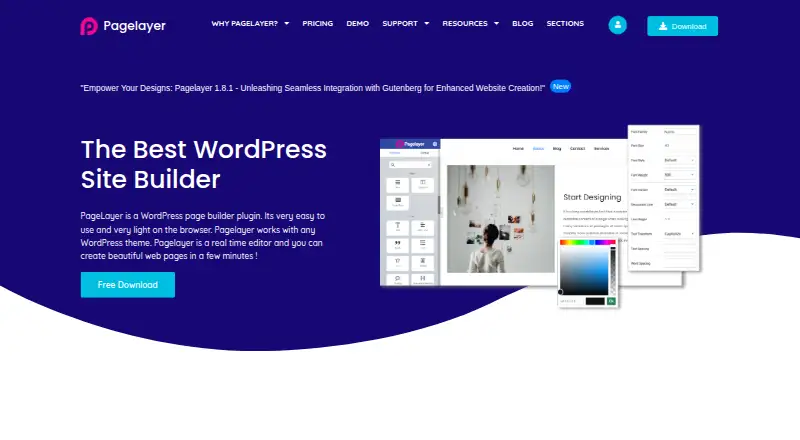
What Pagelayer is
Pagelayer is a WordPress page builder plugin with a real-time editor that works with any WordPress theme. Its visual editing tools include drag-and-drop widgets, inline text editing, responsive design mode, and revision, undo, and redo controls. Design options include animations, image filters, icon sets, Google Fonts, styling controls, shadows, borders, padding, and margins. The free widget selection covers content, media, layout, social, and map tools; PRO adds items such as contact forms, pricing tables, and sliders. Other features include a theme builder, responsive controls, a popup builder, and WooCommerce tools. Row backgrounds can use YouTube or Vimeo video, and the widgets list includes WooCommerce widgets and pages. A free version is available through the WordPress Plugin directory. Paid Personal, Professional, and Business plans cost $39 a month, $75 a month, and $199 a month respectively. They cover one site, five sites, and unlimited sites. Paid licenses include lifetime plugin access, while service, updates, and support are restricted to one year. Pagelayer offers support tickets and forums.
Who it suits
It suits WordPress site owners who want to edit pages visually and build responsive layouts. The paid plans differentiate by whether the license covers one site, five sites, or unlimited sites.
What it does well
- Works with any WordPress theme
- Includes drag-and-drop widgets and inline text editing
- Free widgets cover content, media, layout, social, and maps
- Provides theme, popup, and WooCommerce tools
What to know first
- Paid plans limit service, updates, and support to one year
- Personal plan covers one site
- Professional plan covers five sites
Limits
The free widget list covers content, media, layout, social, and map widgets; PRO adds items such as contact forms, pricing tables, and sliders. Paid plans include lifetime access to the plugin, but service, updates, and support are restricted to one year. Personal covers one site, Professional five sites, and Business unlimited sites.
Plans
| Plan | Billed and limits | Price |
|---|---|---|
| Free | Free version from WordPress Plugin directory | Free |
| Business | Lifetime plugin access; support and updates for 1 year · Unlimited sites · 60+ Pro widgets · Theme Builder · Theme Exporter | $199, paid once |
| PopularFX Business | Per year · All sites · 350+ templates · Pagelayer Pro included · 60+ Pro widgets · 1-year support and updates | $249 a year |
| Personal | Lifetime plugin access; support and updates for 1 year · 1 site · 60+ Pro widgets · Theme Builder · Theme Exporter | $39, paid once |
| PopularFX Personal | Per year · 1 site · 350+ templates · Pagelayer Pro included · 60+ Pro widgets · 1-year support and updates | $59 a year |
| Professional | Lifetime plugin access; support and updates for 1 year · 5 sites · 60+ Pro widgets · Theme Builder · Theme Exporter | $75, paid once |
| PopularFX Professional | Per year · 5 sites · 350+ templates · Pagelayer Pro included · 60+ Pro widgets · 1-year support and updates | $89 a year |
As pagelayer.com lists them, read 15 Oct 2026. The maker's own page has the final word.
Getting started
- Open the Pagelayer website or find its free download in the WordPress Plugin directory.
- Install the plugin on a WordPress site.
- Use the real-time editor with drag-and-drop widgets and inline text editing.
- Choose a free plan or a paid license based on the number of sites you need.
- Use responsive mode and the design controls to adjust the page.
Overview
Pagelayer is a WordPress page-builder plugin with a real-time visual editor that works with any WordPress theme. It suits people building or refining WordPress pages who want visual controls plus tools for themes, popups, and WooCommerce. Its free version is a useful starting point; paid plans add widgets and cover more sites, but their one-year service, update, and support term deserves attention.
Key features
Pagelayer’s drag-and-drop widgets, inline text editing, and responsive design mode let users adjust page content and layouts visually. Revision, undo, and redo controls help when changes need to be reconsidered. Responsive controls are valuable for adapting a design across screen sizes, while the builder’s compatibility with any WordPress theme gives it room to fit into an existing site.
Styling includes animations, image filters, icon sets, Google Fonts, shadows, borders, padding, and margins. That is a broad set of presentation controls for page work, though the feature list does not establish how those controls compare in depth with other builders.
The free widget selection spans content, media, layout, social, and map elements. PRO adds widgets such as contact forms, pricing tables, and sliders, which makes paid access more relevant for sites that need those components. Row backgrounds can use YouTube or Vimeo video, and WooCommerce widgets and pages support store-related layouts. Theme and popup builders extend its remit beyond individual page sections.
Pricing
Pagelayer uses a freemium model. The Free plan costs nothing and can be downloaded from the WordPress Plugin directory. It is the sensible way to start, but the free widget set does not include some PRO examples such as contact forms, pricing tables, and sliders.
| Plan | Price | Site limit | What it means |
|---|---|---|---|
| Personal | $39 a month | 1 site | Paid plugin access for a single site. |
| Professional | $75 a month | 5 sites | A fit for users managing several sites. |
| Business | $199 a month | Unlimited sites | For users deploying the plugin across an unrestricted number of sites. |
Each paid license includes lifetime access to the plugin, but service, updates, and support are restricted to one year. The listed monthly prices therefore should not be read as a promise of lifetime updates or support. Personal is capped at one site; Professional raises that to five; Business removes the site cap. Choose by site count and the value of the added PRO widgets, not on the assumption that paid service continues indefinitely.
Platforms
Pagelayer is for self-hosted WordPress sites and is also categorized for web use. Its WordPress plugin-directory download provides a route to the free version. The builder’s WordPress focus makes it a poor fit for someone seeking a standalone, platform-independent site editor.
Who it's for
Pagelayer is best suited to WordPress users who want to visually edit pages and also need theme, popup, or WooCommerce tools. A single-site owner can begin with Free and move to Personal if PRO widgets matter. Agencies or multi-site operators should weigh Professional or Business against the one-year service and support restriction. Users who do not need the additional widgets or broader site coverage may have little reason to pay.
Pros and cons
- Pros: Works with any WordPress theme, giving users flexibility when adding a visual builder to an existing site.
- Pros: Combines responsive editing, undo/redo, theme building, popups, and WooCommerce tools in one WordPress-focused product.
- Pros: A free version and a range of free widget categories make it possible to start without a paid license.
- Cons: Paid plans restrict service, updates, and support to one year even though plugin access is described as lifetime.
- Cons: The Personal plan covers only one site, while multi-site users must pay for a higher tier.
- Cons: Contact forms, pricing tables, and sliders are examples of PRO widgets, so users needing them cannot rely on the free widget selection alone.
Alternatives
Explore WordPress page builders for a broader set of options. Choose Breakdance instead if an unlimited-website free plan with 80 elements and basic WooCommerce, form, popup, and dynamic features better fits your needs.
Visual Composer offers a free plan with 50+ elements and templates, while its Single plan is $49 a year for one website, 300+ content elements, and 200+ templates; consider it if those published content and template counts suit your work. Zion Builder is another free option, with a visual editor, 50+ core elements, 50+ free blocks, and 10+ free library templates, and it also offers a free trial.
Themify Builder has a free standalone WordPress plugin that works with third-party themes, making it an alternative for users seeking that combination. Elementor is another freemium self-hosted and web option. Brizy AI is worth considering if its AI Builder and premium AWS hosting are priorities; its Personal plan is $19 a month for one website and includes a free trial.
BoldGrid Post and Page Builder offers a free plan with no time limitations, drag-and-drop editing, responsive layouts, blocks, widgets, and page templates, a fit for users seeking those basics in a self-hosted builder. SiteOrigin Page Builder is another freemium self-hosted and web option.
Verdict
Choose Pagelayer if you want a WordPress visual editor that can also handle themes, popups, and WooCommerce, and its free widget set covers your needs or PRO fills a specific gap. Its any-theme compatibility and site-count tiers are practical strengths. Look elsewhere if ongoing updates and support beyond one year are central to your decision, or if the free widgets are too limited for the pages you need to build.
Verdict
Pagelayer offers visual page editing alongside theme, popup, and WooCommerce tools. Its free version provides a starting point, while the paid plans expand widget options and site coverage.
Questions
Is Pagelayer free?
Yes. Its free version is available from the WordPress Plugin directory.
How much do paid plans cost?
Personal is $39 a month for one site, Professional is $75 a month for five sites, and Business is $199 a month for unlimited sites.
What do paid licenses include?
Paid plans include lifetime access to the plugin. Service, updates, and support are restricted to one year.
Does Pagelayer work with any WordPress theme?
Yes. Pagelayer is described as a WordPress page builder plugin and real-time editor that works with any WordPress theme.
Does it include WooCommerce tools?
Yes. Pagelayer lists WooCommerce tools, widgets, and pages.
How can users get support?
Pagelayer offers support tickets and support forums.
Facts from Pagelayer's own pages
- Active installations
- WP Beacon reports more than 400,000 active installations. · wpbeacon.io, 15 Oct 2026
- API and SDK documentation
- The official documentation index does not list a public API or SDK section. · pagelayer.com, 15 Oct 2026
- Company founding and size
- Softaculous Ltd. says it was founded in 2009, incorporated in 2010 and has more than 70 team members. · softaculous.org, 15 Oct 2026
- Company funding
- Softaculous Ltd. states that it is bootstrapped, with no venture capital or debt and $0 funding raised. · softaculous.org, 15 Oct 2026
- Company history
- The About page says founder Pulkit Gupta began full development of Pagelayer in April 2019 and launched it soon afterward. · pagelayer.com, 3 Oct 2026
- Contact locations
- Pagelayer lists Electron Technologies FZC in UAQ Free Trade Zone, UAE and an office in Mumbai, India. · pagelayer.com, 15 Oct 2026
- Design tools
- Design options include animations, image filters, icon sets, Google Fonts, styling controls, shadows, borders, padding, and margins. · pagelayer.com, 3 Oct 2026
- Documentation depth
- The documentation index lists installation, getting-started, settings, theme and popup builders, custom fonts, global widgets and 36 widget articles. · pagelayer.com, 15 Oct 2026
- Downloads
- WP Beacon reports 9,450,166 total downloads. · wpbeacon.io, 15 Oct 2026
- Drag-and-drop editing
- Pages are assembled by dragging widgets into the design. · pagelayer.com, 15 Oct 2026
- Free plan
- Yes · pagelayer.com, 22 Sept 2026
- Headquarters
- The contact page lists addresses in UAQ FTZ, UAE, and Mumbai, India; the site does not specify which is headquarters. · pagelayer.com, 3 Oct 2026
- Inline editing
- Text can be changed directly by clicking it and typing. · pagelayer.com, 15 Oct 2026
- Integrations
- Site settings provide fields for Facebook SDK App ID and social-profile links, while video backgrounds support YouTube and Vimeo. · pagelayer.com, 15 Oct 2026
- Latest maker release
- Pagelayer 2.1.4, dated July 8, 2026, improved the builder UI, added Ctrl+K widget search and fixed PHP warnings. · pagelayer.com, 15 Oct 2026
- Licence
- The public plugin repository identifies Pagelayer as LGPL version 2.1 software. · github.com, 15 Oct 2026
- Limit: editor reliability
- A support report describes a blank editor canvas after reinstalling version 2.1.4, with an unresolved srcset placeholder causing a 404. · wordpress.org, 15 Oct 2026
- Limit: support responsiveness
- A WordPress reviewer reported that support did not respond for a month after a WordPress update broke Pagelayer. · en-ca.wordpress.org, 15 Oct 2026
- Maker relationship
- Pagelayer identifies itself as created by the Softaculous Auto Installer and PopularFX team. · pagelayer.com, 15 Oct 2026
- Open-source status
- WordPress.org describes the plugin as open-source software and links to its code and SVN repository. · wordpress.org, 15 Oct 2026
- Popup Builder
- Popup templates support load, scroll, element-scroll, exit-intent and click triggers with timing and overlay controls. · pagelayer.com, 15 Oct 2026
- Praise: ease of use
- WordPress reviewers repeatedly describe Pagelayer as easy, user-friendly, responsive and helpful for building pages. · wordpress.org, 15 Oct 2026
- Privacy
- The privacy policy says it collects registration details and technical data, uses cookies to personalize experience, and does not sell, rent, or lease customer lists. · pagelayer.com, 3 Oct 2026
- Product
- Pagelayer is a WordPress page builder plugin and real-time editor that works with any WordPress theme. · pagelayer.com, 3 Oct 2026
Where Pagelayer stands on Freedom251
- WordPress page builders#2 of 32