Freedom251 › WordPress page builders
BoldGrid Post and Page Builder
What BoldGrid Post and Page Builder is
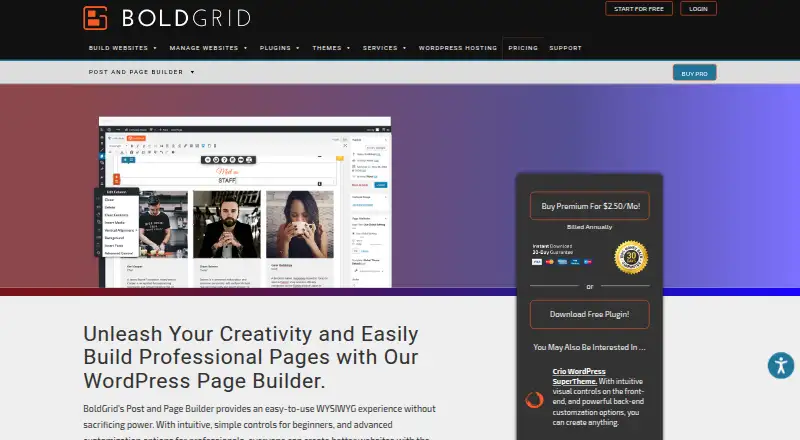
BoldGrid Post and Page Builder is a WordPress plugin for creating and editing pages and posts in a drag-and-drop visual editor. Users can adjust reusable blocks visually or with HTML and CSS, and control whether blocks, rows, and columns appear on different devices. Design tools include Google Fonts, Font Awesome icons, image filters and shapes, backgrounds, animations, and parallax effects. It integrates Google Maps and works with WordPress audio playlists and video URLs. The plugin is designed to work with any WordPress theme, while BoldGrid themes provide additional optimized features. It avoids shortcodes, and disabling it does not break the site. A free plan includes editing, responsive layouts, blocks, widgets, and page templates. Premium costs $2.50 a month, billed annually, and adds premium blocks, sliders, tabs, and premium support. There is no free trial. Minimum requirements are PHP 7.4 or greater and WordPress 4.7 or greater.
Who it suits
The builder suits WordPress users who want visual page and post editing, from beginners to professionals. It may also suit people who need responsive visibility controls or reusable blocks they can edit with code.
What it does well
- Free plan includes blocks, widgets, and page templates
- Responsive controls for blocks, rows, and columns
- Works with any WordPress theme
- Deactivation does not break the site
What to know first
- No free trial
- Premium costs $2.50 a month, billed annually
- Requires PHP 7.4 or greater and WordPress 4.7 or greater
- No theme builder or popup builder
Limits
The free plan includes drag-and-drop editing, responsive layouts, blocks, widgets, and page templates. Premium costs $2.50 a month billed annually and adds premium blocks, sliders, tabs, and premium support; its use is limited to sites directly owned by the purchaser or their company.
Plans
| Plan | Billed and limits | Price |
|---|---|---|
| Free | No time limitations on free access · Drag-and-drop editing · Responsive layouts · Blocks · Widgets · Page templates | Free |
| Premium | Billed annually · Premium blocks · Sliders · Tabs · Premium support | $2.50 a month |
| Post and Page Builder Free | Billed annually · Free download | Free |
| Post and Page Builder Premium | Billed annually · Premium Blocks · Sliders · Tabs · Premium Support | $2.50 a month |
As boldgrid.com lists them, read 22 Sept 2026. The maker's own page has the final word.
Getting started
- Visit the BoldGrid Post and Page Builder website.
- Confirm the site meets the PHP 7.4 or greater and WordPress 4.7 or greater requirements.
- Install the plugin from the WordPress plugin directory or upload it to wp-content/plugins.
- Start with the free plan, or choose Premium at $2.50 a month billed annually.
Verdict
BoldGrid provides visual editing and responsive controls for WordPress pages and posts, with a free plan and an annual-billed Premium option. Check its minimum software requirements before installing.
Questions
Is there a free plan?
Yes. The free plan includes drag-and-drop editing, responsive layouts, blocks, widgets, and page templates, with no time limitation on free access.
How much does Premium cost?
Premium is $2.50 a month, billed annually. It adds premium blocks, sliders, tabs, and premium support.
Is there a free trial?
No, a free trial is not available.
Which platform does it support?
It is a WordPress plugin for self-hosted sites. The listed minimum requirements are PHP 7.4 or greater and WordPress 4.7 or greater.
Does it work with any WordPress theme?
It is designed to work with any WordPress theme. BoldGrid themes provide additional optimized features.
Can Premium be used on any website?
Premium may be used on websites directly owned by the purchaser or the purchaser’s company.
Facts from BoldGrid Post and Page Builder's own pages
- Audience
- BoldGrid says the product was created for both beginners and professionals. · boldgrid.com, 28 Sept 2026
- Blocks
- Blocks are pre-built page elements that can be edited visually or through HTML and CSS, then saved and reused. · boldgrid.com, 28 Sept 2026
- Deactivation behavior
- Disabling the plugin does not break the site because the builder does not rely on shortcodes. · boldgrid.com, 28 Sept 2026
- Design tools
- The builder includes Google Fonts, Font Awesome icons, image filters, image shapes, backgrounds, animations and parallax effects. · boldgrid.com, 28 Sept 2026
- Dynamic content
- Yes · boldgrid.com, 22 Sept 2026
- Editor
- It is a drag-and-drop WYSIWYG editor for creating and editing WordPress pages and posts. · boldgrid.com, 28 Sept 2026
- Free plan
- Yes · boldgrid.com, 22 Sept 2026
- Installation
- It can be installed from the WordPress plugin directory or manually uploaded to the wp-content/plugins directory. · wordpress.org, 28 Sept 2026
- Integrations
- It provides Google Maps integration and works with WordPress audio playlists and video URLs. · boldgrid.com, 28 Sept 2026
- Markup
- It avoids shortcodes and outputs clean markup intended to load quickly and remain customizable. · wordpress.org, 28 Sept 2026
- Popup builder
- No · boldgrid.com, 22 Sept 2026
- Requirements
- The listed minimum requirements are PHP 7.4 or greater and WordPress 4.7 or greater. · wordpress.org, 28 Sept 2026
- Responsive controls
- Yes · boldgrid.com, 22 Sept 2026
- Responsive design
- Responsive controls let users set block, row and column visibility for different devices. · boldgrid.com, 28 Sept 2026
- Security reporting
- Security bugs can be reported through the Patchstack Vulnerability Disclosure Program. · wordpress.org, 28 Sept 2026
- Support
- Premium users get dedicated ticket support in BoldGrid Central, while users can also use the official support portal and Team Orange community. · boldgrid.com, 28 Sept 2026
- Theme builder
- No · boldgrid.com, 22 Sept 2026
- Theme compatibility
- The plugin is designed to work with any WordPress theme, although BoldGrid themes provide additional optimized features. · wordpress.org, 28 Sept 2026
- Usage limit
- Premium may be used on any website directly owned by the purchaser or the purchaser’s company. · boldgrid.com, 28 Sept 2026
- WooCommerce tools
- No · boldgrid.com, 22 Sept 2026
Where BoldGrid Post and Page Builder stands on Freedom251
- WordPress page builders#17 of 32