Freedom251 › Childcare Management Software
OWNA
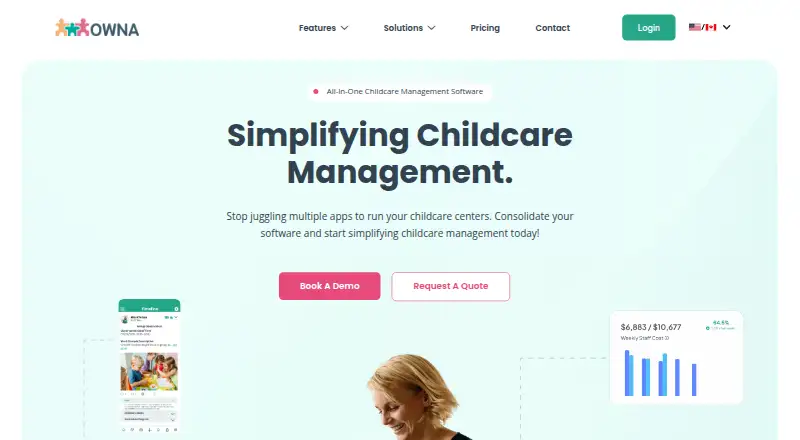
What OWNA is
OWNA is childcare management software for daycare centres and before- and after-school programs, with tools for families, educators and staff. Its family app gives parents access to daily routines, programs, forms, bookings and re-enrolments. Families can also receive photos and videos, message educators, comment on centre posts and provide feedback. Educators can build programs, record learning and connect posts to a child’s learning journey. Staff features include rostering, timesheets, payroll, team communication and performance management. Rostering tools cover weekly forecasts, cost analysis, AI predictions, ratio and compliance checks, and vacant shift bidding. Families can view invoices and account details, update ACH information and make one-off payments. The free plan includes curriculum planning, attendance sign-in and sign-out, a parent app and compliance tools. Premium is $39 a month and adds bookings, enrolments, invoicing, payments, financial reporting, rostering, timesheets and CRM. Enterprise lists custom API integration. OWNA is available on Android, iOS and the web, with a free plan and trial.
Who it suits
OWNA suits childcare centres and services, including daycare and before- and after-school programs, that need family, curriculum and staff management tools. Families can use its app to follow centre updates and manage bookings or payments.
What it does well
- Free plan includes attendance and compliance tools.
- Family app covers routines, forms and bookings.
- Staff tools include payroll and performance management.
- Supports Android, iOS and web.
- No contracts or notice periods required.
What to know first
- Premium starts at $39 a month.
- Enterprise CRM and analytics are marked coming soon.
- Onboarding is typically four to six weeks.
- Visa/Mastercard processing is 2.75%; ACH is 50 cents per transaction.
Limits
The Free plan lists curriculum planning, attendance sign-in and sign-out, a parent app and compliance. It does not list Premium features such as bookings, enrolments, invoicing, payments, financial reporting, rostering, timesheets or CRM.
Plans
| Plan | Billed and limits | Price |
|---|---|---|
| FREE | Curriculum Planning · Attendances (Sign-In/Out) · Parent App · Compliance | Free |
| Premium | from $39/mth · Booking & Enrolments · Invoicing & Payments · Financial Reporting · Rostering & Timesheets · CRM | $39 a month |
| Enterprise | Contact Us · Everything from Premium · Custom Integration (API) · Enterprise CRM (Coming Soon) · Analytics (Coming Soon) | On request |
As owna.app lists them, read 30 Sept 2026. The maker's own page has the final word.
Getting started
- Visit https://owna.app/.
- Choose the Free plan or review Premium at $39 a month.
- Use the Android, iOS or web version.
- Allow four to six weeks for the recommended onboarding; OWNA says it may take as little as five days.
OWNA is childcare management software for daycare centres and before- and after-school programs. It is best for services that want family communication, learning records and staff operations connected in one product. Its free tier handles curriculum and attendance, while centres needing bookings, payments or rostering will need Premium.
Overview
OWNA spans parent-facing updates and centre administration, from learning documentation to staff scheduling. That scope can reduce the need to stitch together separate tools, but it makes plan choice consequential: the free offer is focused, not a full operational suite.
Key features
The family app gives parents access to daily routines, programs, forms, bookings and re-enrolments. Families can also receive photos and videos, message educators, comment on centre posts and provide feedback. This is a useful mix of updates and two-way contact; however, bookings and enrolments are reserved for Premium, even though the parent app itself is included in the free plan.
Educators can plan curriculum, document learning and connect posts to a child’s learning journey. Free also includes sign-in and sign-out attendance and compliance tools, making it a credible starting point for centres whose immediate priorities are learning records and attendance rather than administration of fees or staff shifts.
Premium adds invoicing, payments, financial reporting, rostering, timesheets and CRM. Families can review invoices and account details, update ACH information or make one-off payments through the app. Processing fees are 2.75% for Visa/Mastercard and 50 cents per ACH transaction, so payment volume affects the total cost beyond the subscription.
Staff management covers rostering, timesheets, payroll, staff communication and team performance management. Rostering tools include weekly forecasting, cost analysis, AI predictions, ratio and compliance support, and vacant-shift bidding. These tools are relevant to centres managing coverage and staffing costs; they are part of the paid tier rather than the free attendance offer.
OWNA says user-to-server traffic is encrypted and child-related posts are restricted to the associated family and centre. Its privacy policy says children’s personal information is hosted in Australia, while limited personal information may be processed by US-based SaaS providers. Support is available through helpdesk tickets or online chat for urgent assistance. OWNA recommends four to six weeks for onboarding, though it says implementation can take as little as five days; it requires no contract or notice period.
Pricing
OWNA uses a freemium model, offers a free trial, and has three named plans:
- FREE — free: curriculum planning, attendance sign-in/out, parent app and compliance. This suits a centre that needs learning and attendance tools but can do without bookings, finance and rostering.
- Premium — $39 a month: bookings and enrolments, invoicing and payments, financial reporting, rostering and timesheets, and CRM. It is the practical choice for centres that need those administrative functions in the same system. Transaction charges apply to payments in addition to the subscription.
- Enterprise — custom pricing: everything in Premium plus custom API integration. Enterprise CRM and analytics are marked as coming soon, so they should not be treated as current capabilities.
The free plan has no published seat or child cap. For centres needing custom integration, Enterprise is the relevant tier, but its price is custom rather than a published monthly rate.
Platforms
OWNA supports Android, iOS and the web, giving families and staff access across mobile and browser platforms.
Who it's for
OWNA is aimed at daycare centres and before- and after-school programs. It is a strong fit for services that value a connected parent app, curriculum records and attendance, and want a path to add billing and staff operations. A centre seeking only a lightweight free attendance tool may find the free plan sufficient; one that needs a full suite should budget for Premium and payment processing fees.
Pros and cons
- Pros: Free includes curriculum planning, attendance, compliance and the parent app, covering meaningful daily needs without subscription cost.
- Pros: Premium combines family bookings and payments with staff rostering, timesheets and financial reporting, reducing fragmentation for centres wanting both sides of operations.
- Pros: No contract or notice period, and onboarding may be completed in as little as five days.
- Cons: Bookings, invoicing, payments and rostering are not in the free plan, so centres needing these core administrative tasks must move to Premium.
- Cons: Card and ACH processing fees add costs that can rise with payment activity.
- Cons: OWNA recommends four to six weeks for onboarding, which may require planning ahead even though a shorter rollout is possible.
Alternatives
For a broader comparison, browse Childcare Management Software.
AfterSchool HQ is another freemium option with a free plan, free trial and Android, iOS and web support; its free-plan description notes transaction fees for activities processed through the service.
Cheqdin may suit a smaller service prioritizing a defined free cohort: its Rise plan is free for up to five students, with email support only and no personalized training or record archiving at the limit; Starter costs $68 a month.
Kangarootime offers a free plan capped at one program, one school and five staff members, making that stated limit central to evaluating it.
Neztio has a free Starter plan for up to 15 children and a Standard plan at $79 a month with unlimited children, a useful contrast for services comparing child-count limits and flat monthly pricing.
6crickets has a free marketplace-listing plan with commission or referral fees depending on how registrations are made.
QikKids uses Playground plan bands based on place capacity, including 0–39, 40–69 and 70–99 places.
Brightwheel uses custom pricing based on program information, rather than a published fixed plan price.
Procare offers a $25 a month home version for smaller centres and in-home daycare providers; classroom management is unavailable for in-home users.
Verdict
Choose OWNA if your daycare or before- and after-school program wants curriculum, attendance and family communication together, with the option to add billing and staff operations as needs grow. Its clearest advantage is the useful free core and broad Premium coverage; look elsewhere if you need those paid administrative features without the added subscription and transaction costs.
Verdict
OWNA combines family communication, curriculum, billing and staff operations in one childcare product. Its free plan covers core curriculum and attendance needs, while bookings, payments and rostering are listed under Premium.
Questions
Is there a free plan?
Yes. The Free plan costs nothing and includes curriculum planning, attendance sign-in and sign-out, a parent app and compliance.
How much does Premium cost?
Premium is listed at $39 a month.
Which platforms does OWNA support?
OWNA is available on Android, iOS and the web.
Does OWNA offer a free trial?
Yes, a free trial is listed.
Does OWNA support integrations?
The Enterprise plan lists custom integration through an API. No third-party integrations are named.
Where is children's personal information hosted?
OWNA says children’s personal information is hosted in Australia. It also says limited personal information may be processed by US-based SaaS providers.
Facts from OWNA's own pages
- Communication
- Families can receive photos and videos, message educators, comment on centre posts and provide feedback. · owna.app, 30 Sept 2026
- Curriculum
- Educators can create programs, document learning and link posts to show a child’s learning journey. · owna.app, 30 Sept 2026
- Family app
- The parent app lets families view daily routines, programs, forms, bookings and re-enrolments. · owna.app, 30 Sept 2026
- Headquarters
- Bella Vista, New South Wales, Australia · owna.app, 28 Sept 2026
- Integrations
- The Enterprise plan lists custom integration through an API; the pricing page does not name third-party integrations. · owna.app, 30 Sept 2026
- Onboarding and contract
- OWNA recommends four to six weeks for onboarding, says it may be completed in as little as five days, and says it does not require contracts or notice periods. · owna.app, 30 Sept 2026
- Payment fees
- The pricing FAQ lists Visa/Mastercard processing at 2.75% and ACH at 50 cents per transaction. · owna.app, 30 Sept 2026
- Payments
- Families can view invoices and account details, update ACH information, or make one-off payments through the app. · owna.app, 30 Sept 2026
- Privacy and hosting
- OWNA's privacy policy says all personal information relating to children on OWNA is hosted in Australia, while limited personal information may be processed by US-based SaaS providers. · forms.owna.com.au, 30 Sept 2026
- Product
- OWNA describes itself as all-in-one childcare management software for childcare centres and services. · owna.app, 30 Sept 2026
- Rostering
- Rostering features listed include weekly forecasting, roster cost analysis, AI rostering predictions, ratio and compliance tools, and vacant shift bidding. · owna.app, 30 Sept 2026
- Security
- OWNA says traffic between users and its servers is encrypted and child-related posts are restricted to the associated family and centre. · owna.com.au, 30 Sept 2026
- Staff management
- The product includes rostering, timesheets, payroll, staff communication and team performance management. · owna.app, 30 Sept 2026
- Support
- Users can raise a helpdesk ticket or start an online chat for urgent assistance. · owna.app, 30 Sept 2026
- Who it serves
- OWNA describes solutions for daycare centres and before- and after-school programs. · owna.app, 30 Sept 2026
Where OWNA stands on Freedom251
- Childcare Management Software#9 of 31