Freedom251 › Computer Forensics Software

OSForensics
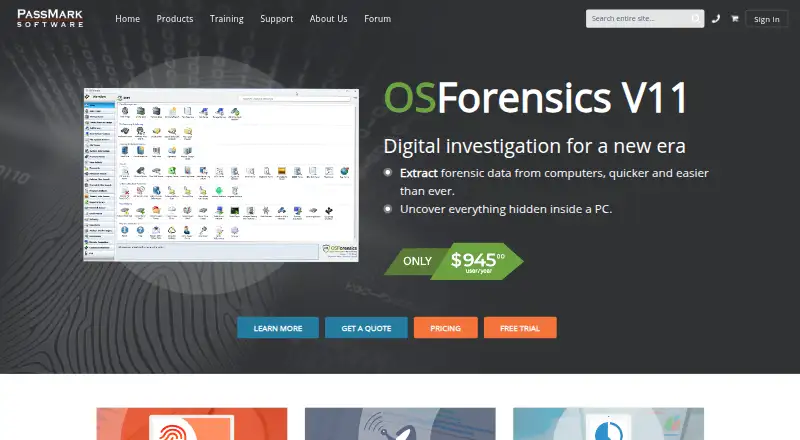
What OSForensics is
OSForensics is digital investigation software for extracting and examining forensic data from computers. It searches and indexes files, looks inside documents and email archives, and attempts to recover deleted files. File hashing can verify evidence or compare it with known files, while extension checks can identify files whose extensions are incorrect. Investigators can review activity such as opened documents, web history, connected USB devices, and network shares. Password tools work with commonly used web browsers and can use rainbow tables to retrieve passwords from hashes.
Evidence can be grouped into case files, cryptographically hashed, and exported as reports readable in HTML or PDF. Reports can include narratives and external reports, and the software can keep an audit trail of investigation activity. It also creates and restores disk images for analysis. OSForensics can run from a portable USB drive. Listed evidence sources include Windows, Mac, Linux, Android, and iOS/macOS file systems, disk images, memory dumps, emails, browser data, registry hives, SQLite, and ESE databases. It supports Windows 7, 8, 10, and 11, plus Windows Server 2012, 2016, 2019, and 2022. A free plan is available; paid options include a $95.00 per user per month subscription and perpetual licenses from $1680.00 per user per license.
Who it suits
OSForensics suits investigators who need to search computer evidence, review user activity, and assemble case reports. Its evidence sources and disk imaging tools also suit work involving file systems, memory dumps, email, browser data, and databases.
What it does well
- Searches files, documents, and email archives.
- Can attempt recovery of deleted files.
- Creates case files and HTML- or PDF-readable reports.
- Maintains an investigation audit trail.
- Can create and restore disk images.
- Can run from a portable USB drive.
What to know first
- The trial edition is feature-restricted and limited to one install.
- The subscription stops working when it expires.
- The perpetual license starts at $1680.00 per user per license.
Limits
The trial edition lasts 30 days, is feature-restricted, allows one install, and does not include upgrades. The subscription costs $95.00 per user per month and stops working when it expires; the free plan has feature differences.
Plans
| Plan | Billed and limits | Price |
|---|---|---|
| OSForensics Free | Free · Free license; feature differences apply | Free |
| OSForensics Trial Edition | 30-day trial · Feature-restricted · 1 install · free public forum support · no upgrades | Free |
| OSForensics Perpetual License (12 months support) | $1680.00 per user per license · Software never expires · includes 12 months of support · 2 machine installs and 1 USB install for the same user | $1,680, paid once |
| OSForensics Perpetual License (36 months support) | $3675.00 per user per license · Software never expires · includes 36 months of support · 2 machine installs and 1 USB install for the same user | $3,675, paid once |
| OSForensics Subscription | $945.00 per user per year subscription · Access to latest version and updates · priority support · license stops working when subscription expires | $945 a year |
| OSForensics Subscription | $95.00 per user per month subscription · Access to latest version and updates · priority support · license stops working when subscription expires | $95 a month |
| OSForensics Site License | Enquire for pricing · Tiered by estimated users within an organization | On request |
As osforensics.com lists them, read 7 Oct 2026. The maker's own page has the final word.
Getting started
- Visit the OSForensics website.
- Choose the free plan or a paid license.
- Download the software for a supported Windows system.
- Run it from the computer or from a USB drive.
- Use the trial edition for 30 days if you choose the trial.
OSForensics combines computer evidence search, activity review, disk imaging and case reporting in one investigation tool. It suits examiners working across several evidence types who can base their workflow on Windows. Its breadth is useful; the paid licenses make it a harder fit for occasional investigations.
Overview
The software brings file and email search, deleted-file recovery attempts, evidence identification, activity analysis, password recovery, imaging and case documentation together. It can work with evidence from Windows, Mac, Linux, Android and iOS/macOS file systems, as well as disk images, memory dumps, emails, browser data, registry hives, and SQLite and ESE databases. That range helps when an investigation spans different sources, though the listed system requirements are Windows-only.
OSForensics supports Windows 7, 8, 10 and 11, along with Windows Server 2012, 2016, 2019 and 2022; 32-bit support is deprecated. It needs at least 2 GB of RAM, with 16 GB or more recommended, and 500 MB of free disk space unless run from USB. USB portability is useful for field work, but does not change the Windows system requirement.
Key features
Search and indexing cover files, document contents and email archives, and the software can attempt to recover deleted files. Hashing verifies files or matches them against known files, while extension checks can flag files whose type does not match their name. Together, these tools help narrow large evidence collections and check file identity; recovery is an attempt, not a guarantee.
Activity analysis can surface opened documents, web history, connected USB devices and network shares. Password tools can recover passwords from commonly used browsers and use rainbow tables to retrieve passwords from hashes. These capabilities broaden an investigation beyond stored documents, though they serve specific evidence tasks rather than replacing a general-purpose workflow for every platform.
Case files group evidence and hash data cryptographically, with reports exportable in HTML and PDF-readable formats, including narratives and external reports. An automatic secure audit trail records investigation activity. Disk imaging and restoration support analysis while protecting the integrity of original evidence; portability from USB can also simplify deployment. The ability to read PST email and browse SQLite databases used by iPhone, Firefox and Chrome adds useful coverage for common evidence formats.
Pricing
OSForensics Free costs nothing. It offers a starting point for users who want to explore the product, but feature differences apply, so it should not be assumed to match the paid editions.
OSForensics Trial Edition costs 0.00 USD for a 30-day trial and includes one install, free public forum support, and no upgrades. It is feature-restricted, making it useful for an initial evaluation but a limited basis for judging the full paid workflow.
OSForensics Subscription costs $95 a month per user. It includes the latest version and updates plus priority support; the license stops working when the subscription expires. This suits users who want current versions and support without buying a perpetual license, provided ongoing monthly cost and renewal are acceptable.
OSForensics Perpetual License (12 months support) costs $1,680 per user per license. The software never expires and includes 12 months of support, with two machine installs and one USB install for the same user. It suits a user who expects to keep using the software beyond a subscription term and accepts the higher upfront price.
OSForensics Perpetual License (36 months support) costs $3,675 per user per license. It also never expires, with 36 months of support and the same two machine installs and one USB install for the same user. The longer support period fits users who want a longer support window, at a substantial upfront cost.
OSForensics Site License has custom pricing, tiered by estimated users within an organization. It is the option for organizations licensing across a team; individual per-user prices do not apply.
Purchases include business-hours support by phone, email or online forums. The trial includes free public forum support. The published plan terms do not give a free-plan quota, so the Free plan is best treated as an entry point rather than a known-capacity option.
Platforms
The supported operating systems are Windows 7, 8, 10 and 11, plus Windows Server 2012, 2016, 2019 and 2022. Although evidence sources include Mac, Linux, Android and iOS/macOS file systems, those are evidence types, not listed desktop platforms for running OSForensics. The Windows focus is a practical constraint for teams standardizing on other operating systems.
Who it's for
OSForensics is best suited to investigators who need file and email search, activity review, imaging and report production in one tool, especially when cases combine several evidence sources. Its free and trial editions can serve as an entry point, while the subscription supports users who need updates and priority support. The perpetual licenses suit longer-term use, and site licensing addresses organizations with multiple users.
It is a less natural choice for occasional users facing the perpetual license cost, or for teams that need to run their investigation software on Linux or macOS. Users focused on a narrower forensic task may find a free alternative a better fit.
Pros and cons
- Broad evidence coverage: It handles files, email, browser data, databases, memory dumps, disk images and multiple operating-system file systems, which helps in cross-source investigations.
- Investigation workflow in one product: Search, activity review, imaging, case organization, audit trails and report exports reduce the need to assemble those capabilities separately.
- Portable operation: Running from USB can help with field use and avoids the stated 500 MB local disk-space requirement.
- High paid entry cost: The perpetual options require a large upfront payment, while the subscription continues to cost $95 a month per user.
- Windows runtime focus: Evidence can come from other systems, but the supported operating systems for running the product are Windows and Windows Server.
- Trial limitations: The 30-day edition is feature-restricted, limited to one install and receives no upgrades, which narrows its value for sustained evaluation.
Alternatives
Digital Forensics Software is the broader category to browse when comparing tools across the field.
Choose Hayabusa if a free tool on Linux, macOS or Windows better fits your budget and platform needs; it is GNU AGPLv3 software, and its detection rules use DRL 1.1.
NetworkMiner is a free or freemium option if you prefer GPLv2 open-source software written in managed C# on .NET Framework.
Plaso is a free option across Linux, macOS, self-hosted and Windows environments, with no commercial plan or usage limits stated.
The Sleuth Kit is a free choice if open-source forensic tools and a C library suit your needs.
Volatility 3 is a free, open-source framework for Linux, macOS, self-hosted and Windows platforms.
Arkime is a free open-source option for API, Linux, self-hosted and web environments, with no paid-only features or license fees.
CAINE is a free Linux and Windows option distributed as an approximately 4000 MB ISO image; third-party software has separate licenses.
Exterro FTK Imager is a free Windows-only alternative for forensic imaging and preview; its FTK Imager Pro plan costs $499 a year per user.
Verdict
Choose OSForensics if your investigations need search, activity review, imaging and documented case handling across varied evidence sources, and Windows fits your working environment. Its most persuasive advantage is the breadth of that workflow in one product. Look elsewhere if the purchase cost is difficult to justify, you need a non-Windows runtime, or a focused free tool covers your task.
Verdict
Choose OSForensics if you need computer evidence search, activity review, case reporting, and disk imaging in one investigation tool. The free plan offers a starting point; the trial is feature-restricted, and paid licenses range from a monthly subscription to perpetual options.
Questions
Is OSForensics free?
Yes. OSForensics has a free plan priced at $0. Feature differences apply.
How much do paid plans cost?
The subscription is $95.00 per user per month. Perpetual licenses cost $1680.00 per user per license with 12 months of support or $3675.00 per user per license with 36 months of support.
Is there a free trial?
Yes. The trial edition is free for 30 days. It is feature-restricted, allows one install, and includes public forum support.
Which systems does OSForensics support?
The listed system requirements include Windows 7, 8, 10, and 11, and Windows Server 2012, 2016, 2019, and 2022. The platforms also list Android and self-hosted.
Can OSForensics produce investigation reports?
Case files can be exported as reports readable in HTML and PDF. Export formats also include CSV and MHT.
What support comes with a purchase?
Purchases include business-hours support by phone, email, or online forums. The trial edition includes free public forum support.
Facts from OSForensics's own pages
- Activity analysis
- It can surface recent user activity such as opened documents, web history, connected USB devices and network shares. · osforensics.com, 7 Oct 2026
- Audit trail
- OSForensics can automatically maintain a secure audit trail of activities carried out during an investigation. · osforensics.com, 7 Oct 2026
- Case reports
- Case files group evidence, hash data cryptographically, and can be exported as HTML- and PDF-readable reports with narratives and external reports. · osforensics.com, 7 Oct 2026
- Drive imaging
- It creates and restores disk images to support analysis without risking the integrity of original evidence data. · osforensics.com, 7 Oct 2026
- Evidence identification
- It uses file hashing to verify files or match them against known files and can identify files with incorrect extensions. · osforensics.com, 7 Oct 2026
- Headquarters
- Sydney, Australia · osforensics.com, 28 Sept 2026
- Integrations and formats
- The product can read popular email formats including PST and can browse SQLite databases used by iPhone, Firefox and Chrome. · osforensics.com, 7 Oct 2026
- Machine requirements
- The download page lists 2 GB minimum RAM, recommends 16 GB or more, and requires 500 MB free disk space unless run from USB. · osforensics.com, 7 Oct 2026
- Password recovery
- Its password tools can recover passwords from commonly used web browsers and use rainbow tables to retrieve passwords from hashes. · osforensics.com, 7 Oct 2026
- Portability
- OSForensics can run from a portable USB drive, and the download page says it can be run from USB. · osforensics.com, 7 Oct 2026
- Purpose
- OSForensics is digital investigation software for extracting forensic data from computers. · osforensics.com, 7 Oct 2026
- Search and recovery
- It searches and indexes files, searches inside documents and email archives, and attempts to recover deleted files. · osforensics.com, 7 Oct 2026
- Support
- Purchases include business-hours support by phone, email or online forums; the trial edition includes free public forum support. · osforensics.com, 7 Oct 2026
- Supported system
- The listed system requirements include Windows 7, 8, 10, 11 and Windows Server 2012, 2016, 2019 and 2022; 32-bit support is deprecated. · osforensics.com, 7 Oct 2026
- Vendor location
- PassMark Software lists its Australian head office in Surry Hills, New South Wales, and a North American branch in Redwood City, California. · osforensics.com, 7 Oct 2026
Where OSForensics stands on Freedom251
- Computer Forensics Software#2 of 23
- Digital Forensics Software#8 of 30