Freedom251 › Digital Forensics Software
Hayabusa
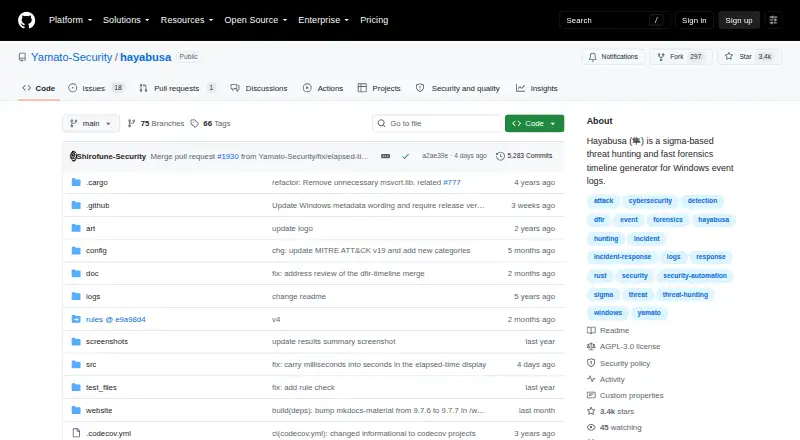
What Hayabusa is
Hayabusa is a free, open-source tool for investigating Windows event logs and building forensic timelines. It processes EVTX data from a single host or many systems and exports timelines as CSV, JSON, or JSONL. Its analysis features include computer and event ID metrics, logon summaries, keyword pivoting, HTML summary reports, and MITRE ATT&CK mapping. The project describes its curated detection rules as numbering over 4,000, and the tool supports Sigma, including v2 correlation rules. Hayabusa can run live on a system, analyze collected logs offline, or hunt across endpoints with the Velociraptor Hayabusa artifact. Results can be brought into Elastic Stack, Timesketch, or Timeline Explorer; JSON output can also be analyzed with jq. The project says its multithreaded Rust implementation can provide up to a 5x speed improvement and describes Rust as memory-safe. Special Windows live-response packages bundle the program, encoded rules, and configuration files to reduce files written to the system and help avoid antivirus false positives on YAML rules. Hayabusa runs on Windows, macOS, and Linux. It is released under AGPLv3, while its detection rules use Detection Rule License 1.1. The project says internal, SaaS, and consulting use are allowed, and asks users to open-source improvements made for SaaS use.
Who it suits
Hayabusa suits incident responders and threat hunters who need to analyze Windows EVTX logs from individual machines or fleets. It also fits teams that want Sigma-based detections, timeline exports, or endpoint hunting through Velociraptor.
What it does well
- Processes EVTX logs from one host or thousands.
- Exports timelines as CSV, JSON, and JSONL.
- Supports Sigma, including v2 correlation rules.
- Offers more than 4,000 curated detection rules.
- Includes MITRE ATT&CK mapping and HTML summary reports.
- Can run live, offline, or through Velociraptor.
What to know first
- No Linux ARM MUSL binary is provided.
- It focuses on Windows event logs; mobile, disk, and memory forensics are unsupported.
- SaaS users are asked to open-source their improvements.
Limits
Hayabusa is free. The project does not provide a Linux ARM MUSL binary because it does not run properly; SaaS use is allowed with a request to open-source improvements made for that use.
Plans
| Plan | Billed and limits | Price |
|---|---|---|
| Hayabusa | GNU AGPLv3 software · detection rules use DRL 1.1 | Free |
As github.com lists them, read 8 Oct 2026. The maker's own page has the final word.
Getting started
- Open the Hayabusa project website on GitHub.
- Choose a build for Windows, macOS, or Linux.
- Run it live on a system or provide collected EVTX logs for offline analysis.
- Select CSV, JSON, or JSONL timeline output for your workflow.
- Use the documented integrations with Elastic Stack, Timesketch, Timeline Explorer, or jq as needed.
Hayabusa is a Windows event-log forensics and threat-hunting tool for investigators and defenders working with EVTX data. It is a strong fit for building timelines across individual machines or endpoint collections, but it is not a full-spectrum forensics suite.
Overview
Hayabusa can run live on one Windows system, analyze collected logs offline, or hunt across endpoints using the Velociraptor Hayabusa artifact. That flexibility makes it useful for both targeted triage and wider hunts, while its focus on event logs sets a clear boundary around what it can investigate.
The project says its multithreaded Rust implementation can deliver up to a 5x speed improvement. That ceiling may matter when processing larger collections, but it is not a guarantee for every workload. Rust’s memory-safe design is a sensible foundation for software handling security evidence.
Key features
Timelines and detection
Hayabusa consolidates events from one host or thousands into CSV, JSON, or JSONL timelines. It supports the Sigma specification, including v2 correlation rules, and its curated detection rules number over 4,000. Together, these capabilities give analysts a substantial event-log hunting toolkit without a paid tier; the detection rules have a separate license from the software.
Analysis and integrations
Computer and event ID metrics, logon summaries, keyword pivoting, HTML summary reports, and MITRE ATT&CK mapping help analysts move from a large event set toward useful leads. The project documents importing results into Elastic Stack, Timesketch, and Timeline Explorer, as well as analyzing JSON with jq. These options suit teams with established investigation workflows, though Hayabusa itself does not provide case collaboration.
Live response
Special Windows live-response packages bundle the binary with XOR-encoded rules and configuration files. That reduces files written to the system and helps avoid antivirus false positives on YAML rule files, a practical benefit when limiting the footprint of a response tool matters.
Pricing
Hayabusa costs nothing under the GNU AGPLv3, and its detection rules use DRL 1.1. There is no paid plan to unlock additional features or a stated free-plan cap. The project says internal, SaaS, and consulting use are allowed, while requesting that SaaS users open-source improvements they make; organizations should review both licenses against their intended use.
Platforms
Hayabusa supports Windows, macOS, and Linux, with Windows event logs as its evidence source. It does not provide a Linux ARM MUSL binary because, according to the project, it does not run properly. It does not cover mobile, disk imaging, or memory forensics, so investigators needing those evidence types will need other tools.
Who it's for
Hayabusa is best suited to incident responders and threat hunters who need to convert EVTX data into timelines, apply Sigma detections, and summarize activity across one or many systems. Its free availability and multiple output formats make it a practical choice for teams already using the documented integrations. It is a poor fit as a single platform for broader forensic evidence collection or collaborative case management.
Pros and cons
- Pros: Free software with no stated usage cap, making it accessible for small investigations and large hunts alike.
- Pros: Sigma v2 correlation support, over 4,000 curated rules, and three timeline formats offer useful breadth for event-log analysis.
- Pros: Live, offline, and Velociraptor-based workflows support different scales of endpoint investigation.
- Cons: No mobile, disk, or memory forensics, limiting its usefulness beyond Windows event logs.
- Cons: No case collaboration feature for teams that need shared investigation management.
- Cons: No Linux ARM MUSL binary, which excludes that platform target.
Alternatives
For a broader digital-forensics shortlist, see Digital Forensics Software.
Choose NetworkMiner instead when its GPLv2 open-source software and free edition better suit your needs. Consider OSForensics if you want a free edition or a 30-day trial. Plaso is another free option for investigators seeking a tool with no stated commercial plan or usage limits. The Sleuth Kit is worth considering when open-source forensic tools and a C library are a better fit.
Pick Volatility 3 when you need a free, open-source framework rather than Hayabusa’s event-log focus. Arkime may fit better if you need a free open-source tool without paid-only features or license fees. Consider CAINE if a free Linux and Windows forensic ISO is more appropriate. For imaging and preview work, Exterro FTK Imager offers a free Windows-only tool, with a paid Pro plan at $499 a year.
Verdict
Choose Hayabusa if you need a free, focused way to turn Windows event logs into timelines and threat-hunting leads across systems. Its Sigma support, summaries, and flexible exports make it particularly useful for event-log investigations. Look elsewhere if you need mobile, disk, or memory forensics, case collaboration, or a Linux ARM MUSL binary.
Verdict
Choose Hayabusa if you need a free tool for Windows event-log timelines and threat hunting across systems. Its Sigma support, analysis summaries, and multiple export formats cover several investigation workflows. Look elsewhere if your work requires mobile, disk, or memory forensics, or a Linux ARM MUSL binary.
Questions
How much does Hayabusa cost?
The listed Hayabusa plan is free. The project describes the software as open source.
Which platforms does it support?
Hayabusa supports Windows, macOS, and Linux. The project says it does not provide a Linux ARM MUSL binary because it does not run properly.
What data does it analyze?
Its evidence source is Windows event logs in EVTX format. It can process logs from one host or thousands.
What formats can it export?
It creates CSV, JSON, and JSONL timelines.
Which integrations are documented?
The project documents importing results into Elastic Stack, Timesketch, and Timeline Explorer, and analyzing JSON with jq.
What are its licenses?
Hayabusa is released under AGPLv3, and its detection rules use Detection Rule License 1.1. The project says internal, SaaS, and consulting use are allowed, with a request to open-source improvements made for SaaS use.
Facts from Hayabusa's own pages
- Analysis features
- Features include computer and event ID metrics, logon summaries, keyword pivoting, HTML summary reports, and MITRE ATT&CK mapping. · yamato-security.github.io, 8 Oct 2026
- Detection rules
- The project homepage describes its curated detection rules as numbering over 4,000. · yamato-security.github.io, 8 Oct 2026
- Enterprise hunting
- Hayabusa can run live on one system, analyze collected logs offline, or hunt across endpoints with the Velociraptor Hayabusa artifact. · yamato-security.github.io, 8 Oct 2026
- Integrations
- The project documents importing results into Elastic Stack, Timesketch, and Timeline Explorer, and analyzing JSON with jq. · yamato-security.github.io, 8 Oct 2026
- Licensing
- Hayabusa is released under AGPLv3 and its detection rules under Detection Rule License 1.1; the project says internal, SaaS, and consulting use are allowed, with a request to open-source improvements made for SaaS use. · yamato-security.github.io, 8 Oct 2026
- Live response
- Special Windows live response packages bundle the binary, XOR-encoded rules, and configuration files to reduce files written to the system and help avoid antivirus false positives on YAML rule files. · yamato-security.github.io, 8 Oct 2026
- Platform limit
- The project says it does not provide a Linux ARM MUSL binary because it does not run properly. · yamato-security.github.io, 8 Oct 2026
- Platforms
- The project lists Windows, Linux, and macOS support, with binaries for those operating systems. · yamato-security.github.io, 8 Oct 2026
- Purpose
- Hayabusa is a Windows event log forensics timeline generator and threat hunting tool. · github.com, 8 Oct 2026
- Security
- Hayabusa is written in Rust, which the project describes as memory-safe. · yamato-security.github.io, 8 Oct 2026
- Sigma support
- Hayabusa supports the Sigma specification, including v2 correlation rules. · yamato-security.github.io, 8 Oct 2026
- Speed
- The project says its Rust implementation is multi-threaded and can deliver up to a 5x speed improvement. · yamato-security.github.io, 8 Oct 2026
- Support
- The maintainers invite bug reports through GitHub and say the project is actively maintained and they are happy to fix reported bugs. · yamato-security.github.io, 8 Oct 2026
- Timeline output
- It consolidates events from one host or thousands into CSV, JSON, or JSONL timelines. · yamato-security.github.io, 8 Oct 2026
Where Hayabusa stands on Freedom251
- Digital Forensics Software#4 of 30