Oride
What Oride is
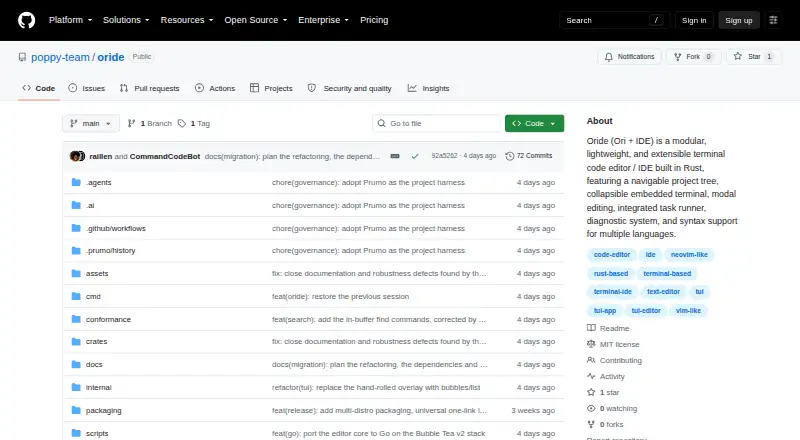
Oride is a terminal-based code editor and mini-IDE for Windows, macOS, and Linux. Its editing tools include Vim-style modal controls, tabs, splits, and multi-cursor editing, alongside a project tree, search and replace, and a collapsible interactive terminal. Git features show status and sync details, including ahead/behind status and pull and push. The project lists syntax support for languages including Rust, C, Bash, Markdown, JavaScript/TypeScript, Python, Lua, and Ruby; configured local language servers can provide autocomplete, hover information, and go to definition. A terminal Markdown preview handles tables, code fences, and graphics protocols on supported terminals. Oride also includes a declarative task runner configured with tasks.toml and environment diagnostics through :health. The repository identifies it as MIT licensed and labels its current status v0.2.0. Lua plugin support, large-file streaming, code actions, and crash recovery are future roadmap items. Installation instructions cover all three listed desktop platforms.
Who it suits
Oride suits developers who want editing, project navigation, terminal work, and Git tools in one terminal interface. It is available for Windows, macOS, and Linux.
What it does well
- Vim-style editing, tabs, splits, and multiple cursors
- Includes project search and an interactive terminal
- Git status and sync features include pull and push
- MIT licensed; available for Windows, macOS, and Linux
What to know first
- Current status is v0.2.0
- Lua plugins, code actions, and crash recovery are roadmap items
- No support service or response commitment is stated
Limits
The repository lists Lua plugin support, large-file streaming, code actions, and crash recovery as future roadmap items. The project Markdown preview's graphics protocols work on supported terminals.
Getting started
- Open the Oride GitHub project page.
- Choose the installation instructions for Windows, Linux, or macOS.
- Use a listed distribution or Nix package option if it fits your setup.
- Configure local language servers if you want their editing features.
Verdict
Oride brings editing, project navigation, terminal access, and Git tools together in a terminal interface. Check the listed roadmap items if you need Lua plugins, code actions, or crash recovery now.
Questions
How much does Oride cost?
Oride is free, with a free plan.
Which operating systems does Oride support?
The listed platforms are Windows, macOS, and Linux.
Is Oride open source?
The repository identifies Oride as MIT licensed.
What languages does Oride support?
Its listed syntax support includes Rust, C, Bash, Markdown, Ori, HTML, CSS, JavaScript and TypeScript, Python, D, Lua, Nim, and Ruby.
Does Oride support language servers?
It can start configured local language servers on demand for autocomplete, hover information, and go to definition.
What is on Oride's future roadmap?
The repository lists Lua plugin support, large-file streaming, code actions, and crash recovery.
Facts from Oride's own pages
- Editing
- It includes Vim-style modal editing, multiple buffer tabs, and project and buffer search and replace. · github.com, 3 Oct 2026
- Git
- The product includes Git status and sync features, including ahead/behind status and pull and push. · github.com, 3 Oct 2026
- Installation
- The README provides installation instructions for Windows, Linux, and macOS, plus distribution and Nix package options. · github.com, 3 Oct 2026
- Integrations
- The repository describes Git/SCM integration and configurable connections to local language servers; it does not list commercial integrations. · github.com, 2 Oct 2026
- Intended users
- The project presents Oride as a contained TUI editor for people who want coding, project navigation, terminal work, and Git tools in one interface. · github.com, 2 Oct 2026
- Languages
- The README lists syntax support for Rust, C, Bash, Markdown, Ori, HTML, CSS, JavaScript and TypeScript, Python, D, Lua, Nim, and Ruby. · github.com, 3 Oct 2026
- Language servers
- The README describes configurable, on-demand LSP support, including Ori, Rust, C/C++, and Bash language servers. · github.com, 3 Oct 2026
- License
- The README states that Oride is licensed under MIT. · github.com, 3 Oct 2026
- Markdown
- Its terminal Markdown preview supports tables, syntax-highlighted code fences, images, links, and graphics protocols on supported terminals. · github.com, 2 Oct 2026
- Markdown preview
- Its terminal Markdown preview supports tables, fenced code blocks, and terminal graphics protocols on supported terminals. · github.com, 3 Oct 2026
- Platforms
- The README provides installation paths for Windows, Linux, and macOS, and lists packages or instructions for Debian/Ubuntu, Arch, Fedora/RHEL, Void, and Nix/NixOS. · github.com, 2 Oct 2026
- Product
- Oride is a modular terminal code editor and mini-IDE built in Rust. · github.com, 3 Oct 2026
- Project goal
- The stated roadmap targets an uncompressed binary budget of 12 MB or less, startup under 10 ms, and input latency under 5 ms. · github.com, 3 Oct 2026
- Project status
- The repository describes version 0.2.0 as a self-contained TUI mini-IDE. · github.com, 3 Oct 2026
- Project tools
- It includes a navigable project tree, an embedded interactive terminal, project search and replace, and Git/SCM tools. · github.com, 2 Oct 2026
- Security
- The project describes a lean, contained, fail-closed philosophy; declarative security sandboxing is listed as a future roadmap item. · github.com, 2 Oct 2026
- Status and limits
- The README labels the current status v0.2.0 and lists Lua plugin support, large-file streaming, code actions, and crash recovery among future roadmap items. · github.com, 2 Oct 2026
- Support
- The repository welcomes contributions and points contributors to its contribution guidelines; it does not state a support service or response commitment. · github.com, 2 Oct 2026
- Tasks and diagnostics
- It includes a declarative task runner configured with tasks.toml and environment health diagnostics available through :health. · github.com, 3 Oct 2026
- Terminal
- It includes a collapsible interactive PTY terminal. · github.com, 3 Oct 2026
Where Oride stands on Freedom251
- Rust IDEs#13 of 13