Freedom251 › Sales Appointment Scheduling Software

OrbitForms
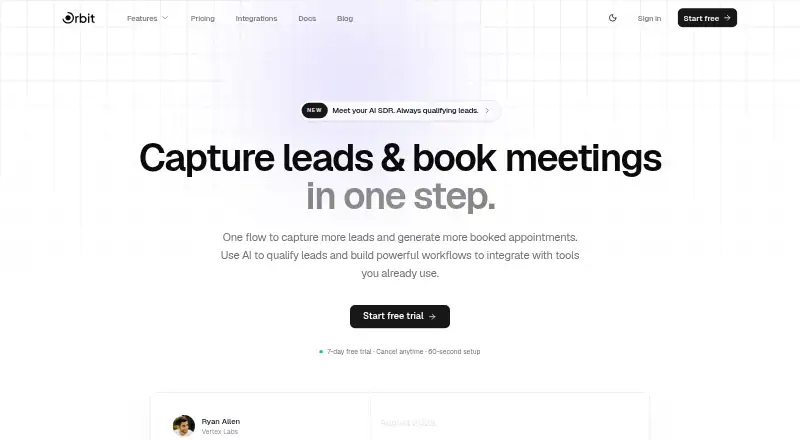
What OrbitForms is
OrbitForms brings forms, scheduling, AI lead qualification, workflows, contact management, sequences and analytics together in one platform for teams handling lead capture and follow-up. Forms can be standard or conversational Flow forms, with conditional logic, file uploads and more than 20 field types. Teams can apply custom colors, fonts, branding and CSS, then embed forms on other sites. Scheduling supports Google Calendar sync, Zoom and Google Meet links, buffer times and daily limits, with booking available through an embed or shareable link. Its AI SDR classifies leads using plain-English ideal customer profile rules and can draw on web research and enrichment. A visual workflow builder can enrich, qualify, route and sync leads through triggers, branching, delays and AI agent nodes. The integrations page lists more than 23 connections, including Slack, HubSpot, Airtable, Clay, Zapier, Google Calendar, Zoom and webhooks. OrbitForms is available on the web and through an API. Paid plans start at $29 a month, billed monthly, and a 7-day trial is available. Pro allows up to 10 forms and 1,000 responses per month; Business and Advanced raise the response caps.
Who it suits
OrbitForms suits high-growth marketing, sales, HR and agency teams, as well as startups, that want forms and scheduling alongside lead qualification and routing. It is also relevant to teams that need CRM integrations, automated reminders or workflows to connect lead capture with follow-up.
What it does well
- Standard and conversational forms include conditional logic and file uploads.
- More than 20 field types and custom form styling options.
- Scheduling includes Google Calendar sync and video meeting links.
- AI lead qualification can use profile rules, web research and enrichment.
- Visual workflows support branching, delays and AI agent nodes.
- Lists more than 23 integrations, including HubSpot and Slack.
What to know first
- There is no free plan.
- Pro is capped at 10 forms and 1,000 responses per month.
- Salesforce, Stripe, Pipedrive, Microsoft Teams and Outlook Calendar are in development.
Limits
Pro includes up to 10 forms and 1,000 responses per month. Business allows 10,000 responses per month, while Advanced allows 100,000 responses per month.
Plans
| Plan | Billed and limits | Price |
|---|---|---|
| Business | Billed monthly · Unlimited forms · 10,000 responses/mo · 100 AI credits/month · Unlimited workflows · Dedicated support | $149 a month |
| Advanced | Billed monthly · 100,000 responses/mo · Sequences · SMS messaging · Custom domains · 100 AI credits/month | $249 a month |
| Pro | Billed monthly · Up to 10 forms · 1,000 responses/mo · Unlimited team members · 3 workflows | $29 a month |
As orbitforms.ai lists them, read 8 Oct 2026. The maker's own page has the final word.
Getting started
- Open the OrbitForms website or use its API.
- Start the 7-day trial or choose a paid plan.
- Build a standard or conversational Flow form.
- Customize and embed the form or share a booking option.
- Connect available integrations and configure scheduling or workflows.
Verdict
Choose OrbitForms if your team wants forms, scheduling, lead qualification and workflow automation in one platform, with integrations for tools such as HubSpot and Google Calendar. Look elsewhere if you need a free plan or response volumes beyond the cap of your selected plan.
Questions
How much does OrbitForms cost?
The Pro plan is $29 a month, billed monthly. Business is $149 a month and Advanced is $249 a month, both billed monthly.
Is there a free plan or trial?
There is no free plan. OrbitForms offers a 7-day trial.
What platforms does OrbitForms support?
OrbitForms is available on web and through an API.
Which integrations are available?
The integrations page lists more than 23 connections, including Slack, HubSpot, Airtable, Clay, Zapier, Google Calendar, Zoom and webhooks. Salesforce, Stripe, Pipedrive, Microsoft Teams and Outlook Calendar are marked as in development.
What are the response limits?
Pro includes 1,000 responses per month, Business includes 10,000, and Advanced includes 100,000.
What does OrbitForms say about security and AI data?
OrbitForms says it encrypts sensitive stored data with AES-256-GCM and uses TLS 1.2 or higher in transit. It also says its AI providers contractually agree not to use customer data for model training.
Facts from OrbitForms's own pages
- AI data
- OrbitForms says its AI providers contractually agree not to use customer data for model training. · orbitforms.ai, 8 Oct 2026
- AI qualification
- Its AI SDR classifies leads against plain-English ideal customer profile rules and can use web research and enrichment. · orbitforms.ai, 8 Oct 2026
- Compliance
- The security page says OrbitForms is aligned with SOC 2, ISO 27001, GDPR, and CCPA frameworks. · orbitforms.ai, 8 Oct 2026
- Customization
- Forms support custom colors and fonts, branding, custom CSS, and embedding on other sites. · orbitforms.ai, 8 Oct 2026
- Forms
- It offers standard and conversational Flow forms with conditional logic, file uploads, and more than 20 field types. · orbitforms.ai, 8 Oct 2026
- Integrations
- The integrations page lists 23+ available connections, including Slack, HubSpot, Airtable, Clay, Zapier, Google Calendar, Zoom, and webhooks. · orbitforms.ai, 8 Oct 2026
- Intended users
- The product is presented as an AI-native forms and scheduling platform for high-growth teams, including marketing, sales, HR, agencies, and startups. · orbitforms.ai, 8 Oct 2026
- Limits
- The plans list monthly response caps of 1,000 for Pro, 10,000 for Business, and 100,000 for Advanced; Pro includes up to 10 forms. · orbitforms.ai, 8 Oct 2026
- Product
- OrbitForms combines forms, scheduling, AI lead qualification, workflows, contact management, sequences, and analytics in one platform. · orbitforms.ai, 8 Oct 2026
- Roadmap integrations
- Salesforce, Stripe, Pipedrive, Microsoft Teams, and Outlook Calendar are marked as in development. · orbitforms.ai, 8 Oct 2026
- Scheduling
- The scheduler supports Google Calendar sync, Zoom and Google Meet links, buffer times, daily limits, and embeddable or shareable booking. · orbitforms.ai, 8 Oct 2026
- Security
- OrbitForms says it encrypts sensitive stored data with AES-256-GCM and uses TLS 1.2 or higher in transit. · orbitforms.ai, 8 Oct 2026
- Support
- The pricing page includes email support and lists dedicated support with the Business plan. · orbitforms.ai, 8 Oct 2026
- Workflows
- A visual workflow builder can enrich, qualify, route, and sync leads using triggers, branching, delays, and AI agent nodes. · orbitforms.ai, 8 Oct 2026