Freedom251 › AI Video Caption Generators
OpenSubs
What OpenSubs is
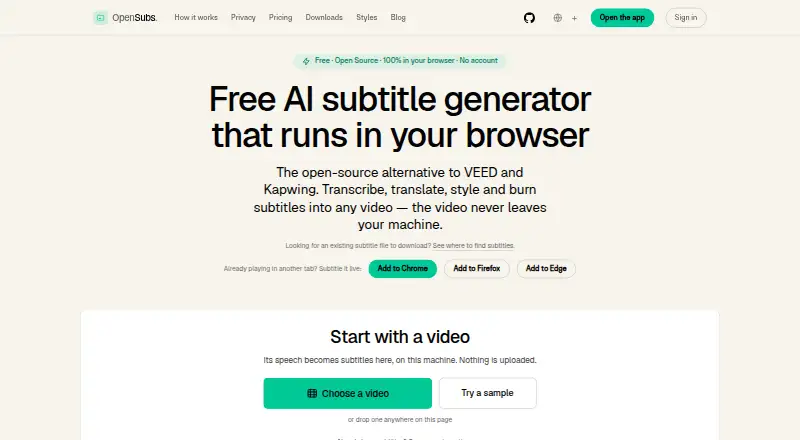
OpenSubs is a freemium subtitle tool that transcribes, translates, styles, and burns captions into video, with processing performed in the browser. It accepts MP4, MOV, WebM, and MKV files. Whisper runs locally through WebGPU when available or WebAssembly otherwise, using Tiny, Base, or Small models. Translation covers 20 languages through Chrome’s on-device translation, user-provided provider keys, or paid cloud credits; Claude, OpenAI, and DeepL are named providers. Users can choose 12 subtitle styles, apply word-by-word highlighting, burn captions into MP4, or export SRT, VTT, and ASS files. The free plan costs nothing, billed forever, with no file-size limit or watermark. The Credits plan costs $5 a month for 1,000 credits. Browser extensions cover Chrome, Edge, and Firefox, and desktop builds exist for macOS, Windows, and Linux.
Who it suits
It suits creators who need browser-based transcription, translated captions, styled subtitles, or burned-in video. Extension and desktop options also support tab playback and local workflows.
What it does well
- Processes video in the browser
- Supports 20 caption languages
- Offers 12 styles and word highlighting
- Exports SRT, VTT, and ASS
- Free plan has no file-size limit or watermark
What to know first
- Cue timings and structure cannot be edited
- Brand caption presets are unavailable
- Desktop builds are unsigned release candidates
- Cloud translation can send text or audio off-device
Plans
| Plan | Billed and limits | Price |
|---|---|---|
| Free | forever · Speech recognition in browser · On-device translation · 12 styles · Word-by-word highlighting · Trimming and resolution control · MP4 burn · SRT, VTT and ASS export · No file-size limit or watermark | Free |
| Credits | for 1,000 credits · Cloud translation on OpenSubs’ backend · Credits never expire · Failed jobs cost nothing | $5, paid once |
As opensubs.app lists them, read 11 Oct 2026. The maker's own page has the final word.
Verdict
OpenSubs provides local-first caption creation with broad format support, styling, and exports. Its free plan covers core tools, while credits support paid cloud translation.
Facts from OpenSubs's own pages
- API key handling
- User-provided API keys are held in page memory and are not stored or sent to OpenSubs, according to the site. · opensubs.app, 11 Oct 2026
- Brand caption presets
- No · opensubs.app, 22 Sept 2026
- Browser extension
- A free extension generates subtitles over video playing in a tab in Chrome, Edge and Firefox. · opensubs.app, 11 Oct 2026
- Burn-in captions
- Yes · opensubs.app, 22 Sept 2026
- Caption languages
- 20 · opensubs.app, 22 Sept 2026
- Caption styling
- Yes · opensubs.app, 22 Sept 2026
- Desktop and CLI
- Free desktop builds are offered for macOS, Windows and Linux; the command-line tool is built from source, and both require ffmpeg with the ASS filter for burning. · opensubs.app, 11 Oct 2026
- Editing limit
- Cue text can be edited, but cue timings cannot be changed and cues cannot be added, deleted or merged. · opensubs.app, 11 Oct 2026
- Free plan
- Yes · opensubs.app, 22 Sept 2026
- Integrations
- The site names Claude, OpenAI and DeepL as providers usable with a user’s own API key; keys are sent directly from the browser to the selected provider. · opensubs.app, 11 Oct 2026
- Offline use
- After initial downloads, the site says it works largely offline except for cloud translation. · opensubs.app, 11 Oct 2026
- Privacy
- The site says it has no video upload endpoint; subtitle text or trimmed audio can leave the device only when the user selects a cloud option. · opensubs.app, 11 Oct 2026
- Purpose
- OpenSubs transcribes, translates, styles and burns subtitles into video, with video processing running in the browser. · opensubs.app, 11 Oct 2026
- Release status
- The site identifies current builds as release candidates and says desktop builds are unsigned. · opensubs.app, 11 Oct 2026
- Styling and export
- OpenSubs offers 12 subtitle styles, word-by-word highlighting, MP4 burn-in and SRT, VTT and ASS export. · opensubs.app, 11 Oct 2026
- Subtitle export
- other formats · opensubs.app, 22 Sept 2026
- Support
- The site lists [email protected] for contact and problem reports. · opensubs.app, 11 Oct 2026
- Transcription
- It runs Whisper locally using WebGPU when available or WebAssembly otherwise, with Tiny, Base and Small models. · opensubs.app, 11 Oct 2026
- Translation
- It supports translation into 20 languages, using Chrome’s built-in on-device translation, user-provided provider keys or paid cloud credits. · opensubs.app, 11 Oct 2026
- Video formats
- The browser app accepts MP4, MOV, WebM and MKV videos. · opensubs.app, 11 Oct 2026
Where OpenSubs stands on Freedom251
- AI Video Caption Generators#41 of 99