Freedom251 › Incentive Compensation Management Software
OpenIncent
What OpenIncent is
OpenIncent combines commission calculation software with a documented process for checking commission pay. Its initial focus is small recruitment agencies that calculate commissions monthly from transaction exports. The engine supports exact decimal calculations, tiers, splits, margin, clawbacks, and plans with dated changes. It creates pay statements and an inspectable record of calculations; users retain their plan configuration and calculation records.
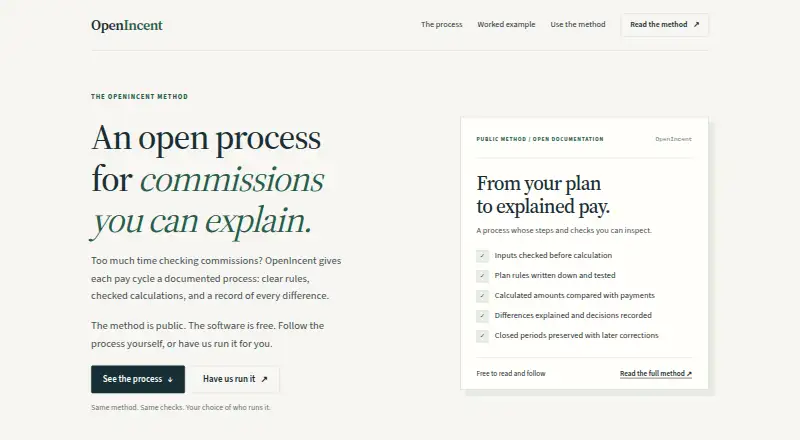
Its reconciliation process checks inputs, documents and tests plan rules, compares calculated amounts with payments, and records differences and decisions. The method is public, and the engine is open source. The site offers a Windows desktop application and lists Linux, macOS, and Windows as platforms. It says desktop calculations remain on the user's machine; prompts entered in the optional AI Builder are sent to Anthropic.
The method and engine are free to use. Ongoing administration is C$500 a month for one monthly cycle, one agreed plan, and up to ten payees. One-time setup is 1000.00 CAD once for one plan, up to ten payees, and one historical month. Additional integrations are quoted separately for paid service work.
Who it suits
OpenIncent suits small recruitment agencies that reconcile monthly commission payments from transaction exports. It can also fit teams that want an open source calculation engine and are prepared to interpret plans, check inputs, and approve results themselves.
What it does well
- Calculates tiers, splits, margin, clawbacks, and dated plans.
- Creates pay statements and inspectable calculation records.
- Method is public and engine is open source.
- Desktop calculations stay on the user's machine.
- Includes commission calculation, quota and bonus management, and payout tracking.
What to know first
- Paid starting scope assumes one currency and usable CSV or Excel exports.
- Ongoing administration covers one plan and up to ten payees.
- Integrations and expanded service scope are quoted separately.
- Optional AI Builder prompts are sent to Anthropic.
Limits
The free method and engine leave plan interpretation, input checks, and approval to the team. Paid starting scope assumes one currency and usable CSV or Excel exports; ongoing administration covers one monthly cycle, one agreed plan, and up to ten payees.
Plans
| Plan | Billed and limits | Price |
|---|---|---|
| Use it yourself | Method and engine free to use; team handles plan interpretation, input checks, and approval | Free |
| Free engine | Free to use · Open-source engine · self-run calculations · team handles interpretation, checks and approval | Free |
| One-time setup | From CAD $1,000 before taxes · One plan · up to 10 payees · one historical month | C$1,000, paid once |
| Ongoing administration | From CAD $500 / month before taxes · One monthly cycle · agreed plan · up to 10 payees · one currency · usable CSV or Excel exports | C$500 a month |
As openincent.com lists them, read 8 Oct 2026. The maker's own page has the final word.
Getting started
- Visit https://openincent.com/.
- Choose the free method and engine if your team will interpret plans, check inputs, and approve results.
- Use the Windows desktop application, or select Linux, macOS, or Windows as your platform.
- For ongoing administration, select C$500 a month for one cycle, one agreed plan, and up to ten payees.
- For one-time setup, select 1000.00 CAD once for one plan, up to ten payees, and one historical month.
- Contact Olivia through the email provided on the site for help with the Windows example or service inquiries.
Overview
OpenIncent pairs commission-calculation software with a documented process for checking how payouts are derived. It is best suited to small recruitment agencies working from monthly transaction exports; its strongest case is a traceable calculation and reconciliation, while the free option leaves interpretation and approval with the team.
The engine is open source and the method is public, giving teams a way to use the calculation approach themselves or pay for bounded administration and setup. That distinction matters: OpenIncent can support a disciplined process, but its starting service scope is deliberately narrow.
Key features
Calculations cover exact decimals, tiers, splits, margin, clawbacks and plans with dates. OpenIncent produces statements and an inspectable calculation record, and users retain plan configurations and records. That makes it a considered option where commission amounts need to be checked and explained, rather than treated as an opaque total.
The reconciliation method checks inputs, documents and tests plan rules, compares calculated amounts with payments, and records differences and decisions. Commission calculation, quota management, bonus management, payout tracking and compensation reporting are supported. These checks can give a team a repeatable process, but the free route leaves plan interpretation, input checks and approval to the team.
The Windows desktop application's calculations stay on the user's machine. The optional AI Builder sends entered prompts to Anthropic, so teams should keep that distinction in mind when deciding what to enter. For service work, scope, confidentiality terms, access and a dated retention and deletion schedule are agreed in writing; working copies are deleted on that schedule.
Two complimentary pilot reviews are available in total, each covering one recent month, one plan and up to five people. A business can receive one review, subject to scope fit. Olivia handles initial reviews and service delivery directly, and provides email help with the Windows example.
Pricing
OpenIncent is freemium, with a free trial. Its self-service option costs nothing: the method and engine are free to use, but the team handles interpretation, input checks and approval. This suits teams able to own those controls; it is not a substitute for managed administration.
Ongoing administration costs C$500 a month for one monthly cycle, one agreed plan and up to ten payees. It fits a small operation seeking recurring help within a defined scope. One-time setup costs C$1,000, paid once and covers one plan, up to ten payees and one historical month, making it more appropriate for a bounded setup than ongoing processing.
The starting paid scope assumes one currency and usable CSV or Excel exports. Additional plans, historical periods, data cleanup, integrations and major plan changes are quoted separately; integrations are also separately quoted paid service work. Those boundaries make the entry scope legible, but teams with messier data or broader needs should budget for a separate quote rather than assume they are included.
Platforms
OpenIncent is available for Linux, macOS and Windows. The site offers a Windows desktop application; desktop calculations stay on the user's machine. The optional AI Builder is a separate privacy consideration because it sends prompts to Anthropic.
Who it's for
OpenIncent is a sensible fit for small recruitment agencies running monthly commission cycles from usable transaction exports, particularly when they value a documented reconciliation and need a clear calculation record. The free engine suits teams with the capacity to interpret plans and approve results themselves; paid administration or setup is better for teams whose needs fit the stated one-plan, ten-payee boundaries.
It is a weaker fit for organizations needing multiple currencies, extensive historical work, data cleanup, integrations or substantial plan changes within a standard starting engagement. Those needs fall outside the stated scope and require separate quotes.
Pros and cons
- Pros: Exact-decimal calculations, dated plans, splits and clawbacks address real commission-rule complexity.
- Pros: Statements, retained configurations and inspectable records support review and explanation of results.
- Pros: The method sets out input checks, rule testing and payment reconciliation rather than stopping at a calculated number.
- Pros: Free use of the method and engine offers a no-cost route for teams willing to own interpretation and approval.
- Cons: The free option does not take responsibility for plan interpretation, input validation or approval.
- Cons: Paid starting scopes are limited to one plan and up to ten payees, with narrow cycle or historical-month coverage.
- Cons: Additional plans, data cleanup, integrations and other scope expansions need separate quotes, limiting predictability for more complex work.
- Cons: The optional AI Builder sends prompts to Anthropic, so it is not equivalent to the on-device desktop calculation path.
Alternatives
Driven is worth considering for a web-based option with a free Starter plan capped at three seats and one compensation plan, plus self-service setup and in-app support chat. Its Pro plan is €29 a month, billed per commissionee, with a three-seat minimum; choose it when that seat-based web plan is a better fit than OpenIncent's documented reconciliation and desktop approach.
Salesforce Sales Cloud offers a free suite with 10GB per organization and a Starter Suite at $25 a month per user, billed monthly. It is an alternative for readers comparing a broader sales-cloud suite rather than OpenIncent's focused commission process.
Centify has a free version for up to three users and paid subscriptions with fees specified in an offer or invoice. It may suit a small team seeking a user-capped free option, while paid cost depends on the subscription offer.
Qobra is a paid alternative available on Android, iOS and the web. STAKT is also paid and supports Android, iOS and the web.
Performio prices according to team size and implementation scope; its subscription scales with participants and selected capabilities, with implementation as a one-time cost. Consider it when that scope-based model suits better than OpenIncent's fixed starting scopes.
QCommission offers a paid Premier plan with 12,000,000 source transaction lines per fiscal year, a minimum of five payee users and no upper limit; pricing requires contacting QCommission. It is an alternative for teams that need that stated transaction capacity and payee range.
Variabl uses custom quotes tailored to plan complexity, data sources, integrations and organizational requirements. It may be preferable when pricing shaped around those factors is more suitable than OpenIncent's defined starting scopes.
For broader category browsing, see Incentive Compensation Management Software and Sales Commission Software.
Verdict
Choose OpenIncent if you need commission calculations with a documented reconciliation process and want to use the method and engine free. The paid administration and setup options cover defined scopes; look elsewhere if your work requires broader plans, historical periods, integrations, or data cleanup within the starting scope.
Verdict
Choose OpenIncent if you need commission calculations with a documented reconciliation process and want to use the method and engine free. The paid administration and setup options cover defined scopes; look elsewhere if your work requires broader plans, historical periods, integrations, or data cleanup within the starting scope.
Questions
Is OpenIncent free?
The method and engine are free to use. Ongoing administration costs C$500 a month, and one-time setup costs 1000.00 CAD once.
Is OpenIncent open source?
The calculation method is public, and the engine is open source.
Which platforms does it support?
Linux, macOS, and Windows are listed. The site offers a Windows desktop application.
What does ongoing administration include?
It covers one monthly cycle, one agreed plan, and up to ten payees for C$500 a month.
Does OpenIncent offer a free trial?
Yes. A free trial is listed.
How are integrations handled?
Additional integrations are quoted separately as paid service work.
Facts from OpenIncent's own pages
- AI data disclosure
- The optional AI Builder sends the entered prompt to Anthropic, while ordinary desktop calculations remain on the user's machine. · openincent.com, 14 Oct 2026
- API
- The project documents a Python library named icm-engine, a CLI and a FastAPI HTTP API that is local-only by default. · github.com, 14 Oct 2026
- Calculation engine
- The engine performs exact-decimal, repeatable calculations and keeps an inspectable calculation record. · openincent.com, 14 Oct 2026
- Calculation features
- The engine supports exact decimal calculations, tiers, splits, margin, clawbacks, and dated plans. · openincent.com, 8 Oct 2026
- Commission rules
- The software supports tiers, splits, margin-based pay, clawbacks and dated plans. · openincent.com, 14 Oct 2026
- Company location
- The project describes itself as made in Canada. · github.com, 14 Oct 2026
- Data handling
- For service work, scope, confidentiality terms, access, and a dated retention and deletion schedule are agreed in writing; working copies are deleted on the agreed schedule. · openincent.com, 8 Oct 2026
- Desktop privacy
- The site says desktop calculations stay on the user's machine; the optional AI Builder sends entered prompts to Anthropic. · openincent.com, 8 Oct 2026
- Documentation and support
- The project publishes a method document, worked data files, expected results and troubleshooting guidance, with support by email to Olivia. · openincent.com, 14 Oct 2026
- Feature: AI builder
- An AI plan builder converts plain-English compensation descriptions into validated YAML plans. · github.com, 14 Oct 2026
- Feature: credits and hierarchy
- It supports split and overlay credits, manager hierarchies with generated overrides, shared quotas and multi-plan runs. · github.com, 14 Oct 2026
- Feature: distribution
- Statements can be distributed through SMTP, .eml or mail merge, with sending disabled unless explicitly requested. · github.com, 14 Oct 2026
- Feature: draws and true-ups
- It supports recoverable and non-recoverable draws, period locking with delta true-ups and partial-period pro-rating. · github.com, 14 Oct 2026
- Feature: MCP assistant
- An MCP server works with Claude Desktop, Claude Code or another MCP client and supports per-person access with OAuth sign-in. · github.com, 14 Oct 2026
- Feature: quotas and bonuses
- Documented features include multi-currency display conversion, MBO or bonus payouts, ramps, time-varying quotas, mid-year plan changes and cumulative year-to-date attainment. · github.com, 14 Oct 2026
- Feature: reconciliation
- The reconciliation command compares calculated commissions with amounts actually paid and surfaces underpayments, overpayments and missing lines. · github.com, 14 Oct 2026
- Feature: rule types
- The engine implements flat-rate, tiered boundary-crossing and accelerator commission rules. · github.com, 14 Oct 2026
- Input formats
- The repository documentation says plans are YAML and transaction data can be CSV, Excel or Parquet, with fuzzy matching for messy column names. · github.com, 14 Oct 2026
- Integrations
- Additional integrations are quoted separately for paid service work. · openincent.com, 8 Oct 2026
- License
- OpenIncent is licensed AGPL-3.0; network operators must release modifications, while commercial licensing is offered separately. · github.com, 14 Oct 2026
- Limit: extra scope
- Additional plans, historical periods, data cleanup, integrations and major plan changes are quoted separately. · openincent.com, 14 Oct 2026
- Limit: review assurance
- The complimentary reconciliation review can confirm a match but explicitly does not promise to find an error. · openincent.com, 14 Oct 2026
- Limit: Windows release
- The publicly documented desktop download is Windows v0.3.0, while other operating-system use is described through the Python and source workflows. · openincent.com, 14 Oct 2026
- Maker
- The homepage identifies Olivia as the OpenIncent maintainer handling initial reviews and service delivery directly. · openincent.com, 14 Oct 2026