Freedom251 › System monitoring tools

Open Hardware Monitor
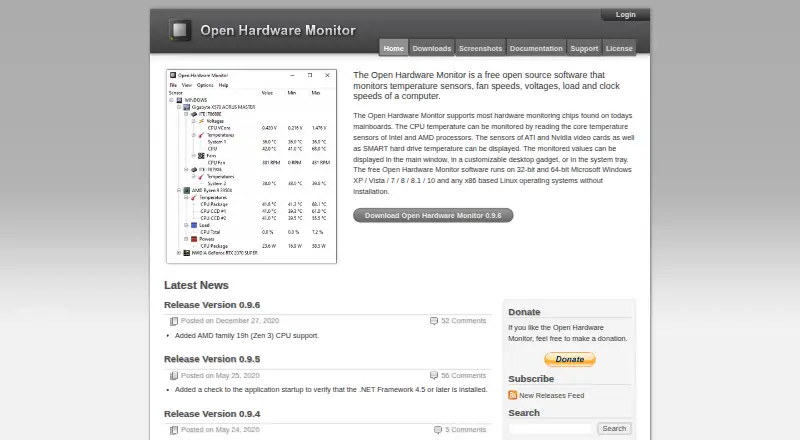
What Open Hardware Monitor is
Open Hardware Monitor is free, open-source software for viewing computer temperatures, fan speeds, voltages, load, and clock speeds. Readings can appear in its main window, a customizable desktop gadget, or the system tray. Documented coverage includes Intel and AMD processor core sensors, mainboard sensors, Nvidia and AMD graphics sensors, SMART drive temperatures, and T-Balancer bigNG and Alphacool Heatmaster fan controllers. SSD monitoring includes wear level and host reads and writes. The application publishes sensor data through Windows Management Instrumentation so other programs can read it. It runs on Windows and x86-based Linux. Windows requires .NET Framework 4.5 or later; Linux requires Mono with WinForms. Installation uses a ZIP archive, and the maker advises running OpenHardwareMonitor.exe with Administrator rights to access most sensors. The project remains in Beta and is provided at the user’s own risk. Binaries use Mozilla Public License 2.0. The homepage lists version 0.9.6, posted December 27, 2020.
Who it suits
It suits users who need free sensor monitoring on Windows or x86-based Linux, including hardware readings that other applications can access through WMI.
What it does well
- Monitors temperatures, fans, voltages, load, and clocks
- Supports Intel, AMD, Nvidia, and SMART sensors
- Displays readings in window, gadget, or tray
- Publishes data through Windows Management Instrumentation
- Free and open source
What to know first
- Still in Beta
- Windows requires .NET Framework 4.5 or later
- Linux requires Mono with WinForms
- Administrator rights needed for most sensors
Limits
The maker describes the application as still in Beta and advises using it at your own risk. Access to most hardware sensors requires running the executable with Administrator rights.
Plans
| Plan | Billed and limits | Price |
|---|---|---|
| Open Hardware Monitor | Free open source software · Windows and x86-based Linux | Free |
As openhardwaremonitor.org lists them, read 11 Oct 2026. The maker's own page has the final word.
Getting started
- Open the Open Hardware Monitor website
- Download the ZIP archive
- Unpack the archive
- On Windows, install .NET Framework 4.5 or later
- On Linux, install Mono with WinForms
- Run OpenHardwareMonitor.exe with Administrator rights for access to most sensors
Verdict
Open Hardware Monitor offers broad sensor coverage and several display options at no cost. Its Beta status, older listed release, and platform prerequisites should be considered before installation.
Questions
Is Open Hardware Monitor free?
Yes. The listed plan costs nothing, and the software is free and open source.
Which platforms are supported?
It supports Windows and Linux, including x86-based Linux in the listed plan.
What hardware can it monitor?
Coverage includes Intel and AMD CPU cores, mainboards, Nvidia and AMD GPUs, SMART drives, SSD metrics, and listed fan controllers.
Can other applications use its readings?
Yes. Sensor data is published through Windows Management Instrumentation (WMI).
How is it licensed?
Binaries use Mozilla Public License 2.0. The source code includes MPL 2.0 and other listed licenses.
Facts from Open Hardware Monitor's own pages
- Beta status
- The maker says the application is still in Beta and should be used at the user’s own risk. · openhardwaremonitor.org, 11 Oct 2026
- Display
- Monitored values can be shown in the main window, a customizable desktop gadget, or the system tray. · openhardwaremonitor.org, 11 Oct 2026
- Graphics and storage
- It can display ATI and Nvidia video card sensors and SMART hard drive temperatures. · openhardwaremonitor.org, 11 Oct 2026
- Hardware coverage
- The documentation lists Intel and AMD CPU core sensors, mainboard sensors, Nvidia and AMD GPU sensors, SMART drive sensors, and T-Balancer bigNG and Alphacool Heatmaster fan controllers. · openhardwaremonitor.org, 11 Oct 2026
- Installation
- The download is a ZIP archive; the maker instructs users to unpack it and run OpenHardwareMonitor.exe with Administrator rights for access to most hardware sensors. · openhardwaremonitor.org, 11 Oct 2026
- Integration
- The application publishes sensor data to Windows Management Instrumentation (WMI) so other applications can read and use it. · openhardwaremonitor.org, 11 Oct 2026
- Latest release shown
- The homepage lists version 0.9.6, posted December 27, 2020, with AMD family 19h (Zen 3) CPU support added. · openhardwaremonitor.org, 11 Oct 2026
- License
- The binaries are provided under Mozilla Public License 2.0, while the source code includes MPL 2.0 and other listed licenses. · openhardwaremonitor.org, 11 Oct 2026
- Linux requirements
- The download page says Linux use requires Mono with WinForms. · openhardwaremonitor.org, 11 Oct 2026
- Processor sensors
- It can read core temperature sensors on Intel and AMD processors. · openhardwaremonitor.org, 11 Oct 2026
- Purpose
- Open Hardware Monitor monitors a computer’s temperature sensors, fan speeds, voltages, load, and clock speeds. · openhardwaremonitor.org, 11 Oct 2026
- SSD metrics
- For SSDs, the documentation lists wear level and host reads and writes. · openhardwaremonitor.org, 11 Oct 2026
- Support
- Users can report bugs or request features through GitHub Issues, and the maker also lists an email contact. · openhardwaremonitor.org, 11 Oct 2026
- Windows requirements
- The download page says Windows use requires .NET Framework 4.5 or later. · openhardwaremonitor.org, 11 Oct 2026
Where Open Hardware Monitor stands on Freedom251
- System monitoring tools#8 of 12
- Hardware Monitoring Software#43 of 59
- Hardware monitoring tools#50 of 59