Freedom251 › Image Upscaling Software

ON1 Resize AI
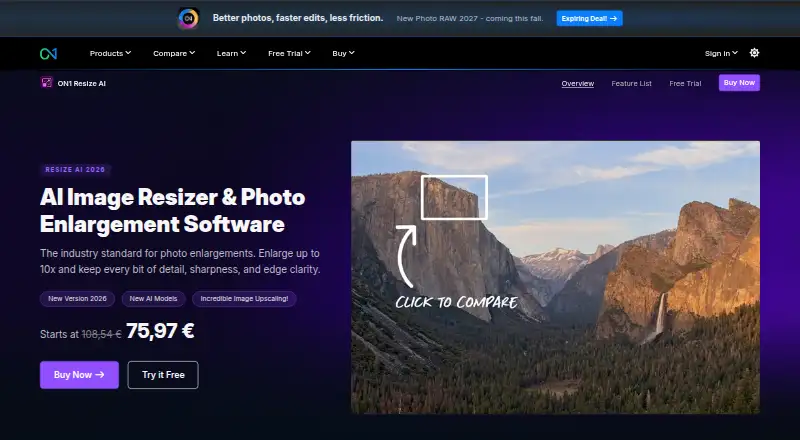
What ON1 Resize AI is
ON1 Resize AI is a desktop application for enlarging photos up to 10×, aimed at print enlargements, tight crops, AI-generated images and older-photo restoration. The 2026 version includes a diffusion-based Highest Quality model and a faster Standard model for batch work and less powerful GPUs. Face recovery has a controllable strength setting. Print features include mural tiling, gallery-wrap margins, printer-optimized sharpening and resolution presets, and soft proofing. The app supports batch processing and accepts RAW, PSD, PSB, TIFF, JPG, PNG and HEIC files. It runs as a standalone app on Mac and Windows and works as a plugin for Adobe Photoshop and Lightroom Classic. ON1 offers a fully functional 30-day trial without limitations or watermarks; it requires no credit card and starts on first launch. There is no free plan, and the Resize AI 2026 plan has no listed price. Minimum requirements include macOS 13 or later, or 64-bit Windows 10 version 22H2 or later or Windows 11; Windows ARM processors are not supported. ON1 says product photos remain yours and describes its software as having no cloud lock-in or data mining.
Who it suits
Resize AI suits photographers who need large prints, tighter crops, batch enlargement or restoration of older images. Its print tools and Photoshop and Lightroom Classic plugins may also fit workflows built around those applications.
What it does well
- Enlarges photos up to 10×.
- Offers two AI models in the 2026 version.
- Includes batch processing and controllable face recovery.
- Print tools include mural tiling and soft proofing.
- A 30-day trial has no watermarks or credit-card requirement.
What to know first
- No free plan.
- Windows ARM processors are not supported.
- Requires macOS 13 or later, or specified Windows versions.
- Resize AI 2026 has no listed price.
Limits
The free trial lasts 30 days, although it is fully functional and has no watermarks. The listed Photo RAW MAX plan covers three computers; Windows ARM processors are not supported.
Plans
| Plan | Billed and limits | Price |
|---|---|---|
| Photo RAW MAX 2026 | 3 computers | On request |
| Photo RAW MAX 2026 | Subscription · 3 computers | On request |
| Resize AI 2026 | One-time purchase; page shows ~~$99.99~~ $69.99 · Standalone app on 2 computers · Adobe plugin · future upgrades included | $69.99, paid once |
| Photo RAW MAX | ~~$89.99~~ $89.99/year · Standalone app on 3 computers · Adobe plugin · all ON1 apps · future upgrades included | $89.99 a year |
As on1.com lists them, read 20 Sept 2026. The maker's own page has the final word.
Getting started
- Open the ON1 Resize AI website
- Install the standalone app on macOS or Windows
- Use macOS 13 or later, or supported 64-bit Windows
- Start the 30-day trial on first launch
- Alternatively install the Photoshop or Lightroom Classic plugin
- Choose a supported image file and enlargement model
Verdict
Resize AI pairs photo enlargement with batch processing, face recovery and print-oriented tools. The trial provides a way to assess its workflow, but check the system requirements and request pricing for the Resize AI 2026 plan.
Questions
Is there a free plan?
No. ON1 Resize AI is paid, but a fully functional 30-day trial is available without a credit card.
What does the Photo RAW MAX plan cost?
The listed price is $89.99 a year. It includes a standalone app on three computers, an Adobe plugin, all ON1 apps, and future upgrades.
Which operating systems are supported?
The app supports macOS 13 or later and 64-bit Windows 10 version 22H2 or later or Windows 11. Windows ARM processors are not supported.
Which image formats can it open?
Supported inputs are RAW, PSD, PSB, TIFF, JPG, PNG, and HEIC.
Does it work with Photoshop and Lightroom Classic?
Yes. It works as a plugin for Adobe Photoshop and Lightroom Classic, or as a standalone Mac and Windows app.
What AI models are included?
The 2026 version includes a diffusion-based Highest Quality model and a faster Standard model for batch jobs and less powerful GPUs.
Facts from ON1 Resize AI's own pages
- AI models
- The 2026 version includes a diffusion-based Highest Quality model and a faster Standard model for batch jobs and less powerful GPUs. · on1.com, 11 Oct 2026
- Batch processing
- Resize AI can process dozens or hundreds of photos at once and supports export presets, watermarks, and layered Photoshop files. · on1.com, 11 Oct 2026
- Best suited for
- ON1 describes its tools as built for photographers and highlights print enlargements, high-volume workflows, tight crops, and restoration of older images. · on1.com, 11 Oct 2026
- Desktop app
- Yes · on1.com, 20 Sept 2026
- Face recovery
- The software includes face recovery with controllable strength. · on1.com, 11 Oct 2026
- Founded
- 2005 · on1.com, 4 Oct 2026
- Free plan
- No · on1.com, 20 Sept 2026
- Headquarters
- Portland, Oregon, United States · on1.com, 4 Oct 2026
- Input formats
- RAW, PSD, PSB, TIFF, JPG, PNG, HEIC · on1.com, 20 Sept 2026
- Integrations
- It works as a plugin for Adobe Photoshop and Lightroom Classic and can also run as a standalone app on Mac and Windows. · on1.com, 11 Oct 2026
- Maximum scale
- custom · on1.com, 20 Sept 2026
- Print tools
- Print features include tiling for murals, gallery-wrap margins, printer-optimized sharpening and resolution presets, and soft proofing. · on1.com, 11 Oct 2026
- Privacy
- ON1 says product photos remain yours and describes its software as having no cloud lock-in or data mining. · on1.com, 11 Oct 2026
- Purpose
- Resize AI enlarges photos up to 10× while maintaining detail, sharpness, and edge clarity for prints, crops, AI-generated images, and older photos. · on1.com, 11 Oct 2026
- Security
- ON1 says purchase data is transmitted using SSL, stored in a database protected by a firewall, and that the company is PCI and GDPR compliant. · on1.com, 11 Oct 2026
- Support
- ON1 advertises human support and a free library of training videos. · on1.com, 11 Oct 2026
- System requirements
- The minimum requirements include macOS 13 or later or 64-bit Windows 10 version 22H2 or later/Windows 11; Windows ARM processors are not supported. · on1.com, 11 Oct 2026
- Trial
- The 30-day trial is fully functional without limitations or watermarks, requires no credit card, and starts on first launch. · on1.com, 11 Oct 2026
- Upscaling method
- both · on1.com, 20 Sept 2026
Where ON1 Resize AI stands on Freedom251
- Image Upscaling Software#74 of 99
- Photo Resizing Software#21 of 28
- AI Image Upscalers#23 of 28